

Displaying Conky on an Old Android Phone
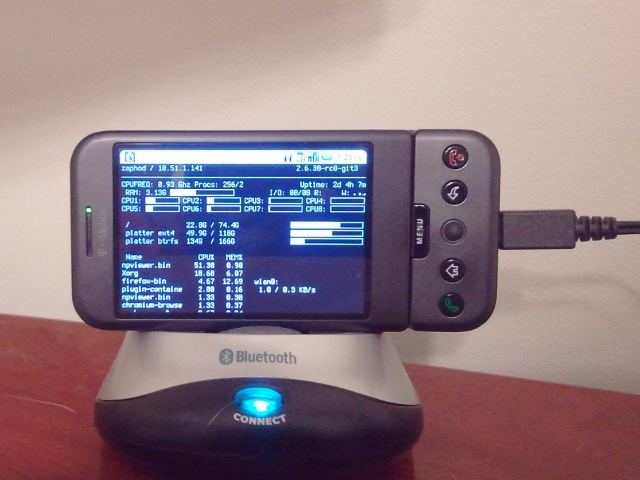
I have had my old HTC Dream sitting around collecting dust for months. I have been trying to come up with a cool use for it for months. After all that time, I think I finally may have come up with a good use: running a small [Conky][0] status display on it via [VNC][2].
How to do it
Install a VNC server and Conky:
apt-get install vnc4server conky-all
I am running Ubuntu and chose to install the [VNC][2] version 4 server. This ought to work on Debian as well.
Download and install my [Conky][0] configuration file and [VNC][2] xstartup file:
wget https://blog.patshead.com/Assets/conky-phone/conkyrc-phone -O ~/.conkyrc
mkdir ~/.vnc
wget https://blog.patshead.com/Assets/conky-phone/xstartup ~/.vnc/xstartup
chmod +x ~/.xstartup
Then fire up the [VNC][2] server:
vnc4server -geometry 480x320 :10
If all goes well, there should be a [VNC][2] server waiting for a connection on port 5910. I am currently using the Mocha Lite VNC client on my phone. It is the second client I tried and I am not very happy with it. If I end up finding this hack useful, I will probably try to hunt down a better client. I’d like one that will let me disable the status bar and hide the mouse pointer.
My [Conky][0] configuration is rather boring. I just trimmed, condensed, and slightly expanded on an old configuration I used to use a long time ago. It is quite utilitarian.
How useful is this?
I am not entirely sure how useful this is going to be; I haven’t been running this for very long. It has already kept me from having to fire up htop a few times already.
I would like to come up with a good way to attach the phone to [my monitor stand][3] if I actually end up finding it useful.
[0]: http://conky.sourceforge.net/ “” [2]: http://en.wikipedia.org/wiki/Vnc “” [3]: /2010/11/do-it-yourself-dual-lcd-monitor-stand.html “”