<?xml version="1.0" encoding="utf-8"?>
<feed xmlns="http://www.w3.org/2005/Atom">

  <title><![CDATA[Patshead.com Blog]]></title>
  <link href="https://blog.patshead.com/atom.xml" rel="self"/>
  <link href="https://blog.patshead.com/"/>
  <updated>2026-04-24T16:57:55-05:00</updated>
  <id>https://blog.patshead.com/</id>
  <author>
    <name><![CDATA[Pat Regan]]></name>
    <email><![CDATA[thehead@patshead.com]]></email>
  </author>
  <generator uri="http://octopress.org/">Octopress</generator>

  
  <entry>
    <title type="html"><![CDATA[Using An Android Tablet As Second Independent Display And Macropad At My Desk]]></title>
    <link href="https://blog.patshead.com/2026/04/using-an-android-tablet-as-second-independent-display-and-macropad-at-my-desk.html"/>
    <updated>2026-04-21T00:33:00-05:00</updated>
    <id>https://blog.patshead.com/2026/04/using-an-android-tablet-as-second-independent-display-and-macropad-at-my-desk</id>
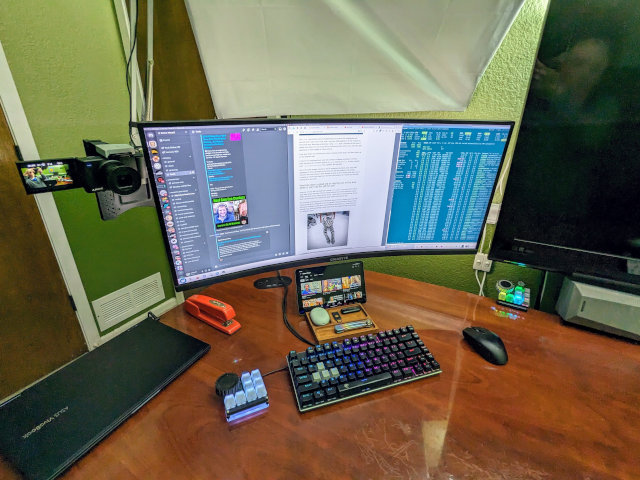
    <content type="html"><![CDATA[<p>I have had a small problem ever since downsizing from two 27&#8221; monitors to a single ultrawide 34&#8221; monitor.  I don&rsquo;t mind that I gave up one third of my screen real estate, because I had to turn my head too far to see that part of the screen anyway.  Downsizing was mostly an upgrade.  The trouble is that I can&rsquo;t keep an eye on Discord chat while gaming.</p>

<p>I thought about adding one of those 1920x800 ultrawide touch screens to my desk, but I couldn&rsquo;t convince myself that having a small second monitor was actually the right plan.  I don&rsquo;t want windows randomly positioning themselves down there.  I don&rsquo;t want my mouse pointer accidentally getting lost down there.</p>

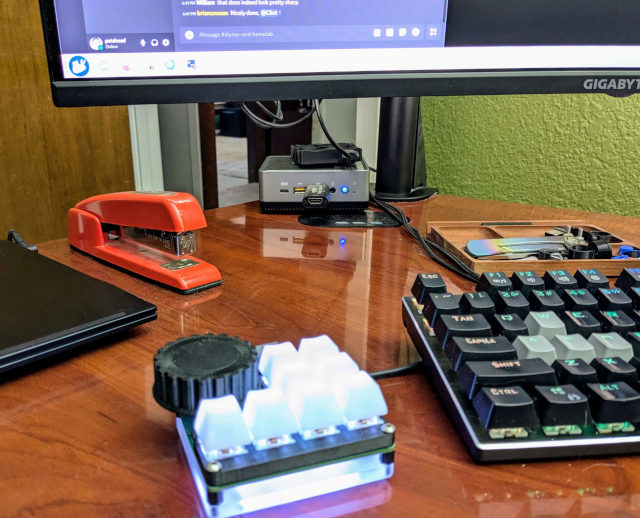
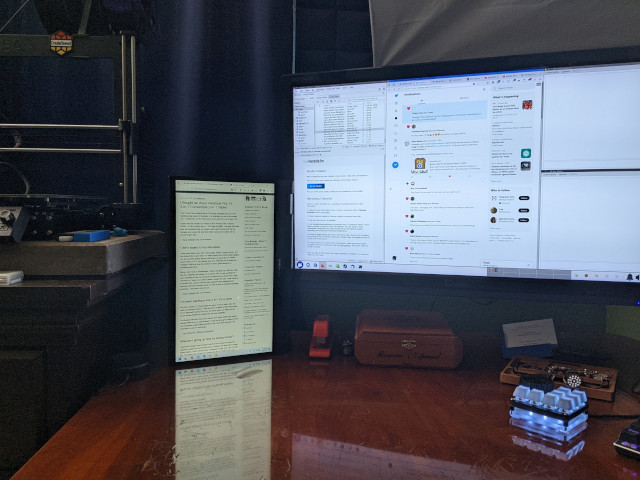
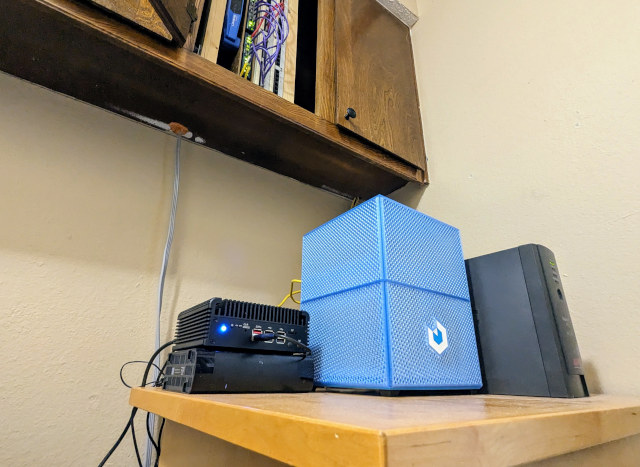
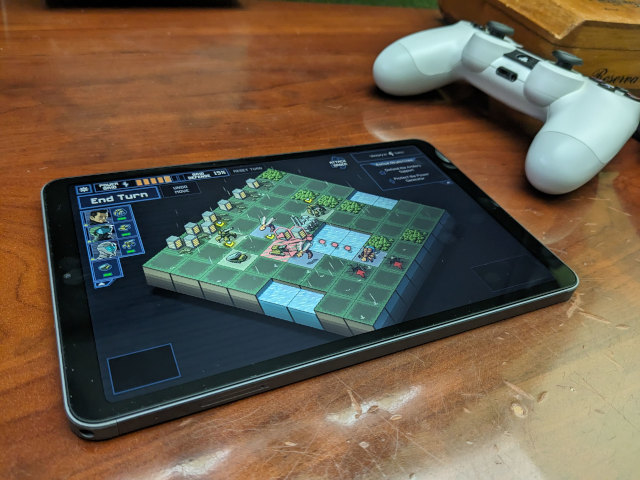
<p><img src="https://blog.patshead.com/Assets/TabletAsMacropad1.jpg" alt="Macropad Tablet on my desk" /></p>

<p>That&rsquo;s when I had another great idea.  I have had a delightful JC Pro Macro pad at my desk for the last few years for Mission Control purposes.  I had keys to turn my espresso machine on, force a particular office lighting profile in Home Assistant, and control my GPU power level.  I had all those keys lit up to indicate the current status of their function, but lights only go so far.  I figured that I could do much better here with a small Home Assistant dashboard.</p>

<p>The macropad dashboard has been a massive upgrade, because the buttons work when my computer is locked or off, because it is just running the Home Assistant app on a split-screen Android tablet.</p>

<h2>A quick note on the tablet I used</h2>

<p>I am linking <a href="https://www.amazon.com/dp/B0DY3PP1XR?th=1&amp;linkCode=ll2&amp;tag=patsheadcom-20&amp;linkId=e9831ad0a5c4df62c9d70cb2dca61690&amp;language=en_US&amp;ref_=as_li_ss_tl">the cheap 10&#8221; Android tablet</a> that I used all over the place in this blog post.  I am most definitely <em>NOT</em> saying that this is the best option.  It was the right size for me.  The DPI fits well enough.  The price was right.  I think the best that I can say is that it is extremely adequate.</p>

<p>A 1920x1200 tablet would be better, and I have posted a few at the same price point to <a href="https://butterwhat.com/discord" title="Butter, What!? Discord Server">the deal board on the <em>Butter, What?!</em> Discord server</a> since I bought this tablet.  A faster tablet with more RAM would be nice, because the apps clear the screen and reload every time I flick between my split-screen view and Firefox.  It isn&rsquo;t a thing I do often, but I wish this didn&rsquo;t take a few seconds every time I have to keep an eye on an OpenCode session in the browser.</p>

<p>I have uploaded my custom tablet stand with room to hide cables to MakerWorld and Printables.  I am also linking to the 90-degree flat cables that I chose.  All of these things worked well for me, so I want them to be easy for you to find.</p>

<h2>This project has been moving slowly</h2>

<p>I ordered a 10&#8221; Android tablet for $60 from Amazon.  It is only 1280x800, but that is fine, because it is a slightly higher DPI than my main display.  The size is perfect.  I mocked up a test dashboard on my existing 8.4&#8221; tablet before I ordered, and that tablet was definitely too small for the job.  Any bigger, though, and I would be blocking my main screen.</p>

<p>I had a useful setup the day the tablet arrived.  I was using a basic 3D-printed folding phone stand to prop the tablet up.  I fired up Discord and Home Assistant in a split screen, and I expanded Discord to take up two thirds of the display.</p>

<p>Immediately useful, but far from ideal.  That little stand was wobbly, so it wasn&rsquo;t fun pushing buttons on the dashboard.  I had USB-C cables running all over the place.  The tablet was a little too low to touch the bottom of the screen without hitting the keyboard.  The macropad was half empty, and it had limited functionality.</p>

<p>I made some slow, incremental progress until I started using the Home Assistant VibeCode MCP.  Once I was able to just tell OpenCode what I wanted added or removed from the dashboard, things started moving fast!</p>

<h2>The final setup!</h2>

<p>That encouraged me to design a better 3D-printed stand.  I ordered some 90-degree low-profile USB-C cables.  I even wound up drilling a hole in my desk to completely hide the cables!  Now all we can see is a short stretch of cable for my USB-C microphone.</p>

<p>The macropad dashboard has my Bambu A1 Mini controls and status on the top.  Then there are four bubble-card buttons to control my espresso machine, my office lighting, whether my GPU is in quiet or max performance mode, and a drop-down button to control whether my PC uses the monitor, just the TV, or both displays at the same time.</p>

<p>Below that are some CPU and GPU status graphs.  These aren&rsquo;t absolutely necessary, but they make the display more interesting.</p>

<p><img src="https://blog.patshead.com/Assets/TabletAsMacropad2.jpg" alt="Close-up view of my macropad on the tablet" /></p>

<p>The bottom shows the utilization of my quotas on various LLM coding plans.</p>

<p>I was going to add these next two buttons to the &ldquo;What&rsquo;s next?!&rdquo; section of this post, but it is so easy to vibe code Home Assistant that I set them up in barely more time than it would have taken to write the paragraph.  I&rsquo;ve added a button to indicate whether <code>gpu-screen-recorder</code> has its replay buffer running.  This is a handy reminder, since I can&rsquo;t actually see <code>gpu-screen-recorder</code> when a game is running.</p>

<p>I also added an indicator to show which Steam game is currently running.  You can click on any of these buttons or graphs to see the history.  The CPU and GPU graphs show a 24-hour graph when you click on them, and the Steam button shows a list of games and start times.</p>

<h2>Is it better to have a separate device instead of just a second monitor?</h2>

<p>That is up to you to decide for yourself.  This is definitely better for me.  I can click through various channels in <a href="https://butterwhat.com/discord" title="Butter, What!? Discord Server">our Discord community</a> or switch my GPU out of quiet mode without <em>Arc Raiders</em> losing focus.  Those two features alone are an absolute delight.</p>

<p>In the months that I have had this setup running, I believe I have only spent a couple of hours with anything other than my Discord/Macropad split on the screen.  I needed to pull up a map of raider caches in <em>Arc Raiders</em> last week, so I pulled up Firefox on the tablet and loaded the page.</p>

<p>This is the first time that I wished I bought a faster tablet.  The macropad and Discord are fine, but the <em>Arc Raiders</em> map site is a Javascript monstrosity.  It was a little slow to load, and scrolling around was sluggish.  Not unusable, but noticeable.</p>

<h2>I <em>CAN</em> use my Android tablet as a second screen</h2>

<p>I did try this out.  Bazzite Linux ships with <code>krfb-virtualmonitor</code> installed.  This lets you create a virtual display that is exported as a VNC session.  It was easy to use, and I was able to connect using a VNC client on my tablet.</p>

<p>The latency is noticeable, but it looked great.  I wouldn&rsquo;t want to use the tablet as my primary display, but it would be fine to throw Discord or <code>htop</code> or something on it to keep an eye on things.  I might start bringing the 10&#8221; tablet with me when I am away from home to use as a second display for my laptop.</p>

<h2>Getting the screen angle right is <em>VERY</em> important!</h2>

<p>I have to admit here that I first tried this by turning 2-in-1 laptop inside-out.  The 14&#8221; screen is about as wide as my Keychron K2 HE keyboard.  The farther back you can tilt the screen, the taller of a screen you can fit under your monitor.  On the surface, this sounds really smart!</p>

<p>The trouble for me was the glare.  I had to tilt the giant laptop screen so far back to fit it under the monitor that all I could see was a reflection of my ceiling.  That was a massive problem, and the laptop was still a little too big to fit between my keyboard and monitor, so that was obviously a terrible idea.</p>

<p>This is still a problem with the 10&#8221; Android tablet.  The tablet is a little over six inches tall in landscape orientation, but my monitor is only a little over five inches off the desk.  My tablet is raised up a bit by the stand, and even tilted backwards at about twenty degrees the top is still 6.5&#8221; tall.</p>

<p>I was worried that this would block the monitor, but the tablet is close to the keyboard.  That means my eyes are high enough that I can still see over the tablet.  I was worried that this would be distracting, but I stopped noticing the tablet pretty quickly.</p>

<p>Your goal should be to get the tablet as close to vertical as you can get away with.  If you have to lean it too far back, you will have to deal with glare.</p>

<h2>You need to keep your tablet screen awake using Caffeine!</h2>

<p>It used to be possible to keep your screen on and bright all the time using system settings or settings available in the developer options.  You can no longer set the screen timeout to infinity, but you can set it pretty high.</p>

<p>Unlocking the tablet every eight hours didn&rsquo;t seem like it would be a big deal.  The trouble is that my screen was dimming long before the screen turned off.  Yuck.</p>

<p>I found an app in the Play store called Caffeine.  I got the settings right on the second try, and my second-screen tablet has been lit up for the last two weeks.  It is perfect.</p>

<h2>The tablet isn&rsquo;t the only extra monitor at my desk</h2>

<p>I upgraded the wall-mounted 43&#8221; television in my office last year.  I went from an ancient 1080p TV with massive bezels to a 55&#8221; 4K 120-Hz mid-range gaming TV with narrow bezels.</p>

<p>It is mounted to the wall across from my office&rsquo;s recliner.  It is great for watching the occasional show or playing controller-based games on Steam.  It also happens to be mounted over my desk, so I took some care to make sure that the new TV landed right next to my monitor, and I made sure the bottom of the TV was at about the same level as the bottom of my monitor.</p>

<p>You can&rsquo;t do work on the TV.  The DPI is too low, and it is just way too big.  That doesn&rsquo;t mean it isn&rsquo;t useful as a second display.  I use the bottom corner of the TV as a second monitor a few times a week.  I might leave an OpenCode window over there to keep an eye on it.  I&rsquo;ll often drop a small YouTube window when I am watching a podcast.</p>

<p>The ultrawide monitor has me 100% covered roughly 95% of the time.  I just had to dig deeper into using more virtual desktops again to make a single screen work.  The TV and now the Android tablet have me covered for that 5% of the time when I <em>actually</em> need just a little extra display in front of me.</p>

<h2>It isn&rsquo;t just a macropad and Discord device now!</h2>

<p>I set up an open-source Android app called Ava.  Ava emulates an ESPHome voice satellite for Home Assistant.  Ava is connected to my Home Assistant server, and my Home Assistant server&rsquo;s <a href="https://blog.patshead.com/2026/04/home-assistant-voice-control-with-a-56-dollar-gpu-and-local-machine-learning.html" title="Home Assistant Voice Control With a $56 GPU and Local Machine Learning">voice assistant</a> is plumbed into a voice transcription server and a <a href="https://blog.patshead.com/2026/01/machine-learning-in-your-homelab-on-a-budget.html" title="Fast Machine Learning in Your Homelab on a Budget">local LLM server running on a $56 GPU in my homelab</a>.</p>

<div id="L-z8v7LCSXk " class="embed-video-container"><iframe src="//www.youtube.com/www.youtube.com/embed/L-z8v7LCSXk "></iframe></div>


<p>This is more of a proof of concept at this point than a replacement for my Google Home Mini devices.  Home Assistant&rsquo;s voice assistant doesn&rsquo;t include batteries.  I can use my voice to ask for the status of devices on my Home Assistant server, turn devices on or off, and set timers.  My assistant doesn&rsquo;t have access to the Internet yet.</p>

<p>This is a fun project, and I think it has a lot of potential.  It is especially neat that it is working on a piece of hardware that I was already using at my desk!</p>

<ul>
<li><a href="https://blog.patshead.com/2026/04/home-assistant-voice-control-with-a-56-dollar-gpu-and-local-machine-learning.html" title="Home Assistant Voice Control With a $56 GPU and Local Machine Learning">Home Assistant Voice Control With a $56 GPU and Local Machine Learning</a></li>
<li><a href="https://blog.patshead.com/2026/01/machine-learning-in-your-homelab-on-a-budget.html" title="Fast Machine Learning in Your Homelab on a Budget">Fast Machine Learning in Your Homelab on a Budget</a></li>
</ul>


<h2>What&rsquo;s next for the macropad dashboard?!</h2>

<p>I have everything I need.  There isn&rsquo;t much wasted space.  I prefer things to be automated.  I feel like I have failed a bit every time I have to manually control something in my office, but I am aware that not everything can be automated.  It is nice to be able to turn a light on for a minute while I am in the middle of a game, and there is no way for the system to figure that out on its own!</p>

<p>I am most disappointed in the three graphs in the middle of the macropad.  They feel like a waste of space.  The graphs only take up the bottom third of that row.  They don&rsquo;t contain important enough information, but they do look neat.  I bet we could come up with a better way of displaying the same information.  I bet we could squeeze even more useful information into the same space.</p>

<h2>Conclusion</h2>

<p>This Android tablet setup turned out better than expected. Discord chat and my Home Assistant dashboard below my main monitor have become indispensable. I can switch Discord channels or toggle my GPU without alt-tabbing out of a game. I can see at a glance whether my espresso machine is ready to pull a shot or my 3D-print job is going to complete soon. These are minor conveniences, but they add up.</p>

<p>My macropad dashboard works whether my computer is on, off, locked, or booted into a different OS.  I can turn the lights back on if a bleeding-edge GPU driver locks up in the middle of a game!  The 3D-printed stand and low-profile cable routing keep everything clean. I spent maybe $70 total, and it was worth every penny.</p>

<p>Have you tried something similar at your desk? Maybe you&rsquo;re using a macropad with a tiny display, or repurposed an old tablet as a Home Assistant dashboard. Come hang out with us in <a href="https://butterwhat.com/discord" title="Butter, What!? Discord Server">our Discord community</a> and share your desk hacks. We&rsquo;re a friendly bunch of homelabbers, 3D-printing enthusiasts, and tinkerers who love this kind of thing!</p>

<ul>
<li><a href="https://blog.patshead.com/2026/04/home-assistant-voice-control-with-a-56-dollar-gpu-and-local-machine-learning.html" title="Home Assistant Voice Control With a $56 GPU and Local Machine Learning">Home Assistant Voice Control With a $56 GPU and Local Machine Learning</a></li>
<li><a href="https://blog.patshead.com/2026/01/machine-learning-in-your-homelab-on-a-budget.html" title="Fast Machine Learning in Your Homelab on a Budget">Fast Machine Learning in Your Homelab on a Budget</a></li>
<li><a href="https://blog.patshead.com/2026/03/vibe-coding-my-home-assistant-setup-i-cant-believe-how-well-this-works.html" title="Vibe Coding My Home Assistant Setup -- I Can't Believe How Well This Works!">Vibe Coding My Home Assistant Setup &mdash; I Can&rsquo;t Believe How Well This Works!</a></li>
<li><a href="https://www.amazon.com/dp/B0DY3PP1XR?th=1&amp;linkCode=ll2&amp;tag=patsheadcom-20&amp;linkId=e9831ad0a5c4df62c9d70cb2dca61690&amp;language=en_US&amp;ref_=as_li_ss_tl">10&#8221; 1280x800 Android Tablet</a> at Amazon</li>
</ul>

 ]]>
    </content>
  </entry>
  
  <entry>
    <title type="html"><![CDATA[Home Assistant Voice Control With a $56 GPU and Local Machine Learning]]></title>
    <link href="https://blog.patshead.com/2026/04/home-assistant-voice-control-with-a-56-dollar-gpu-and-local-machine-learning.html"/>
    <updated>2026-04-19T00:26:00-05:00</updated>
    <id>https://blog.patshead.com/2026/04/home-assistant-voice-control-with-a-56-dollar-gpu-and-local-machine-learning</id>
    <content type="html"><![CDATA[<p>The last time we visited <a href="https://blog.patshead.com/2026/01/machine-learning-in-your-homelab-on-a-budget.html" title="Fast Machine Learning in Your Homelab on a Budget">this topic</a>, I had ordered a used 8 GB Radeon RX 580 for $56, and I had tested most of the capabilities required for Home Assistant voice control.  A local LLM was smart and fast enough, and speech recognition was also fast on the GPU.  I didn&rsquo;t get voice generation working on the GPU, but the CPU is plenty fast enough for that.  What I hadn&rsquo;t done was combine everything together, and I didn&rsquo;t find a good way to get my voice command into Home Assistant.</p>

<div id="L-z8v7LCSXk " class="embed-video-container"><iframe src="//www.youtube.com/www.youtube.com/embed/L-z8v7LCSXk "></iframe></div>


<p>I am not nearly finished setting this up, but I am far enough down the path that all the pieces are in place and functioning.  The things that are functioning are working well.  Things are extremely barebones so far, because all the batteries are definitely not included when you turn on Home Assistant&rsquo;s Voice Assist, and most of my scenes and automations are named poorly.  Asking for things to be done in my home has to be worded pretty awkwardly!</p>

<p>These are all solvable problems.  The difficult technical hurdles have all been cleared.</p>

<ul>
<li><a href="https://blog.patshead.com/2026/01/machine-learning-in-your-homelab-on-a-budget.html" title="Fast Machine Learning in Your Homelab on a Budget">Fast Machine Learning in Your Homelab on a Budget</a></li>
</ul>


<h2>Ava turns your Android device into a voice satellite</h2>

<p>This is the part that held me back.  I looked into microphone and speaker hardware that is compatible with Home Assistant, and I didn&rsquo;t get a good vibe from any of it.  Some hardware seemed overpriced, other hardware seemed like complete junk.  How was I going to get my words into Home Assistant?</p>

<p>I looked at and dismissed one or two projects intended to get either your Android device or a web browser plumbed into Home Assistant&rsquo;s voice controls.  Then I stumbled across Ava!</p>

<p>Ava is an open-source Android app that runs in the background and emulates an ESPHome voice satellite.  This is awesome, because a 10&#8221; Android tablet already has a permanent home on my desk.  Not only do I have a full-time Discord display and <a href="https://blog.patshead.com/2026/04/using-an-android-tablet-as-second-independent-display-and-macropad-at-my-desk.html" title="Using An Android Tablet As Second Independent Display And Macropad At My Desk">Home Assistant macropad dashboard</a> on this small screen, but the microphone is always listening for the wake word.</p>

<p>This was the part of the setup that I was most worried about.  Thank goodness it is working perfectly.  Home Assistant saw Ava immediately, it was easy to configure, and it hasn&rsquo;t missed a wake word yet.</p>

<p>I don&rsquo;t know about you, but I have quite a few old Android tablets.  I can start dropping Android tablets with Home Assistant dashboards in every room of the house as soon as I get all the rough edges ironed out, and I won&rsquo;t even have to buy anything!  Ava claims to work well on extremely low end Android hardware.</p>

<p>The ESPHome voice satellite protocol supports two different wake words, each pointing to a different assistant.  I&rsquo;m only using one wake word right now, but I&rsquo;m already planning to point the second one at an OpenClaw instance.  There&rsquo;s an integration available in HACS, which would give me a general-purpose AI assistant alongside my Home Assistant voice control on the same tablet.</p>

<p>Ava is not available in the Play Store.  You have to download the release from their Github repository and manually install it.</p>

<ul>
<li><a href="https://blog.patshead.com/2026/04/using-an-android-tablet-as-second-independent-display-and-macropad-at-my-desk.html" title="Using An Android Tablet As Second Independent Display And Macropad At My Desk">Using An Android Tablet As Second Independent Display And Macropad At My Desk</a></li>
</ul>


<h2>Qwen 3.5 4B is delightful</h2>

<p>New models get released so fast!  When I first visited this topic in January, I was squeezing Gemma 3 4B onto my 8 GB GPU.  That was the best model available in this size range that could use vision to analyze photos.  I don&rsquo;t have a camera on my front porch yet, but my plans involve having the local robot be able to identify whether or not a package has been delivered!</p>

<p>More models have been released since then.  I tried Qwen 3.5 4B at Q6 as soon as it was available, and I was immediately impressed.  Gemma 3 wasn&rsquo;t terrible at tool calling, but Qwen 3.5 4B hasn&rsquo;t missed a tool call yet.  This is important, because every time you ask the LLM to turn on a light or activate a scene, the LLM has to call a tool in Home Assistant to make that happen.</p>

<p>Performance was an issue at first.  Home Assistant sends a system prompt to the LLM that contains information about every single entity.  This means I am at nearly 2,500 tokens of context before even getting to the words that I spoke.  It takes somewhere between 5 and 8 seconds when we have to process that entire prompt.</p>

<p>It was a little tricky to tune with the latest <code>llama.cpp</code> update, but I managed to set up the context checkpoint caching to keep most of the preprocessed prompt in memory.  The first prompt still takes 8 seconds, but now it takes between 500 and 900 milliseconds to process any subsequent prompts.  I don&rsquo;t lose the cache unless I have to restart <code>llama.cpp</code> or my entities in Home Assistant change.</p>

<p>I think this is perfect.  My $56 GPU can respond to the text from spoken sentences in less than a second.</p>

<p>I asked <a href="https://blog.patshead.com/2026/03/vibe-coding-my-home-assistant-setup-i-cant-believe-how-well-this-works.html" title="Vibe Coding My Home Assistant Setup -- I Can't Believe How Well This Works!">OpenCode</a> to figure out how to compile <code>llama.cpp</code> with the correct Vulkan support, and I had OpenCode set me up scripts to start, stop, and update the <code>llama.cpp</code> container on my test machine.</p>

<ul>
<li><a href="https://blog.patshead.com/2026/03/vibe-coding-my-home-assistant-setup-i-cant-believe-how-well-this-works.html" title="Vibe Coding My Home Assistant Setup -- I Can't Believe How Well This Works!">Vibe Coding My Home Assistant Setup &mdash; I Can&rsquo;t Believe How Well This Works!</a></li>
<li><a href="https://blog.patshead.com/2026/01/machine-learning-in-your-homelab-on-a-budget.html" title="Fast Machine Learning in Your Homelab on a Budget">Fast Machine Learning in Your Homelab on a Budget</a></li>
</ul>


<h2>Wyoming Whisper:  CPU vs. GPU</h2>

<p>The first thing I did after installing Ava was click the buttons to install the voice assistant things on my Home Assistant server.  I let it set things up on its own, so it installed a Wyoming Whisper speech-to-text service and the Piper text-to-speech service in the HASSOS virtual machine on my little Intel N100 mini PC.</p>

<p>I also installed the Extended OpenAI Conversation HACS integration.  The default OpenAI integration can only connect to OpenAI&rsquo;s servers and not third-party OpenAI-compatible endpoints.  I did initially take the lazy route and connect it to GPT-OSS-120B on my <a href="https://blog.patshead.com/2026/02/opencode-on-a-budget-synthetic-dot-new-chutes-dot-ai-and-z-dot-ai.html" title="OpenCode on a Budget -- Synthetic.new, Chutes.ai, and Z.ai">$3 Chutes subscription</a>.</p>

<p>It worked, but it was slow.  The CPU-based Whisper server is slow on the N100, the responses from the LLM are slow on my cheap Chutes account, but at least Piper is reasonably responsive.</p>

<p>My test machine is an old AMD FX-8350 machine running Bazzite.  It is my home office&rsquo;s second gaming PC, and I might even keep things set up this way.  I asked OpenCode to set up a Wyoming Whisper Podman container with Vulkan support for me, and it has a similar management script to my <code>llama.cpp</code> container.</p>

<p>It is working great.  Using the default <code>base.en-q5_1</code> model has my voice commands transcribed in 500 to 600 milliseconds and uses only 26 megabytes of VRAM.  Bumping up to the larger models bumped the voice recognition time up to 1.2 seconds.  That isn&rsquo;t a massive difference, and I have VRAM to spare, but the base model is transcribing my voice just fine.</p>

<ul>
<li><a href="https://blog.patshead.com/2026/02/opencode-on-a-budget-synthetic-dot-new-chutes-dot-ai-and-z-dot-ai.html" title="OpenCode on a Budget -- Synthetic.new, Chutes.ai, and Z.ai">OpenCode on a Budget &mdash; Synthetic.new, Chutes.ai, and Z.ai</a></li>
<li><a href="https://blog.patshead.com/2026/01/machine-learning-in-your-homelab-on-a-budget.html" title="Fast Machine Learning in Your Homelab on a Budget">Fast Machine Learning in Your Homelab on a Budget</a></li>
</ul>


<h2>What is this going to cost me?!</h2>

<p>I&rsquo;ve dug myself into a bit of a conundrum.  This old FX-8350 machine was my gaming PC and workstation in 2013.  When I upgraded, it became my homelab and NAS.  When this old machine was effectively my entire homelab, it averaged 70 watts at the power outlet.  It might be a little higher with the beefier GPU now.</p>

<p>I replaced that server with an <a href="https://blog.patshead.com/2024/12/should-you-run-a-large-language-model-on-an-intel-n100-mini-pc.html" title="Should You Run A Large Language Model On An Intel N100 Mini PC?">N100 mini PC</a> and a single 14 TB USB hard drive which combined average less than 15 watts.  Even my best mini PC can&rsquo;t quite match the LLM performance of my $56 GPU, but adding a slightly underclocked FX-8350 running 24/7 back into the mix will cost me between $80 and $100 in electricity every year.</p>

<p>That is $56 up front for the GPU, plus, let&rsquo;s just call it twenty cents per day in electricity.  I can add a dashboard display and voice satellite to any room for an extra $50 or so.</p>

<p>I don&rsquo;t think that&rsquo;s terrible for a voice assistant, even if my current voice assistant is extremely limited in capabilities.</p>

<figure class='code'><div class="highlight"><table><tr><td class="gutter"><pre class="line-numbers"><span class='line-number'>1</span>
<span class='line-number'>2</span>
<span class='line-number'>3</span>
<span class='line-number'>4</span>
<span class='line-number'>5</span>
<span class='line-number'>6</span>
<span class='line-number'>7</span>
<span class='line-number'>8</span>
<span class='line-number'>9</span>
<span class='line-number'>10</span>
<span class='line-number'>11</span>
<span class='line-number'>12</span>
</pre></td><td class='code'><pre><code class=''><span class='line'>slot update_slots: id  3 | task 394 | new prompt, n_ctx_slot = 25088, n_keep = 0, task.n_tokens = 1956
</span><span class='line'>slot update_slots: id  3 | task 394 | n_past = 1928, slot.prompt.tokens.size() = 1941, seq_id = 3, pos_min = 1940, n_swa = 1
</span><span class='line'>slot update_slots: id  3 | task 394 | restored context checkpoint (pos_min = 1419, pos_max = 1419, n_tokens = 1420, size = 50.251 MiB)
</span><span class='line'>slot update_slots: id  3 | task 394 | n_tokens = 1420, memory_seq_rm [1420, end)
</span><span class='line'>slot update_slots: id  3 | task 394 | prompt processing progress, n_tokens = 1444, batch.n_tokens = 24, progress = 0.738241
</span><span class='line'>slot update_slots: id  3 | task 394 | n_tokens = 1444, memory_seq_rm [1444, end)
</span><span class='line'>slot init_sampler: id  3 | task 394 | init sampler, took 0.40 ms, tokens: text = 1956, total = 1956
</span><span class='line'>slot update_slots: id  3 | task 394 | prompt processing done, n_tokens = 1956, batch.n_tokens = 512
</span><span class='line'>slot print_timing: id  3 | task 394 | 
</span><span class='line'>prompt eval time =    2100.90 ms /   536 tokens (    3.92 ms per token,   255.13 tokens per second)
</span><span class='line'>       eval time =     520.67 ms /    10 tokens (   52.07 ms per token,    19.21 tokens per second)
</span><span class='line'>      total time =    2621.57 ms /   546 tokens</span></code></pre></td></tr></table></div></figure>


<p><em>Qwen 3.5 4B is pretty quick to respond when the context checkpoints are working!</em></p>

<p>The big win arrives when you are doing image recognition.  I figured out in January that I would spend way more than $80 per year in API costs if I had to ask the cheapest vision model whether there was a package on my front porch once every five minutes during business hours.  I can do that today with nearly zero additional cost, and I could even check multiple cameras without doubling, tripling, or quadrupling my spending.</p>

<p>I have a <a href="https://blog.patshead.com/2025/05/bazzite-on-a-ryzen-6800h-living-room-gaming-pc.html" title="Bazzite on a Ryzen 6800H Living Room Gaming PC">Ryzen 6800H mini PC</a>.  It is my Steam machine in the living room.  We play <em>Grand Theft Auto V</em>, <em>Red Dead Redemption 2</em>, and <em>Dead Cells</em> out there.  I have done some <code>llama.cpp</code> testing on that box, and that $330 mini PC that idles at 8 watts is roughly 80% as fast as the $56 RX 580 GPU.</p>

<p>Maybe your homelab has a free PCIe slot, or maybe your homelab has an extremely basic GPU that can be upgraded.  I think a used RX 580 with 8 GB of VRAM would be a fantastic option for you.  If you&rsquo;re just starting your Home Assistant journey, then choosing a <a href="https://blog.patshead.com/2024/12/should-you-run-a-large-language-model-on-an-intel-n100-mini-pc.html" title="Should You Run A Large Language Model On An Intel N100 Mini PC?">mini PC</a> with decent memory bandwidth and a reasonable iGPU might be a better place to start.</p>

<p>What if you already have an N100 mini PC that just can&rsquo;t run the LLM fast enough?  A $3 per month Chutes subscription would go a long way, and this use case doesn&rsquo;t violate their terms of service.</p>

<ul>
<li><a href="https://blog.patshead.com/2024/12/should-you-run-a-large-language-model-on-an-intel-n100-mini-pc.html" title="Should You Run A Large Language Model On An Intel N100 Mini PC?">Should You Run A Large Language Model On An Intel N100 Mini PC?</a></li>
<li><a href="https://blog.patshead.com/2025/05/bazzite-on-a-ryzen-6800h-living-room-gaming-pc.html" title="Bazzite on a Ryzen 6800H Living Room Gaming PC">Bazzite on a Ryzen 6800H Living Room Gaming PC</a></li>
<li><a href="https://blog.patshead.com/2026/01/machine-learning-in-your-homelab-on-a-budget.html" title="Fast Machine Learning in Your Homelab on a Budget">Fast Machine Learning in Your Homelab on a Budget</a></li>
</ul>


<h2>More info on performance, noise, and power</h2>

<p>I chose the 8 GB RX 580 because it is inexpensive, fast enough for the job, and isn&rsquo;t a dead end.  If my homelab machine-learning experiments didn&rsquo;t wind up being useful, I could still build a low-end gaming PC out of my spare parts.  This $56 GPU combined with old junk parts from my closet is several times faster than the $330 Ryzen 6800H mini PC that I use as a Steam machine in the living room.</p>

<p>I fully expected to wind up turning my spare-parts gaming PC test rig back into a Proxmox host.  The trouble is that I didn&rsquo;t expect my ancient machine to be able to run <em>Arc Raiders</em> at better than 60 FPS, and I didn&rsquo;t know that I would enjoy the idea of having a second gaming PC at the second desk in my home office.</p>

<p>That means I can&rsquo;t relegate this machine to my network cupboard on the other side of the house.  It has to be in the room with me.  I have to be able to tolerate the noise.</p>

<figure class='code'><div class="highlight"><table><tr><td class="gutter"><pre class="line-numbers"><span class='line-number'>1</span>
<span class='line-number'>2</span>
<span class='line-number'>3</span>
<span class='line-number'>4</span>
<span class='line-number'>5</span>
<span class='line-number'>6</span>
<span class='line-number'>7</span>
<span class='line-number'>8</span>
<span class='line-number'>9</span>
<span class='line-number'>10</span>
<span class='line-number'>11</span>
<span class='line-number'>12</span>
<span class='line-number'>13</span>
<span class='line-number'>14</span>
<span class='line-number'>15</span>
<span class='line-number'>16</span>
<span class='line-number'>17</span>
</pre></td><td class='code'><pre><code class=''><span class='line'>pat@rx580:~$ ./llama-vulkan/bin/manage bench -m /models/OmniCoder-2-9B.i1-IQ3_XXS.gguf -d 20000 -ngl 99 -fa 1 -ctk q4_0 -ctv q4_0
</span><span class='line'>ggml_vulkan: Found 1 Vulkan devices:
</span><span class='line'>ggml_vulkan: 0 = AMD Radeon RX 580 Series (RADV POLARIS10) (radv) | uma: 0 | fp16: 0 | bf16: 0 | warp size: 64 | shared memory: 65536 | int dot: 0 | matrix cores: none
</span><span class='line'>watts          | model                          |       size |     params | backend    | ngl | type_k | type_v | fa |            test |                  t/s |
</span><span class='line'>--------------:| ------------------------------ | ---------: | ---------: | ---------- | --: | -----: | -----: | -: | --------------: | -------------------: |
</span><span class='line'>75w            | qwen35 ?B IQ3_XXS - 3.0625 bpw |   3.66 GiB |     8.95 B | Vulkan     |  99 |   q4_0 |   q4_0 |  1 |  pp512 @ d20000 |         79.64 ± 0.52 |
</span><span class='line'>75w            | qwen35 ?B IQ3_XXS - 3.0625 bpw |   3.66 GiB |     8.95 B | Vulkan     |  99 |   q4_0 |   q4_0 |  1 |  tg128 @ d20000 |          9.70 ± 0.02 |
</span><span class='line'>100w 41%       | qwen35 ?B IQ3_XXS - 3.0625 bpw |   3.66 GiB |     8.95 B | Vulkan     |  99 |   q4_0 |   q4_0 |  1 |  pp512 @ d20000 |        102.68 ± 0.33 |
</span><span class='line'>100w 41%       | qwen35 ?B IQ3_XXS - 3.0625 bpw |   3.66 GiB |     8.95 B | Vulkan     |  99 |   q4_0 |   q4_0 |  1 |  tg128 @ d20000 |         10.49 ± 0.02 |
</span><span class='line'>115w 44%?      | qwen35 ?B IQ3_XXS - 3.0625 bpw |   3.66 GiB |     8.95 B | Vulkan     |  99 |   q4_0 |   q4_0 |  1 |  pp512 @ d20000 |        113.65 ± 0.16 |
</span><span class='line'>115w           | qwen35 ?B IQ3_XXS - 3.0625 bpw |   3.66 GiB |     8.95 B | Vulkan     |  99 |   q4_0 |   q4_0 |  1 |  tg128 @ d20000 |         10.58 ± 0.02 |
</span><span class='line'>125w 55%       | qwen35 ?B IQ3_XXS - 3.0625 bpw |   3.66 GiB |     8.95 B | Vulkan     |  99 |   q4_0 |   q4_0 |  1 |  pp512 @ d20000 |        119.59 ± 0.08 |
</span><span class='line'>125w           | qwen35 ?B IQ3_XXS - 3.0625 bpw |   3.66 GiB |     8.95 B | Vulkan     |  99 |   q4_0 |   q4_0 |  1 |  tg128 @ d20000 |         10.58 ± 0.01 |
</span><span class='line'>150w (default) | qwen35 ?B IQ3_XXS - 3.0625 bpw |   3.66 GiB |     8.95 B | Vulkan     |  99 |   q4_0 |   q4_0 |  1 |  pp512 @ d20000 |        126.01 ± 0.26 |
</span><span class='line'>150w (default) | qwen35 ?B IQ3_XXS - 3.0625 bpw |   3.66 GiB |     8.95 B | Vulkan     |  99 |   q4_0 |   q4_0 |  1 |  tg128 @ d20000 |         10.58 ± 0.01 |
</span><span class='line'>220w (max)     | qwen35 ?B IQ3_XXS - 3.0625 bpw |   3.66 GiB |     8.95 B | Vulkan     |  99 |   q4_0 |   q4_0 |  1 |  pp512 @ d20000 |        132.45 ± 0.14 |
</span><span class='line'>220w (max)     | qwen35 ?B IQ3_XXS - 3.0625 bpw |   3.66 GiB |     8.95 B | Vulkan     |  99 |   q4_0 |   q4_0 |  1 |  tg128 @ d20000 |         10.59 ± 0.02 |</span></code></pre></td></tr></table></div></figure>


<p>The first thing I did was rip out the old 92-mm CPU fan and the older, filthy, loud 120-mm case fan.  I replaced both with a spare pair of reasonably quiet and modern Antec 120-mm fans.  That helped a lot, but when the GPU gets choochin&#8217; on inference, the GPU fans get pretty loud.</p>

<p>The RX 580 defaults to 150 watts.  I decided to run some <code>llama-bench</code> tests from 75 watts to the default 150 watts, and then all the way up to the maximum of 220 watts.  I would have run these tests with Qwen 3.5 4B if I had known that I would include the table in this blog post.  I decided to run OmniCoder-2-9B.  It is a heavier model, and I pushed the context high enough to heat up the GPU, but I kept the context low enough that the tests would complete in a reasonable amount of time.</p>

<p>I learned that the noise level stays low as long as I keep the RX 580&rsquo;s fans under 50%.  That is why I ran that extra test at 115 watts, and that is where I wound up setting the power limit.  The default power limit is only 9% faster at prompt processing.  That is a small price to pay to keep my home office quiet!</p>

<h2>Home Assistant&rsquo;s voice assist isn&rsquo;t a replacement for your Google Home Mini</h2>

<p>At least not out of the box.  I can&rsquo;t set timers.  I can&rsquo;t set alarms.  I can&rsquo;t play music.  I can&rsquo;t check the weather report.  I can only query and control entities in my home.</p>

<p>I use our Google Home Mini in the kitchen regularly to set timers and to <a href="https://www.youtube.com/shorts/dxqjrVuDLEo">listen to the Dirtman</a> while I make my morning latte.  I learned that all I have to do is add a timer helper entity to my Home Assistant server, and I could have voice timers on my new voice satellite!</p>

<p>This was technically correct.  I added the helper, and I was able to ask for a 5-minute timer.  However, when I asked for the status of the timer, she explained that I had no timers, and I couldn&rsquo;t see the timer anywhere in Home Assistant.  Even so, the satellite started making noise five minutes later.  Usable, but not exactly at parity with Google here.</p>

<p>As I said earlier, I am not terribly deep into trying to get all the functionality working.  It definitely looks like I will be able to get all the features I need working, but I will have to work to enable them myself.  I don&rsquo;t know for sure how successful I will be.</p>

<p>At this point, I am just excited to have input, output, and machine-learning hardware that can handle what should be the hardest part of the job!</p>

<h2>What&rsquo;s next?</h2>

<p>My plan is to just inch along.  All the hard parts that I was worried about are working, and they are working well, so I thought it was worth writing this much down.  I might need to rename some of my scenes and entities to make them easier to control verbally, but I&rsquo;m not so sure I would even want to verbally control individual entities.  I should probably work on setting up good names for the scenes that are useful but challenging to automate.</p>

<p>I am also looking into a locally hosted doorbell camera.  The Internet seems to like the <a href="https://www.amazon.com/REOLINK-Doorbell-Battery-Wireless-Security/dp/B0CYGVPLLT?crid=D4KJSP8Y3IJI&amp;dib=eyJ2IjoiMSJ9.TmXpr1DPkNYG6TOF0ohS770UfsH3CcPxbb1hn_EnGzdEqIkWz0OTRpvDn5-AV79tTvHG4XJfozAuNFdCdVRVJudO1zD-ENIXalA_5UdQKF3CqMLJIiFyjWHm_m818kwfGhN3x4ZZoF9JllW4KLo5Ib5h5h_whey05lLNiHRSRbadgESTVIKoESUsypQ96Xb8OAo-VQ0uubnzn3n64Ca9BLtwQ4Ao6ibDgV-eqNy7K916HajsC-CG-RQQoo2JYA0j06aueZrdcUz-wCLLJV_CBU3-iWCoo6NXc0Olol_iCjM.x8WSU317eNJL3BP3riXPLn6H-QqQBE1vA0PmBMAp4vs&amp;dib_tag=se&amp;keywords=reolink%2Bdoorbell&amp;qid=1776458939&amp;sprefix=reolink%2Bdoorbell%2Caps%2C176&amp;sr=8-1&amp;th=1&amp;linkCode=ll2&amp;tag=patsheadcom-20&amp;linkId=f0361673364b466286f3935df85d2d9f&amp;language=en_US&amp;ref_=as_li_ss_tl" title="Reolink video doorbell at Amazon">Reolink doorbells</a>, and a couple of people <a href="https://butterwhat.com/discord" title="Butter, What!? Discord Server">in our Discord community</a> are having good luck with them.  Being able to determine when deliveries are waiting is high on my priority list, and I am now wondering if I could have Qwen silence the doorbell when salespeople are trying to ring the bell!</p>

<p>Have you been tinkering with Home Assistant voice control?  Are you running a local LLM on your homelab hardware, or are you sticking with cloud services?  What kind of GPU or mini PC are you using, and how has your experience been?  Come hang out with us in <a href="https://butterwhat.com/discord" title="Butter, What!? Discord Server">our Discord community</a> and let&rsquo;s compare notes!  We&rsquo;re a friendly bunch of homelabbers, tinkerers, and machine learning enthusiasts.</p>

<ul>
<li><a href="https://blog.patshead.com/2026/01/machine-learning-in-your-homelab-on-a-budget.html" title="Fast Machine Learning in Your Homelab on a Budget">Fast Machine Learning in Your Homelab on a Budget</a></li>
<li><a href="https://blog.patshead.com/2026/03/vibe-coding-my-home-assistant-setup-i-cant-believe-how-well-this-works.html" title="Vibe Coding My Home Assistant Setup -- I Can't Believe How Well This Works!">Vibe Coding My Home Assistant Setup &mdash; I Can&rsquo;t Believe How Well This Works!</a></li>
<li><a href="https://blog.patshead.com/2025/05/bazzite-on-a-ryzen-6800h-living-room-gaming-pc.html" title="Bazzite on a Ryzen 6800H Living Room Gaming PC">Bazzite on a Ryzen 6800H Living Room Gaming PC</a></li>
<li><a href="https://www.amazon.com/REOLINK-Doorbell-Battery-Wireless-Security/dp/B0CYGVPLLT?crid=D4KJSP8Y3IJI&amp;dib=eyJ2IjoiMSJ9.TmXpr1DPkNYG6TOF0ohS770UfsH3CcPxbb1hn_EnGzdEqIkWz0OTRpvDn5-AV79tTvHG4XJfozAuNFdCdVRVJudO1zD-ENIXalA_5UdQKF3CqMLJIiFyjWHm_m818kwfGhN3x4ZZoF9JllW4KLo5Ib5h5h_whey05lLNiHRSRbadgESTVIKoESUsypQ96Xb8OAo-VQ0uubnzn3n64Ca9BLtwQ4Ao6ibDgV-eqNy7K916HajsC-CG-RQQoo2JYA0j06aueZrdcUz-wCLLJV_CBU3-iWCoo6NXc0Olol_iCjM.x8WSU317eNJL3BP3riXPLn6H-QqQBE1vA0PmBMAp4vs&amp;dib_tag=se&amp;keywords=reolink%2Bdoorbell&amp;qid=1776458939&amp;sprefix=reolink%2Bdoorbell%2Caps%2C176&amp;sr=8-1&amp;th=1&amp;linkCode=ll2&amp;tag=patsheadcom-20&amp;linkId=f0361673364b466286f3935df85d2d9f&amp;language=en_US&amp;ref_=as_li_ss_tl" title="Reolink video doorbell at Amazon">Reolink Doorbell Camera</a> at Amazon</li>
</ul>

 ]]>
    </content>
  </entry>
  
  <entry>
    <title type="html"><![CDATA[OpenCode Go Coding Plan From A Light User's Perspective]]></title>
    <link href="https://blog.patshead.com/2026/03/opencode-go-coding-plan-from-a-light-users-perspective.html"/>
    <updated>2026-03-22T00:28:00-05:00</updated>
    <id>https://blog.patshead.com/2026/03/opencode-go-coding-plan-from-a-light-users-perspective</id>
    <content type="html"><![CDATA[<p>I start all of these blog posts about coding plans the same way.  You need to understand my perspective.  I am a light user.  I don&rsquo;t spend all day writing code.  I don&rsquo;t need bleeding-edge models, and I will never need a $200 Claude Code subscription.  Since you found your way here, there is a very good chance that you and I have significant overlap in our needs.</p>

<p>You don&rsquo;t even have to read this entire post for the summary of my thoughts.  The $10 OpenCode Go is very nearly the best deal in coding plans by every objective measure.  The subscription has the best open-weight coding models, the limits are as high or higher than other budget plans, the price is low, and the speed has been good.</p>

<p>The $3 plan from <a href="https://chutes.ai/pricing" title="Chutes.ai">Chutes</a> gets you fewer tokens for your money, but it is a tough deal to beat if you are an extremely light user.  In fact, I believe I could <em>ALMOST</em> fit my normal usage into a $3 Chutes plan.  I would have to downgrade to less capable models to make that work, but those models being cheaper is the reason I might be able to stretch that $3 until the end of the month!  <a href="https://nano-gpt.com/r/RqeRVTn3" title="NanoGPT">NanoGPT</a>&rsquo;s $8 plan looks like it might get you almost twice as much usage of GLM-5 or Kimi K2.5, but they&rsquo;ve been less reliable for me, and NanoGPT doesn&rsquo;t give you a discount on cached tokens like Chutes and OpenCode Go.</p>

<p>It is hard for me to run with just a single coding plan, because I enjoy trying new models and services.  If I only had one service, I&rsquo;d be very pleased if it was OpenCode Go.  I would fit within the limits most months, the models work well for me, and the speed is better than reasonable.</p>

<ul>
<li><a href="https://blog.patshead.com/2026/03/squeezing-more-value-from-low-cost-coding-plans-models-and-context.html" title="Squeezing More Value From Low-Cost Coding Plans -- Models and Context">Squeezing More Value From Low-Cost Coding Plans &mdash; Models and Context</a></li>
<li><a href="https://blog.patshead.com/2026/03/openai-codex-with-opencode-my-experience-after-a-month.html" title="OpenAI Codex with OpenCode -- My Experience After a Month">OpenAI Codex with OpenCode &mdash; My Experience After a Month</a></li>
</ul>


<h2>I am a light user, but here is what I have found</h2>

<p>You get to burn $60 worth of tokens at OpenCode Zen API prices for $10 per month.  Like with most coding plans, you can&rsquo;t use it all at once.  There are 5-hour and weekly limits.</p>

<p>I have several coding plans active, but I have been trying to use nothing but OpenCode Go since I signed up just to see how far the plan will take me.  I am currently 12 days in, and I have used 22% of my monthly allotment of tokens.</p>

<table>
<thead>
<tr>
<th>Provider        </th>
<th align="right">   Cost </th>
<th align="right">    Total </th>
<th align="right">  Input </th>
<th align="right"> Output </th>
<th align="right"> Cache Read</th>
</tr>
</thead>
<tbody>
<tr>
<td>OpenCode Go     </td>
<td align="right"> $19.13 </td>
<td align="right">     109M </td>
<td align="right">   5.8M </td>
<td align="right"> 0.728M </td>
<td align="right">       103M</td>
</tr>
<tr>
<td>Z.ai Plan       </td>
<td align="right">  $7.04 </td>
<td align="right">      21M </td>
<td align="right">   2.6M </td>
<td align="right"> 0.239M </td>
<td align="right">      18.5M</td>
</tr>
<tr>
<td>Codex           </td>
<td align="right">  $4.98 </td>
<td align="right">       8M </td>
<td align="right">   1.2M </td>
<td align="right"> 0.107M </td>
<td align="right">       6.9M</td>
</tr>
<tr>
<td>Chutes          </td>
<td align="right">  $0.40 </td>
<td align="right">       3M </td>
<td align="right">   0.8M </td>
<td align="right"> 0.022M </td>
<td align="right">       2.2M</td>
</tr>
</tbody>
</table>


<p><em>Data in the table spans roughly the first three weeks of my OpenCode Go subscription.  Cost is based on pay-per-token API pricing.  Go and Chutes deduct usage from your quota based on their pricing.</em></p>

<p>The plan goes quite far if your OpenCode tasks can be done using MiniMax M2.5 or M2.7.  At the time that I generated this table, I had used roughly 28 million GLM-5, 15 million MiniMax M2.5, and 33 million MiniMax M2.7 tokens, which cost me $8.16, $0.81, and $2.83 respectively according to tokscale.</p>

<p>My ratio of cached to uncached tokens when using the OpenCode harness seems to vary between 8:1 and 20:1 or so.  I use GLM-5 and GLM-5.1 mostly for planning, so they lean closer to 8:1.  I use MiniMax M2.7 for implementing plans and doing grunt work, so those jobs tend to run longer so I am averaging something well over 20:1 there.</p>

<p>$10 of my quota on OpenCode Go is getting me around 35 million total GLM-5 tokens or 115 million total MiniMax M2.7 tokens.  The total quota for the month is $60, so you can probably puzzle out around how much usage of the various models I could fit within the limits.  Your mileage will be different than mine, but I bet it&rsquo;ll be in a similar enough ballpark.</p>

<p>I tend to run several small jobs almost every day.  Sometimes I ask <a href="https://opencode.ai/" title="OpenCode">OpenCode</a> to poke around log files and documentation.  Sometimes I ask to <a href="https://blog.patshead.com/2026/03/vibe-coding-my-home-assistant-setup-i-cant-believe-how-well-this-works.html" title="Vibe Coding My Home Assistant Setup -- I Can't Believe How Well This Works!">have something updated on my Home Assistant server</a>.  Other times I ask for scripts to be updated or for files to be organized.</p>

<p>Each individual task tends to cost somewhere between a nickel or a dime worth of MiniMax M2.7 tokens.  When a job can&rsquo;t be handled by MiniMax, I often wind up burning $0.20 to $0.40 in GLM-5.1 tokens.  I am in good shape as long as I average less than $2.00 per day in tokens, and I seem to be doing that!</p>

<ul>
<li><a href="https://blog.patshead.com/2026/03/squeezing-more-value-from-low-cost-coding-plans-models-and-context.html" title="Squeezing More Value From Low-Cost Coding Plans -- Models and Context">Squeezing More Value From Low-Cost Coding Plans &mdash; Models and Context</a></li>
<li><a href="https://blog.patshead.com/2026/02/opencode-on-a-budget-synthetic-dot-new-chutes-dot-ai-and-z-dot-ai.html" title="OpenCode on a Budget -- Synthetic.new, Chutes.ai, and Z.ai">OpenCode on a Budget &mdash; Synthetic.new, Chutes.ai, and Z.ai</a></li>
</ul>


<h2>MiniMax weirds me out, but I really do like using it!</h2>

<p>MiniMax is the cheap model on OpenCode Go.  A Claude Code subscriber might use Opus for planning and Sonnet for building, while I wind up use GLM-5 for planning and MiniMax M2.7 for building.  Let the expensive model do the thinking, then let the cheap model do the grunt work.  When things aren&rsquo;t working out, you can call on the smarter model to find out what is going wrong.</p>

<p>MiniMax M2.7 feels way more capable than GLM-4.7 most of the time, which is impressive because MiniMax is less than half the size.  GLM-4.7 is my cheaper, grunt-work model on my Z.ai coding plan.  The trouble for me is that MiniMax doesn&rsquo;t always like to follow directives.  GLM-4.7 usually does a better job at that.</p>

<p>My <a href="https://blog.patshead.com/2026/03/vibe-coding-my-home-assistant-setup-i-cant-believe-how-well-this-works.html" title="Vibe Coding My Home Assistant Setup -- I Can't Believe How Well This Works!">Home Assistant</a> <code>AGENTS.md</code> clearly explains that nothing is available on the local filesystem, and that everything needs to be accessed via the Home Assistant Vibe MCP.  MiniMax often starts poking around the local directory looking for dashboards and things.  It gets back on track if I stop it and explain again, but I don&rsquo;t feel like I should have to do that with modern models.</p>

<p><img src="https://blog.patshead.com/Assets/OpenCodeGoDashboard.png" alt="OpenCode Go Usage Dashboard" /></p>

<p><em>My first two weeks or so of OpenCode Go usage on OpenCode&rsquo;s dashboard</em></p>

<p>I have started using Beads.  I wound up modifying my <code>AGENTS.MD</code> in all my projects that use Beads to make sure that all queries to Beads happen in a subagent.  This does a great job of saving 5 to 10 thousand tokens of context when the agent has to dig deeper to find the correct bead, which saves hundreds of thousands of tokens over the course of a longer session.</p>

<p>GLM and Kimi follow this directive every time.  I had to rewrite the directives in the <code>AGENTS.MD</code> three or four times to get MiniMax M2.7 to follow them at all, and MiniMax still ignores it some the time.</p>

<p>Not the end of the world, but I think it illustrates my problems with MiniMax fairly well.  MiniMax isn&rsquo;t perfect, but it is both fast and cheap.  You get around three times more MiniMax usage on your OpenCode Go subscription than GLM-5 usage.</p>

<ul>
<li><a href="https://blog.patshead.com/2026/03/vibe-coding-my-home-assistant-setup-i-cant-believe-how-well-this-works.html" title="Vibe Coding My Home Assistant Setup -- I Can't Believe How Well This Works!">Vibe Coding My Home Assistant Setup &mdash; I Can&rsquo;t Believe How Well This Works!</a></li>
<li><a href="https://blog.patshead.com/2026/03/squeezing-more-value-from-low-cost-coding-plans-models-and-context.html" title="Squeezing More Value From Low-Cost Coding Plans -- Models and Context">Squeezing More Value From Low-Cost Coding Plans &mdash; Models and Context</a></li>
</ul>


<h2>Are the models on OpenCode Go overly quantized?  Are they quantized at all?!</h2>

<p>I&rsquo;ve said the same thing in <a href="https://blog.patshead.com/2026/03/squeezing-more-value-from-low-cost-coding-plans-models-and-context.html" title="Squeezing More Value From Low-Cost Coding Plans -- Models and Context">more than one previous blog post</a>.  OpenCode claim they aren&rsquo;t doing any quantization shenanigans, but how your provider is running their models is irrelevant.  What matters is that you are getting results you are pleased with at a price you can afford while getting your responses back at a reasonable speed.</p>

<p>I feel like I am getting good results with OpenCode Go.  You probably remember that I spent an entire section complaining about MiniMax M2.7.  I verified that my complaints are not OpenCode Go&rsquo;s fault.  I ran pay-per-token sessions against MiniMax M2.7 through Vercel and OpenRouter.  Both aggregators claim that I was getting my inference direction from MiniMax&rsquo;s servers, and MiniMax felt the same there.</p>

<p>OpenCode Zen, the pay-per-token service, calls out that they offer models that are known to work well with OpenCode.  They don&rsquo;t call this out as specifically anywhere in the OpenCode Go description or FAQ, but they are selling you a service that is meant to work with their software.  It is in their best interest to make sure the service works well with OpenCode.</p>

<p>OpenCode Go has only been available for a few months.  I do hope they are experimenting with quants to find the sweet spot between cost and performance.</p>

<p>Here is what I have seen with my own eyes:</p>

<ul>
<li>GLM-5.1 is usually faster on OpenCode Go than on my <a href="https://blog.patshead.com/2025/11/is-the-z-dot-ai-coding-plan-a-no-brainer.html" title="Is The $6 Z.ai Coding Plan a No-Brainer?">Z.ai Coding Plan</a></li>
<li>GLM-5.1 doesn&rsquo;t have problems over 120k context on OpenCode Go</li>
<li>GLM-5.1 often royally goofs up over 120k context on my <a href="https://blog.patshead.com/2025/11/is-the-z-dot-ai-coding-plan-a-no-brainer.html" title="Is The $6 Z.ai Coding Plan a No-Brainer?">Z.ai Coding Plan</a>

<ul>
<li>This problem <em>MIGHT</em> be fixed on the Z.ai Coding Plan!</li>
</ul>
</li>
<li>MiniMax M2.7 feels the same to me at every provider I have tried</li>
</ul>


<p>I can&rsquo;t tell you how OpenCode Go is running their models.  They haven&rsquo;t told us if they are running at 16-bit, 8-bit, or even less accurate weights.  I do know that I am happy with how the models are performing.</p>

<ul>
<li><a href="https://blog.patshead.com/2025/11/is-the-z-dot-ai-coding-plan-a-no-brainer.html" title="Is The $6 Z.ai Coding Plan a No-Brainer?">Is The $6 Z.ai Coding Plan a No-Brainer?</a></li>
<li><a href="https://blog.patshead.com/2026/02/opencode-on-a-budget-synthetic-dot-new-chutes-dot-ai-and-z-dot-ai.html" title="OpenCode on a Budget -- Synthetic.new, Chutes.ai, and Z.ai">OpenCode on a Budget &mdash; Synthetic.new, Chutes.ai, and Z.ai</a></li>
</ul>


<h2>What if you outgrow the $10 OpenCode Go subscription?</h2>

<p>This bums me out.  There is only one tier of subscription available.  If the $10 OpenCode Go plan isn&rsquo;t enough for you, then you&rsquo;re stuck.  Maybe you can create a second account, but that feels weird.  I&rsquo;d rather connect another subscription or two to my OpenCode client.</p>

<p><a href="https://chutes.ai/pricing" title="Chutes.ai">Chutes</a> is a good option.  While OpenCode Go gives you six times the cost of your subscription in tokens, Chutes gives you five.  Not quite as good of a deal, but not far behind.  The $10 plan from Chutes gives you most of the same models as OpenCode Go, plus a whole lot more.</p>

<p><img src="https://blog.patshead.com/Assets/OpenCodeGoTokscale.png" alt="Tokscale output from the last seven days" /></p>

<p>*Tokscale&rsquo;s breakdown of my long-term OpenCode usage by agent**</p>

<p>I am supplementing my OpenCode Go subscription with a $3 Chutes plan.  The $3 plan doesn&rsquo;t give you access to GLM-5, Kimi K2.5, or Minimax models, but it does have GLM-5-Turbo.  Turbo isn&rsquo;t quite in the same tier as full GLM-5, but it isn&rsquo;t bad.  If you&rsquo;re running out of OpenCode Go usage around three weeks into the month, this might be a good way to fill out the last week.</p>

<p><strong>NOTE</strong>: My understanding is that Chutes said that the $3 plan wouldn&rsquo;t have access to MiniMax M2.5, and I believe was true when those changes to the quotas were implemented.  I have used MiniMax M2.5 on my $3 Chutes plan a few times this week, and it worked just fine.  I don&rsquo;t know for certain whether this is intentional or a mistake!</p>

<p>It would be best to sprinkle Chutes usage in every day instead of being stuck with it for your entire last week.  I learned from my `tokscale** report that my simple explore agent accounts for around 5% of my token usage.  Just assigning that to an inexpensive model on my $3 Chutes account would instantly free up 5% of my OpenCode Go usage.</p>

<h4>Some sensible coding-plan combos!</h4>

<table>
<thead>
<tr>
<th align="left">Planning              </th>
<th align="left"> Grunt Work                  </th>
<th align="left"> Cost </th>
</tr>
</thead>
<tbody>
<tr>
<td align="left">Chutes + GLM 5 Turbo  </td>
<td align="left"> Chutes + MiniMax M2.5       </td>
<td align="left"> $3</td>
</tr>
<tr>
<td align="left">OpenCode Go + GLM 5.1 </td>
<td align="left"> OpenCode Go + MiniMax M2.7  </td>
<td align="left"> $10</td>
</tr>
<tr>
<td align="left">Codex Go + GPT-5.4    </td>
<td align="left"> OpenCode Go + GLM-5.1       </td>
<td align="left"> $18</td>
</tr>
<tr>
<td align="left">Codex Go + GPT-5.4    </td>
<td align="left"> OpenCode Go + MiniMax M2.7  </td>
<td align="left"> $18</td>
</tr>
<tr>
<td align="left">Codex Go + GPT-5.4    </td>
<td align="left"> MiniMax + MiniMax M2.7      </td>
<td align="left"> $18</td>
</tr>
<tr>
<td align="left">OpenCode Go + GLM 5.1 </td>
<td align="left"> MiniMax + MiniMax M2.7      </td>
<td align="left"> $20</td>
</tr>
</tbody>
</table>


<p><em>You can mix and match plans whatever way works best for you!</em></p>

<p>I also have something like two years of my Z.ai Coding Pro plan left.  I haven&rsquo;t been using many of these tokens while testing other services, because I want to be able to tell you how far I can go before exhausting them.  That said, there are more tokens available to me here than I could ever use up, so I have a safety net.</p>

<p><a href="https://nano-gpt.com/r/RqeRVTn3" title="NanoGPT">NanoGPT</a> is also a reasonable option.  Their quotas currently allow you to use nearly four times as many GLM-5 tokens as OpenCode Go.  In my experience, NanoGPT isn&rsquo;t as fast or as reliable as OpenCode Go, but they definitely give you a good amount of tokens on high-end models for your money.</p>

<p>I keep reading that MiniMax&rsquo;s Token Plan is fast and has extremely high limits.  If you&rsquo;re already enjoying MiniMax M2.7 on your OpenCode Go plan, then this would be a great way to stretch your quota.  You could use GLM-5.1 for planning, Kimi K2.5 when you need a visual model, and then shift the bulk of your grunt work to the MiniMax plan.</p>

<p>The bummer about the MiniMax plan is that you have to use MiniMax.  That doesn&rsquo;t work well for me.  MiniMax M2.7 is a fantastic model that punches weigh above its weight class, and I have started using it for nearly half of my tokens now.  The trouble is that it often can&rsquo;t easily solve my problems.  I would be in trouble if I didn&rsquo;t have GLM-5.1 in my back pocket.</p>

<ul>
<li><a href="https://blog.patshead.com/2026/03/squeezing-more-value-from-low-cost-coding-plans-models-and-context.html" title="Squeezing More Value From Low-Cost Coding Plans -- Models and Context">Squeezing More Value From Low-Cost Coding Plans &mdash; Models and Context</a></li>
<li><a href="https://blog.patshead.com/2026/03/openai-codex-with-opencode-my-experience-after-a-month.html" title="OpenAI Codex with OpenCode -- My Experience After a Month">OpenAI Codex with OpenCode &mdash; My Experience After a Month</a></li>
</ul>


<h2>DeepSeek V4 is making OpenCode Go even better</h2>

<p>My OpenCode Go subscription has lapsed.  Two DeepSeek V4 models were released last night, and I woke up to news that they are already available on OpenCode Go.  The absolutely massive DeepSeek V4 Pro model is priced at around 60% of the price of GLM-5.1, and DeepSeek V4 Flash only costs half as much as MiniMax M2.7!</p>

<p>The people at OpenCode said that they worked quickly to make this happen. They&rsquo;re not sure if this is where the pricing will stay, so we will have to keep an eye on it.  Today, though, it is quite impressive.  You can nearly double the amount of work you can get done before your quota runs out if you switch from GLM-5.1 and MiniMax M2.7 to the new DeepSeek models.</p>

<p>I am doing my best to test out these two new models.  I am paying for tokens via OpenRouter, but I am getting rate limited.</p>

<p>DeepSeek V4 Flash does seem to be in the same league as MiniMax M2.7.  Both models seem to handle straightforward tasks well, and both absolutely refuse to consistently use the MCP to query and make changes to my Home Assistant server&rsquo;s configuration.  This isn&rsquo;t exactly an exhaustive test, but I think it gave me a good feel for where the limitations are.</p>

<p>I am having DeepSeek V4 Pro attack a slightly more challenging update to my Home Assistant server.  Its reasoning seemed to make sense, and we got to a good solution within 37 cents.  It took almost an hour.  The retries after being rate limited were sometimes taking 15 minutes between turns.</p>

<p>Day one is not the day to be trying new models!</p>

<h2>Conclusion</h2>

<p>I suspect OpenCode Go is the most appropriate budget coding plan for most people reading this.  The pricing is fair, the limits are quite generous, and the models are fast and reliable.  I would have no problem recommending this to anyone that is a light or even medium user.  The only real problem is that there isn&rsquo;t a higher tier available if you outgrow the $10 plan, but the OpenCode harness makes it easy to combine several competing coding plans.</p>

<p>I have a few more coding subscriptions that I want to try, so I won&rsquo;t be renewing my OpenCode Go subscription when it runs out in a few days.  When I do finally run out of coding plans to try out, I am expecting to come back to OpenCode Go.  The plan is the right size for me, the price is right, and I get to support a company behind an open-source project that I use every day.</p>

<p>Have you tried OpenCode Go?  Are you a light user trying to decide between the budget plans?  Has your experience with MiniMax M2.7 been comparable to mine?  Come hang out with us in <a href="https://butterwhat.com/discord" title="Butter, What!? Discord Server">our Discord community</a> and let&rsquo;s compare notes!  We&rsquo;re a friendly bunch of homelabbers, tinkerers, and machine learning enthusiasts.</p>

<ul>
<li><a href="https://blog.patshead.com/2026/03/squeezing-more-value-from-low-cost-coding-plans-models-and-context.html" title="Squeezing More Value From Low-Cost Coding Plans -- Models and Context">Squeezing More Value From Low-Cost Coding Plans &mdash; Models and Context</a></li>
<li><a href="https://blog.patshead.com/2026/03/openai-codex-with-opencode-my-experience-after-a-month.html" title="OpenAI Codex with OpenCode -- My Experience After a Month">OpenAI Codex with OpenCode &mdash; My Experience After a Month</a></li>
<li><a href="https://blog.patshead.com/2026/03/vibe-coding-my-home-assistant-setup-i-cant-believe-how-well-this-works.html" title="Vibe Coding My Home Assistant Setup -- I Can't Believe How Well This Works!">Vibe Coding My Home Assistant Setup &mdash; I Can&rsquo;t Believe How Well This Works!</a></li>
<li><a href="https://blog.patshead.com/2026/02/opencode-on-a-budget-synthetic-dot-new-chutes-dot-ai-and-z-dot-ai.html" title="OpenCode on a Budget -- Synthetic.new, Chutes.ai, and Z.ai">OpenCode on a Budget &mdash; Synthetic.new, Chutes.ai, and Z.ai</a></li>
<li><a href="https://blog.patshead.com/2026/01/squeezing-value-from-free-and-low-cost-ai-coding-subscriptions.html" title="Squeezing Value from Free and Low-Cost AI Coding Subscriptions">Squeezing Value from Free and Low-Cost AI Coding Subscriptions</a></li>
<li><a href="https://blog.patshead.com/2025/11/is-the-z-dot-ai-coding-plan-a-no-brainer.html" title="Is The $6 Z.ai Coding Plan a No-Brainer?">Is The $6 Z.ai Coding Plan a No-Brainer?</a></li>
<li><a href="https://blog.patshead.com/2026/01/machine-learning-in-your-homelab-on-a-budget.html" title="Fast Machine Learning in Your Homelab on a Budget">Fast Machine Learning in Your Homelab on a Budget</a></li>
<li><a href="https://blog.patshead.com/2026/01/open-code-with-local-llms-can-a-16-gb-gpu-match-cloud-performance.html" title="OpenCode with Local LLMs -- Can a 16 GB GPU Compete With The Cloud?">OpenCode with Local LLMs &mdash; Can a 16 GB GPU Compete With The Cloud?</a></li>
</ul>

 ]]>
    </content>
  </entry>
  
  <entry>
    <title type="html"><![CDATA[OpenAI Codex with OpenCode -- My Experience After a Month]]></title>
    <link href="https://blog.patshead.com/2026/03/openai-codex-with-opencode-my-experience-after-a-month.html"/>
    <updated>2026-03-19T00:48:00-05:00</updated>
    <id>https://blog.patshead.com/2026/03/openai-codex-with-opencode-my-experience-after-a-month</id>
    <content type="html"><![CDATA[<p>I think it is important to explain my perspective.  I am not a professional software developer, but I do use <a href="https://opencode.ai/" title="OpenCode">OpenCode</a> almost every day.  I am not writing massive applications.  I rarely hit the limits of the lowest price coding plans from Z.ai or Chutes.  I don&rsquo;t even work on things that are so complicated that they require the latest frontier models.</p>

<p>That said, I am a curious person.  I keep seeing people say that Claude Opus, Gemini Pro, and GPT Codex are on a different level than GLM-5, Kimi K2.5, and MiniMax M2.5.  Anthropic and Google don&rsquo;t allow their subscriptions to be used with OpenCode, but OpenAI does, and I also keep hearing that OpenAI Codex has pretty generous quotas.</p>

<p>These all seemed like good reasons to give OpenAI&rsquo;s Codex subscription a try.</p>

<p>If you are as heavy of a user of OpenCode as I am, or you expect to be at around my basic level, there are definitely useful insights in here for you.  Even if you are several steps above me in your agentic coding usage levels, I still think I have some good information for you.  The price points that don&rsquo;t make much sense for someone like me might make a ton of sense for you!</p>

<p>It is important to keep in mind that I am a light user.  Almost all my comparisons will be between the lowest tier of each company&rsquo;s offerings.  The value will shift if you are using the higher end plans!</p>

<ul>
<li><a href="https://opencode.ai/" title="OpenCode">OpenCode</a></li>
<li><a href="https://blog.patshead.com/2026/01/squeezing-value-from-free-and-low-cost-ai-coding-subscriptions.html" title="Squeezing Value from Free and Low-Cost AI Coding Subscriptions">Squeezing Value from Free and Low-Cost AI Coding Subscriptions</a></li>
</ul>


<h2>Let&rsquo;s start with the tl;dr</h2>

<p>I can&rsquo;t justify an OpenAI Codex Plus subscription at $20 for myself.  It is great.  Their frontier model is fantastic and fast.  Their quotas seem reasonable, though I do think I would bump into them more often than I do on Chutes&#8217; $3 plan.</p>

<p>I am glad I tried a month of Codex with OpenCode.  If you&rsquo;re already using OpenCode with GLM-5, Kimi K2.5, or MiniMax M2.5, then I think you should spend the $20 to give it a try for a month as well.  It is a small price to pay to see if you are actually missing out on something you need.</p>

<p>My Codex subscription is faster and smarter than all of my <a href="https://chutes.ai" title="Chutes">Chutes</a>, <a href="https://nano-gpt.com/r/RqeRVTn3" title="NanoGPT">NanoGPT</a>, OpenCode Go, and <a href="https://z.ai/subscribe?ic=HI2O0PPHWU" title="Z.ai Subscription">Z.ai</a> subscriptions.  Is it faster or smarter enough to justify paying three to seven times as much money for smaller daily quotas?  Not for what I am doing.</p>

<p>Even so, $20 a month isn&rsquo;t a bad price to be able to use OpenCode every day.  The difference between $3 and $20 a month is just a couple of lattes at Starbucks.</p>

<p>If I weren&rsquo;t curious about the subscription experience, I would have been better off putting that $20 into my <a href="https://openrouter.ai/" title="OpenRouter">OpenRouter</a> account.</p>

<p>That would have paid for more than a few pay-per-token Codex-5.3 planning or debugging sessions whenever I run into a problem that GLM-5 or Kimi K2.5 can&rsquo;t handle.</p>

<ul>
<li><a href="https://blog.patshead.com/2026/02/opencode-on-a-budget-synthetic-dot-new-chutes-dot-ai-and-z-dot-ai.html" title="OpenCode on a Budget -- Synthetic.new, Chutes.ai, and Z.ai">OpenCode on a Budget &mdash; Synthetic.new, Chutes.ai, and Z.ai</a></li>
<li><a href="https://z.ai/subscribe?ic=HI2O0PPHWU" title="Z.ai Subscription">Z.ai Subscription</a></li>
</ul>


<h2>An update regarding OpenAI&rsquo;s new $8 tier!</h2>

<p>It has been about three weeks since my month of Codex Plus ran out, and I just saw that they added an $8 Codex Go tier.  They don&rsquo;t yet say anything about the quotas, but I am going to assume that the Go tier has roughly 1/3 the limits of the $20 Plus plan.</p>

<p>I am excited that OpenAI has a more casual tier available, and I would love to pair this with my OpenCode Go subscription.  OpenCode Go&rsquo;s limits have been way more generous than they appear at first glance.  OpenCode Go doesn&rsquo;t hit your quota very hard for cached tokens, so I am getting nearly six times more usage than I expected.</p>

<p>I suspect that I could use GPT-5.4 on an $8 Codex Go plan nearly every time I use OpenCode&rsquo;s planning agent without hitting my limits. Then I could hand that plan off to MiniMax or GLM on my OpenCode Go plan.  At worst, I could skip using GPT-5.4 for the simpler planning tasks to stretch those $8 even farther.  Complicated tasks are the exception for me rather than the rule.</p>

<p>I have been occasionally using the free Codex tier since my subscription ran out.  I don&rsquo;t know how long it will be available, but it seems pretty generous.  I can sneak in a couple of planning sessions with GPT-5.4, or lots of GPT-5.4-Mini sessions without hitting my weekly quota.  However long it lasts, it is nice to have limited access to a frontier model when I feel the need to bring out a bigger gun!</p>

<h2>Codex-5.3 and GPT-5.4 are both fantastic, GPT-5.4-Mini is a delight!</h2>

<p>I am the wrong person to figure out exactly how much smarter Codex-5.3 is compared to its open-weight competition.  What I can tell you is that it has always been fast for me.  The big models at both <a href="https://chutes.ai" title="Chutes">Chutes</a> and <a href="https://synthetic.new/?referral=YCWAxolKynRAhig" title="Synthetic.new">Synthetic</a> are <em>sometimes</em> equally as fast, but their services are definitely more oversubscribed than OpenAI.  Codex-5.3 seems to always be moving at a good clip for me, and it is most definitely a more capable model than Kimi K2.5 or GLM-5.</p>

<p>When I signed up for my month of Codex, the best model was Codex-5.3 and the grunt-work model was GPT-5.1-Mini.  The idea that your quota only gets hit 1/3 as hard when using the Mini model is great, but 5.1 Mini was nearly useless to me.</p>

<p><img src="https://blog.patshead.com/Assets/HomeAssistantVibeCodeWithOpenCode4.png" alt="Asking the Home Assistant Vibe MCP to describe my Espresso button" /></p>

<p>I think this idea is great.  Charge me less for using the smaller, faster models.  Charge me more when I need to pull out the bigger guns.  Fantastic.  I get to decide how fast I burn my quota.  The trouble was that I didn&rsquo;t have many use cases where 5.1 Mini could fit into.</p>

<p>OpenAI has fixed this.  They&rsquo;ve now added GPT-5.4, which is an even more capable model than Codex-5.3 in most ways, and they added GPT-5.4-Mini.  5.1 Mini felt outdated.  5.4 Mini seems to be in a league closer to Kimi K2.5 or GLM-5.  I could <em>actually</em> use this new mini model to stretch my quota.</p>

<ul>
<li><a href="https://blog.patshead.com/2026/02/opencode-on-a-budget-synthetic-dot-new-chutes-dot-ai-and-z-dot-ai.html" title="OpenCode on a Budget -- Synthetic.new, Chutes.ai, and Z.ai">OpenCode on a Budget &mdash; Synthetic.new, Chutes.ai, and Z.ai</a></li>
</ul>


<h2>How did I verify that GPT-5.4-Mini does a good job?</h2>

<p>I have a pretty simple test that I have been running by local LLMs.  Overly REAPed or quantized local LLMs, and even the dopier cloud models fail this test.  I ask my <a href="https://blog.patshead.com/2026/03/vibe-coding-my-home-assistant-setup-i-cant-believe-how-well-this-works.html" title="Vibe Coding My Home Assistant Setup -- I Can't Believe How Well This Works!">Home Assistant agent</a> to analyze the Rancilio Silvia button on my macropad dashboard and explain how the button works.</p>

<p>It is a fairly complicated button.  It shows four different states, and those states are determined by a handful of timers.  This requires a lot of queries over the MCP, which is awesome for me, because the worst models tend to fail a lot of tool calls. It is nice to find those failures early.</p>

<p>This is not an exhaustive test, and it isn&rsquo;t any sort of real benchmark.  This is an easy way for me to verify that lots of tool calls run without a hitch, and to see if the model heads in the right direction.  It is also handy that the button and dashboard are always there to be queried!</p>

<p>The previous GPT-Mini model did not fail tool calls, but it really didn&rsquo;t want to use the MCP.  It wanted to check the local filesystem, but there is no useful information there. The AGENTS.md explains this.  I repeatedly explained this to the model after it failed.  This isn&rsquo;t the only place where GPT-Mini did a poor job, but this was an easy test for me to replicate.</p>

<p>I couldn&rsquo;t use GPT-5.4-Mini via my Codex subscription because <a href="https://github.com/anomalyco/opencode/issues/18062">it wasn&rsquo;t enabled in the OpenCode plugin</a>.  So I burned a few nickels on my Vercel account to try this test with both GPT-5.4-Mini and GPT-5.4-Nano.  My understanding is that the Nano model won&rsquo;t be available in our Codex subscriptions, but by the time you read this there should be an OpenCode release that supports GPT-5.4-Mini via Codex.</p>

<p>Both models did a fantastic job. They started their MCP queries in a logical spot. They followed the tree towards the correct sensors. They explained how things work in English, and their explanations matched reality.</p>

<p>I am not the person who could devise the tests to figure out where this new model sits in relation to the various open-weight models.  I think the important thing to note is that the new Mini model is a properly capable coding model, and you could definitely use it to stretch out the duration of your Codex quota.</p>

<ul>
<li><a href="https://blog.patshead.com/2026/03/vibe-coding-my-home-assistant-setup-i-cant-believe-how-well-this-works.html" title="Vibe Coding My Home Assistant Setup -- I Can't Believe How Well This Works!">Vibe Coding My Home Assistant Setup &mdash; I Can&rsquo;t Believe How Well This Works!</a></li>
</ul>


<h2>Let&rsquo;s talk about speed!</h2>

<p>Speed is not worth a premium price for me.  I don&rsquo;t do important work in OpenCode, and I have other things to do while OpenCode is working.  Even so, let&rsquo;s talk about speed!</p>

<p>The smaller players are all oversubscribed to different extents.  <a href="https://z.ai/subscribe?ic=HI2O0PPHWU" title="Z.ai Subscription">Z.ai&rsquo;s</a> coding plan is always slow, but at least mostly steady.  <a href="https://synthetic.new/?referral=YCWAxolKynRAhig" title="Synthetic.new">Synthetic</a> is usually the fastest of my open-weight subscriptions, but it isn&rsquo;t $17 faster than <a href="https://chutes.ai" title="Chutes">Chutes</a>.  <a href="https://chutes.ai" title="Chutes">Chutes</a> is occasionally as fast as Synthetic, but often as slow as Z.ai.  There just aren&rsquo;t enough GPUs for these companies to buy or rent.</p>

<p>All the budget providers have either been raising their prices or tightening their quotas.  This has driven some customers away, and it has made others more careful with their prompts.  Speeds have been improving.</p>

<p>When Kimi K2.5 on <a href="https://synthetic.new/?referral=YCWAxolKynRAhig" title="Synthetic.new">Synthetic</a> or <a href="https://chutes.ai" title="Chutes">Chutes</a> is running fast it is comparable to the usual speed of Codex-5.3 on OpenAI&rsquo;s service.  When Chutes is slow, Codex is probably five times faster.</p>

<p>Speed may not be important to me, but faster is always nicer.  How much is that speed worth?  Is it worth paying $1 more than <a href="https://z.ai/subscribe?ic=HI2O0PPHWU" title="Z.ai Subscription">Z.ai</a> or OpenCode Go plan or $17 more than a <a href="https://chutes.ai" title="Chutes">Chutes</a> subscription for three to five times the speed?  Don&rsquo;t forget that Z.ai and Chutes give you more requests than OpenAI.</p>

<ul>
<li><a href="https://blog.patshead.com/2026/02/opencode-on-a-budget-synthetic-dot-new-chutes-dot-ai-and-z-dot-ai.html" title="OpenCode on a Budget -- Synthetic.new, Chutes.ai, and Z.ai">OpenCode on a Budget &mdash; Synthetic.new, Chutes.ai, and Z.ai</a></li>
</ul>


<h2>OpenAI Codex quotas seem pretty tight!</h2>

<p>OpenAI isn&rsquo;t terribly transparent with their quotas.  Codex Plus has a 5-hour quota of between 45 and 225 messages.  My understanding is that this would translate to 45 Codex or 225 Mini requests.  I am not confident that I have deciphered this correctly.</p>

<p>There is also a weekly quota. They don&rsquo;t seem to tell you what the weekly quota is, but my weekly quota appears to be roughly double my 5-hour quota, meaning I can use about two full 5-hour windows per week. My weekly quota doesn&rsquo;t seem to follow a consistent pattern &ndash; some days it drains quickly, others more slowly. It might be closer to three times the 5-hour quota.</p>

<p>I keep saying that I rarely hit my daily limits on any of my open-weight model providers, and it is equally true that I won&rsquo;t be likely to hit the daily limit on Codex Plus.  I would most definitely be hitting my weekly Codex Plus limit with regularity if it were my only coding subscription.  It is rare that I use 300 requests in a day on <a href="https://chutes.ai" title="Chutes">Chutes</a>, but it is common for me to use more than 50 requests most days of the week.</p>

<p>Figuring out how loose or tight the quotas are is a challenge for someone with my rather light usage levels.  I don&rsquo;t want to just send OpenCode down useless rabbit holes, and I keep having the urge to swap in Kimi or GLM right after using Codex just to see if they actually feel slower, or if I can really see a difference in quality.</p>

<p>Nothing in this blog post is proper science.  I&rsquo;m just here to tell you how things are working out for me in order to help you make your own decisions.</p>

<ul>
<li><a href="https://blog.patshead.com/2026/02/opencode-on-a-budget-synthetic-dot-new-chutes-dot-ai-and-z-dot-ai.html" title="OpenCode on a Budget -- Synthetic.new, Chutes.ai, and Z.ai">OpenCode on a Budget &mdash; Synthetic.new, Chutes.ai, and Z.ai</a></li>
</ul>


<h2>OpenAI Codex pricing makes way more sense when you are a professional</h2>

<p>Paying $200 per month for Codex Pro is peanuts if you&rsquo;re getting paid to write code.  It doesn&rsquo;t even have to be the job you do five days a week to make that a good deal.  There is a good chance you&rsquo;re billing a large fraction of that $200 for an hour of your time, but what do you do if you&rsquo;re hitting the limits on OpenAI&rsquo;s biggest plan?</p>

<p>According to the pricing page, Codex Pro gets you 300 Codex-5.3 requests every 5-hour window.  I assume that the weekly limits scale the same way as my Codex Plus plan, so you might be able to average 120 Codex-5.3 requests per business day for $200.</p>

<p>If you keep your Codex Pro subscription ($200) and also sign up for <a href="https://synthetic.new/?referral=YCWAxolKynRAhig" title="Synthetic.new">Synthetic&rsquo;s</a> $30 plan, you could use Codex-5.3 or GPT-5.4 for OpenCode&rsquo;s planning agent, then use Kimi K2.5 for your build agent.</p>

<p>Every $30 per month that you spend on your <a href="https://synthetic.new/?referral=YCWAxolKynRAhig" title="Synthetic.new">Synthetic</a> plan gets you at least 135 Kimi K2.5 requests per 5-hour window plus 500 free tool calls per day.  At least 10% of my requests are tool calls, which Synthetic doesn&rsquo;t count against the request limit, effectively extending my quota.  There are other models to choose from, but Kimi K2.5 is a good example because it is comparable enough to GPT-5.4-Mini.</p>

<p>I know that I said $200 is probably peanuts to a professional, so paying for <em>TWO</em> Codex Pro accounts might also be cheap for you.  I don&rsquo;t think Synthetic&rsquo;s plan is just about saving money here, though.  It also gives you access to more models, and sometimes having a different model attack the same problem makes all the difference.  Saving $110 to $170 and getting more requests for your money is a happy accident.</p>

<p>Even if you are a professional, I think it is still worth throwing some of your work towards <a href="https://chutes.ai" title="Chutes">Chutes.ai</a> or OpenCode Go.  Both have a $10 per month offering with generous limits on GLM-5, Kimi K2.5, and MiniMax M2.5.  They&rsquo;re not as fast as Synthetic, but I think it is worth spending $10 to see if it would work for you.  Especially if you&rsquo;re only just barely going over your Codex Pro quotas every week.</p>

<ul>
<li><a href="https://blog.patshead.com/2026/02/opencode-on-a-budget-synthetic-dot-new-chutes-dot-ai-and-z-dot-ai.html" title="OpenCode on a Budget -- Synthetic.new, Chutes.ai, and Z.ai">OpenCode on a Budget &mdash; Synthetic.new, Chutes.ai, and Z.ai</a></li>
<li><a href="https://blog.patshead.com/2026/01/squeezing-value-from-free-and-low-cost-ai-coding-subscriptions.html" title="Squeezing Value from Free and Low-Cost AI Coding Subscriptions">Squeezing Value from Free and Low-Cost AI Coding Subscriptions</a></li>
</ul>


<h2>Codex and Synthetic make a lot less sense for amateurs</h2>

<p>Codex-5.3 is pretty quick, and it is a premium frontier model.  Kimi K2.5 on <a href="https://synthetic.new/?referral=YCWAxolKynRAhig" title="Synthetic.new">Synthetic</a> often matches Codex&rsquo;s speed.  Speed and a smart model are absolutely worth paying for when you&rsquo;re earning money using these tools.</p>

<p>I&rsquo;m not earning money.  I am a shade-tree programmer.  I write glue code.  I do sysadmin stuff in my homelab.  I work on parametric 3D models using OpenSCAD.  Can I tell that Codex-5.3 is a more capable model than GLM-5?  Sure!  Is Codex worth $12 more per month for less quota than my $8 <a href="https://nano-gpt.com/r/RqeRVTn3" title="NanoGPT">NanoGPT</a> subscription?  Not for me.</p>

<p>I haven&rsquo;t yet hit a single problem that Kimi K2.5 or GLM-5 couldn&rsquo;t handle.  A professional working on larger repos would get a lot of mileage out of Claude Opus, Google Gemini Pro, or GPT Codex.  I&rsquo;m not one of those professionals.  If you found this blog post, there is a good chance you are like me.</p>

<p>What if we do run into a problem that Kimi or GLM can&rsquo;t solve?  We don&rsquo;t have to sign up for a month of Codex Plus just to use Codex-5.3!  I keep some cash in my <a href="https://openrouter.ai/" title="OpenRouter">OpenRouter</a> account, and I think you should, too.  OpenRouter gives you 1,000 requests per day to any of their free models as long as you have deposited $10 in your account, and I can pay by the token to use Opus, Gemini, or Codex.</p>

<p>These are the priciest models, but I would still be getting a better deal if I only paid for a few million tokens when I actually need them.  They cost $5, $2, and $1.75 per million input tokens, respectively.  It is quick and easy to blow through $5 in Opus tokens via the API, but I could have paid for quite a few Codex planning sessions over the next 12 months if I put this $20 into my OpenRouter account instead of trying out the Codex Plus subscription.  One 5-hour window on Codex gives you something like $4 in paid Codex-5.3 tokens.</p>

<p>Why didn&rsquo;t I just try Codex 5.3 using the API instead of signing up for a subscription?  I wanted to see how well I would fit in OpenAI&rsquo;s limits, and I wanted to see how the speed was when using the plan.  I couldn&rsquo;t write this blog post if I only paid for a few million tokens.  I needed to try the subscription.</p>

<ul>
<li><a href="https://blog.patshead.com/2026/02/opencode-on-a-budget-synthetic-dot-new-chutes-dot-ai-and-z-dot-ai.html" title="OpenCode on a Budget -- Synthetic.new, Chutes.ai, and Z.ai">OpenCode on a Budget &mdash; Synthetic.new, Chutes.ai, and Z.ai</a></li>
<li><a href="https://nano-gpt.com/r/RqeRVTn3" title="NanoGPT">NanoGPT</a></li>
</ul>


<h2>Things change so fast!</h2>

<p>I am just past the three week mark on my Codex subscription.  My opinion on the value I&rsquo;m getting for my ~$21 monthly cost (with tax) changed <em>A LOT</em> in those weeks.</p>

<p>When I signed up, the only GPT-Mini model that could stretch my quota wasn&rsquo;t a model I could actually use.  At the time, my $3 <a href="https://chutes.ai" title="Chutes">Chutes</a> subscription had 300 GLM-5, Kimi K2.5, or MiniMax M2.5 requests available every single day with no monthly limits.  These models aren&rsquo;t as good as Codex, but paying seven times more for <em>WAY</em> less available usage didn&rsquo;t feel great.</p>

<p>This has all shifted in a short amount of time.  GPT-5.4-Mini is fantastic, and will definitely make my Codex quotas last a lot longer.  The $3 <a href="https://chutes.ai" title="Chutes">Chutes</a> plan no longer has those three models, and their limits are now based on the cost of the models you use.  You do now get GLM-5-Turbo on the $3 plan, but you have to bump up to the $10 <a href="https://chutes.ai" title="Chutes">Chutes</a> plan to use Kimi K2.5, MiniMax M2.5, or the full GLM-5.</p>

<p>You will still get a lot more usage out of a $10 <a href="https://chutes.ai" title="Chutes">Chutes</a> plan, a $10 OpenCode Go plan, or an $8 <a href="https://nano-gpt.com/r/RqeRVTn3" title="NanoGPT">NanoGPT</a> plan.  Even so, things have gotten a lot closer now, so it might be worth paying a bit more for Codex to get access to faster and more capable models.</p>

<p>I wonder what things will look like a few months from now?!</p>

<ul>
<li><a href="https://blog.patshead.com/2026/02/opencode-on-a-budget-synthetic-dot-new-chutes-dot-ai-and-z-dot-ai.html" title="OpenCode on a Budget -- Synthetic.new, Chutes.ai, and Z.ai">OpenCode on a Budget &mdash; Synthetic.new, Chutes.ai, and Z.ai</a></li>
</ul>


<h2>Conclusion</h2>

<p>OpenAI&rsquo;s Codex Plus subscription is genuinely excellent. Codex-5.3 is fast and capable, and GPT-5.4-Mini is even faster and finally gives us a smaller model that&rsquo;s actually useful for stretching your Codex quota. The speed is consistently good, and OpenAI&rsquo;s infrastructure doesn&rsquo;t feel oversubscribed like some of the budget providers.</p>

<p>For me, it comes down to value. I don&rsquo;t hit the limits on my $8 <a href="https://nano-gpt.com/r/RqeRVTn3" title="NanoGPT">NanoGPT</a> subscription, and even my $3 <a href="https://chutes.ai" title="Chutes">Chutes</a> plan goes a long way. I rarely encounter problems that GLM-5 or Kimi K2.5 can&rsquo;t solve. Paying $20 for fewer requests and tighter weekly limits doesn&rsquo;t make sense for my usage pattern.</p>

<p>That doesn&rsquo;t mean Codex Plus is a bad deal. If you&rsquo;re a professional building larger projects, or if you regularly bump into problems that GLM-5 or Kimi K2.5 can&rsquo;t solve, the premium models and consistent speeds might be worth every penny. Even for someone like me, spending $20 to test a frontier model for a month was educational.  I now know what I&rsquo;m not missing out on.</p>

<p>What has your experience been with Codex and OpenCode? Are you sticking with the budget providers, or did you find that frontier model quality is worth the premium? Come hang out with us in <a href="https://butterwhat.com/discord" title="Butter, What!? Discord Server">our Discord community</a> and share your thoughts. We&rsquo;re a friendly bunch of homelabbers, tinkerers, and 3D printing enthusiasts all trying to get the most out of these tools.</p>

<ul>
<li><a href="https://blog.patshead.com/2026/02/opencode-on-a-budget-synthetic-dot-new-chutes-dot-ai-and-z-dot-ai.html" title="OpenCode on a Budget -- Synthetic.new, Chutes.ai, and Z.ai">OpenCode on a Budget &mdash; Synthetic.new, Chutes.ai, and Z.ai</a></li>
<li><a href="https://blog.patshead.com/2026/01/squeezing-value-from-free-and-low-cost-ai-coding-subscriptions.html" title="Squeezing Value from Free and Low-Cost AI Coding Subscriptions">Squeezing Value from Free and Low-Cost AI Coding Subscriptions</a></li>
<li><a href="https://blog.patshead.com/2026/03/squeezing-more-value-from-low-cost-coding-plans-models-and-context.html" title="Squeezing More Value From Low-Cost Coding Plans -- Models and Context">Squeezing More Value From Low-Cost Coding Plans &mdash; Models and Context</a></li>
</ul>

 ]]>
    </content>
  </entry>
  
  <entry>
    <title type="html"><![CDATA[Vibe Coding My Home Assistant Setup -- I Can't Believe How Well This Works!]]></title>
    <link href="https://blog.patshead.com/2026/03/vibe-coding-my-home-assistant-setup-i-cant-believe-how-well-this-works.html"/>
    <updated>2026-03-17T01:37:00-05:00</updated>
    <id>https://blog.patshead.com/2026/03/vibe-coding-my-home-assistant-setup-i-cant-believe-how-well-this-works</id>
    <content type="html"><![CDATA[<p>This is awesome, and I can&rsquo;t believe how well this works.  I can write code in all sorts of different languages.  I understand YAML.  I can handle Node Red.  What I can&rsquo;t do is remember the names of all the variables, entities, and functions available in Home Assistant.  It gets especially more difficult when months go by between tweaking any of my automations.</p>

<p>That&rsquo;s where the <a href="https://github.com/Coolver/home-assistant-mcp" title="Home Assistant Vibecode MCP">Home Assistant Vibecode MCP</a> comes in.  I installed the MCP using HACS, set up the MCP in my existing OpenCode configuration.  I could instantly describe things that I wanted to happen in plain English, and things on my server are reconfigured in a successful way most of the time.</p>

<p>I&rsquo;m not going to tell you how to make this work, because the documentation should be enough to get you started.  I&rsquo;m not qualified to give you tips and advice on how to prompt this thing, because I am only a beginner.</p>

<p>I am going to give you some examples of what is working for me.</p>

<h2>My espresso machine and my macropad dashboard</h2>

<p>I am not a fan of dashboards.  I&rsquo;d prefer not to have to look at the status of my home.  It should do things automatically, and I shouldn&rsquo;t have to check up on things.</p>

<p>Last month, though, I replaced the mechanical macro pad at my desk with a 10&#8221; Android tablet that lives between my monitor and keyboard.  The left two thirds of my screen is running the Discord app so I can keep an eye on our Discord community while I am playing <em>Arc Raiders</em>.  The right third is now a Home Assistant dashboard.</p>

<p>The dashboard has a few buttons that handle tasks that my macropad used to handle, except now they work even when my computer is locked.  It also has some status displays.  I set everything up on this macropad dashboard using the vibe MCP.</p>

<p>One of those buttons controls my espresso machine.  Instead of just controlling the power state, the button now shows that the machine is warming up, when it is ready to pull a shot, and when the machine is currently being used to pull a shot.  The last one is important, because I am working on using my last shot of the day to predict when I might go to sleep!</p>

<p><img src="https://blog.patshead.com/Assets/HomeAssistantVibeCodeWithOpenCode1.png" alt="OpenCode Working On My Espresso Machine Monitoring" /></p>

<p>The set of rules to puzzle out the state of the espresso machine is a little convoluted, but I didn&rsquo;t have to figure them out myself.  I explained everything to GLM-5 in English.  It explained back to me what it thought I meant, and it showed me a diagram of how it thought things should work.</p>

<p>We didn&rsquo;t get things perfect on the first try, because I thought we could put all the logic in the button on the <a href="https://github.com/Clooos/Bubble-Card" title="Bubble Card for Home Assistant">bubble card</a>.  That didn&rsquo;t work out, so I went back and asked to move the logic into helper variables and automations.  That way the button only has to check the state of the system to decide what color and label to use.</p>

<p>Automations like this take time to dial in correctly.  To figure out if I timed the &ldquo;ready&rdquo; indicator well, I need to see the machine turn on from fully cold.  If things didn&rsquo;t go well, I can&rsquo;t really test it again until the next day.  I think me and OpenCode had this one dialed in after three days.</p>

<p><em>NOTE</em>: Unlike when you manually edit a dashboard, Home Assistant needs to be restarted for card changes to take effect after a dashboard is edited using the MCP.</p>

<h2>Tracking my sleep using available data in Home Assistant</h2>

<p>I do not have a schedule.  I don&rsquo;t wake up at seven to make it into the office for nine.  I go to sleep when I am tired, I wake up when I am rested, and I work on things when I want to.  I tend to drift farther off course every few days, and an occasional scheduled appointment might disrupt everything.</p>

<p>While I do have an occupancy sensor installed in the comfy chair in my office, I have no such thing in bed.  Home Assistant does have useful data that we can use, but using it is complicated.  It is tracking when my phone and tablet are charging, locked, or unlocked.  It knows if I am at my computer.  It now knows when I have last made espresso, and it has a pretty good idea if a TV is in use.</p>

<p><img src="https://blog.patshead.com/Assets/HomeAssistantVibeCodeWithOpenCode2.png" alt="Tracking My Sleep Schedule With The Help Of OpenCode" /></p>

<p>There is a screenshot here of my initial prompt, and of the last few days of the status of my sleep likelihood sensor.  We definitely didn&rsquo;t nail it on the first try, but the next two days line up pretty well with my actual sleeping times, so it sure looks like we are on the right track!</p>

<p>This will give me the sensor output that I need to automate turning my espresso machine on around the time I wake up.  On my old OpenHAB server, it would turn on around eight hours after I went to sleep.  These days I haven&rsquo;t been drinking my daily latte as early, so I&rsquo;ve set the automation to trigger 20 or 30 minutes after the sleep sensor believes I&rsquo;ve woken up.</p>

<p>We will see how that goes.  I want to see a week or two of successful sleep tracking before I try to automate the espresso machine!</p>

<h2>Tracking LLM service quotas on a <a href="https://github.com/Clooos/Bubble-Card" title="Bubble Card for Home Assistant">bubble card</a></h2>

<p>This was fun, but mostly unnecessary.  I&rsquo;ve been trying out different <a href="https://blog.patshead.com/2026/03/squeezing-more-value-from-low-cost-coding-plans-models-and-context.html" title="Squeezing More Value From Low-Cost Coding Plans -- Models and Context">budget-friendly coding subscriptions</a> to use with OpenCode.  You can definitely get by with various free tiers if you&rsquo;re only going to be adjusting your Home Assistant automations and dashboards, but if you&rsquo;re looking for a subscription the $3 per month plan from Chutes would go a long way.  It might be tight the first month when you&rsquo;re hammering lots of things out.  I wrote about my experiences with <a href="https://blog.patshead.com/2026/02/opencode-on-a-budget-synthetic-dot-new-chutes-dot-ai-and-z-dot-ai.html" title="OpenCode on a Budget -- Synthetic.new, Chutes.ai, and Z.ai">OpenCode on a budget</a> using Chutes, <a href="https://synthetic.new/?referral=YCWAxolKynRAhig" title="Synthetic.new">Synthetic.new</a>, and <a href="https://z.ai/subscribe?ic=HI2O0PPHWU" title="Z.ai Subscription">Z.ai</a>.  <a href="https://nano-gpt.com/r/RqeRVTn3" title="NanoGPT">NanoGPT</a> is also worth a look!</p>

<p>I wanted a way to keep track of how quickly I was eating up the limits on these plans.  I&rsquo;m not a heavy enough user to reach my limits often, but I wanted some idea of how generous they felt so I could impart that information to my readers.  The OpenCode-Bar project would do a good job, but that&rsquo;s for MacOS, and I run Linux.</p>

<p><img src="https://blog.patshead.com/Assets/HomeAssistantVibeCodeMacropadDashboard.png" alt="My Home Assistant Macropad Dashboard" /></p>

<p>I wound up downloading the source files involved in querying the various APIs from OpenCode-Bar.  I asked OpenCode and GLM-5 to convert those to shell scripts, then I had OpenCode combine them into a single shell script that could run on my Home Assistant server.  After that, I just had to ask OpenCode to put a <a href="https://github.com/Clooos/Bubble-Card" title="Bubble Card for Home Assistant">bubble card</a> on my macropad dashboard with the quotas I was interested in.</p>

<p>I know that I had to iterate a few times to get the look I wanted.  I needed short enough names that they wouldn&rsquo;t spill over to two lines on my tablet.  I had to ask for some of the countdowns to be tweaked because the API is using an ambiguous time zone.  I think it came out nice at the end.</p>

<ul>
<li><a href="https://blog.patshead.com/2026/03/squeezing-more-value-from-low-cost-coding-plans-models-and-context.html" title="Squeezing More Value From Low-Cost Coding Plans -- Models and Context">Squeezing More Value From Low-Cost Coding Plans &mdash; Models and Context</a></li>
<li><a href="https://blog.patshead.com/2026/02/opencode-on-a-budget-synthetic-dot-new-chutes-dot-ai-and-z-dot-ai.html" title="OpenCode on a Budget -- Synthetic.new, Chutes.ai, and Z.ai">OpenCode on a Budget &mdash; Synthetic.new, Chutes.ai, and Z.ai</a></li>
<li><a href="https://synthetic.new/?referral=YCWAxolKynRAhig" title="Synthetic.new">Synthetic.new Coding Plan</a></li>
<li><a href="https://nano-gpt.com/r/RqeRVTn3" title="NanoGPT">NanoGPT Coding Plan</a></li>
<li><a href="https://z.ai/subscribe?ic=HI2O0PPHWU" title="Z.ai Subscription">Z.ai Coding Plan</a></li>
</ul>


<h2>OpenCode and I have vibed a few other simple things!</h2>

<p>I am pushing useful data from my workstation to Home Assistant using <code>hacompanion</code>.  The server knows when the screen is locked, which Steam game is running, and the state of various temperature sensors.</p>

<p>I have a <a href="https://github.com/Clooos/Bubble-Card" title="Bubble Card for Home Assistant">bubble card</a> button that tells me whether my GPU is set to my quiet or max profile, and touching that button will toggle the state on my PC.</p>

<p>I have a drop-down button on the same card that lets me select between just my monitor, just the TV, or using both displays on my computer.  The automation will tune the gaming TV to the correct HDMI input or turn the TV off depending on the setting.  This makes it easy to play games with a controller from my comfy chair on the opposite side of my office.</p>

<p><img src="https://blog.patshead.com/Assets/HomeAssistantVibeCodeWithOpenCode3.png" alt="More Vibe Coding with OpenCode for Home Assistant" /></p>

<p>I also had OpenCode set up a trio of <a href="https://github.com/kalkih/mini-graph-card" title="Mini Graph Card for Home Assistant">mini-graph-card</a> graphs.  They aren&rsquo;t exactly necessary, but they show my PC&rsquo;s CPU temperature, CPU utilization, and GPU watts.  The power usage of the GPU is a good indicator of GPU utilization.</p>

<p>I think it might be fun to see if I could get MangoHud to send FPS and frame-time information to Home Assistant so I could display all the important MangoHud information on the extra display.</p>

<h2>Conclusion</h2>

<p>I don&rsquo;t know exactly what is next for my Home Assistant setup. I do expect that I will be working with OpenCode to tweak the awake likelihood sensor, and I will definitely be using that to automate my Rancilio Silvia! I am also excited that now even when something seems way too complicated to implement by hand, I can just explain it to the machines so we can work together to iron out the details.</p>

<p>The barrier to entry for complex Home Assistant automations has gotten so low!  Ideas that used to sit in my &ldquo;someday&rdquo; pile because I couldn&rsquo;t justify the time investment are now getting implemented over the course of two or three 15-minute sessions. I&rsquo;m not saying everything works perfectly on the first try, but the iteration loop is so much faster when you can just describe what you want in plain English and start seeing results within a few minutes.</p>

<p>Have you been playing with the Home Assistant MCP yourself, or do you have questions about how I set things up? I&rsquo;d love to hear from you! What automations have you been putting off because they seemed too complicated? Did you manage to implement them using the vibe MCP?  Join our <a href="https://discord.gg/Bu9vBRs" title="Butter, What? Discord Community">Discord community</a> and share your own vibecoding adventures. We&rsquo;ve got a friendly group of homelabbers and tinkerers who are always happy to help brainstorm solutions!</p>

<ul>
<li><a href="https://blog.patshead.com/2026/03/squeezing-more-value-from-low-cost-coding-plans-models-and-context.html" title="Squeezing More Value From Low-Cost Coding Plans -- Models and Context">Squeezing More Value From Low-Cost Coding Plans &mdash; Models and Context</a></li>
<li><a href="https://blog.patshead.com/2026/02/opencode-on-a-budget-synthetic-dot-new-chutes-dot-ai-and-z-dot-ai.html" title="OpenCode on a Budget -- Synthetic.new, Chutes.ai, and Z.ai">OpenCode on a Budget &mdash; Synthetic.new, Chutes.ai, and Z.ai</a></li>
<li><a href="https://synthetic.new/?referral=YCWAxolKynRAhig" title="Synthetic.new">Synthetic.new Coding Plan</a></li>
<li><a href="https://nano-gpt.com/r/RqeRVTn3" title="NanoGPT">NanoGPT Coding Plan</a></li>
<li><a href="https://z.ai/subscribe?ic=HI2O0PPHWU" title="Z.ai Subscription">Z.ai Coding Plan</a></li>
</ul>

 ]]>
    </content>
  </entry>
  
  <entry>
    <title type="html"><![CDATA[Squeezing More Value From Low-Cost Coding Plans -- Models and Context]]></title>
    <link href="https://blog.patshead.com/2026/03/squeezing-more-value-from-low-cost-coding-plans-models-and-context.html"/>
    <updated>2026-03-12T01:05:00-05:00</updated>
    <id>https://blog.patshead.com/2026/03/squeezing-more-value-from-low-cost-coding-plans-models-and-context</id>
    <content type="html"><![CDATA[<p>The budget-friendly LLM subscription landscape is changing fast.  Chutes, NanoGPT, and Z.ai have all shaken up their pricing or limits in the last few weeks, and if the angry Reddit threads are any indication, a lot of people are unhappy about it.</p>

<p>I think these changes are actually a good thing.  They&rsquo;re pushing us toward better habits: matching the right model to the task, paying attention to context, and using subagents for noisy work.  The providers counting every request the same, whether you used a tiny model or the biggest one, was never going to be sustainable.  Now that they&rsquo;re charging based on actual token costs, we all have an incentive to be more mindful.</p>

<p>I&rsquo;ll walk through what changed, why it matters, and how I&rsquo;m adjusting my workflow to squeeze more value out of these plans.  I&rsquo;ll also share which combinations of subscriptions I think make sense for different kinds of users.</p>

<p>Let&rsquo;s look at what&rsquo;s actually different.</p>

<p>The $3 Chutes plan no longer includes Kimi K2.5, GLM-5, MiniMax M2.5, and Qwen 3.5-397B.  You have to bump up to the $10 Chutes plan to use these models.  Chutes has also switched from a simple 300 requests per day limit to new monthly and 4-hour limits based on the API prices of the models you call.  Your monthly limit is equal to five times the price of your plan, and your limit during your 4-hour rolling window appears to be 1/12 of that.  On my $3 plan, that&rsquo;s $15 monthly and $1.25 every four hours.  I&rsquo;m inferring this ratio from my plan since I can&rsquo;t see the $10 and $20 tier limits directly, but they should have limits of $50 and $100 worth of tokens per month.</p>

<p><em>NOTE</em>: I don&rsquo;t know if this is official, but Chutes has GLM-5-Turbo in their list of models.  It is roughly half the price of GLM-5, but it is running in FP4 instead of FP8, so it won&rsquo;t be as smart.  I manually added this model to my <code>opencode.jsonc</code>, and I am able to use it with my $3 Chutes plan.</p>

<p>Z.ai has also introduced weekly limits, and they now deduct three requests from your quota for a single GLM-5 request.  <a href="https://nano-gpt.com/r/RqeRVTn3" title="NanoGPT">NanoGPT</a> has also changed their limit from 30,000 requests per month to 60 million tokens per week.</p>

<h2>You can&rsquo;t just throw every problem at the best model anymore</h2>

<p>When Chutes was deducting the same single request from your quota for Kimi K2.5, GLM-5, or the tiny GPT-OSS-120B, it made absolutely no sense to use the smaller models.  I know for certain that most of my tasks can be accomplished just fine with the smaller MiniMax M2.5 model, but the providers weren&rsquo;t giving me much incentive to use it.  They&rsquo;re charging me the same to use GLM-5, so I may as well just use GLM-5 for everything.</p>

<p>This isn&rsquo;t the case any longer.  I can push nearly ten times as many Qwen3-235B tokens than GLM-5 tokens through Chutes now.  I&rsquo;m not currently on the $10 Chutes plan, so I can&rsquo;t use GLM-5 at the moment, but you get the idea.  That is a massive difference in quantity.  If Qwen3-235B can do the job, I&rsquo;m going to use it.</p>

<p>Here&rsquo;s an example of how I configure models in my opencode.json to work around provider limitations:</p>

<figure class='code'><div class="highlight"><table><tr><td class="gutter"><pre class="line-numbers"><span class='line-number'>1</span>
<span class='line-number'>2</span>
<span class='line-number'>3</span>
<span class='line-number'>4</span>
<span class='line-number'>5</span>
<span class='line-number'>6</span>
<span class='line-number'>7</span>
<span class='line-number'>8</span>
<span class='line-number'>9</span>
<span class='line-number'>10</span>
<span class='line-number'>11</span>
<span class='line-number'>12</span>
<span class='line-number'>13</span>
<span class='line-number'>14</span>
<span class='line-number'>15</span>
<span class='line-number'>16</span>
<span class='line-number'>17</span>
<span class='line-number'>18</span>
<span class='line-number'>19</span>
<span class='line-number'>20</span>
<span class='line-number'>21</span>
<span class='line-number'>22</span>
<span class='line-number'>23</span>
<span class='line-number'>24</span>
<span class='line-number'>25</span>
<span class='line-number'>26</span>
<span class='line-number'>27</span>
<span class='line-number'>28</span>
</pre></td><td class='code'><pre><code class=''><span class='line'>  "provider": {
</span><span class='line'>    "nano-gpt": {
</span><span class='line'>      "models": {
</span><span class='line'>        "stepfun-ai/step-3.5-flash": {
</span><span class='line'>          "name": "Step 3.5 Flash",
</span><span class='line'>          "limit": {
</span><span class='line'>            "context": 256000,
</span><span class='line'>            "output": 256000
</span><span class='line'>          }
</span><span class='line'>        },
</span><span class='line'>        "stepfun-ai/step-3.5-flash:thinking": {
</span><span class='line'>          "name": "Step 3.5 Flash Thinking",
</span><span class='line'>          "limit": {
</span><span class='line'>            "context": 256000,
</span><span class='line'>            "output": 256000
</span><span class='line'>          }
</span><span class='line'>        }
</span><span class='line'>      }
</span><span class='line'>    },
</span><span class='line'>    "chutes": {
</span><span class='line'>      "models": {
</span><span class='line'>        "Qwen/Qwen3-235B-A22B-Instruct-2507-TEE": {
</span><span class='line'>          "name": "Qwen3-235B-A22B-Instruct-2507-TEE",
</span><span class='line'>          "top_p": 0.95, "top_k": 20
</span><span class='line'>        }
</span><span class='line'>      }
</span><span class='line'>    }
</span><span class='line'>  }</span></code></pre></td></tr></table></div></figure>


<p><em>Step 3.5 Flash isn&rsquo;t on models.dev for NanoGPT, so I added it to my opencode.json manually.  Qwen3-235B Instruct hosted by Chutes didn&rsquo;t work correctly with OpenCode until I added top_p and top_k settings manually.</em></p>

<p>I am currently on the $3 Chutes plan, so I don&rsquo;t have access to the best models today.  Right now, I have OpenCode&rsquo;s plan agent using GLM-5 on my <a href="https://z.ai/subscribe?ic=HI2O0PPHWU" title="Z.ai Subscription">Z.ai coding plan</a>, the build agent using GLM-4.7 on either Chutes or Z.ai, and my explore agent is using GPT-OSS-120B on Chutes.</p>

<p>GLM-5 is smart, GLM-4.7 is cheaper and plenty capable, and GPT-OSS-120B is much faster and nearly free.</p>

<p><em>NOTE</em>: I am in blogger research mode over here.  I am subscribed to too many coding plans.  I am flipping between providers way more than necessary, and I am barely touching my limits.  I am doing a bad job settling myself into the bare minimum, but I am getting closer.  I will probably be pared down to just two plans next month.  I hope!</p>

<h2>Managing context is so important now!</h2>

<p>This part depends on your plan.  Z.ai still seems to only be counting requests, so it doesn&rsquo;t matter if those requests have 10,000, 100,000, or 250,000 tokens.  They still count as one request.</p>

<p>Chutes, NanoGPT, OpenCode Black, and OpenCode Go definitely count tokens.  OpenAI and Anthropic are less transparent about what consumes your limits.</p>

<p>You can see your currently used context at the top of the OpenCode window.  It never looks all that big, but how you are billed might not be intuitive.  Every time an API request is sent by OpenCode, the full context is sent up to the provider.  I can&rsquo;t speak for the rest, but Chutes and NanoGPT seem to count both cached and uncached requests the same against your limits.</p>

<p>It is easy to hit 1,000,000 tokens in a dozen prompts as your context is growing to 120,000.</p>

<h2>How I am dealing with this new reality?</h2>

<p>I have been using OpenCode to set up or update Podman containers.  I wanted to try Qwen 3.5 4B with vision on my <a href="https://blog.patshead.com/2026/01/machine-learning-in-your-homelab-on-a-budget.html" title="Fast Machine Learning in Your Homelab on a Budget">test machine with a $56 RX 580 GPU</a>.  I just popped into OpenCode, gave it the hostname, explained that it can access it via ssh, and had it update my llama.cpp build.</p>

<p>I was curious how much of my new quota this might eat up, so I used GLM-4.7 via Chutes.  These are long jobs, because that old machine compiles slowly.  It also generates a lot of compiler and Podman output.  I watched lots of round trips go by, and OpenCode built up around 80k tokens of context during the process.  At Chutes&#8217; pricing for GLM-4.7, 80k tokens of context sent repeatedly added up to 90 cents of my $1.25 4-hour limit.</p>

<p>I was thinking about that overnight, and wound up adjusting my OpenCode Podman agent the next day.  I explained that it should run all compile and Podman jobs via a subagent.  There&rsquo;s no need to pollute the primary agent&rsquo;s context with 1,000 lines of useless compiler output.</p>

<p>My build didn&rsquo;t go perfectly.  My ssh connection timed out, so I had to ask it to try again.  Even with an entire extra build, context was at 37k by the end, and the process only used up 18 cents out of my 4-hour window.</p>

<p>I think this is on the extreme end.  You can&rsquo;t cut down your token usage this dramatically with this one simple trick unless your agent is running jobs with lots of compiler output.  The improvements will be much less drastic if you&rsquo;re assigning common programming tasks to subagents, but there will be improvements.</p>

<ul>
<li><a href="https://blog.patshead.com/2026/03/vibe-coding-my-home-assistant-setup-i-cant-believe-how-well-this-works.html" title="Vibe Coding My Home Assistant Setup -- I Can't Believe How Well This Works!">Vibe Coding My Home Assistant Setup &mdash; I Can&rsquo;t Believe How Well This Works!</a></li>
</ul>


<h2>What <em>AREN&rsquo;T</em> we talking about here today?</h2>

<p>I am not here to defend a giant corporation.  I am also not here to throw them under a bus.</p>

<p>I am not going to try to figure out if it is legal to change the terms of an agreement in the middle of an active subscription.  I do hope Chutes will be giving refunds to anyone who asks, but I have no way to know if they will be doing this.</p>

<p>For the purposes of this blog post, I am going to assume their intentions are either neutral or good.  This would be a very long blog post if we explored whether or not Chutes is evil!</p>

<h2>I think the changes at Chutes and NanoGPT are for the better</h2>

<p>I also think that Chutes had to rip off the band-aid immediately.  If they gave us warning that the change was coming in a month, then every angry customer would be trying to use every ounce of inference available to them until their month ran out.  That would ruin performance for the rest of us.</p>

<p>Using requests as a quota was never going to be sustainable.  I have lots of long but easy tasks that can be handled by GPT-OSS-120B.  That is a cheap model for Chutes to host.  They charge a nickel per million input tokens.  I used to eat up the same single request whether I was using GPT-OSS-120B or GLM-5.  Why use the cheap model when it costs the same to use one of the best models?</p>

<p>This update encourages all of us to choose an appropriate model for the task.  When more of us use smaller models, there is more compute available for everyone to use.</p>

<p>Chutes makes more money.  We all, hopefully, enjoy a faster experience.  We just have to drop down to MiniMax M2.5, GLM-4.7, or another smaller model and stop using Kimi K2.5 and GLM-5 for every single task.</p>

<h2>Z.ai is still <em>PROBABLY</em> a good deal, but I can&rsquo;t use math to prove it</h2>

<p>My <a href="https://z.ai/subscribe?ic=HI2O0PPHWU" title="Z.ai Subscription">Z.ai Coding Pro plan</a> is paid up until March of 2027.  I am grandfathered in, so my account does not have a weekly limit.  On its own, this would make it challenging for me to figure out how much work you can get done for your dollar with a Z.ai plan.</p>

<p>I definitely think you should be looking at <a href="https://z.ai/subscribe?ic=HI2O0PPHWU" title="Z.ai Subscription">Z.ai&rsquo;s coding plans</a>.  They cost more and offer fewer requests than they used to, but speed has been noticeably improving, and their competitors prices have also gone up.  Just like with Chutes and NanoGPT, higher prices and tightened limits have probably driven away the heaviest users.</p>

<p>I only have one problem with Z.ai today.  They don&rsquo;t currently offer GLM-5 on their Coding Lite plan.  They say it is coming by the end of March.  I have no reason to believe that they are lying.</p>

<p>Until GLM-5 arrives on the lower tier plan, you&rsquo;re better off using <a href="https://chutes.ai/pricing" title="Chutes.ai">Chutes&rsquo;s $10 plan</a> or <a href="https://nano-gpt.com/r/RqeRVTn3" title="NanoGPT">NanoGPT&rsquo;s subscription</a> at around the same price so that you have access to GLM-5, Kimi K2.5, and MiniMax M2.5.</p>

<h2>What should an extremely casual OpenCode user choose?</h2>

<p>If you find yourself occasionally bumping up against the limits of the free providers, I would say that you can&rsquo;t go wrong trying out <a href="https://chutes.ai/pricing" title="Chutes.ai">Chutes&rsquo;s $3 plan</a>.  I use GLM-4.7 for all sorts of tasks.  I bet you can get away with using GLM-4.7, too, and that extra 38 million tokens per month that you get for your $3 ought to be enough to cover the gaps in your free usage.  You don&rsquo;t have to stop using free tokens just because you are paying for some!</p>

<p>OpenRouter gives you 1,000 requests per day on their free models as long as you load your account up with $10 in credits.  They don&rsquo;t have as many high-end coding models available for free as they used to, but they still have StepFun-3.5-Flash.  It is a fast and capable model that punches well above its price point.</p>

<p>I don&rsquo;t want to get too specific about which models are available for free at each provider, because that changes so often.  I do know that OpenCode Go/Zen, Nvidia NIM, and Kilo Gateway all offer a combination Kimi, MiniMax, and GLM models for free to different extents.  You can also get $5 in free credits every month at Vercel, and you can use those credits on both open-weight models and proprietary models.</p>

<p>You can use these more advanced free models for your planning agent, then follow up with paid GLM-4.7 tokens for your build agent.</p>

<p>I could most definitely get by doing exactly this, but my budget isn&rsquo;t that limited.  I may not want to spend $20 a month on OpenAI Codex, but I can definitely spend more than $3 a month.</p>

<p>Someone with a big budget might use Claude Opus for planning and Claude Sonnet for building.  Someone like me will use GLM-5 for planning and GLM-4.7 or MiniMax M2.5 for building.  If you are really trying to save money, you might get away with GLM-4.7 for planning and Qwen3-235B for at least some of your building tasks.  I can definitely get by using GLM-4.7 for both planning and building.</p>

<h2>A quick note about Codex Plus</h2>

<p>I signed up for a $20 Codex Plus subscription just so I could see what all the fuss is about.  OpenAI is the frontier lab with the friendliest relationship with <a href="https://opencode.ai/" title="OpenCode">OpenCode</a>, so they&rsquo;re not going to ban me for using my subscription with OpenCode like Anthropic would.</p>

<p>Codex-5.3 is a faster and more capable model than GLM-5 or Kimi K2.5.  Even so, I don&rsquo;t have problems that GLM-5 can&rsquo;t solve, so paying extra for Codex wasn&rsquo;t really getting me all that much.  I also got half way to my weekly limit on my first day, and that was during their promotional period where the limits were doubled!</p>

<p>The way you are meant to stretch those limits is to use Codex-5.1-Mini, but I did not have good luck with this model.  For my uses, GLM-4.7 or GLM-4.6 goof up way less often.  I just couldn&rsquo;t make this work out well.  OpenAI needs a model comparable to GLM-4.7 (not just GLM-4.7-Flash) for tasks where Codex-5.3 is overkill.  If they had that, Codex Plus would be a much better deal.</p>

<p>What if I <em>DO</em> encounter a problem that GLM-5 can&rsquo;t solve?  Math says that I could get a pretty long session of Codex-5.3 via OpenRouter for around $2.  I could have put the $21.28 that I spent on a month of Codex Plus into my OpenRouter account instead, and I would have eight or ten Codex 5.3 sessions that I could use throughout the year.</p>

<h2>What should you do if you&rsquo;re not a professional, but you are a more than just casual?</h2>

<p>I like having at least two subscriptions.  <a href="https://opencode.ai/" title="OpenCode">OpenCode</a> makes it easy to manage multiple subscriptions, and you don&rsquo;t even have to think about it unless you have <em>WAY</em> too many subscriptions with overlapping models.  You can set your plan agent to GLM-5 on one provider, your build agent to MiniMax M2.5 on another provider, and never touch it again.</p>

<p>There is a particular combination that I am interested in.  I would combine a $10 OpenCode Go subscription, an $8 NanoGPT subscription, and maybe throw in a $3 Chutes plan.  That trio would cost 28 cents less than I paid for a month of OpenAI Codex Plus.  Why these three plans in particular?</p>

<table>
<thead>
<tr>
<th> Model               </th>
<th align="right"> Chutes $3 </th>
<th align="right"> Chutes $10 </th>
<th align="right"> NanoGPT $8 </th>
<th align="right"> OpenCode Go $10 </th>
</tr>
</thead>
<tbody>
<tr>
<td> <strong>GLM-5.1</strong>         </td>
<td align="right">           </td>
<td align="right">        53m </td>
<td align="right">            </td>
<td align="right">         <del>48m</del></td>
</tr>
<tr>
<td> <strong>GLM-5</strong>           </td>
<td align="right">           </td>
<td align="right">        53m </td>
<td align="right">   <strong>240m</strong> </td>
<td align="right">         <del>64m</del></td>
</tr>
<tr>
<td> <strong>Kimi K2.5</strong>       </td>
<td align="right">           </td>
<td align="right">       111m </td>
<td align="right">   <strong>240m</strong> </td>
<td align="right">         <del>133m</del></td>
</tr>
<tr>
<td> GLM-4.7             </td>
<td align="right">       38m </td>
<td align="right">       125m </td>
<td align="right">   <strong>240m</strong> </td>
<td></td>
</tr>
<tr>
<td> <strong>MiniMax M2.7</strong>    </td>
<td align="right">           </td>
<td align="right">            </td>
<td align="right">   <strong>240m</strong> </td>
<td align="right">         <del>153m</del></td>
</tr>
<tr>
<td> <strong>MiniMax M2.5</strong>    </td>
<td align="right">           </td>
<td align="right">       167m </td>
<td align="right">   <strong>240m</strong> </td>
<td align="right">         <del>200m</del></td>
</tr>
<tr>
<td> GLM-5 Turbo (FP4)   </td>
<td align="right">       30m </td>
<td align="right">       102m </td>
<td align="right">            </td>
<td></td>
</tr>
<tr>
<td> Devstral-2-123b     </td>
<td align="right">           </td>
<td align="right">            </td>
<td align="right">   <strong>240m</strong> </td>
<td></td>
</tr>
<tr>
<td> StepFun-3.5-Flash   </td>
<td align="right">           </td>
<td align="right">            </td>
<td align="right">   <strong>240m</strong> </td>
<td></td>
</tr>
<tr>
<td> Qwen3-235B-A22B     </td>
<td align="right">      136m </td>
<td align="right">   <strong>455m</strong> </td>
<td align="right">       240m </td>
<td></td>
</tr>
<tr>
<td> Qwen-3.5-397B       </td>
<td align="right">           </td>
<td align="right">            </td>
<td align="right">   <strong>240m</strong> </td>
<td></td>
</tr>
<tr>
<td> GPT-OSS-120B-TEE    </td>
<td align="right">  <strong>300m</strong> </td>
<td align="right"> <strong>1,000m</strong> </td>
<td align="right">            </td>
<td></td>
</tr>
</tbody>
</table>


<p><strong>NOTE</strong>: <em>*GLM-5 Turbo is quantized to FP4 at Chutes.  It is available on their $3 plan, but I am not sure how much that impacts its capabilities over FP8.  OpenCode Go is the only provider on the list that charges less for cached tokens, so you will get a lot more use, but the actual number is hard to predict.  In practice, I am getting four to six times more tokens from OpenCode Go than I expected because most of my tokens are cached reads!</em></p>

<p>OpenCode Go now has better pricing than Chutes.  Not only that, but I am enjoying my use of the open-source OpenCode program, so I am excited that I am getting a good deal while also supporting the development of a tool that I use every day.  That would be a big win for me.</p>

<p><a href="https://nano-gpt.com/r/RqeRVTn3" title="NanoGPT">NanoGPT&rsquo;s subscription</a> offers four or five times as much GLM-5 usage or around twice as much Kimi K2.5 as the $10 plans from OpenCode or Chutes.  That is an amazing value, and GLM-5 on NanoGPT has been nice and fast for me over the last week.  NanoGPT also offers Devstral 2.  I don&rsquo;t use Devstral 2 often, but it is a unique model, and sometimes it is nice to use a model with a different perspective.</p>

<p>Adding <a href="https://chutes.ai/pricing" title="Chutes.ai">Chutes&rsquo;s $3 plan</a> almost feels unnecessary.  I do use GPT-OSS-120B for my explore agent, and I also use it for some blogging tasks.  What I don&rsquo;t use is anywhere near 300 million GPT-OSS-120B tokens in a month.  I don&rsquo;t think that I need to take the load off the other two subscriptions, but having an inexpensive backup couldn&rsquo;t hurt.</p>

<p>If you are disappointed with slow speeds and you are regularly bumping into limits on the budget providers, you might want to check out <a href="https://synthetic.new/?referral=YCWAxolKynRAhig" title="Synthetic.new">Synthetic.new</a>. I don&rsquo;t feel like they are a budget-friendly provider anymore because their base plan is now $30 per month. They are not charging by the token, though, and you get 135 requests every five hours with no weekly or monthly limits. The plan costs a bit more than Codex Plus, and the open-weight models available aren&rsquo;t as good as Codex-5.3, but I&rsquo;d blow through my weekly $20 Codex Plus limit in a day, whereas I can keep coming back to Synthetic every five hours.</p>

<h2>That recommendation is not what I am actually doing!</h2>

<p>I feel that I have to mention two important things here.  I <del>haven&rsquo;t tried OpenCode Go</del> have now [tried OpenCode Go]]<a href="https://blog.patshead.com/2026/03/opencode-go-coding-plan-from-a-light-users-perspective.html" title="OpenCode Go Coding Plan From A Light User's Perspective">ocgo</a>, and it is delightful.  I am doing my best to not have every coding subscription active at the same time, because I am just not a heavy enough user to even fully utilize one of these plans.  I will be subscribing to OpenCode Go when I cancel my Codex and NanoGPT subscriptions over the next two weeks.</p>

<p>I also have enough money in my <a href="https://z.ai/subscribe?ic=HI2O0PPHWU" title="Z.ai Subscription">Z.ai coding account</a> to extend my Coding Pro plan out to 2028.  This is because so many of you that are reading these blog posts have clicked my referral link.  It is hard to justify paying for OpenCode Go, <a href="https://nano-gpt.com/r/RqeRVTn3" title="NanoGPT">NanoGPT&rsquo;s $8 plan</a>, and <a href="https://chutes.ai/pricing" title="Chutes.ai">Chutes&rsquo;s $3 plan</a> when my <a href="https://z.ai/subscribe?ic=HI2O0PPHWU" title="Z.ai Subscription">Z.ai plan</a> gives me five times more requests every five hours than I can even use.  I can&rsquo;t even use that many requests in a day, and I rarely use that many requests in an entire week.</p>

<p>I am trying all the plans.  I am enjoying learning which models work for me.  I am figuring out which providers are doing a good job.  I also hope that everything I am learning is helpful to you.</p>

<p>I will definitely be paying for a second provider.  I don&rsquo;t want to be stuck without access to Kimi and MiniMax, and I do use some of the lesser models for grammar checking these blog posts.</p>

<p>I would like my number two provider to be OpenCode Go, because I want to support the company.  I am also tempted to keep the $3 <a href="https://chutes.ai/pricing" title="Chutes.ai">Chutes</a> plan, but that doesn&rsquo;t get me Kimi and MiniMax.  If I had to decide right now, though, I would be choosing <a href="https://nano-gpt.com/r/RqeRVTn3" title="NanoGPT">NanoGPT&rsquo;s $8 subscription</a> as my second provider.  My dollars go further with NanoGPT, and they give me access to more models than OpenCode Go.</p>

<ul>
<li><a href="https://blog.patshead.com/2026/03/opencode-go-coding-plan-from-a-light-users-perspective.html" title="OpenCode Go Coding Plan From A Light User's Perspective">OpenCode Go Coding Plan From A Light User&rsquo;s Perspective</a></li>
</ul>


<h2>Squeezing value doesn&rsquo;t mean you have to use up every token!</h2>

<p>It is feast or famine in my world.  I am either spending a few hours working on a project, or days are going by where I only barely touch OpenCode.  I am not trying to burn through all 240 million <a href="https://nano-gpt.com/r/RqeRVTn3" title="NanoGPT">NanoGPT tokens</a> in a month.  I just want to make sure I have tokens available when I need them.</p>

<p>If I set OpenCode to GLM-4.7 on my basic $3 <a href="https://chutes.ai/pricing" title="Chutes.ai">Chutes plan</a>, and I just let the context grow, then I will reach my 4-hour limit in 20 minutes.  Managing my context and choosing appropriate models will let me stretch that to an hour or more.</p>

<p>I&rsquo;m not worried that I might burn through my monthly limit before the month is over.  I am more concerned that I will have to wait 4 or 5 hours before I can continue working.  Putting in a little extra thought in ahead of time means I will be more likely to have enough quota to finish my task in one day instead of having to finish tomorrow.</p>

<p>I don&rsquo;t need to pull every token that the limits allow, and I hope you don&rsquo;t feel the need to do so either.</p>

<h2>Conclusion</h2>

<p>The budget LLM subscription landscape keeps shifting.  <a href="https://chutes.ai/pricing" title="Chutes.ai">Chutes</a> has moved to limits based on model pricing, <a href="https://nano-gpt.com/r/RqeRVTn3" title="NanoGPT">NanoGPT</a> has moved to token-based quotas, and <a href="https://z.ai/subscribe?ic=HI2O0PPHWU" title="Z.ai Subscription">Z.ai</a> has instituted weekly limits.  I think this is the right direction.  It pushes us toward better habits: matching the models to the tasks, watching our context, and using subagents for noisy jobs.  Those better habits will help everyone.</p>

<p>There are still incredible values out there.  <a href="https://nano-gpt.com/r/RqeRVTn3" title="NanoGPT">NanoGPT&rsquo;s</a> $8 plan gives you a ridiculous amount of GLM-5 and Kimi K2.5.  OpenCode Go is competitively priced and seemingly more reliable.  Free tiers can fill in the gaps.  Pick one or two providers, configure your agents appropriately, and get started building things!</p>

<p>I&rsquo;m still figuring out the ideal combination for my own workflow, and I&rsquo;d love to hear what you&rsquo;ve settled on.  Have the <a href="https://chutes.ai/pricing" title="Chutes.ai">Chutes</a> or <a href="https://nano-gpt.com/r/RqeRVTn3" title="NanoGPT">NanoGPT</a> changes pushed you toward a different provider?  Are you sticking with the $3 <a href="https://chutes.ai/pricing" title="Chutes.ai">Chutes</a> plan and dropping down to smaller models, or did you bump up to the $10 tier?  Are you going to migrate to OpenCode Go or <a href="https://nano-gpt.com/r/RqeRVTn3" title="NanoGPT">NanoGPT</a>?  Come hang out with us in <a href="https://butterwhat.com/discord" title="Butter, What!? Discord Server">our Discord community</a> and let&rsquo;s compare notes.  We&rsquo;re a friendly bunch of homelabbers, tinkerers, and machine learning enthusiasts all trying to squeeze the most value out of these tools.</p>

<ul>
<li><a href="https://blog.patshead.com/2026/02/opencode-on-a-budget-synthetic-dot-new-chutes-dot-ai-and-z-dot-ai.html" title="OpenCode on a Budget -- Synthetic.new, Chutes.ai, and Z.ai">OpenCode on a Budget &mdash; Synthetic.new, Chutes.ai, and Z.ai</a></li>
<li><a href="https://blog.patshead.com/2026/01/squeezing-value-from-free-and-low-cost-ai-coding-subscriptions.html" title="Squeezing Value from Free and Low-Cost AI Coding Subscriptions">Squeezing Value from Free and Low-Cost AI Coding Subscriptions</a></li>
<li><a href="https://blog.patshead.com/2025/11/is-the-z-dot-ai-coding-plan-a-no-brainer.html" title="Is The $6 Z.ai Coding Plan a No-Brainer?">Is The $6 Z.ai Coding Plan a No-Brainer?</a></li>
<li><a href="https://blog.patshead.com/2026/01/machine-learning-in-your-homelab-on-a-budget.html" title="Fast Machine Learning in Your Homelab on a Budget">Fast Machine Learning in Your Homelab on a Budget</a></li>
<li><a href="https://blog.patshead.com/2026/01/open-code-with-local-llms-can-a-16-gb-gpu-match-cloud-performance.html" title="OpenCode with Local LLMs -- Can a 16 GB GPU Compete With The Cloud?">OpenCode with Local LLMs &mdash; Can a 16 GB GPU Compete With The Cloud?</a></li>
</ul>

 ]]>
    </content>
  </entry>
  
  <entry>
    <title type="html"><![CDATA[Trying Out Hall-Effect Keyboards from Royal Kludge]]></title>
    <link href="https://blog.patshead.com/2026/02/trying-out-hall-effect-keyboards-from-royal-kludge.html"/>
    <updated>2026-02-28T16:44:00-06:00</updated>
    <id>https://blog.patshead.com/2026/02/trying-out-hall-effect-keyboards-from-royal-kludge</id>
    <content type="html"><![CDATA[<p>The folks at Royal Kludge and Redragon sent me three free hall-effect keyboards to review.  I&rsquo;m going to tell you about the two Royal Kludge keyboards in this post.  They arrived first, and they&rsquo;re the two I&rsquo;ve had a chance to spend time with so far.</p>

<p>You don&rsquo;t have to read this entire post.  I&rsquo;m going to give you the most important piece of information right here.  As far as gaming is concerned, all three of these hall-effect keyboards are almost indistinguishable from my more expensive and premium <a href="https://blog.patshead.com/2025/08/keychron-k2-he-hall-effect-gaming-keyboard-for-writing-and-coding.html" title="Keychron K2 HE Hall Effect Gaming Keyboard For Writing, Coding, and Gaming">Keychron K2 HE</a>.  Once I got the actuation points dialed in to match what I am used to, and I got my headphones on, I quickly forgot which keyboard I was using.</p>

<p><img src="https://blog.patshead.com/Assets/RoyalKludgeHallEffectKeyboard1.jpg" alt="My desk setup with the Royal Kludge C84 HE Keyboard" /></p>

<p>The <a href="https://www.amazon.com/Redragon-K617-Mechanical-Hyper-Fast-Adjustable/dp/B0CRVBFQHG?crid=AIS16AG0EHXC&amp;dib=eyJ2IjoiMSJ9.01BipBMre-AzNWuSL29xvhlHFUurLfUnV4LXn4Ty2Mv3URqXpOwpHQOyKlvb80Y7WwlxIlzzvfSkdzbLOEYAIwK0Rqy1IaEld_GNnRThXX5L4JfGAQl0zRM3B0IByXKw9xio8a4o0xDT5Kx9WasvqBn8p_7MZejPdkzN4A9TABLK76Bunl9s6p-ioU-dhgVbn0swlZJuXhUAshfQ9ZKBx9qZSqvpTqzbL_PKO3vR52M.I_gwjoBHJQABuUQ782SNjfQnqKH3jqsP_CNnEdtEVR8&amp;dib_tag=se&amp;keywords=redragon%2Bk617%2Bhall%2Beffect&amp;qid=1769895513&amp;sprefix=redragon%2Bk617%2Bhall%2Beffect%2Caps%2C102&amp;sr=8-1&amp;th=1&amp;linkCode=ll2&amp;tag=patsheadcom-20&amp;linkId=2bd7319b43fbbc3517b0fbcf73791c76&amp;language=en_US&amp;ref_=as_li_ss_tl" title="Redragon K617 FIZZ HE Keyboard at Amazon">Redragon K617</a> keyboard, which isn&rsquo;t going to be the focus of this blog post and is the cheapest hall-effect keyboard available, is missing one important feature.  Keychron and Wooting call it Last Key Priority (LKP), while Royal Kludge and Redragon call it Simultaneous Opposite Cardinal Directions (SOCD).  This feature isn&rsquo;t terribly useful for me, but it might be a deal-breaker for you!  Using this feature can get you banned from some multiplayer games.</p>

<p>The little Redragon keyboard is different enough from the rest that I feel it deserves its own post.</p>

<ul>
<li><a href="https://blog.patshead.com/2025/08/keychron-k2-he-hall-effect-gaming-keyboard-for-writing-and-coding.html" title="Keychron K2 HE Hall Effect Gaming Keyboard For Writing, Coding, and Gaming">Keychron K2 HE Hall Effect Gaming Keyboard</a> at patshead.com</li>
<li><a href="https://rkgamingstore.com/discount/patshead?redirect=/products/c84-magnetic-keyboard&amp;aff=889" title="Royal Kludge C84 HE Keyboard at rkgamingstore.com">Royal Kludge C84 HE Keyboard</a> at rkgamingstore.com</li>
<li><a href="https://www.amazon.com/RK-ROYAL-KLUDGE-Mechanical-Adjustable/dp/B0FXWMW1MP?crid=XK9BW1Q79HV&amp;dib=eyJ2IjoiMSJ9.59gdYNkBb0TH8mmjKb2d3pmBJH_fQ0H8xaHAlRGLnUFrD4q-ujJZmLS70oLUP5zx-qdm-twMMuuWA7ArOCJ3glXpFKCE9rKFCdyo7qaYeQMm7ZDGffI2lyso44Vict5MjuhNP7MgfAFgH8OE5Pb-Gww2Wqikuo_NLcjSpam1XZ2fqyTCv2zB0yTJYq9yCU8VSp3uQh8fe8ZyW4wB1fsIGQsT0_Gk-Q0CSKn__tK3CrY.GD0gfbcD048KtSOarRJv2_GOEHR-xAVgQ11XS0FpRx4&amp;dib_tag=se&amp;keywords=royal+kludge+c84+hall+effect&amp;qid=1769895552&amp;sprefix=royal+kludge+c84+hall+effect%2Caps%2C122&amp;sr=8-3&amp;linkCode=ll2&amp;tag=patsheadcom-20&amp;linkId=4dd73faf795f8144a81599e6a5b60de4&amp;language=en_US&amp;ref_=as_li_ss_tl" title="Royal Kludge C84 HE Keyboard at Amazon">Royal Kludge C84 HE Keyboard</a> at Amazon</li>
<li><a href="https://rkgamingstore.com/discount/patshead?redirect=/products/c98-magnetic-switch-keyboard&amp;aff=889" title="Royal Kludge C98 HE Keyboard at rkgamingstore.com">Royal Kludge C98 HE Keyboard</a> at rkgamingstore.com</li>
<li><a href="https://www.amazon.com/RK-ROYAL-KLUDGE-Mechanical-Adjustable/dp/B0FF8YDXVR?crid=2ERLMVYHOEV0D&amp;dib=eyJ2IjoiMSJ9.cIWn9f0p8KKXXz3tnylgmNEnGCDWbJMllIU71-FlytNGzZXYyIX7FOYkMJwnZ7PT8MJZ5ZqWSusFdaMmXsq_g8H7mrtuO31I_TSqSPerjE2bdlkGllZdTvsqFElEX9gROugJ7QcBTLUEdfrPTnMWv0B3AZbsZEpUvh4-MTdzisUxOSBCe2Cnk-eeyiSAInXTTGOgbkT4I0anH2-e7PMjTiSFic93vqfGzApqNPVqYCI.G8jbjTIAvT3Ehz1ucPNDViI8gK_fr8SbJmrgLDbSfXc&amp;dib_tag=se&amp;keywords=royal+kludge+c98+hall+effect&amp;qid=1769895566&amp;sprefix=royal+kludge+c98+hall+effect%2Caps%2C111&amp;sr=8-3&amp;linkCode=ll2&amp;tag=patsheadcom-20&amp;linkId=64e42f86784cecf79081457569c0f2c1&amp;language=en_US&amp;ref_=as_li_ss_tl" title="Royal Kludge C98 HE Keyboard at Amazon">Royal Kludge C98 HE Keyboard</a> at Amazon</li>
<li><a href="https://www.amazon.com/Redragon-K617-Mechanical-Hyper-Fast-Adjustable/dp/B0CRVBFQHG?crid=AIS16AG0EHXC&amp;dib=eyJ2IjoiMSJ9.01BipBMre-AzNWuSL29xvhlHFUurLfUnV4LXn4Ty2Mv3URqXpOwpHQOyKlvb80Y7WwlxIlzzvfSkdzbLOEYAIwK0Rqy1IaEld_GNnRThXX5L4JfGAQl0zRM3B0IByXKw9xio8a4o0xDT5Kx9WasvqBn8p_7MZejPdkzN4A9TABLK76Bunl9s6p-ioU-dhgVbn0swlZJuXhUAshfQ9ZKBx9qZSqvpTqzbL_PKO3vR52M.I_gwjoBHJQABuUQ782SNjfQnqKH3jqsP_CNnEdtEVR8&amp;dib_tag=se&amp;keywords=redragon%2Bk617%2Bhall%2Beffect&amp;qid=1769895513&amp;sprefix=redragon%2Bk617%2Bhall%2Beffect%2Caps%2C102&amp;sr=8-1&amp;th=1&amp;linkCode=ll2&amp;tag=patsheadcom-20&amp;linkId=2bd7319b43fbbc3517b0fbcf73791c76&amp;language=en_US&amp;ref_=as_li_ss_tl" title="Redragon K617 FIZZ HE Keyboard at Amazon">Redragon K617 FIZZ HE Keyboard</a> at Amazon</li>
</ul>


<h2>I feel that I need to explain my desk setup!</h2>

<p>You can feel free to skip this section if you only care about the keyboards!</p>

<p>Unique elements of my desk setup are visible in and around the edges of the photos I took for this blog post.  I have written about some of them, while others are still rough around the edges and haven&rsquo;t gotten their own dedicated post yet.  Let&rsquo;s talk a little about some of those things.</p>

<p>I am sitting in a used <a href="https://blog.patshead.com/2013/05/invest-in-a-quality-office-chair.html" title="Invest in a Quality Office Chair">Herman Miller Aeron chair</a> at a rather large 60&#8221; by 48&#8221; corner desk.  I am staring at a <a href="https://blog.patshead.com/2023/05/one-month-with-my-gigabyte-g34wqc-a-ultrawide-monitor.html" title="One Month With My Gigabyte G34WQC A Ultrawide Monitor">34&#8221; ultrawide gaming monitor</a>, and there is a 55&#8221; 120-Hz TV on the wall above my desk.  That TV is sitting across the room from a comfy chair.  When I&rsquo;m not sitting in that chair playing <em>Marvel&rsquo;s Spider-Man 2</em> with my GameSir Cyclone 2 controller, I can use the bottom corner of that massive TV to watch YouTube videos or to keep an eye on a build or server.</p>

<p><img src="https://blog.patshead.com/Assets/TCLQ6_1.jpg" alt="Pat's desk" /></p>

<p>I have an inexpensive 10&#8221; Android tablet on my desk running Discord and Home Assistant in split screen.  This lets me poke around <a href="https://butterwhat.com/discord" title="Butter, What!? Discord Server">the <em>Butter, What?!</em> Discord server</a> without interrupting my <em>Arc Raiders</em> gameplay, and it lets me tap things on my Home Assistant macropad dashboard even when my PC is locked.  This has been awesome, and is finally fleshed out enough that a blog post will be coming soon.</p>

<p>I have my 15-gram <a href="https://blog.patshead.com/2025/09/the-ultimate-lil-magnum-fingertip-mouse-using-the-corsair-sabre-pro-v2-or-dareu-a950-hardware.html" title="The Ultimate Li'l Magnum! Fingertip Mouse Using The Corsair Sabre Pro V2 or Dareu A950 Hardware"><em>Li&#8217;l Magnum!</em> gaming mouse</a> on my desk.  It has been a fun project to work on, and it has definitely improved my FPS gaming experience.</p>

<p>There is also a Neat Bumblebee II microphone on my desk with a 3D-printed low-profile stand.  I use my Anker Q20i Bluetooth headset for game audio, but I can&rsquo;t use its mic to chat in game while also using the high-quality Bluetooth audio.  I designed that stand to keep the Bumblebee mic out of my line of sight, and it does a great job of letting me chat with my friends while gaming.</p>

<p>You will also see a pair of old and loud Onkyo surround-sound speakers.  They&rsquo;re mounted in a way that they sit slightly above and half behind the desk with custom 3D-printed brackets, and they are plugged into an inexpensive amplifier from Aliexpress.  They are fairly small, sound nice, and can get really loud.  I am only supplying them with around half their rated power limit, and they want to blast my eardrums out at around 60% volume.</p>

<ul>
<li><a href="https://blog.patshead.com/2023/05/one-month-with-my-gigabyte-g34wqc-a-ultrawide-monitor.html" title="One Month With My Gigabyte G34WQC A Ultrawide Monitor">One Month With My Gigabyte G34WQC A Ultrawide Monitor</a></li>
<li><a href="https://blog.patshead.com/2013/05/invest-in-a-quality-office-chair.html" title="Invest in a Quality Office Chair">Invest in a Quality Office Chair</a></li>
<li><a href="https://blog.patshead.com/2025/09/the-ultimate-lil-magnum-fingertip-mouse-using-the-corsair-sabre-pro-v2-or-dareu-a950-hardware.html" title="The Ultimate Li'l Magnum! Fingertip Mouse Using The Corsair Sabre Pro V2 or Dareu A950 Hardware">The Ultimate Li&#8217;l Magnum! Fingertip Mouse Using The Corsair Sabre Pro V2 or Dareu A950 Hardware</a></li>
</ul>


<h2>What do I look for in a keyboard?</h2>

<p>I am a huge fan of the 75% layout.  I feel that the space between the enter key and your mouse is the most valuable real estate on your desk.  I&rsquo;d rather not have to reach as far for the mouse and have a couple of extra inches available on my mouse mat rather than have a number pad.  I&rsquo;m not an accountant, and even if I was, I would hope that I wouldn&rsquo;t be keying in rows of numbers manually in 2026.</p>

<p>That is my preference, but possibly not yours.  I think everyone should try giving up the number pad to see how it works out, but if you absolutely disagree with me, I&rsquo;ve tested a Royal Kludge keyboard with a numpad.</p>

<p><img src="https://blog.patshead.com/Assets/RoyalKludgeHallEffectKeyboard4.jpg" alt="Royal Kludge C84 Keyboard" /></p>

<p>There are smaller keyboards, like the Redragon K617 that I have here.  These are just too small for me to use as a daily driver.  I use the arrow keys and function keys, and the row of function keys on a 75% layout doesn&rsquo;t get in my way.</p>

<p>I also need a keyboard that has a good balance between gaming and productivity.  The truth is that I do miss having non-linear keys, but the benefits of linear hall-effect switches for gaming are too great for me to ignore.</p>

<p>So what am I looking for?  Compact, but not overly so.  Hall-effect switches.  Feel is important, but a pleasant sounding keyboard would be nice!</p>

<h2>Let&rsquo;s talk about the differences between these two keyboards from Royal Kludge</h2>

<p>They are both fantastic wired gaming keyboards.  They seem as though they should be built the same judging by the model numbers, but I don&rsquo;t believe that they are.  Their styles are different, and the smaller <a href="https://www.amazon.com/RK-ROYAL-KLUDGE-Mechanical-Adjustable/dp/B0FXWMW1MP?crid=XK9BW1Q79HV&amp;dib=eyJ2IjoiMSJ9.59gdYNkBb0TH8mmjKb2d3pmBJH_fQ0H8xaHAlRGLnUFrD4q-ujJZmLS70oLUP5zx-qdm-twMMuuWA7ArOCJ3glXpFKCE9rKFCdyo7qaYeQMm7ZDGffI2lyso44Vict5MjuhNP7MgfAFgH8OE5Pb-Gww2Wqikuo_NLcjSpam1XZ2fqyTCv2zB0yTJYq9yCU8VSp3uQh8fe8ZyW4wB1fsIGQsT0_Gk-Q0CSKn__tK3CrY.GD0gfbcD048KtSOarRJv2_GOEHR-xAVgQ11XS0FpRx4&amp;dib_tag=se&amp;keywords=royal+kludge+c84+hall+effect&amp;qid=1769895552&amp;sprefix=royal+kludge+c84+hall+effect%2Caps%2C122&amp;sr=8-3&amp;linkCode=ll2&amp;tag=patsheadcom-20&amp;linkId=4dd73faf795f8144a81599e6a5b60de4&amp;language=en_US&amp;ref_=as_li_ss_tl" title="Royal Kludge C84 HE Keyboard at Amazon">RK C84</a> sounds somewhat more hollow compared to the RK C98.</p>

<p>The Royal Kludge C98 has dual-height legs just like my <a href="https://blog.patshead.com/2025/08/keychron-k2-he-hall-effect-gaming-keyboard-for-writing-and-coding.html" title="Keychron K2 HE Hall Effect Gaming Keyboard For Writing, Coding, and Gaming">Keychron K2 HE</a>, while the Royal Kludge C84 has nifty magnetic feet that you can detach.</p>

<p><img src="https://blog.patshead.com/Assets/RoyalKludgeHallEffectKeyboard2.jpg" alt="Both Royal Kludge Hall Effect Keyboards" /></p>

<p>There isn&rsquo;t a massive difference in acoustics between the two keyboards.  The real differences are in the layouts.</p>

<p>The <a href="https://www.amazon.com/RK-ROYAL-KLUDGE-Mechanical-Adjustable/dp/B0FF8YDXVR?crid=2ERLMVYHOEV0D&amp;dib=eyJ2IjoiMSJ9.cIWn9f0p8KKXXz3tnylgmNEnGCDWbJMllIU71-FlytNGzZXYyIX7FOYkMJwnZ7PT8MJZ5ZqWSusFdaMmXsq_g8H7mrtuO31I_TSqSPerjE2bdlkGllZdTvsqFElEX9gROugJ7QcBTLUEdfrPTnMWv0B3AZbsZEpUvh4-MTdzisUxOSBCe2Cnk-eeyiSAInXTTGOgbkT4I0anH2-e7PMjTiSFic93vqfGzApqNPVqYCI.G8jbjTIAvT3Ehz1ucPNDViI8gK_fr8SbJmrgLDbSfXc&amp;dib_tag=se&amp;keywords=royal+kludge+c98+hall+effect&amp;qid=1769895566&amp;sprefix=royal+kludge+c98+hall+effect%2Caps%2C111&amp;sr=8-3&amp;linkCode=ll2&amp;tag=patsheadcom-20&amp;linkId=64e42f86784cecf79081457569c0f2c1&amp;language=en_US&amp;ref_=as_li_ss_tl" title="Royal Kludge C98 HE Keyboard at Amazon">RK C98</a> is nearly a full-size keyboard.  They&rsquo;ve tucked the arrow keys in closer to the spacebar and condensed the navigation cluster.  This allowed them to make the keyboard narrower by roughly two keys without sacrificing the number pad.  There is also a handy volume knob in the corner.</p>

<p>The RK C84 is a space-saver. The arrow keys are tucked in even closer, and the number pad and volume knob are completely absent.  There is just a single column of keys between the enter key and your mouse.</p>

<ul>
<li><a href="https://blog.patshead.com/2025/08/keychron-k2-he-hall-effect-gaming-keyboard-for-writing-and-coding.html" title="Keychron K2 HE Hall Effect Gaming Keyboard For Writing, Coding, and Gaming">Keychron K2 HE Hall Effect Gaming Keyboard</a> at patshead.com</li>
<li><a href="https://www.amazon.com/RK-ROYAL-KLUDGE-Mechanical-Adjustable/dp/B0FXWMW1MP?crid=XK9BW1Q79HV&amp;dib=eyJ2IjoiMSJ9.59gdYNkBb0TH8mmjKb2d3pmBJH_fQ0H8xaHAlRGLnUFrD4q-ujJZmLS70oLUP5zx-qdm-twMMuuWA7ArOCJ3glXpFKCE9rKFCdyo7qaYeQMm7ZDGffI2lyso44Vict5MjuhNP7MgfAFgH8OE5Pb-Gww2Wqikuo_NLcjSpam1XZ2fqyTCv2zB0yTJYq9yCU8VSp3uQh8fe8ZyW4wB1fsIGQsT0_Gk-Q0CSKn__tK3CrY.GD0gfbcD048KtSOarRJv2_GOEHR-xAVgQ11XS0FpRx4&amp;dib_tag=se&amp;keywords=royal+kludge+c84+hall+effect&amp;qid=1769895552&amp;sprefix=royal+kludge+c84+hall+effect%2Caps%2C122&amp;sr=8-3&amp;linkCode=ll2&amp;tag=patsheadcom-20&amp;linkId=4dd73faf795f8144a81599e6a5b60de4&amp;language=en_US&amp;ref_=as_li_ss_tl" title="Royal Kludge C84 HE Keyboard at Amazon">Royal Kludge RK C84 HE Keyboard</a> at Amazon</li>
<li><a href="https://www.amazon.com/RK-ROYAL-KLUDGE-Mechanical-Adjustable/dp/B0FF8YDXVR?crid=2ERLMVYHOEV0D&amp;dib=eyJ2IjoiMSJ9.cIWn9f0p8KKXXz3tnylgmNEnGCDWbJMllIU71-FlytNGzZXYyIX7FOYkMJwnZ7PT8MJZ5ZqWSusFdaMmXsq_g8H7mrtuO31I_TSqSPerjE2bdlkGllZdTvsqFElEX9gROugJ7QcBTLUEdfrPTnMWv0B3AZbsZEpUvh4-MTdzisUxOSBCe2Cnk-eeyiSAInXTTGOgbkT4I0anH2-e7PMjTiSFic93vqfGzApqNPVqYCI.G8jbjTIAvT3Ehz1ucPNDViI8gK_fr8SbJmrgLDbSfXc&amp;dib_tag=se&amp;keywords=royal+kludge+c98+hall+effect&amp;qid=1769895566&amp;sprefix=royal+kludge+c98+hall+effect%2Caps%2C111&amp;sr=8-3&amp;linkCode=ll2&amp;tag=patsheadcom-20&amp;linkId=64e42f86784cecf79081457569c0f2c1&amp;language=en_US&amp;ref_=as_li_ss_tl" title="Royal Kludge C98 HE Keyboard at Amazon">Royal Kludge RK C98 HE Keyboard</a> at Amazon</li>
</ul>


<h2>Why buy a hall-effect keyboard?</h2>

<p>I am nearly convinced that all keyboards should be hall-effect keyboards.  The only bummer is that hall-effect switches don&rsquo;t make a lot of sense unless they are linear, and I have always been a fan of keys like the IBM buckling spring.  That said, I&rsquo;ve never found a modern keyswitch that feels like an IBM Model M keyboard, so I am starting to feel that the pros of the hall-effect switches are more important than having tactile switches.</p>

<p>The majority of the benefits of hall-effect keyboards, which use magnetic sensors instead of switches with physical contacts, come into play when gaming.</p>

<p>You can set the actuation height of one or all the keys on the keyboard.  You can put your WASD-cluster on a hair trigger.  That means you will start strafing left as soon as the <code>A</code> key begins to descend instead of when the key is nearing the bottom.  I don&rsquo;t have a way to measure this, but the Internet suggests that your keys can register 5 to 10 milliseconds sooner with a hall-effect keyboard.</p>

<p>Not only do you start strafing more quickly, but you also stop strafing as soon as the key lifts a few tenths of a millimeter. You can also activate the key again before it reaches the top.  It is pretty neat!</p>

<p><img src="https://blog.patshead.com/Assets/RoyalKludgeHallEffectKeyboard3.jpg" alt="Royal Kludge C98 Hall Effect Keyboard" /></p>

<p>There is also a feature that Royal Kludge refers to as Dynamic Keys (DKS).  You can bind an action to a partial keypress, to a full keypress, and even bind a different action on release from either of those states.</p>

<p>DKS seems neat on paper.  I tried to set up my 1, 2, and 3 keys to send 4, 5, and 6 when fully depressed so as not to have to reach so far for the less-used weapons in FPS games.  I didn&rsquo;t manage to make it work as I wanted, and I realized that I would have been forced to use different profiles for gaming and productivity if I wanted to use this feature.  That&rsquo;s too much effort for too little gain.</p>

<p>The really neat feature is one that Royal Kludge refers to as SOCD.  This feature lets you rapidly change strafe direction so well that it can get you banned in some competitive multiplayer games.  It allows you to hold one of your direction keys while tapping the opposite direction, and your character will instantly swap directions every time you press or release the second key.</p>

<p>We&rsquo;ve been doing the equivalent of SOCD Cleaning in our <em>Team Fortress 2</em> configuration for years.  This allows you to do it in games that don&rsquo;t support it.</p>

<h2>Should you use a hall-effect keyboard for productivity?</h2>

<p>Yes.  You absolutely should.  Especially now that the prices are getting so low.</p>

<p>I have a minor complaint about the layout of both my Keychron K2 HE and the Royal Kludge C84.  Neither keyboard has a gap between the number row and the function-key row.  This had me accidentally bump my screenshot key when I meant to hit backspace.</p>

<p>I wouldn&rsquo;t be able to do anything about this on a normal keyboard, but I could adjust the sensitivity of that entire top row with my hall-effect keyboards.  I can just set the actuation point of the print-screen key to 3 millimeters.</p>

<p>I&rsquo;ve worn out a handful of Cherry MX Blue keyswitches.  I supposedly won&rsquo;t be able to do that with hall-effect keys.  There are no contacts to wear down, corrode, or get dirty.  There is a sensor under each key that detects the force of a magnet.  They should just work forever.  We won&rsquo;t know how this works out in practice for quite a few more years still.</p>

<p>You can set up the keys to be as light or as heavy as you like.  You can&rsquo;t adjust the force of the springs, but you can adjust when they engage.</p>

<h2>I prefer not to use different modes or profiles for gaming and productivity</h2>

<p>The default setup on the Keychron keyboard wanted me to use one profile for gaming and one for productivity.  I could have set up the Royal Kludge keyboards to do the same.  I didn&rsquo;t like the idea of having to remember to change modes, so I found a compromise.</p>

<p>I started by setting all the keys on the keyboard to have the default 2-mm activation depth.  Then I tweaked the keys around the WASD-cluster to activate at 0.6 mm.  I tried 0.4 mm at first, but my character would sometimes run diagonally just from the weight of my finger.  I thought it was a bug in the game at first!</p>

<p>Initially having the 0.4-mm activation height set on all the keys taught me about some of my typing idiosyncrasies.  Sometimes I would see the letter <code>t</code> repeat over and over again when I stopped in the middle of a sentence to think.  It turned out that I sometimes pause with my fingers outside the home row, and I was putting just enough weight on that key to activate it.  Isn&rsquo;t that weird?!</p>

<p>I got this all dialed in a few months ago on my Keychron keyboard, and I used those settings as a base when I tested the Royal Kludge keyboards.  I immediately felt right at home.</p>

<h2>Royal Kludge&rsquo;s web configurator works perfectly on Linux</h2>

<p>There&rsquo;s not too much to say here.  Both of these Royal Kludge keyboards use a web-based tool for configuration.  This is where you configure things like engagement heights, macros, and dynamic keystrokes.</p>

<p>The Royal Kludge configurator works just as well on Linux as the Keychron configurator.  An advantage of the Keychron K2 HE is that it can be flashed with the open-source QMK or VIA firmware.  I haven&rsquo;t had a good reason to try this, and I probably never will.  It isn&rsquo;t a massive selling point, but it is nice to know that I can upgrade the Keychron even if the company abandons the hardware.</p>

<p>This seems like a good place to note that the inexpensive [Redragon K617][k617] that I keep recommending has a configuration tool that only runs on Windows.  I had to borrow my wife&rsquo;s laptop to configure it to my liking.</p>

<h2>Are the keys creamy or thocky?!</h2>

<p>The kids these days have all sorts of vocabulary revolving around the sound of mechanical keyboards.  I&rsquo;m not entirely certain that I am applying the terminology correctly, but I am going to do my best to explain.</p>

<p>Typing on so many keyboards in a short span of time has me believing that creamy and thocky exist on a spectrum.  I imagine that the klackier sound of an IBM Model M fits somewhere on this same spectrum.</p>

<p>The Keychron K2 HE is much more creamy with a hint of thock, while both Royal Kludge keyboards are thocky and seem significantly louder.  None are as loud as an IBM Model M, but the RK keyboards sound louder and a bit more hollow compared to the Keychron.</p>

<table>
<thead>
<tr>
<th>Keyboard            </th>
<th align="right"> Weight    </th>
<th align="right"> Keys </th>
<th align="right"> Polling </th>
</tr>
</thead>
<tbody>
<tr>
<td>Redragon K617 FIZZ  </td>
<td align="right"> 530 grams </td>
<td align="right"> 61   </td>
<td align="right"> 8 KHz</td>
</tr>
<tr>
<td>Royal Kludge RK C84 </td>
<td align="right"> 729 grams </td>
<td align="right"> 84   </td>
<td align="right"> 8 KHz</td>
</tr>
<tr>
<td>Keychron K2 HE      </td>
<td align="right"> 942 grams </td>
<td align="right"> 84   </td>
<td align="right"> 1 KHz</td>
</tr>
<tr>
<td>Royal Kludge RK C98 </td>
<td align="right"> 977 grams </td>
<td align="right"> 98   </td>
<td align="right"> 8 KHz</td>
</tr>
</tbody>
</table>


<p>I imagine the weight has something to do with it.  The Keychron is 30% heavier than the same-size Royal Kludge keyboards.  Some of that weight is the battery.  Some might be differences in sound dampening.</p>

<p>I clicked through a handful of videos on YouTube, and Royal Kludge almost definitely has creamier keyboards in their lineup.  They just aren&rsquo;t hall-effect keyboards.</p>

<h2>I am back to using my Keychron K2 HE</h2>

<p>The Royal Kludge RK C84 is a fine keyboard.  In fact, it has all the features that I truly need, and the color scheme reminds me of the Solarized terminal theme that I use everywhere.  Had I bought the RK C84 keyboard back in August, I would never have bought the Keychron, and I wouldn&rsquo;t miss the creamy sound.  If I somehow lost my Keychron, I would put the RK C84 on my desk and not look back.  But I do have the Keychron, so I am going to use it.</p>

<p>I have a slight preference for the OSA keycaps on the Keychron.  They&rsquo;re slightly more rounded and one or two millimeters wider at the top than the standard keycaps used on the Royal Kludge keyboards.  This is one of those things that is more noticeable when switching away from the OSA caps than when switching to the OSA caps.  I barely noticed the difference when I first got the Keychron, but I immediately knew the edges of the keys felt different when I started typing on the RK C84.</p>

<p><img src="https://blog.patshead.com/Assets/KeychronK2HE3.jpg" alt="My Keychron K2 HE at my desk" /></p>

<p>I am giving up the 8-KHz polling rate, which is a bummer, but I am excited to be able to once again eliminate the wire.  I only have to charge the Keychron every 10 days, and it is nice to have a bit less clutter.</p>

<p>Royal Kludge most definitely has wireless gaming keyboards that sound and feel just as good as my Keychron K2 in their lineup.  The trouble for me is that those models aren&rsquo;t using hall-effect switches.  I am confident that Royal Kludge will have a more direct competitor for my Keychron K2 HE in the future, and the things that I like about my Keychron may not matter to you at all.  Especially when the Keychron costs twice as much!</p>

<p>However, I&rsquo;m less excited about going wireless than I was when I bought the keyboard.  I added a 10&#8221; Android tablet to my desk to use as a Discord and Home Assistant dashboard.  That can&rsquo;t run for long without being plugged in, and if I have to carefully route one USB-C cable for the tablet, routing a second one won&rsquo;t be a problem.  This is something for future Pat to ponder.</p>

<ul>
<li><a href="https://blog.patshead.com/2025/08/keychron-k2-he-hall-effect-gaming-keyboard-for-writing-and-coding.html" title="Keychron K2 HE Hall Effect Gaming Keyboard For Writing, Coding, and Gaming">Keychron K2 HE Hall Effect Gaming Keyboard</a></li>
<li><a href="https://blog.patshead.com/2025/09/the-ultimate-lil-magnum-fingertip-mouse-using-the-corsair-sabre-pro-v2-or-dareu-a950-hardware.html" title="The Ultimate Li'l Magnum! Fingertip Mouse Using The Corsair Sabre Pro V2 or Dareu A950 Hardware">The Ultimate Li&#8217;l Magnum! Fingertip Mouse Using The Corsair Sabre Pro V2 or Dareu A950 Hardware</a></li>
</ul>


<h2>Final Thoughts</h2>

<p>I started this post by saying that once I got the actuation points dialed in, I quickly forgot which keyboard I was using. That is absolutely the truth. The Royal Kludge keyboards do everything I actually need a keyboard to do.</p>

<p>I prefer the Keychron K2 HE, but I definitely won&rsquo;t say that it is worth twice the price of the Royal Kludge C84.  The RK C84 and C98 are 90% of the experience at 60% of the price.  All the important features are there.  If you don&rsquo;t need a wireless keyboard, then the difference is mostly down to sound.</p>

<p>If all of these keyboards are out of your price range, you should most definitely check out the [Redragon K617 hall-effect keyboard][k617].  It is only missing one hall-effect feature, and I&rsquo;ve seen it go on sale as low as $25 on Amazon.  It is an absolute steal at that price.</p>

<p>You will receive 5% off your order when you use coupon code <code>patshead</code> at <a href="https://rkgamingstore.com/discount/patshead?redirect=/products/c84-magnetic-keyboard&amp;aff=889" title="Royal Kludge C84 HE Keyboard at rkgamingstore.com">rkgamingstore.com</a>, and I will also receive 5%, so we both get a deal there.  That said, buy your keyboards wherever you get the best deal.  Sales happen all over the place all the time.  Don&rsquo;t pay full price!</p>

<p>Have you tried a hall-effect keyboard yet? Do you think the premium options are worth the extra money? Come hang out in <a href="https://butterwhat.com/discord" title="Butter, What!? Discord Server">our Discord community</a> and tell me why I am wrong about keycaps. We talk about keyboards, games, homelab servers, 3D printing, and whatever else comes up!</p>

<ul>
<li><a href="https://rkgamingstore.com/discount/patshead?redirect=/products/c84-magnetic-keyboard&amp;aff=889" title="Royal Kludge C84 HE Keyboard at rkgamingstore.com">Royal Kludge C84 HE Keyboard</a> at rkgamingstore.com</li>
<li><a href="https://www.amazon.com/RK-ROYAL-KLUDGE-Mechanical-Adjustable/dp/B0FXWMW1MP?crid=XK9BW1Q79HV&amp;dib=eyJ2IjoiMSJ9.59gdYNkBb0TH8mmjKb2d3pmBJH_fQ0H8xaHAlRGLnUFrD4q-ujJZmLS70oLUP5zx-qdm-twMMuuWA7ArOCJ3glXpFKCE9rKFCdyo7qaYeQMm7ZDGffI2lyso44Vict5MjuhNP7MgfAFgH8OE5Pb-Gww2Wqikuo_NLcjSpam1XZ2fqyTCv2zB0yTJYq9yCU8VSp3uQh8fe8ZyW4wB1fsIGQsT0_Gk-Q0CSKn__tK3CrY.GD0gfbcD048KtSOarRJv2_GOEHR-xAVgQ11XS0FpRx4&amp;dib_tag=se&amp;keywords=royal+kludge+c84+hall+effect&amp;qid=1769895552&amp;sprefix=royal+kludge+c84+hall+effect%2Caps%2C122&amp;sr=8-3&amp;linkCode=ll2&amp;tag=patsheadcom-20&amp;linkId=4dd73faf795f8144a81599e6a5b60de4&amp;language=en_US&amp;ref_=as_li_ss_tl" title="Royal Kludge C84 HE Keyboard at Amazon">Royal Kludge C84 HE Keyboard</a> at Amazon</li>
<li><a href="https://rkgamingstore.com/discount/patshead?redirect=/products/c98-magnetic-switch-keyboard&amp;aff=889" title="Royal Kludge C98 HE Keyboard at rkgamingstore.com">Royal Kludge C98 HE Keyboard</a> at rkgamingstore.com</li>
<li><a href="https://www.amazon.com/RK-ROYAL-KLUDGE-Mechanical-Adjustable/dp/B0FF8YDXVR?crid=2ERLMVYHOEV0D&amp;dib=eyJ2IjoiMSJ9.cIWn9f0p8KKXXz3tnylgmNEnGCDWbJMllIU71-FlytNGzZXYyIX7FOYkMJwnZ7PT8MJZ5ZqWSusFdaMmXsq_g8H7mrtuO31I_TSqSPerjE2bdlkGllZdTvsqFElEX9gROugJ7QcBTLUEdfrPTnMWv0B3AZbsZEpUvh4-MTdzisUxOSBCe2Cnk-eeyiSAInXTTGOgbkT4I0anH2-e7PMjTiSFic93vqfGzApqNPVqYCI.G8jbjTIAvT3Ehz1ucPNDViI8gK_fr8SbJmrgLDbSfXc&amp;dib_tag=se&amp;keywords=royal+kludge+c98+hall+effect&amp;qid=1769895566&amp;sprefix=royal+kludge+c98+hall+effect%2Caps%2C111&amp;sr=8-3&amp;linkCode=ll2&amp;tag=patsheadcom-20&amp;linkId=64e42f86784cecf79081457569c0f2c1&amp;language=en_US&amp;ref_=as_li_ss_tl" title="Royal Kludge C98 HE Keyboard at Amazon">Royal Kludge C98 HE Keyboard</a> at Amazon</li>
</ul>

 ]]>
    </content>
  </entry>
  
  <entry>
    <title type="html"><![CDATA[OpenCode on a Budget -- Synthetic.new, Chutes.ai, and Z.ai]]></title>
    <link href="https://blog.patshead.com/2026/02/opencode-on-a-budget-synthetic-dot-new-chutes-dot-ai-and-z-dot-ai.html"/>
    <updated>2026-02-20T01:19:00-06:00</updated>
    <id>https://blog.patshead.com/2026/02/opencode-on-a-budget-synthetic-dot-new-chutes-dot-ai-and-z-dot-ai</id>
    <content type="html"><![CDATA[<p>I can&rsquo;t help myself.  I don&rsquo;t need to try another coding plan.  My needs are simple.  I never reach the quota on my <a href="https://z.ai/subscribe?ic=HI2O0PPHWU" title="Z.ai Subscription">Z.ai Coding Lite plan</a>, though this may be tighter now that Z.ai is charging three times the quota for GLM-5.  Even so, I couldn&rsquo;t help myself.  I signed up for a $3 per month plan at <a href="https://chutes.ai/pricing" title="Chutes.ai">Chutes.ai</a>.  I had so much fun there that I wound up also signing up for a $20 per month subscription from <a href="https://synthetic.new/?referral=YCWAxolKynRAhig" title="Synthetic.new">Synthetic.new</a>.</p>

<p>I will definitely pare this back down to one or two subscriptions, but I figured I should write about these while I have all three subscriptions active.</p>

<p><img src="https://blog.patshead.com/Assets/HomeAssistantCodingPlanDashboard.png" alt="My Home Assistant Macropad Dashboard" /></p>

<p><em>I added my coding plan quota status to my Home Assistant macropad dashboard on my desk.  Isn&rsquo;t that neat?!</em></p>

<p>I am going to assume that you are like me.  Just a guy at home.  Maybe you have a homelab.  You write the occasional script to glue things together.  You use OpenCode to help you set up fancy things in Home Assistant.  You use the robots to help you model things in OpenSCAD.</p>

<p>That means I am going to focus on the cheaper end of every service&rsquo;s pricing chart.  We don&rsquo;t need 1,350 LLM requests per hour.  We aren&rsquo;t developing software eight hours each day.  We have a busy day if we manage to burn through 120 requests.</p>

<p>I am not going to attempt to benchmark the speed of these services with any precision.  I am not going to try to figure out which service has stronger models.  I am only going to tell you about my experiences.  Benchmarks are hard work!</p>

<ul>
<li><a href="https://opencode.ai/" title="OpenCode">OpenCode</a></li>
<li><a href="https://z.ai/subscribe?ic=HI2O0PPHWU" title="Z.ai Subscription">Z.ai Subscription</a></li>
</ul>


<h2><strong>UPDATE</strong>:  Recent changes to plans and pricing</h2>

<p>Most of what I wrote here still applies, but prices are drifting upwards and limits are shrinking across the board.</p>

<p>Z.ai added GLM-5 to their subscription.  This is a huge upgrade over GLM-4.7, but it isn&rsquo;t yet on their Lite plan.  They are no longer offering 50% off, and their Lite plan has gone up in price to $10.  They say they will be adding GLM-5 to the Lite plan in the near future, but it hasn&rsquo;t happened yet.  Z.ai&rsquo;s deducts three times as much usage from your 5-hour limit when you use GLM-5, so the limits are feeling smaller here.</p>

<p>Chutes.ai no longer offers what they refer to as <a href="https://blog.patshead.com/2026/03/squeezing-more-value-from-low-cost-coding-plans-models-and-context.html" title="Squeezing More Value From Low-Cost Coding Plans -- Models and Context">frontier models</a> on the $3 plan.  I can&rsquo;t access GLM-5, Kimi K2.5, or MiniMax M2.5 on my plan right now.  You have to move up to the $10 plan to use these models.  They have not shrunk the limits on any of their plans, so the $10 plan seems to be the best value out there right now.</p>

<p>Synthetic bumped the price of their base plan to $30.  The limit hasn&rsquo;t changed, but they did expand the limit on lower-cost tool calls to 500, which means you can run 500 small requests without impacting your quota.  They used to have a $60 plan with 10x the limits of the $20 plan, but that is gone now.</p>

<ul>
<li><a href="https://blog.patshead.com/2026/03/squeezing-more-value-from-low-cost-coding-plans-models-and-context.html" title="Squeezing More Value From Low-Cost Coding Plans -- Models and Context">Squeezing More Value From Low-Cost Coding Plans &mdash; Models and Context</a></li>
</ul>


<h2>Comparing coding plans isn&rsquo;t straightforward</h2>

<p>Some plans have better models.  Some have quotas that reset every five hours, while others reset once a day.  Some plans that aren&rsquo;t in this comparison have a separate weekly quota in addition to the five-hour limits.</p>

<p>That reset timing might matter more than you&rsquo;d think.  Maybe you only sit down to crank out code for a couple of hours each day, so you&rsquo;d like to burn through the 300 requests you&rsquo;re allotted for the entire day all at once.  But if you&rsquo;re the type to chip away at projects throughout the day, you might get more for your money with a quota of 120 requests that reset every five hours.</p>

<p>Then there&rsquo;s the whole model situation. Some services give you one family of models, and that&rsquo;s it. Others hand you the full assortment of Kimi, DeepSeek, and MiniMax. Having choices is great, but I&rsquo;ll admit I sometimes waste five minutes just deciding which model to use.  Sometimes you just get things done when you don&rsquo;t have a choice.</p>

<p>Oh, and don&rsquo;t get me started on the pricing.  One subscriptions includes useful MCP servers, some providers are faster, some are in the US.  Privacy policies seem alright across the board, but their verbiage is all different.  By the time you factor it all in, you realize comparing these things is like comparing apples to&hellip; slightly different apples.</p>

<h2>I started writing this post based on incorrect information!</h2>

<p>I signed up for Synthetic.new because I figured that I had to try it out.  Surely you get something when you pay seven times more for comparable quotas, right?  You do, but it isn&rsquo;t quite as impressive as I first thought.</p>

<p>On my first evening, Synthetic&rsquo;s Kimi K2.5 throughput was three times faster than Chutes&#8217; or OpenCode Zen&rsquo;s temporarily free Kimi K2.5.  What I didn&rsquo;t find out until a few days later is that Synthetic was having trouble getting Kimi K2.5 up and running on their hardware, so they were outsourcing inference to another party.</p>

<p>Synthetic is running Kimi K2.5 on their own network now.</p>

<table>
<thead>
<tr>
<th>run </th>
<th align="right"> Chutes </th>
<th align="right"> Synthetic </th>
<th align="right"> opencode free</th>
</tr>
</thead>
<tbody>
<tr>
<td>1   </td>
<td align="right"> 471    </td>
<td align="right"> 26.5      </td>
<td align="right"> 63</td>
</tr>
<tr>
<td>2   </td>
<td align="right"> 146    </td>
<td align="right"> 53        </td>
<td align="right"> 159</td>
</tr>
<tr>
<td>3   </td>
<td align="right"> 71     </td>
<td align="right"> 29        </td>
<td align="right"> 65</td>
</tr>
<tr>
<td>4   </td>
<td align="right"> 60     </td>
<td align="right"> 153       </td>
<td align="right"> 39</td>
</tr>
<tr>
<td>5   </td>
<td align="right"> 120    </td>
<td align="right"> 74        </td>
<td align="right"> 29</td>
</tr>
</tbody>
</table>


<p><em>NOTE</em>: The table shows the number of seconds each run took to check the grammar on this blog post using Kimi K2.5.</p>

<p>Don&rsquo;t take this table as being proper science.  I decided to point my grammar-checking swarm at three different Kimi K2.5 providers, and I ran a grammar check of this blog post at random times.  I&rsquo;m not averaging runs.  I&rsquo;m not running this pseudobenchmark every ten minutes.  All that I can say for sure is that the numbers match my experiences.</p>

<p>We&rsquo;ll talk about Chutes and Synthetic in more detail soon, but I do want to make a quick note about OpenCode Zen&rsquo;s free Kimi K2.5.  It won&rsquo;t be free forever, and I have had instances where it rejects my prompts due to being overcapacity.  It has taken 90 seconds or more before a prompt has gone through when that happens.</p>

<h2>Z.ai&rsquo;s coding plan</h2>

<p>Z.ai has gotten a lot of criticism since I signed up for my <a href="https://blog.patshead.com/2025/11/is-the-z-dot-ai-coding-plan-a-no-brainer.html" title="Is The $6 Z.ai Coding Plan a No-Brainer?">Z.ai coding plan</a>.  Their service got slower for a while when they released GLM-4.7.  I assume the hype of the release drove up usage and subscriber count, and I wouldn&rsquo;t be surprised if it took them a while to figure out how to balance their GLM-4.6 and GLM-4.7 split on their inference servers.</p>

<p>They recently announced that they were going to be limiting the number of new users who can subscribe so they don&rsquo;t go too far over capacity.  Even so, their service is slower than ever.  It is possibly too slow to reach the quotas of their Pro plan, and not nearly fast enough to properly utilize a Max plan.</p>

<p>Enough readers of my blog have used my Z.ai referral code that I wound up upgrading to the Pro plan.  I&rsquo;ve never managed to use more than 3% of my quota, but I also never work for an entire five-hour period.</p>

<p>Z.ai&rsquo;s plan only gives you access to Z.ai&rsquo;s models.  GLM-4.7 is a capable model that works great with <a href="https://opencode.ai/" title="OpenCode">OpenCode</a>, and their newly released GLM-5 feels like it might actually be a little better than Kimi K2.5.</p>

<p>The biggest perk of Z.ai&rsquo;s coding plan is probably the MCP servers that they offer.  I have them all configured in <a href="https://opencode.ai/" title="OpenCode">OpenCode</a>.  The work I do doesn&rsquo;t hit them all that often, but I do rack up several dozen uses of the WebFetch and WebSearch MCP servers each month. They also offer a vision MCP with OCR and their Zread MCP for searching indexes of documentation for open-source repositories.</p>

<p>Z.ai&rsquo;s Lite coding plan has a quota of 120 requests every five hours.  There is no weekly quota, but they have been saying one is coming.  They might already be here, but I can&rsquo;t see them on my legacy account.</p>

<p>There is a big problem with Z.ai&rsquo;s Lite plan at the time I am writing this.  Their excellent new GLM-5 model is only available on the Pro and Max plans, but not on the Lite plan.  Z.ai says they are working to add capacity so they can add GLM-5 to the Lite plan, but they haven&rsquo;t said when that will happen.  Until they do, this gives a big advantage to the next provider on the list.</p>

<ul>
<li><a href="https://blog.patshead.com/2025/11/is-the-z-dot-ai-coding-plan-a-no-brainer.html" title="Is The $6 Z.ai Coding Plan a No-Brainer?">Is The $6 Z.ai Coding Plan a No-Brainer?</a></li>
<li><a href="https://blog.patshead.com/2026/01/open-code-with-local-llms-can-a-16-gb-gpu-match-cloud-performance.html" title="OpenCode with Local LLMs -- Can a 16 GB GPU Compete With The Cloud?">OpenCode with Local LLMs &mdash; Can a 16 GB GPU Compete With The Cloud?</a></li>
</ul>


<h2>Chutes.ai</h2>

<p>I have been searching Google for inexpensive LLM subscriptions every week since signing up for my Z.ai plan.  I didn&rsquo;t learn about <a href="https://chutes.ai/pricing" title="Chutes.ai">Chutes</a> until I was reading a random Reddit thread where somebody mentioned them.  Their service is well hidden!</p>

<p>I was immediately intrigued.  $3 per month with a quota of 300 requests per day.  They give you access to all sorts of open-weight models including GLM-5, Devstral 2, Kimi K2.5, MiniMax M2.5, and DeepSeek V3.2.</p>

<p>That is a real $3.  They aren&rsquo;t telling you this is 50% off like Z.ai&rsquo;s marketing has been doing for the last several months.  It is just listed at $3.  Even better, the next step up the ladder jumps to nearly seven times the daily quota for $10.</p>

<table>
<thead>
<tr>
<th>Model           </th>
<th align="center"> Z.ai  </th>
<th align="center"> Chutes </th>
<th align="center"> Synthetic</th>
</tr>
</thead>
<tbody>
<tr>
<td>GLM-5           </td>
<td align="center"> Pro   </td>
<td align="center"> Yes    </td>
<td></td>
</tr>
<tr>
<td>GLM-4.7         </td>
<td align="center"> Yes   </td>
<td align="center"> Yes    </td>
<td align="center"> Yes</td>
</tr>
<tr>
<td>Kimi K2.5       </td>
<td align="center">       </td>
<td align="center"> Yes    </td>
<td align="center"> Yes</td>
</tr>
<tr>
<td>MiniMax M2.5    </td>
<td align="center">       </td>
<td align="center"> Yes    </td>
<td align="center"> Yes</td>
</tr>
<tr>
<td>Devstral 2      </td>
<td align="center">       </td>
<td align="center"> Yes    </td>
<td></td>
</tr>
<tr>
<td>DeepSeek V3.2   </td>
<td align="center">       </td>
<td align="center"> Yes    </td>
<td align="center"> Yes</td>
</tr>
<tr>
<td>GPT-OSS-120B    </td>
<td align="center">       </td>
<td align="center"> Yes    </td>
<td align="center"> Yes</td>
</tr>
<tr>
<td>Gemma 3 27B     </td>
<td align="center">       </td>
<td align="center"> Yes    </td>
<td></td>
</tr>
<tr>
<td>MCP Servers     </td>
<td align="center"> Yes   </td>
<td align="center">        </td>
<td></td>
</tr>
</tbody>
</table>


<p>There&rsquo;s a lot of value here.  You get access to all the same models that Z.ai offers and then some.  You can probably squeeze a bit more value out of Z.ai if you manage to burn through your Z.ai quota during three five-hour periods in the same day, but <a href="https://chutes.ai/pricing" title="Chutes.ai">Chutes</a> gives you more than double Z.ai&rsquo;s five-hour quota for the entire day, and they&rsquo;ll let you burn through all of them in a single session.  This works better for me, and Chutes&#8217; smallest plan is less than half the price of Z.ai&rsquo;s offering.</p>

<p>While Z.ai has gotten slow over the last two months, <a href="https://chutes.ai/pricing" title="Chutes.ai">Chutes</a> has been slightly unreliable.  Sometimes my <a href="https://opencode.ai/" title="OpenCode">OpenCode</a> session will just seem to get stuck.  I have to cancel the current operation and ask it to continue.</p>

<p>Is this a deal-breaker for you?  I don&rsquo;t mind sending a &ldquo;boop&rdquo; message every once in a while.</p>

<p>I&rsquo;ve come to rely on <a href="https://chutes.ai/pricing" title="Chutes.ai">Chutes</a> for my blogging workflow.  I have an <a href="https://opencode.ai/" title="OpenCode">OpenCode</a> skill that launches a swarm of subagents to check my grammar.  Each subagent uses a different model, and the main model collects the suggestions and shows me the ones that two models agreed on.  I am using GLM-4.7 via my Z.ai subscription, and GPT-OSS-120B and Gemma 3 27B via my <a href="https://chutes.ai/pricing" title="Chutes.ai">Chutes</a> subscription.  These three different lineages of models sometimes provide me with very different results.</p>

<ul>
<li><a href="https://chutes.ai/pricing" title="Chutes.ai">Chutes.ai</a></li>
<li><a href="https://opencode.ai/" title="OpenCode">OpenCode</a></li>
</ul>


<h2>Synthetic.new</h2>

<p><a href="https://synthetic.new/?referral=YCWAxolKynRAhig" title="Synthetic.new">Synthetic.new</a> is priced in a different category than the other two.  Their cheapest plan is $20 per month while having a similar quota to Z.ai&rsquo;s $7 plan.  They are based in the United States, and my understanding is that they do all their inference in the clouds of large providers in the United States.</p>

<p>Synthetic has a more professional and enterprise-grade feel than Chutes or Z.ai.  The more time I spend flipping back and forth between the same models on Synthetic and Chutes, the more I think that professional veneer doesn&rsquo;t matter.</p>

<p>Synthetic really needs to be as good or better than an <a href="https://blog.patshead.com/2026/03/openai-codex-with-opencode-my-experience-after-a-month.html" title="OpenAI Codex with OpenCode -- My Experience After a Month">OpenAI Codex subscription</a> at this price.</p>

<p>The first thing I did was fire up two simultaneous OpenCode sessions using Kimi K2.5 using <a href="https://chutes.ai/pricing" title="Chutes.ai">Chutes</a> and <a href="https://synthetic.new/?referral=YCWAxolKynRAhig" title="Synthetic.new">Synthetic.new</a>.  I gave them the same code to work on and exactly the same prompt.  It was obvious that <a href="https://synthetic.new/?referral=YCWAxolKynRAhig" title="Synthetic.new">Synthetic.new</a> was running significantly faster.</p>

<p>They did <em>NOT</em> come back with identical plans, so comparing the completion times isn&rsquo;t entirely fair or precise.  That said, <a href="https://synthetic.new/?referral=YCWAxolKynRAhig" title="Synthetic.new">Synthetic.new</a> can be three times faster than <a href="https://chutes.ai/pricing" title="Chutes.ai">Chutes</a>.  Even so, sometimes Synthetic is slower than everyone else.  I do feel that Synthetic is more consistent, but I don&rsquo;t know if that small potential boost in speed is worth seven times the price.</p>

<p>I don&rsquo;t feel that <a href="https://synthetic.new/?referral=YCWAxolKynRAhig" title="Synthetic.new">Synthetic.new</a> fits all that well into this comparison.  When I saw the pricing, I immediately thought their $60 plan would be a fantastic deal for professionals who are using <a href="https://claude.ai/code" title="Claude Code">Claude Max</a>.  The offerings from both <a href="https://synthetic.new/?referral=YCWAxolKynRAhig" title="Synthetic.new">Synthetic.new</a> and Anthropic are definitely targeted at someone with bigger workloads than mine.</p>

<p>If Kimi K2.5, GLM-5, and Sonnet 4.6 were students, they would attend the same classes and all three would be getting passing grades.  I suspect Sonnet 4.6 would be doing a little better, but they&rsquo;re definitely peers.  Maybe you would want to subscribe to <a href="https://claude.ai/code" title="Claude Code">Claude Max 5x</a> at $100 per month to use your 75 or so requests with Opus for the planning phase, then use the 1,350 requests with Kimi K2.5 on your <a href="https://synthetic.new/?referral=YCWAxolKynRAhig" title="Synthetic.new">Synthetic.new</a> Pro plan for implementation.  You only get 900 Sonnet requests with a $200 <a href="https://claude.ai/code" title="Claude Code">Claude Max</a> subscription.</p>

<p><em>NOTE</em>: I am not sure how Anthropic does their math.  Claude Max 5x gives you 225 Sonnet requests per five-hour window, and it is my understanding that they count one Opus request as three Sonnet requests.  I can&rsquo;t find any official documentation that says this.  If you&rsquo;re already using Claude Max, then you probably already have an idea of how much Opus use you get each day.</p>

<p>Z.ai and <a href="https://chutes.ai/pricing" title="Chutes.ai">Chutes</a> are good for the workhorse requests when using Claude, Codex, or Gemini for planning, but <a href="https://synthetic.new/?referral=YCWAxolKynRAhig" title="Synthetic.new">Synthetic.new&rsquo;s</a> service and privacy policy seem to match the three big providers more closely.</p>

<p><em>NOTE</em>: I am not a legal expert.  I&rsquo;m not convinced that Synthetic&rsquo;s privacy policy or terms of service are stronger than Z.ai&rsquo;s or Chutes.ai&rsquo;s, but there is something about Synthetic that feels more trustworthy to me.</p>

<ul>
<li><a href="https://synthetic.new/?referral=YCWAxolKynRAhig" title="Synthetic.new">Synthetic.new</a></li>
<li><a href="https://blog.patshead.com/2026/03/openai-codex-with-opencode-my-experience-after-a-month.html" title="OpenAI Codex with OpenCode -- My Experience After a Month">OpenAI Codex with OpenCode &mdash; My Experience After a Month</a></li>
</ul>


<h2>There is something unique about Synthetic.new&rsquo;s quotas!</h2>

<p>Synthetic gives you a limited number of LLM requests during a 5-hour window, just like almost every competing LLM subscription.  What is unique about Synthetic is that they don&rsquo;t charge you a full request for small prompts.</p>

<p>They charge you 0.1 for tiny tool-call requests.  I see these tiny requests go past my OpenCode window quite often.  It is normal for me to see a dozen of them go by in a 20-minute OpenCode session.</p>

<p>Remember when I said that it is difficult to directly compare coding plans?  Add this to the list of reasons.  In practice, you&rsquo;re probably getting more like 160 or 180 requests every five hours.</p>

<h2>How much does speed matter?</h2>

<p>I keep wanting to use the word performance, but most people are comparing the quality of the output when talking about the performance of an LLM regardless of how long it takes.  This blog post is mostly focused on Kimi K2.5 or at least models that perform similarly enough.  Speed of the delivery of tokens is what I am noticing here.</p>

<p>I was working on my blog post about <a href="https://blog.patshead.com/2026/01/machine-learning-in-your-homelab-on-a-budget.html" title="Fast Machine Learning in Your Homelab on a Budget">local LLMs on a used Radeon RX 580 GPU</a> the week I signed up for <a href="https://chutes.ai/pricing" title="Chutes.ai">Chutes</a>.  I had <a href="https://opencode.ai/" title="OpenCode">OpenCode</a> creating Podman containers on a remote host over SSH.  I want to say that I averaged around 100 requests for each test container I created.</p>

<p>The speed of the LLM wasn&rsquo;t a significant bottleneck.  OpenCode was waiting for images to download and for llama.cpp to compile.  It didn&rsquo;t help that my test server was a high-performance gaming PC in 2013.  A machine like that is a little slow these days!</p>

<p>I am enjoying the extra speed of <a href="https://synthetic.new/?referral=YCWAxolKynRAhig" title="Synthetic.new">Synthetic.new</a>, even if it isn&rsquo;t always faster than Chutes.  When Synthetic is faster, it is almost twice as fast.  That isn&rsquo;t a game changer for me, but it is nice!</p>

<p>While it doesn&rsquo;t make much difference for me, the extra speed might be a <em>huge</em> selling point for you!</p>

<ul>
<li><a href="https://blog.patshead.com/2026/01/open-code-with-local-llms-can-a-16-gb-gpu-match-cloud-performance.html" title="OpenCode with Local LLMs -- Can a 16 GB GPU Compete With The Cloud?">OpenCode with Local LLMs &mdash; Can a 16 GB GPU Compete With The Cloud?</a></li>
<li><a href="https://blog.patshead.com/2026/01/machine-learning-in-your-homelab-on-a-budget.html" title="Fast Machine Learning in Your Homelab on a Budget">Fast Machine Learning in Your Homelab on a Budget</a></li>
</ul>


<h2>Is there a difference in quality of responses from different providers?</h2>

<p>Yes, but I am not the right person to attempt to conduct the science to figure out exactly how well each provider is doing.</p>

<p>You can quantize models to fit in less VRAM.  That means you can fit larger models on smaller GPUs, like how I squeezed <a href="https://blog.patshead.com/2026/01/open-code-with-local-llms-can-a-16-gb-gpu-match-cloud-performance.html" title="OpenCode with Local LLMs -- Can a 16 GB GPU Compete With The Cloud?">a 3-bit quant of GLM-4.7-Flash onto my 16 GB 9070 XT GPU</a>.  A smaller quant could also be used to squeeze more parallel requests onto the same GPU.  The smaller the quant, the lower the quality of the output.</p>

<p>Kimi K2.5 isn&rsquo;t a model that a provider is likely to be squeezing down into a smaller quant.  It is a massive model with 1 trillion parameters, but it is already natively running at 4 bits.  That is between one-half and one-quarter of the native size per weight of most other models.</p>

<p>I have been signing up for more services specifically to try Kimi K2.5, so I am less likely to notice if one provider is serving degraded models.</p>

<p>I have swapped back and forth between Z.ai and Chutes for GLM-4.7 and GLM-5 quite a bit, and I haven&rsquo;t noticed Chutes performing any worse.  This is not science.  This is only my anecdote.</p>

<p>Quantization doesn&rsquo;t matter.  The model you&rsquo;re using doesn&rsquo;t matter.  What matters is that the model on the service you choose gives you results that you&rsquo;re pleased with at a price you can afford.</p>

<h2>Which provider should you choose?</h2>

<p>Whatever you choose, I would suggest that you start small.  Don&rsquo;t just prepay for a year of <a href="https://z.ai/subscribe?ic=HI2O0PPHWU" title="Z.ai Subscription">Z.ai&rsquo;s Max plan</a> without trying the Lite or Pro plan first.  Upgrading later is easy.</p>

<p><a href="https://synthetic.new/?referral=YCWAxolKynRAhig" title="Synthetic.new">Synthetic.new</a> is the answer if you want to support an American company with a good privacy policy or if a little extra speed, reliability, and consistency are more important than price.  Odds are good that Synthetic is more likely to be serving higher quality quants or unquantized models.</p>

<p>I am not sure that Synthetic is worth the price, though, when you can pay a bit less for OpenAI Codex and have access to even stronger and faster models.</p>

<p><em>NOTE</em>: I have had a couple of nights where Kimi K2.5 on Synthetic, Chutes, and OpenCode Zen&rsquo;s free tier were all extremely slow.  Synthetic does <em>SEEM</em> to perform better more often, but their service isn&rsquo;t perfect.</p>

<p><a href="https://z.ai/subscribe?ic=HI2O0PPHWU" title="Z.ai Subscription">Z.ai</a> is a good choice if you need their MCP servers, or if you want to show your support to one of the companies that is releasing fantastic open-weight LLMs.  Z.ai is the creator of all the models that it hosts.  Maybe the lack of choice in models is a bonus for you.  GLM-5 is a fine model, and GLM-4.7 works well with the build agent.  You won&rsquo;t be tempted to waste time trying to figure out which open-weight coding model is ideal for your use case if you don&rsquo;t have them in your arsenal.</p>

<table>
<thead>
<tr>
<th>Provider                   </th>
<th align="right"> Price </th>
<th align="right"> Requests every 5 hours       </th>
<th align="center"> MCPs</th>
</tr>
</thead>
<tbody>
<tr>
<td>Z.ai (Lite)                </td>
<td align="right"> $3    </td>
<td align="right"> 120            </td>
<td align="center"> Yes</td>
</tr>
<tr>
<td>Z.ai (Pro)                 </td>
<td align="right"> $15   </td>
<td align="right"> 600            </td>
<td align="center"> No</td>
</tr>
<tr>
<td>Z.ai (Max)                 </td>
<td align="right"> $30   </td>
<td align="right"> 2,400          </td>
<td align="center"> No</td>
</tr>
<tr>
<td>Chutes.ai (Base)           </td>
<td align="right"> $3    </td>
<td align="right"> 300/day        </td>
<td align="center"> No</td>
</tr>
<tr>
<td>Chutes.ai (Plus)           </td>
<td align="right"> $10   </td>
<td align="right"> 2,000/day      </td>
<td align="center"> No</td>
</tr>
<tr>
<td>Chutes.ai (Pro)            </td>
<td align="right"> $20   </td>
<td align="right"> 5,000/day      </td>
<td align="center"> No</td>
</tr>
<tr>
<td>Synthetic.new (Standard)   </td>
<td align="right"> $20   </td>
<td align="right"> 135            </td>
<td align="center"> No</td>
</tr>
<tr>
<td>Synthetic.new (Pro)        </td>
<td align="right"> $60   </td>
<td align="right"> 1,350          </td>
<td align="center"> No</td>
</tr>
</tbody>
</table>


<p><em>NOTE</em>:  Z.ai is shaking up their plans a little, so I am not sure if the requests in the quota are actually the same today as they were when I made this table.  I do know that Z.ai says they are charging 3 requests for every GLM-5 message.</p>

<p><a href="https://chutes.ai/pricing" title="Chutes.ai">Chutes</a> is probably the best value.  Chutes has all the best open-weight models that are currently available.  Their pricing is the lowest.  Their speed is adequate.  If you told me to cancel everything and pick just one provider today, I would be choosing Chutes.</p>

<p>They are all inexpensive enough that you could try them all.  You get a discount on <a href="https://z.ai/subscribe?ic=HI2O0PPHWU" title="Z.ai Subscription">Z.ai</a> if you use my referral link, though I am not sure how much money you save.  You definitely get $10 off your first month at <a href="https://synthetic.new/?referral=YCWAxolKynRAhig" title="Synthetic.new">Synthetic.new</a> when using my referral code.  Chutes doesn&rsquo;t have a referral program.</p>

<p>You could spend less than $30 all at once and immediately have a ton of new toys to play with for the next month, or you could space out your testing over two or three months like I did.  It is nice to have a week or two of overlap between services so you can see them operating side by side!</p>

<ul>
<li><a href="https://blog.patshead.com/2025/11/is-the-z-dot-ai-coding-plan-a-no-brainer.html" title="Is The $6 Z.ai Coding Plan a No-Brainer?">Is The $6 Z.ai Coding Plan a No-Brainer?</a></li>
<li><a href="https://blog.patshead.com/2026/01/squeezing-value-from-free-and-low-cost-ai-coding-subscriptions.html" title="Squeezing Value from Free and Low-Cost AI Coding Subscriptions">Squeezing Value from Free and Low-Cost AI Coding Subscriptions</a></li>
<li><a href="https://synthetic.new/?referral=YCWAxolKynRAhig" title="Synthetic.new">Synthetic.new</a></li>
</ul>


<h2>What about NanoGPT?</h2>

<p>This is another service that was tough to find!  [NanoGPT][nangpt] gives you <del>30,000 requests per month</del> 60,000,000 tokens per week at $8 per month, and they have all the latest open-weight models.  Pricing, models, and usage <del>are comparable in value to the $10 plan from Chutes.</del>changed, and they are not tighter for me than the $3 plan at Chutes.  I hit my limit at 1,536 requests in five days.  I would still have had another 600 requests to use over the weekend with Chutes.</p>

<p>I keep reading about problems with NanoGPT.  I came very close to just explaining that the reviews were all poor, and the vibe didn&rsquo;t seem right, and that I had no interest in trying the service.  I couldn&rsquo;t do that.  I had to sign up and give it a try.  Just stay away.</p>

<p><img src="https://blog.patshead.com/Assets/Nano-GPTKimiK2.5ToolCallFails.png" alt="Nano-GPT with Kimi K2.5 in OpenCode Failing Tool Calls" /></p>

<p>Kimi K2.5, GLM-5, and MiniMax M2.5 are all slow.  I don&rsquo;t think I&rsquo;ve had a single successful tool call with Kimi K2.5 or GLM-5 in half a million tokens.  I tried the same prompt with GLM-4.7, but it just kept coming back with no response.  I did manage to see some successful tool calls with MiniMax M2.5, but it is going at an absolute snail&rsquo;s pace.</p>

<p>Sometimes Kimi K2.5 via NanoGPT will just say that it is going to investigate, but it just stops after that statement.</p>

<p>These two issues don&rsquo;t always happen, but when they&rsquo;re happening with a model, they do not stop happening.  I assume it depends on which provider NanoGPT is routing your requests through at that time.  I have been having better luck using models that only have one provider on NanoGPT, like MiniMax M2.5.  If I have to stick to such a limited selection of models, why should I use NanoGPT at all?</p>

<p>They have my $8.  I&rsquo;m not going to try to get it back, but my NanoGPT subscription is nearly useless with OpenCode.</p>

<h2><em>UPDATE:</em> Was I was too harsh on NanoGPT?</h2>

<p>I had a really crummy first week with NanoGPT.  I believe I am now in my third week of my NanoGPT subscription, and things are going pretty well right now.  I keep poking at it.  I fire up OpenCode, and I ask it to query the heck out of my Home Assistant server via the MCP.  This is something that was constantly failing with Kimi K2.5 and GLM-5 the first week.</p>

<p>This week, though, it has been working out great with both models.  I can&rsquo;t remember the time Kimi or GLM failed a tool call on me.  Do responses still abruptly end right in the middle on occasion?  Yes, but that seems to happen with all the budget providers.</p>

<p>My first week with NanoGPT was during their transition from 30,000 requests per month to 60 million tokens per week.  Were they overloaded before the changes caused them to shed some percentage of their customers?  Did the new caps slow their heaviest users?  Was NanoGPT routing their calls to whatever providers they could manage just to squeeze by?</p>

<p>I don&rsquo;t know, but things seem better this week.  I don&rsquo;t know that I am brave enough to give <a href="https://nano-gpt.com/r/RqeRVTn3" title="NanoGPT">NanoGPT</a> a recommendation, but $8 isn&rsquo;t a lot of money to give them a shot.</p>

<h2>Conclusion</h2>

<p>At the end of the day, any of these services will get the job done for casual coding, tinkering, and creating Podman or Docker containers. You don&rsquo;t need to overthink it. I have been happily using Z.ai for months, and I only started experimenting with the others because I enjoy comparing tools and finding good deals.  I imagine that most people would be perfectly content picking one service and sticking with it.</p>

<p>I didn&rsquo;t write this blog post to do an accurate, exhaustive head-to-head comparison of these services.  It took me months to learn that Chutes and Nano-GPT even existed, and judging by the threads in <a href="https://reddit.com/r/opencodecli">r/OpenCodeCLI</a>, most people using OpenCode don&rsquo;t know about these subscriptions.  I just want you to be aware that they exist, and I want you to understand where they might fit into your workflow.</p>

<p>If you have questions or want to share your own experiences, come hang out with us in <a href="https://butterwhat.com/discord" title="Butter, What!? Discord Server">our Discord community</a>.  We are a friendly group of people who are all figuring this stuff out together.  We aren&rsquo;t just talking about machine learning in there.  We have a good overlap of homelabbers, 3D printing enthusiasts, and gamers.</p>

<ul>
<li><a href="https://blog.patshead.com/2025/11/is-the-z-dot-ai-coding-plan-a-no-brainer.html" title="Is The $6 Z.ai Coding Plan a No-Brainer?">Is The $6 Z.ai Coding Plan a No-Brainer?</a></li>
<li><a href="https://blog.patshead.com/2026/01/open-code-with-local-llms-can-a-16-gb-gpu-match-cloud-performance.html" title="OpenCode with Local LLMs -- Can a 16 GB GPU Compete With The Cloud?">OpenCode with Local LLMs &mdash; Can a 16 GB GPU Compete With The Cloud?</a></li>
<li><a href="https://blog.patshead.com/2025/12/devstral-and-vibe-cli-vs-opencode-ai-coding-tools-for-casual-programmers.html" title="Devstral with Vibe CLI vs. OpenCode: AI Coding Tools for Casual Programmers">Devstral with Vibe CLI vs. OpenCode: AI Coding Tools for Casual Programmers</a></li>
<li><a href="https://blog.patshead.com/2026/01/squeezing-value-from-free-and-low-cost-ai-coding-subscriptions.html" title="Squeezing Value from Free and Low-Cost AI Coding Subscriptions">Squeezing Value from Free and Low-Cost AI Coding Subscriptions</a></li>
<li><a href="https://blog.patshead.com/2026/01/machine-learning-in-your-homelab-on-a-budget.html" title="Fast Machine Learning in Your Homelab on a Budget">Fast Machine Learning in Your Homelab on a Budget</a></li>
<li><a href="https://synthetic.new/?referral=YCWAxolKynRAhig" title="Synthetic.new">Synthetic.new</a></li>
</ul>

 ]]>
    </content>
  </entry>
  
  <entry>
    <title type="html"><![CDATA[Fast Machine Learning in Your Homelab on a Budget]]></title>
    <link href="https://blog.patshead.com/2026/01/machine-learning-in-your-homelab-on-a-budget.html"/>
    <updated>2026-01-27T01:36:00-06:00</updated>
    <id>https://blog.patshead.com/2026/01/machine-learning-in-your-homelab-on-a-budget</id>
    <content type="html"><![CDATA[<p>Setting up local LLM services in your home is complicated.  Running a coding model locally would cost on the order of $10,000, whereas the same capability is available in the cloud for about $3 per month and runs several times faster.  I most definitely will not be trying to host a coding model at home, and I don&rsquo;t think you should either!</p>

<p>You <em>CAN</em> squeeze the smallest yet barely usable coding model onto your $650 16 GB Radeon 9070 XT GPU, but it will still be slower than the much more capable $3-per-month cloud coding plan.</p>

<p><img src="https://blog.patshead.com/Assets/LittleTrudyHelpsWithRadeonRX580.jpg" alt="Litte Trudy Judy helps setting up the RX 580" /></p>

<p><em>Little Trudy helped me install Bazzite on the RX 580 test rig at my workbench</em></p>

<p>I&rsquo;ve been thinking about this a lot over the last year.  What models are <em>ACTUALLY</em> worth running in my home?  What data would I prefer to never see leaving the house?  Which services need to work if my home Internet connection goes down?  Just how much hardware do you need to meet these needs?  Do all of these things require GPU acceleration to be performant?</p>

<p>Everything I think about seems to revolve around <a href="https://blog.patshead.com/2026/04/using-an-android-tablet-as-second-independent-display-and-macropad-at-my-desk.html" title="Using An Android Tablet As Second Independent Display And Macropad At My Desk">Home Assistant</a>.  I don&rsquo;t have any of the cameras, microphones, or speakers to make any of this work, but here&rsquo;s what I&rsquo;d like to be able to do locally:</p>

<ul>
<li>Analyze photos of the front door to look for packages</li>
<li>Convert voice input to text</li>
<li>Have a capable LLM to process that text output</li>
<li>Convert the output of that LLM to speech</li>
</ul>


<p>I realize that this essentially adds up to a local equivalent of Google Home&rsquo;s voice assistant.  I currently have none of the front-end hardware to make this work with Home Assistant.  I would need a handful of open-source equivalents to the Google Home Mini.  I would need at least one IP camera.  I&rsquo;m just not there yet, but I figured attacking the deepest part of the backend first would be a smart move.  If things work out as well as I hope, then maybe it is time to investigate options for the rest of the hardware!</p>

<p>I already experimented with the LLM with vision using my 16 GB GPU.  Google&rsquo;s Gemma 3 4B with vision analysis components fits into four or five gigabytes of VRAM.  I already surmised in <a href="https://blog.patshead.com/2026/01/open-code-with-local-llms-can-a-16-gb-gpu-match-cloud-performance.html" title="OpenCode with Local LLMs -- Can a 16 GB GPU Compete With The Cloud?">that blog post</a> that I could likely fit that LLM, a text-to-speech model, and a speech-to-text model into 8 GB of VRAM.</p>

<p>One of my friends in <a href="https://butterwhat.com/discord" title="Butter, What!? Discord Server">our Discord community</a> told me that I should put my money where my mouth is.  Technically he suggested that I put <em>his</em> money where <em>his</em> mouth is, but an 8 GB RX 580 GPU only came out to $56, and I don&rsquo;t think I should take his money!</p>

<ul>
<li><a href="https://blog.patshead.com/2026/04/using-an-android-tablet-as-second-independent-display-and-macropad-at-my-desk.html" title="Using An Android Tablet As Second Independent Display And Macropad At My Desk">Using An Android Tablet As Second Independent Display And Macropad At My Desk</a></li>
</ul>


<h2>Why the 8 GB Radeon RX 580?</h2>

<p>I think the RX 580 is the sweet spot.</p>

<p>I have friends in our Discord community using old enterprise Radeon Instinct Mi50 and Mi60 GPUs.  These can both be found in 16 GB and 32 GB variants.  The prices are fair, but you will need to add cooling ducts and your own fans to make these work.  I think these GPUs are a fine way to go.  More VRAM is always better.</p>

<p><img src="https://blog.patshead.com/Assets/PatLLMVision.png" alt="Testing Gemma 4B Vision" /></p>

<p>I like that the RX 580 is a decent gaming GPU.  It isn&rsquo;t going to compete with a modern GPU, but it can run a lot of current games at 1080p60.  If it doesn&rsquo;t work out in my homelab, then maybe it will wind up replacing the 6800H mini PC that we use for playing games in the living room.</p>

<p>The RX 580 is one of the cheapest GPUs with 8 GB of VRAM.  We have a lot of small but capable models now, and we keep seeing new ones pop up.  This is a good amount of VRAM for chatting with an LLM, and that&rsquo;s all I&rsquo;m hoping to do.  My hope is to be able to ask how the weather is going to be tomorrow, and to be able to ask for alarms and timers.</p>

<ul>
<li><a href="https://blog.patshead.com/2026/01/open-code-with-local-llms-can-a-16-gb-gpu-match-cloud-performance.html" title="OpenCode with Local LLMs -- Can a 16 GB GPU Compete With The Cloud?">OpenCode with Local LLMs &mdash; Can a 16 GB GPU Compete With The Cloud?</a></li>
<li><a href="https://blog.patshead.com/2024/12/should-you-run-a-large-language-model-on-an-intel-n100-mini-pc.html" title="Should You Run A Large Language Model On An Intel N100 Mini PC?">Should You Run A Large Language Model On An Intel N100 Mini PC?</a></li>
<li><a href="https://blog.patshead.com/2024/11/deciding-not-to-buy-a-radeon-instinct-mi50-with-the-help-of-vast-ai.html" title="Deciding Not To Buy A Radeon Instinct Mi50 With The Help Of Vast.ai!">Deciding Not To Buy A Radeon Instinct Mi50 With The Help Of Vast.ai!</a></li>
</ul>


<h2>Why not a beefier GPU?</h2>

<p>Here&rsquo;s what I&rsquo;ve figured out for my use cases.  I have tasks where Gemma 3 4B is enough.  I have tasks that require something more like Qwen 80B A3B, but that 80B model is barely enough to handle those tasks.  When I need something bigger than Gemma 3 4B, I really want to be using <a href="https://z.ai/subscribe?ic=HI2O0PPHWU" title="Z.ai Subscription">GLM-4.7</a>, Kimi K2, or even Claude Opus.</p>

<p>Being able to run slightly bigger models doesn&rsquo;t make a big difference in the quality of my experience for these tasks.  If Gemma 3 27B or Qwen 30B A3B can handle the job for me, odds are pretty good that Gemma 3 4B will manage just fine.</p>

<p><img src="https://blog.patshead.com/Assets/RadeonRX580And6700XT.jpg" alt="RX 580 and 6700 XT" /></p>

<p><em>The slightly smaller Radeon RX 580 next to my old and slightly larger Radeon 6700 XT</em></p>

<p>Not only is the 8 GB RX 580 pretty close to the minimum viable LLM GPU for my homelab, it is also as much GPU as I need unless I want to spend tens of thousands of dollars.  Inching my way up the price ladder doesn&rsquo;t buy me any extra utility.</p>

<ul>
<li><a href="https://blog.patshead.com/2026/01/squeezing-value-from-free-and-low-cost-ai-coding-subscriptions.html" title="Squeezing Value from Free and Low-Cost AI Coding Subscriptions">Squeezing Value from Free and Low-Cost AI Coding Subscriptions</a></li>
<li><a href="https://blog.patshead.com/2025/11/is-the-z-dot-ai-coding-plan-a-no-brainer.html" title="Is The $6 Z.ai Coding Plan a No-Brainer?">Is The $6 Z.ai Coding Plan a No-Brainer?</a></li>
<li><a href="https://blog.patshead.com/2025/11/contemplating-local-llms-vs-openrouter-and-trying-out-z-dot-ai-with-glm-4-dot-6-and-opencode.html" title="Contemplating Local LLMs vs. OpenRouter and Trying Out Z.ai With GLM-4.6 and OpenCode">Contemplating Local LLMs vs. OpenRouter and Trying Out Z.ai With GLM-4.6 and OpenCode</a></li>
</ul>


<h2>Why Vulkan?</h2>

<p>ROCm is usually faster than Vulkan, but it is so much more fiddly.  You need to install the correct ROCm version that works with your GPU, and this becomes problematic as your GPU gets older.  It doesn&rsquo;t help that the GPUs with the lowest prices are no longer supported on the latest ROCm releases.</p>

<p>The containers that I build with llama.cpp and whisper.cpp are using Vulkan, and those containers should work on almost any Linux machine with a GPU.  That includes the Intel N100, Ryzen 3550H, and Ryzen 6800H machines in my homelab, and my aging Ryzen 5700U laptop.</p>

<p>Vulkan support in llama.cpp has been improving steadily for the past year, and Vulkan support has been landing in other machine-learning software as well.  It is starting to be a pretty good common denominator.</p>

<p>I am not looking to squeeze every ounce of performance out of this GPU.  I want something that will perform well enough to do the job without becoming a maintenance nightmare.</p>

<ul>
<li><a href="https://blog.patshead.com/2024/07/is-machine-learning-finally-serviceable-with-an-amd-radeon-gpu-in-2024.html" title="Is Machine Learning Finally Practical With An AMD Radeon GPU In 2024?">Is Machine Learning Finally Practical With An AMD Radeon GPU In 2024?</a></li>
<li><a href="https://blog.patshead.com/2024/11/deciding-not-to-buy-a-radeon-instinct-mi50-with-the-help-of-vast-ai.html" title="Deciding Not To Buy A Radeon Instinct Mi50 With The Help Of Vast.ai!">Deciding Not To Buy A Radeon Instinct Mi50 With The Help Of Vast.ai!</a></li>
</ul>


<h2>Why in the heck is Pat testing this on Bazzite Linux?!</h2>

<p>The appropriate place to run my homelab GPU would be on another Proxmox server in my homelab.  I have several reasons why I installed Bazzite on the test machine with the RX 580.</p>

<p>I would want to run the LLM things in one or more LXC containers, because that would allow them to all share 100% of the GPU.  Setting up LXC containers for this would have been a little more effort, and most of the other GPUs around the house that I want to compare the RX 580 to are in machines running Bazzite.</p>

<p>Setting up a working Podman container on one of these Bazzite boxes means that I have a Podman container that will work on every other Bazzite box.  I can probably layer Podman inside a privileged LXC container.</p>

<p>I also wanted to see for myself exactly what sort of games I could run on this old GPU.  Bazzite was the right choice for that.  I&rsquo;ve seen videos showing people playing <em>Arc Raiders</em> at 1080p on an RX 580 and getting better than 60 frames per second.  They were using a DDR3 motherboard, but their CPU has 40% more single-core performance than my FX-8350.  I suspect that will limit my choices of games.</p>

<ul>
<li><a href="https://blog.patshead.com/2025/05/bazzite-on-a-ryzen-6800h-living-room-gaming-pc.html" title="Bazzite on a Ryzen 6800H Living Room Gaming PC">Bazzite on a Ryzen 6800H Living Room Gaming PC</a></li>
</ul>


<h2>Vibe-coding my way to a working setup</h2>

<p>I ordered the GPU on Tuesday.  It arrived on Saturday.  That night, I installed Bazzite then told OpenCode that I needed a llama.cpp server with Vulkan support in a Podman container.  That went pretty well, so when I woke up this morning, I asked OpenCode and Kiki K2 to do the same thing with whisper.cpp.  It is now Sunday night, and I have a fast test environment ready to go!</p>

<p>This seemed like a fitting way to get a machine learning test environment up and running.  Did my vibe coding environment pick safe, trusted images to build this on top of?  I have no idea.  I&rsquo;ll work on improving this foundation if and when I figure out how to tie these pieces together into something that I can connect to Home Assistant.</p>

<p><img src="https://blog.patshead.com/Assets/OpenCodeVibeCodingROCmEnvironment.png" alt="OpenCode creating a ROCm Immich setup" /></p>

<p>I am just testing for now.  I am only trying to determine viability.  Can we chat at the speed of speech?  Can we scan photos of my front door fast enough to be worthwhile?  Will it be cheaper to do that in the cloud?</p>

<p>This setup will give us a good idea of whether or not I&rsquo;ve chosen the right hardware.</p>

<p>I am impressed with how well <a href="https://opencode.ai/" title="OpenCode">OpenCode</a> manages to work with software on a remote machine.  I told it the hostname of the machine, that it could be accessed via <code>ssh</code>, and that we would be working with Podman.  It knew how to copy heredocs over an <code>ssh</code> connection, and when that didn&rsquo;t go quite as planned, it created files locally and copied them over an <code>ssh</code> connection.</p>

<ul>
<li><a href="https://blog.patshead.com/2025/12/devstral-and-vibe-cli-vs-opencode-ai-coding-tools-for-casual-programmers.html" title="Devstral with Vibe CLI vs. OpenCode: AI Coding Tools for Casual Programmers">Devstral with Vibe CLI vs. OpenCode: AI Coding Tools for Casual Programmers</a></li>
<li><a href="https://blog.patshead.com/2026/03/vibe-coding-my-home-assistant-setup-i-cant-believe-how-well-this-works.html" title="Vibe Coding My Home Assistant Setup -- I Can't Believe How Well This Works!">Vibe Coding My Home Assistant Setup &mdash; I Can&rsquo;t Believe How Well This Works!</a></li>
</ul>


<h2>Why am I running llama-bench at 4,000 tokens of context?</h2>

<p>I get a little grumpy when I go out searching for llama benchmarks.  I believe the default context length is 512 tokens.  That is definitely a long enough prompt to ask your local LLM about the weather, and probably enough context for my primary use cases here, but your conversation isn&rsquo;t going much farther than that.</p>

<p>You usually see people benchmarking massive coding models like <a href="https://z.ai/subscribe?ic=HI2O0PPHWU" title="Z.ai Subscription">GLM-4.7</a> on a $10,000 Mac Mini, and they wind up using the default context length.  You need many tens of thousands of tokens of context to use GLM-4.7 with Claude Code or OpenCode.  I hit 80,000 tokens of context regularly.  Prompt processing speed at 80,000 tokens of context is likely going to be an order of magnitude slower than at 512 tokens of context.</p>

<p><img src="https://blog.patshead.com/Assets/Gemma4BLocalPackageDelivery.png" alt="Asking Gemma 4B Vision Model If There Is a Package At My Door" /></p>

<p>You need to benchmark at a context length appropriate to your needs, and you need enough VRAM to hold that level of context.</p>

<p>I did run some benchmarks down at 400 tokens of context.  Things weren&rsquo;t much slower at 400 tokens than at 4,000 tokens.  I figured I may as well stick with something spacious.  Maybe we&rsquo;ll find another use case for larger context down the road!</p>

<ul>
<li><a href="https://blog.patshead.com/2026/01/open-code-with-local-llms-can-a-16-gb-gpu-match-cloud-performance.html" title="OpenCode with Local LLMs -- Can a 16 GB GPU Compete With The Cloud?">OpenCode with Local LLMs &mdash; Can a 16 GB GPU Compete With The Cloud?</a></li>
<li><a href="https://butterwhat.com/2025/12/02/how-is-pat-using-machine-learning-at-the-end-of-2025.html" title="How Is Pat Using Machine Learning At The End Of 2025?">How Is Pat Using Machine Learning At The End Of 2025?</a></li>
</ul>


<h2>How fast is Gemma 3 4B on the RX 580?</h2>

<p>I am going to say that Gemma 3 4B at Q6 performs admirably.  I am getting better than 300 tokens per second in prompt processing, and token generation is just shy of 20 tokens per second.  I suspect these numbers would be higher if I switched to ROCm, but I don&rsquo;t want to worry about being deprecated in 12 months.</p>

<figure class='code'><div class="highlight"><table><tr><td class="gutter"><pre class="line-numbers"><span class='line-number'>1</span>
<span class='line-number'>2</span>
<span class='line-number'>3</span>
<span class='line-number'>4</span>
<span class='line-number'>5</span>
<span class='line-number'>6</span>
<span class='line-number'>7</span>
<span class='line-number'>8</span>
<span class='line-number'>9</span>
<span class='line-number'>10</span>
<span class='line-number'>11</span>
<span class='line-number'>12</span>
<span class='line-number'>13</span>
<span class='line-number'>14</span>
</pre></td><td class='code'><pre><code class=''><span class='line'>| GPU    | model                   |       size |     params | backend    | ngl |           test |                  t/s |
</span><span class='line'>| -------| ----------------------- | ---------: | ---------: | ---------- | --: | -------------: | -------------------: |
</span><span class='line'>| RX 580 | qwen35 4B Q4_K          |   2.70 GiB |     4.21 B | Vulkan     |  99 |  pp512 @ d4000 |        274.73 ± 1.48 |
</span><span class='line'>| RX 580 | qwen35 4B Q4_K          |   2.70 GiB |     4.21 B | Vulkan     |  99 |  tg128 @ d4000 |         14.24 ± 0.01 |
</span><span class='line'>| RX 580 | gemma3 4B Q6_K          |   3.12 GiB |     3.88 B | Vulkan     |  99 |  pp512 @ d4000 |        306.82 ± 0.47 |
</span><span class='line'>| RX 580 | gemma3 4B Q6_K          |   3.12 GiB |     3.88 B | Vulkan     |  99 |  tg128 @ d4000 |         18.92 ± 0.01 |
</span><span class='line'>| 5700U  | gemma3 4B Q6_K          |   3.12 GiB |     3.88 B | Vulkan     |  99 |  pp512 @ d4000 |        147.38 ± 0.59 |
</span><span class='line'>| 5700U  | gemma3 4B Q6_K          |   3.12 GiB |     3.88 B | Vulkan     |  99 |  tg128 @ d4000 |          9.62 ± 0.01 |
</span><span class='line'>| 6800H  | gemma3 4B Q6_K          |   3.12 GiB |     3.88 B | Vulkan     |  99 |  pp512 @ d4000 |        268.13 ± 0.76 |
</span><span class='line'>| 6800H  | gemma3 4B Q6_K          |   3.12 GiB |     3.88 B | Vulkan     |  99 |  tg128 @ d4000 |         17.49 ± 0.02 |
</span><span class='line'>| 9070XT | gemma3 4B Q6_K          |   3.12 GiB |     3.88 B | Vulkan     |  99 |  pp512 @ d4000 |      2561.24 ± 35.59 |
</span><span class='line'>| 9070XT | gemma3 4B Q6_K          |   3.12 GiB |     3.88 B | Vulkan     |  99 |  tg128 @ d4000 |        124.77 ± 0.65 |
</span><span class='line'>| 9070XT | gemma3 4B Q6_K          |   3.12 GiB |     3.88 B | ROCm       |  99 |  pp512 @ d4000 |      3305.23 ± 25.74 |
</span><span class='line'>| 9070XT | gemma3 4B Q6_K          |   3.12 GiB |     3.88 B | ROCm       |  99 |  tg128 @ d4000 |         92.31 ± 0.21 |</span></code></pre></td></tr></table></div></figure>


<p><em>NOTE</em>: I Frankensteined the relevant lines from runs of <code>llama-bench</code> on different machines into one table.  I added a column for the GPU, and I omitted the flash attention column from the 9070 XT runs.  The 9070 XT is very slow on ROCm without flash attention, and that is the only run with flash attention enabled.  Flash attention made little difference on any of the Vulkan test runs.</p>

<p>I don&rsquo;t have a great way to properly benchmark the vision portion of Gemma 3.  I just pulled up the llama.cpp web interface, pasted in a photo of my front door that was taken by an Amazon delivery driver, and I prompted the LLM to give me a simple yes or no answer about whether there was a package at my front door.</p>

<p>The web interface lies.  It says it took a fraction of a second, but that is just the time it took to generate the &ldquo;Yes&rdquo; response.  It actually takes around 10 seconds to process an image on the RX 580.  Not lightning fast, but fast enough that I could have it check a still image from several cameras every few minutes without breaking a sweat.</p>

<ul>
<li><a href="https://blog.patshead.com/2026/01/open-code-with-local-llms-can-a-16-gb-gpu-match-cloud-performance.html" title="OpenCode with Local LLMs -- Can a 16 GB GPU Compete With The Cloud?">OpenCode with Local LLMs &mdash; Can a 16 GB GPU Compete With The Cloud?</a></li>
<li><a href="https://blog.patshead.com/2024/07/is-machine-learning-finally-serviceable-with-an-amd-radeon-gpu-in-2024.html" title="Is Machine Learning Finally Practical With An AMD Radeon GPU In 2024?">Is Machine Learning Finally Practical With An AMD Radeon GPU In 2024?</a></li>
</ul>


<h2>UPDATE: <del>Qwen3 VL</del> Qwen3.5 4B or 6B is a better option now</h2>

<p>I don&rsquo;t think Qwen3 with vision was an option when I started writing this blog post.  Either that, or I just managed to miss it.  Qwen3.5 was for sure not an option that long ago!</p>

<p>Gemma 3 4B can be a bummer because it is terrible at calling tools.  I connected Qwen3.5 4B to OpenCode, and it managed to run some tool calls without any trouble.  It isn&rsquo;t a smart enough model to use for coding, but having a high success rate on tool calls opens up your local LLM GPU to all sorts of other options.  I don&rsquo;t think I can squeeze enough context into 8 GB of VRAM for OpenClaw, but I might have to try!</p>

<p>Speed is in the same ballpark as Gemma 3 4B, and Qwen had no trouble finding packages in photos of my front door.  Small models have been improving so quickly.  The models that easily fit in 8 GB of VRAM will probably be really impressive by the end of the year.</p>

<h2>Whisper.cpp speech to text runs faster than I can talk</h2>

<p>I&rsquo;m not trying to transcribe a 2-hour podcast here.  I&rsquo;m just hoping to say things like, &ldquo;Hey Robot!  Set a 13-minute timer!&rdquo;  Even the slow Intel N100 in my homelab was able to transcribe sentences like that in a couple of seconds using the Whisper&rsquo;s tiny model on its CPU only.</p>

<p>I have moved up from the 75-megabyte tiny model to the 466-megabyte small model.  It transcribes a single voice command so quickly on the RX 580, my 9070 XT, or my 6800H that it isn&rsquo;t even worth attempting to measure the speed.  Any of these machines would be more than up to the task.</p>

<p>Even with Gemma 3 4B, its vision model, and Whisper small all loaded into VRAM, I still have nearly three gigabytes of VRAM free.  There will probably be room left over to either use a less quantized GGUF of Gemma 3 4B, extend the maximum context of Gemma 3 4B, or use Whisper medium.</p>

<ul>
<li><a href="https://blog.patshead.com/2024/07/is-machine-learning-finally-serviceable-with-an-amd-radeon-gpu-in-2024.html" title="Is Machine Learning Finally Practical With An AMD Radeon GPU In 2024?">Is Machine Learning Finally Practical With An AMD Radeon GPU In 2024?</a></li>
</ul>


<h2>Text to speech options are overwhelming!</h2>

<p>There are <em>SO MANY</em> text-to-speech engines.  I decided to try Piper, because that is the one that the Home Assistant community seems to be integrating with.  I don&rsquo;t know why I thought Piper had Vulkan support.  OpenCode had a Podman container up and running pretty quickly that used the CPU, but it churned away for a long time trying to get any sort of GPU acceleration going.</p>

<p>I&rsquo;m not sure that it matters.  Piper was able to generate voice audio roughly ten times faster than it could speak the words, and that was using my ancient AMD FX-8350 CPU in my test server.</p>

<p>It does seem like you can get Piper running using ROCm, but I am hoping to avoid ROCm.</p>

<ul>
<li><a href="https://blog.patshead.com/2024/07/is-machine-learning-finally-serviceable-with-an-amd-radeon-gpu-in-2024.html" title="Is Machine Learning Finally Practical With An AMD Radeon GPU In 2024?">Is Machine Learning Finally Practical With An AMD Radeon GPU In 2024?</a></li>
</ul>


<h2>I tested the same Podman containers on my Ryzen 6800H mini PC</h2>

<p>I was pleasantly surprised by how well everything works on the Radeon 680M iGPU.  The text model is barely slower than when running the RX 580.  Processing an image takes a few extra seconds, but not ridiculously long.  The response to my short recording of my voice from the whisper.cpp interface is essentially instantaneous on either the 680M or RX 580.</p>

<p>If you already have a mini PC with a decent iGPU, then you probably don&rsquo;t need an RX 580.</p>

<ul>
<li><a href="https://blog.patshead.com/2025/05/bazzite-on-a-ryzen-6800h-living-room-gaming-pc.html" title="Bazzite on a Ryzen 6800H Living Room Gaming PC">Bazzite on a Ryzen 6800H Living Room Gaming PC</a></li>
<li><a href="https://blog.patshead.com/2024/12/should-you-run-a-large-language-model-on-an-intel-n100-mini-pc.html" title="Should You Run A Large Language Model On An Intel N100 Mini PC?">Should You Run A Large Language Model On An Intel N100 Mini PC?</a></li>
</ul>


<h2>Why an RX 580 instead of a Ryzen 6800H or faster mini PC?</h2>

<p>A used 8 GB RX 580 costs $56, while a new Ryzen 6800H mini PC costs somewhere between $300 and $400.  If you think I am comparing apples to oranges, you are correct.</p>

<p>Many of you reading this already have a homelab setup.  You may already have one or more machines in your lab with PCIe slots.  Maybe you can swap out an extremely basic GPU in one of your servers for a GPU capable of running LLMs.  Adding something like an RX 580 to your existing setup is almost a no-brainer if you have a use case for this scale of LLM.</p>

<ul>
<li><a href="https://blog.patshead.com/2024/12/should-you-run-a-large-language-model-on-an-intel-n100-mini-pc.html" title="Should You Run A Large Language Model On An Intel N100 Mini PC?">Should You Run A Large Language Model On An Intel N100 Mini PC?</a></li>
<li><a href="https://blog.patshead.com/2024/11/deciding-not-to-buy-a-radeon-instinct-mi50-with-the-help-of-vast-ai.html" title="Deciding Not To Buy A Radeon Instinct Mi50 With The Help Of Vast.ai!">Deciding Not To Buy A Radeon Instinct Mi50 With The Help Of Vast.ai!</a></li>
</ul>


<h2>When would an RX 580 pay for itself?</h2>

<p>I have to tell you that I didn&rsquo;t expect this to be a truly good deal in the long run.  I assumed the only value would be in keeping your Home Assistant LLM inside your home, and keeping the photos of your doorstep out of the cloud.  I resurrected my old FX-8350 homelab box when my 8 GB Radeon RX 580 arrived, and it isn&rsquo;t an efficient machine.  The meter says it is currently idling at 71 watts, and math says that keeping this box running 24/7 will cost at least $80 a year.</p>

<p>Surely sending images up to the cloud would cost less than that, right?  I repeated my photo experiment using Gemma 3 Flash via <a href="https://blog.patshead.com/2025/11/contemplating-local-llms-vs-openrouter-and-trying-out-z-dot-ai-with-glm-4-dot-6-and-opencode.html" title="Contemplating Local LLMs vs. OpenRouter and Trying Out Z.ai With GLM-4.6 and OpenCode">OpenRouter</a>.  It cost about 1/3 of a penny to tell me that there was a package on my doorstep.  That seems cheap!  Let me show you the math:</p>

<p>At $0.0033 per image check, checking one image every five minutes adds up to 288 images per day, or 105,120 images per year.  That works out to about $347 per year in cloud costs.  That is more than four times what the electricity costs to run the local server.  Even if you only check one image per hour, you&rsquo;d spend about $29 per year in the cloud.</p>

<p>I had to stand up a new server, because my homelab consists entirely of power-sipping mini PCs now.  My hardware would still pay for itself in a matter of months.  You&rsquo;ll do even better if you already have a server to plug this GPU into, because the GPU is only adding 10 or 20 watts on its own.</p>

<p>This math will change if you are hitting the LLM constantly.</p>

<ul>
<li><a href="https://blog.patshead.com/2025/11/contemplating-local-llms-vs-openrouter-and-trying-out-z-dot-ai-with-glm-4-dot-6-and-opencode.html" title="Contemplating Local LLMs vs. OpenRouter and Trying Out Z.ai With GLM-4.6 and OpenCode">Contemplating Local LLMs vs. OpenRouter and Trying Out Z.ai With GLM-4.6 and OpenCode</a></li>
</ul>


<h2>I forgot about Immich!</h2>

<p>I didn&rsquo;t start trying to set up Immich with ROCm acceleration for its machine-learning server until the last minute, and I didn&rsquo;t manage to get it working on the GPU yet.  I didn&rsquo;t want to delay this blog post.</p>

<p>I first want to say that I feel like it would be better to run Immich on something like an Intel N100 mini PC.  Probably the same mini PC that you should be using to host Jellyfin!  Using machine learning for face detection is only a small part of what Immich needs to do.</p>

<p>If you&rsquo;re syncing a lot of your phone videos, then your server is going to be transcoding video.  The RX 580 has video encode and decode hardware, but it is old.  The Intel N100 is able to transcode more modern codecs, and it can do it just fast enough to convert and tone maqp three simultaneous 4K HDR videos to playback on non-HDR displays.</p>

<p>I will update this section when I get a chance to figure out how to test Immich on the RX 580.</p>

<h2>Is this the conclusion?</h2>

<p>I only had one question when I was ordering the 8 GB RX 580 GPU.  Can this GPU run the text, vision, and speech models necessary to implement some sort of voice assistant to tie into Home Assistant?  The answer is definitely yes, but I am not at all prepared to move forward from here!</p>

<p>I don&rsquo;t know anything about Home Assistant&rsquo;s voice integration.  I don&rsquo;t <em>ACTUALLY</em> have any cameras around the house.  I have no microphone and speaker hardware that is compatible with Home Assistant.  It looks like my purchase and testing is only going to lead to more purchases and more testing, so I better start figuring out what to buy next!</p>

<p>The RX 580 gave me exactly what I was hoping for.  It has enough VRAM to hold and run a few models at a time, those models are capable enough for tasks around the house, and the performance is more than up to these sorts of tasks.  It&rsquo;s a humble little GPU, but it&rsquo;s proven itself more than capable for my homelab needs.</p>

<p>If you&rsquo;re in the market for an affordable way to start experimenting with small local LLMs, vision, and speech models without going all-in on expensive hardware, this 8 GB RX 580 is worth a look.  It&rsquo;s not about chasing maximum performance.  It is about finding a sweet spot where you get useful functionality without breaking the bank.</p>

<p>Now if you&rsquo;ll excuse me, I have to figure out how to build a voice assistant!</p>

<p>If you&rsquo;re tinkering with your own homelab AI projects or curious about what&rsquo;s possible with budget hardware, come <a href="https://butterwhat.com/discord" title="Butter, What!? Discord Server">hang out in our Discord community</a> to swap stories and share what you&rsquo;re building.</p>

<ul>
<li><a href="https://blog.patshead.com/2026/01/open-code-with-local-llms-can-a-16-gb-gpu-match-cloud-performance.html" title="OpenCode with Local LLMs -- Can a 16 GB GPU Compete With The Cloud?">OpenCode with Local LLMs &mdash; Can a 16 GB GPU Compete With The Cloud?</a></li>
<li><a href="https://blog.patshead.com/2025/11/contemplating-local-llms-vs-openrouter-and-trying-out-z-dot-ai-with-glm-4-dot-6-and-opencode.html" title="Contemplating Local LLMs vs. OpenRouter and Trying Out Z.ai With GLM-4.6 and OpenCode">Contemplating Local LLMs vs. OpenRouter and Trying Out Z.ai With GLM-4.6 and OpenCode</a></li>
<li><a href="https://blog.patshead.com/2025/11/is-the-z-dot-ai-coding-plan-a-no-brainer.html" title="Is The $6 Z.ai Coding Plan a No-Brainer?">Is The $6 Z.ai Coding Plan a No-Brainer?</a></li>
<li><a href="https://blog.patshead.com/2025/12/devstral-and-vibe-cli-vs-opencode-ai-coding-tools-for-casual-programmers.html" title="Devstral with Vibe CLI vs. OpenCode: AI Coding Tools for Casual Programmers">Devstral with Vibe CLI vs. OpenCode: AI Coding Tools for Casual Programmers</a></li>
<li><a href="https://blog.patshead.com/2026/01/squeezing-value-from-free-and-low-cost-ai-coding-subscriptions.html" title="Squeezing Value from Free and Low-Cost AI Coding Subscriptions">Squeezing Value from Free and Low-Cost AI Coding Subscriptions</a></li>
<li><a href="https://blog.patshead.com/2024/07/is-machine-learning-finally-serviceable-with-an-amd-radeon-gpu-in-2024.html" title="Is Machine Learning Finally Practical With An AMD Radeon GPU In 2024?">Is Machine Learning Finally Practical With An AMD Radeon GPU In 2024?</a></li>
<li><a href="https://blog.patshead.com/2024/12/should-you-run-a-large-language-model-on-an-intel-n100-mini-pc.html" title="Should You Run A Large Language Model On An Intel N100 Mini PC?">Should You Run A Large Language Model On An Intel N100 Mini PC?</a></li>
<li><a href="https://blog.patshead.com/2024/11/deciding-not-to-buy-a-radeon-instinct-mi50-with-the-help-of-vast-ai.html" title="Deciding Not To Buy A Radeon Instinct Mi50 With The Help Of Vast.ai!">Deciding Not To Buy A Radeon Instinct Mi50 With The Help Of Vast.ai!</a></li>
<li><a href="https://blog.patshead.com/2025/05/bazzite-on-a-ryzen-6800h-living-room-gaming-pc.html" title="Bazzite on a Ryzen 6800H Living Room Gaming PC">Bazzite on a Ryzen 6800H Living Room Gaming PC</a></li>
</ul>

 ]]>
    </content>
  </entry>
  
  <entry>
    <title type="html"><![CDATA[Squeezing Value from Free and Low-Cost AI Coding Subscriptions]]></title>
    <link href="https://blog.patshead.com/2026/01/squeezing-value-from-free-and-low-cost-ai-coding-subscriptions.html"/>
    <updated>2026-01-16T01:36:00-06:00</updated>
    <id>https://blog.patshead.com/2026/01/squeezing-value-from-free-and-low-cost-ai-coding-subscriptions</id>
    <content type="html"><![CDATA[<p><a href="https://z.ai/subscribe?ic=HI2O0PPHWU" title="Z.ai Subscription">I subscribed to Z.ai&rsquo;s Coding Lite plan</a> for what worked out to $3 per month.  <a href="https://blog.patshead.com/2025/11/is-the-z-dot-ai-coding-plan-a-no-brainer.html" title="Is The $6 Z.ai Coding Plan a No-Brainer?">I&rsquo;ve written in detail about my experiences with the Z.ai plan</a>, and running <a href="https://opencode.ai/" title="OpenCode">OpenCode</a> against Z.ai&rsquo;s GLM-4.7 is most definitely all that I need.  In fact, it is way more than enough to meet my needs, but the trouble is that I am a curious person.  How much better are other models?  I keep hearing that Claude Opus works much better with OpenCode&rsquo;s planning agent.  Is there a way I could use Opus without adding $20 a month to my <a href="https://claude.ai/code" title="Claude Code">Claude Code</a> expenses?  Should I be looking at other open-weight models like Kimi K2?</p>

<p>I am writing this from my perspective, but I believe my perspective here could be extended to more serious professionals, so don&rsquo;t click away just yet!  The same train of thought could also help you squeeze the most out of your Claude Code subscription by augmenting it with another company&rsquo;s plan!</p>

<p>I keep seeing posts on Reddit from people unexpectedly hitting their weekly Claude Max quotas early in the week when they used to easily make it through Friday.  I don&rsquo;t know if Anthropic has accidentally introduced a bug, or if they are purposely tightening things up.  It sounds like it might be a bug in the <a href="https://claude.ai/code" title="Claude Code">Claude Code</a> client, but it sure seems like a good enough reason to explore other coding plans as a supplement.</p>

<ul>
<li><a href="https://claude.ai/code" title="Claude Code">Claude Code</a></li>
<li><a href="https://opencode.ai/" title="OpenCode">OpenCode</a></li>
</ul>


<h2><strong>UPDATE</strong>:  Recent changes to plans and pricing</h2>

<p>Most of what I wrote here still applies, but prices are drifting upwards and limits are shrinking across the board.</p>

<p>Z.ai added GLM-5 to their subscription.  This is a huge upgrade over GLM-4.7, but it isn&rsquo;t yet on their Lite plan.  They are no longer offering 50% off, and their Lite plan has gone up in price to $10.  They say they will be adding GLM-5 to the Lite plan in the near future, but it hasn&rsquo;t happened yet.  Z.ai&rsquo;s deducts three times as much usage from your 5-hour limit when you use GLM-5, so the limits are feeling smaller here.</p>

<p>Chutes.ai no longer offers what they refer to as <a href="https://blog.patshead.com/2026/03/squeezing-more-value-from-low-cost-coding-plans-models-and-context.html" title="Squeezing More Value From Low-Cost Coding Plans -- Models and Context">frontier models</a> on the $3 plan.  I can&rsquo;t access GLM-5, Kimi K2.5, or MiniMax M2.5 on my plan right now.  You have to move up to the $10 plan to use these models.  They have not shrunk the limits on any of their plans, so the $10 plan seems to be the best value out there right now.</p>

<p>Synthetic bumped the price of their base plan to $30.  The limit hasn&rsquo;t changed, but they did expand the limit on lower-cost tool calls to 500, which means you can run 500 small requests without impacting your quota.  They used to have a $60 plan with 10x the limits of the $20 plan, but that is gone now.</p>

<ul>
<li><a href="https://blog.patshead.com/2026/03/squeezing-more-value-from-low-cost-coding-plans-models-and-context.html" title="Squeezing More Value From Low-Cost Coding Plans -- Models and Context">Squeezing More Value From Low-Cost Coding Plans &mdash; Models and Context</a></li>
</ul>


<h2>Restrictions on third-party agentic coding clients</h2>

<p>Things have gotten a bit more complicated in the world of LLM coding tools this week.  Anthropic has started banning people for using Claude subscriptions with other agentic coding tools that aren&rsquo;t Claude Code, and they&rsquo;ve asked the authors of some of these tools to remove support.  Google has also taken steps to block OpenCode-Antigravity-Auth.</p>

<p>This is exactly why OpenCode&rsquo;s multi-model approach has become so valuable.  When one provider decides to lock things down, you still have options.  You&rsquo;re not betting everything on one horse anymore.</p>

<p>These restrictions are also exactly why I&rsquo;m so excited about Chutes.ai and Z.ai.  They&rsquo;re giving us access to capable models without the same level of vendor lock-in or platform restrictions.  We will talk more about these providers soon.</p>

<ul>
<li><a href="https://claude.ai/code" title="Claude Code">Claude Code</a></li>
</ul>


<h2>OpenCode makes it easy to use multiple models from different vendors</h2>

<p>You can use Z.ai&rsquo;s coding plans with the <a href="https://claude.ai/code" title="Claude Code">Claude Code</a> client, but you have to set up your API settings through environment variables.  I believe there are some sneaky ways to streamline the process, but this essentially means that if you want to switch models, you have to exit <a href="https://claude.ai/code" title="Claude Code">Claude Code</a>, point your variables to a different provider, and fire up <a href="https://claude.ai/code" title="Claude Code">Claude Code</a> again.  Some of the other open-source agentic tools are set up the same way.</p>

<p><a href="https://opencode.ai/" title="OpenCode">OpenCode</a> lets you mix and match models from different providers in a single interface.  When I started writing this blog post, I was logged in to Z.ai, Google&rsquo;s <a href="https://aistudio.google.com" title="Google AI Studio (Antigravity)">Antigravity API</a>, <a href="https://www.npmjs.com/package/opencode-alibaba-qwen3-auth">Alibaba&rsquo;s service</a>, OpenRouter, and OpenCode Zen.</p>

<p>In OpenCode&rsquo;s framework, you can assign different models to specialized roles.  A planning agent breaks down complex tasks and creates a roadmap for the work, but doesn&rsquo;t have the ability to modify files.  Build agents, meanwhile, execute the actual coding work and make changes to your files.  By assigning different LLM models to each role, you can optimize for both quality and cost.  Until recently, I had my planning agent pointed to Claude Opus via the Antigravity API, but Google has blocked OpenCode-Antigravity-Auth, so I switched my planning agent to Kimi K2 via Chutes.</p>

<p><em>NOTE</em>:  Using <a href="https://opencode.ai/" title="OpenCode">OpenCode</a> with Antigravity&rsquo;s API seems to be against Google&rsquo;s terms of service.  Even so, Google has taken steps to block opencode-antigravity-auth.  The authors of the plugin have bypassed Google&rsquo;s restrictions again, but this could break at any time, and you almost definitely don&rsquo;t want Google to ban your Gmail account.</p>

<p>You can get started whichever way makes sense for you.  I started using <a href="https://opencode.ai/" title="OpenCode">OpenCode</a> with a $3 a month subscription through Z.ai, but you could just as easily start using it with only free API calls, or you could connect OpenCode to your existing <a href="https://blog.patshead.com/2026/03/openai-codex-with-opencode-my-experience-after-a-month.html" title="OpenAI Codex with OpenCode -- My Experience After a Month">OpenAI Codex subscription</a>, because it sure looks like OpenAI is going to be friendly to third-party clients.</p>

<p>Being able to switch models on the fly is nice.  I don&rsquo;t have to learn or configure a new tool when I want to try something new.  I can just point OpenCode at a new model at any time in the future.</p>

<ul>
<li><a href="https://blog.patshead.com/2025/11/is-the-z-dot-ai-coding-plan-a-no-brainer.html" title="Is The $6 Z.ai Coding Plan a No-Brainer?">Is The $6 Z.ai Coding Plan a No-Brainer?</a></li>
<li><a href="https://aistudio.google.com" title="Google AI Studio (Antigravity)">Google AI Studio (Antigravity)</a></li>
<li><a href="https://blog.patshead.com/2026/03/openai-codex-with-opencode-my-experience-after-a-month.html" title="OpenAI Codex with OpenCode -- My Experience After a Month">OpenAI Codex with OpenCode &mdash; My Experience After a Month</a></li>
</ul>


<h2>I just learned about Chutes.ai!</h2>

<p>I&rsquo;ve only been using Chutes for a few days, but I&rsquo;m already pretty excited about what they&rsquo;re offering.  <a href="https://chutes.ai" title="Chutes">Chutes</a> gives you 300 requests per day for $3 per month, and that scales up to 2,000 requests per day when you pay $10 per month.</p>

<p>What really gets me excited about Chutes is the model lineup they&rsquo;ve got available.  They&rsquo;re offering GLM-4.7, DeepSeek v3.2, Kimi K2, MiniMax M2, and more.  Kimi K2 is particularly interesting because it&rsquo;s got around 1 trillion parameters.  That is nearly three times the size of Z.ai&rsquo;s GLM-4.7.  Having access to a model that size at these price points is pretty wild.</p>

<p>I&rsquo;m still in the early days of experimenting with Chutes, so I don&rsquo;t have a fully formed opinion yet.  But having access to multiple high-end models from a single provider, at these prices, and without the restrictions we&rsquo;re seeing from the big players?  That&rsquo;s a compelling proposition.</p>

<p>Chutes is more versatile than Z.ai&rsquo;s plans, and a Chutes subscription costs less.  Chutes might be the way to go if you&rsquo;re on a budget, but I haven&rsquo;t been using it nearly long enough to say for sure.  Is their service reliable?  Is it fast, and does it stay fast?  Is their GLM-4.7 service as capable as Z.ai&rsquo;s, or is Chutes quantizing the model to save money?  I don&rsquo;t have the answers to any of these questions, but $3 isn&rsquo;t a lot of money to risk to try the service.</p>

<p>I am expecting to change my recommendation for other low-volume users like myself from Z.ai&rsquo;s coding plan to the Chutes plans, but I need at least a few weeks to feel confident in that.  Having access to the same models as Z.ai and more at a lower price is fantastic.</p>

<ul>
<li> <a href="https://chutes.ai" title="Chutes">Chutes</a></li>
<li> <a href="https://blog.patshead.com/2025/11/contemplating-local-llms-vs-openrouter-and-trying-out-z-dot-ai-with-glm-4-dot-6-and-opencode.html" title="Contemplating Local LLMs vs. OpenRouter and Trying Out Z.ai With GLM-4.6 and OpenCode">Contemplating Local LLMs vs. OpenRouter and Trying Out Z.ai With GLM-4.6 and OpenCode</a></li>
</ul>


<h2>Chutes includes Devstral 2</h2>

<p>I am excited about Devstral 2.  I <a href="https://mistral.ai/news/devstral-2-vibe-cli" title="Devstral 2 Mistral Vibe CLI">tried Devstral 2 with Mistral&rsquo;s Vibe CLI</a> last month, and both the model and coding frontend are pretty good!</p>

<p>Devstral 2 stands out as the only dense coding model recently released.  It is half the size of MiniMax M2, or around one-third the size of GLM-4.6, but they are both MoE models.</p>

<p>It will be fun to find out if a smaller, dense model can outperform a much larger MoE model on some tasks!</p>

<ul>
<li><a href="https://mistral.ai/news/devstral-2-vibe-cli" title="Devstral 2 Mistral Vibe CLI">Devstral 2 Mistral Vibe CLI Announcement</a></li>
</ul>


<h2>A Z.ai plan is still a fine choice, and the value might be in their MCP servers</h2>

<p><a href="https://blog.patshead.com/2025/11/is-the-z-dot-ai-coding-plan-a-no-brainer.html" title="Is The $6 Z.ai Coding Plan a No-Brainer?">I&rsquo;ve been using Z.ai for months now</a>, and it&rsquo;s been my go-to low-cost option.  Their Coding Lite plan lists at $6 per month, but I&rsquo;ve always been able to get it at 50% off, so I&rsquo;m actually paying $3 per month for 120 requests every 5 hours.  If you need more, they&rsquo;ve got a $15 per month plan that gives you 600 requests every 5 hours.</p>

<p>For an 8-hour business day, you&rsquo;re looking at more total requests with Z.ai compared to Chutes.  The tradeoff is that Z.ai only has GLM-4.7 available, so you&rsquo;re not getting access to the massive parameter models like Kimi K2 that Chutes also offers.</p>

<p>The Z.ai plan is inexpensive.  For someone like me who only burns through 30 million tokens each month, <a href="https://blog.patshead.com/2026/01/open-code-with-local-llms-can-a-16-gb-gpu-match-cloud-performance.html" title="OpenCode with Local LLMs -- Can a 16 GB GPU Compete With The Cloud?">pairing it with OpenCode makes it an extremely capable model</a>.  It is nice to have that $3 spending cap for a virtually unlimited number of tokens in a model that can do all the grunt work.</p>

<p>Z.ai&rsquo;s plans come with a few useful MCP servers that I have plumbed in to OpenCode.  They have a vision MCP, but it is challenging to do anything useful with vision when using OpenCode.  Their Zread MCP can pull useful information from public GitHub repositories.  I don&rsquo;t use either of those, but my OpenCode sessions are making several dozen calls to Z.ai&rsquo;s web search and web reader MCP servers every month.</p>

<p>I suspect that we might get more mileage out of the vision MCP as OpenCode matures.  The MCP is able to check for differences between images, which might help OpenCode debug changes to a web site.  It can also decode technical drawings and OCR text from an image.<br/>
What do I do with <a href="https://opencode.ai/" title="OpenCode">OpenCode</a> and Z.ai?  I would say that I&rsquo;ve mostly been having it write glue code: scripts to use data from Home Assistant to light up the appropriate keys on my macro pad, and little daemon scripts to monitor the state of audio devices so the correct headphones are activated when they are turned on.</p>

<p>I am also using <a href="https://opencode.ai/" title="OpenCode">OpenCode</a> to help me with blogging.  I think that is going to be an entire blog post of its own soon, but I have been doing the majority of these tasks using Z.ai as well.  I am definitely getting more than enough value for my money here.</p>

<ul>
<li><a href="https://blog.patshead.com/2025/12/devstral-and-vibe-cli-vs-opencode-ai-coding-tools-for-casual-programmers.html" title="Devstral with Vibe CLI vs. OpenCode: AI Coding Tools for Casual Programmers">Devstral with Vibe CLI vs. OpenCode: AI Coding Tools for Casual Programmers</a></li>
<li><a href="https://blog.patshead.com/2025/11/is-the-z-dot-ai-coding-plan-a-no-brainer.html" title="Is The $6 Z.ai Coding Plan a No-Brainer?">Is The $6 Z.ai Coding Plan a No-Brainer?</a></li>
</ul>


<h2>What about NanoGPT?!</h2>

<p>I regularly search for low-cost coding subscriptions.  I want to make sure I&rsquo;m not missing something interesting when I tell you about the inexpensive services that I am currently using.  I had never once seen mention of NanoGPT.  I only happened to come across it due to a random Reddit comment.  I literally published this blog post earlier today, then I saw the comment and figured I should add some information.</p>

<p>NanoGPT has all the same large open-source models that Chutes offers, plus a variety of other smaller models.  <a href="https://nano-gpt.com/r/RqeRVTn3" title="NanoGPT Subscription">NanoGPT&rsquo;s subscription</a> costs $8 per month.  You get 60,000 requests per month, and they also give you access to their image-generation models.  This equates to roughly the same number of requests as a $10 Chutes subscription.</p>

<p>Does NanoGPT perform well?  Is the uptime good?  <del>I have no idea.</del>  I only learned of its existence a few hours ago.  I do know that it is a supported provider in the list of choices when you run <code>opencode model auth</code> at the command line.</p>

<p><em>UPDATE</em>:  I have tried NanoGPT.  The major models are lucky when they manage to run a successful tool call.  <a href="https://nano-gpt.com/r/RqeRVTn3" title="NanoGPT Subscription">NanoGPT can&rsquo;t be properly used with OpenCode</a></p>

<p>Chutes is $3 per month, Z.ai is $6 per month, and NanoGPT is $8 per month.  These are all inexpensive enough that there isn&rsquo;t much risk in trying them out.  Try each service for a month.  Snag them all at the same time and cancel the ones that don&rsquo;t work out.  Alternatively, wait until next month, because I&rsquo;ll probably also be giving NanoGPT a try!</p>

<ul>
<li><a href="https://nano-gpt.com/r/RqeRVTn3" title="NanoGPT Subscription">NanoGPT Subscriptions</a></li>
</ul>


<h2>Maybe you can stretch your subscriptions with some paid tokens?</h2>

<p>I switched OpenCode&rsquo;s <code>explore</code> subagent to use gpt-oss-120b via my Chutes subscription.  This is a relatively simple task, so you don&rsquo;t need to use massive models like Kimi K2, GLM-4.7, or Claude Opus to hammer on these for you.  This felt like a good way to direct my less premium requests to a different service provider, and it will probably speed up my OpenCode sessions by at least a little.</p>

<p>This open-weight model from OpenAI is extremely inexpensive.  You can pay for a million tokens via OpenRouter for less than a nickel.  I haven&rsquo;t been doing this long enough to check my statistics, but spending 25 cents a month on gpt-oss-120b via OpenRouter might be enough to keep me from bumping into my quota on my $3 Chutes or Z.ai subscriptions.  I will do my best to analyze my OpenCode logs and statistics to see how this works out for me!</p>

<p>You could also sign up for an Nvidia developer account and add your Nvidia NIM free-trial API key to OpenCode.  That would let you assign models on Nvidia&rsquo;s service to the simpler subagents to keep a percentage of your paid quotas free for more difficult tasks.</p>

<p>I ran some small requests through Chutes using OpenCode using a handful of different models.  My plan was to choose something <em>FAST</em> for these two subagents.  I tried Qwen 30B A3B, but the Chutes implementation didn&rsquo;t seem to agree with OpenCode.  I tried MiniMax M2, but it seemed roughly as fast as GLM-4.7.  I was pleased with the speed of gpt-oss-120b, so I stopped there.</p>

<p>Pricing and performance will vary by provider.  You will have to puzzle out exactly what makes sense for your setup.</p>

<h2>Vercel offers $5 in free credits for their AI Gateway every month</h2>

<p>I don&rsquo;t know a lot about this yet.  <a href="https://vercel.com/" title="Vercel">Vercel</a> offers GPU hosting infrastructure and it is an OpenRouter-style inference gateway.</p>

<p>I signed up, I got my free credits, and I chewed through 60 cents in Claude Opus 4.5 tokens in about two minutes.  I was curious what Opus might make of the OpenSCAD source for my <em>Li&#8217;l Magnum!</em> mouse mod.  I was wondering if it could intuit anything useful about the shape of the mouse in real life.</p>

<p>I asked Opus to give me a plan to help improve the print quality of the underside of the button paddles.  Then I decided to have my Z.ai subscription implement the plan, since OpenCode burned 15% of my free tokens almost instantly while generating the plan.</p>

<p>The fix wasn&rsquo;t great, but it did add material to the correct areas.  I asked GLM-4.7 and Kimi K2 for similar plans, and they also did a reasonable job.  In fact, GLM-4.7 was the only model that did the math to figure out the angle of the underside of the button paddles.</p>

<p>I don&rsquo;t mind spending a dollar or two of my OpenRouter credits on Claude Opus, Google Gemini 3 Pro, or GPT 5.2 Codex when a tricky problem pops up.  When I am paying for the tokens, though, I will probably only do it once.  Having a few free credits to throw around encourages me to try all three of these models just to see how much better they are than GLM or Kimi!</p>

<ul>
<li><a href="https://vercel.com/" title="Vercel">Vercel</a></li>
</ul>


<h2>OpenRouter offers 1,000 requests to free models per day</h2>

<p>The caveat is that you have to purchase $10 in API credits.  None of the models available for free are the top-tier coding models at the time I am writing this.  They do have Qwen3 Coder 480B and Step 3.5 Flash.</p>

<p>OpenAI has a similar deal where they will give you several million free tokens per day on some of their lower tier models as long as you have money in your account, but your paid credits at OpenAI expire if they haven&rsquo;t been used in 12 months.</p>

<p>I&rsquo;m a little grumpy that OpenAI deleted my money.  I didn&rsquo;t even get to use any free tokens.  It wasn&rsquo;t much money, but it felt scummy.  I deposited $10 into my OpenRouter account more than 13 months ago, and most of it is still there.</p>

<p>OpenRouter&rsquo;s free models may not be exciting, but they are useful.  There are definitely tasks you could offload to these less capable models instead of eating into your quota on your paid coding plans.</p>

<ul>
<li><a href="https://openrouter.ai/">OpenRouter</a></li>
</ul>


<h2>Nvidia NIM offers developers large quotas</h2>

<p>Nvidia must not be advertising this massive free trial at all, because I only just learned about it, and I am adding this section to the blog post three weeks after it was published.  Nvidia&rsquo;s NIM trial doesn&rsquo;t specify what the limits are, but they say up to 40 requests per minute.</p>

<p>They have all the usual open-weight models in their lineup:  Kimi K2, GLM-4.7, Devstral 2, and MiniMax M2.1.  Performance varies quite a lot.  When I first fired up Kimi K2 with my Nvidia API key in OpenCode, it was screaming along.  Later the same day, I felt like I was lucky to be getting anything back at all.  That said, I&rsquo;ve only been trying this for a few days.  Maybe the bad luck I had is the exception rather than the rule.</p>

<p>If you&rsquo;re running entirely on free tokens, then this seems like it would be a worthwhile service to pair with Vercel&rsquo;s $5 monthly credits.  You could use Vercel to run Claude Opus, GPT 5.2 Codex, or Gemini 3 Pro when Kimi K2 or GLM-4.7 aren&rsquo;t able to handle your current task.</p>

<p>I&rsquo;m happy to pay $3 per month for a steady stream of tokens, but Nvidia NIM&rsquo;s free trial seems like a good way to stretch your plan a little farther.</p>

<h2>I could probably get by using only free tokens</h2>

<p>Google <a href="https://aistudio.google.com" title="Google AI Studio (Antigravity)">Antigravity</a> gives you a free allotment of Gemini and Opus tokens every day. However, with Google blocking opencode-antigravity-auth, you&rsquo;d need to use their Antigravity client to access these directly.  Alibaba will give you one million free Qwen tokens per day, though I haven&rsquo;t managed to get that to work quite well with <a href="https://opencode.ai/" title="OpenCode">OpenCode</a>.  You can get several million tokens per day for free from OpenAI as long as you have $10 in your account and agree to let them use your data for training.</p>

<p><a href="https://blog.patshead.com/2025/11/contemplating-local-llms-vs-openrouter-and-trying-out-z-dot-ai-with-glm-4-dot-6-and-opencode.html" title="Contemplating Local LLMs vs. OpenRouter and Trying Out Z.ai With GLM-4.6 and OpenCode">I&rsquo;ve previously written about trying out different models through OpenRouter</a>, which is a great way to test before committing to a subscription.</p>

<p>I am confident that I would hit my daily limits on these services. However, I&rsquo;m just as confident that I would be in pretty good shape if I could use a lower-volume Kimi K2 via Chutes for the planning agent while using Gemini 3 Flash or Qwen Coder for the build agent.  I might have to swap between models on an occasional busy day, but I think I would do all right.</p>

<p>I still have Alibaba plugged into OpenCode to use Qwen Coder 480B for free.  I don&rsquo;t know if it is against Alibaba&rsquo;s terms of service to use their free API with OpenCode, but I&rsquo;m also not the least bit worried about being banned from their service.  This wouldn&rsquo;t be like losing access to my Google account, and I&rsquo;m really only using it so I have more useful information to include in this blog post.</p>

<p>Possibly even more exciting, OpenAI now has a GPT Codex Mini coding model, and it&rsquo;s one of the models that is included in OpenAI&rsquo;s free daily API tokens.  OpenAI provides several free models as long as you have a funded API account and opt in to let OpenAI use the tokens for training.  Codex Mini seems to be in the same ballpark as GLM-4.7 or Claude Sonnet.</p>

<p>Even though I could use free tokens, spending around $30 for a year of what amounts to unlimited use for my purposes is nice.  I don&rsquo;t have to worry about using a lesser model or running out of tokens.  I just get to keep trucking.</p>

<ul>
<li><a href="https://aistudio.google.com" title="Google AI Studio (Antigravity)">Google AI Studio (Antigravity)</a></li>
<li><a href="https://blog.patshead.com/2025/11/contemplating-local-llms-vs-openrouter-and-trying-out-z-dot-ai-with-glm-4-dot-6-and-opencode.html" title="Contemplating Local LLMs vs. OpenRouter and Trying Out Z.ai With GLM-4.6 and OpenCode">Contemplating Local LLMs vs. OpenRouter and Trying Out Z.ai With GLM-4.6 and OpenCode</a></li>
</ul>


<h2>Using a swarm of models to check the grammar of my blog posts?!</h2>

<p>I am absolutely delighted that this worked.  I am still dialing things in a bit.  I will publish everything that I am using once things feel a little more polished.</p>

<p>I have had two serious problems when asking an LLM to check my grammar.  The LLM usually misses some of my mistakes, and the LLM almost always wants to correct lots and lots of things that don&rsquo;t need correcting.</p>

<p>I don&rsquo;t know if I did this correctly, but I set up three nearly identical grammar-checking subagents that each point to a different model.  I&rsquo;m currently using GLM-4.7 via Z.ai, and I&rsquo;m experimenting with Kimi K2 and DeepSeek v3.2 via Chutes for the other two.  With Google blocking opencode-antigravity-auth, I&rsquo;m no longer able to use their models through OpenCode for this setup.</p>

<p>I have a grammar-checking skill set up that is instructed to call these subagents in parallel and collect their findings.  It tells me where the various models reach consensus on grammar problems, and asks me which of those problems I would like it to correct.</p>

<p>Why did I pick these three models?  It does help that they are all free, but that isn&rsquo;t terribly important.  It only costs a nickel in OpenRouter credits to use Claude Opus and Gemini 3 Pro to check one blog post, and it is even cheaper to use the more appropriate Claude Sonnet and Gemini 3 Flash.  I thought it was important to use models with different lineages, because I suspect they&rsquo;ll have different feelings on what constitutes a good blog post.</p>

<p>I don&rsquo;t think I would consistently get the results I want by using GLM-4.7, GLM-4.6-Flash, and GLM-4.5 in three different subagents.  I switched two of the swarm agents to GPT-OSS-120B and Gemma-27B after signing up for a Chutes plan.  I&rsquo;ve only used them in the trio once so far, but they seem to be up to the task, and they&rsquo;re really fast.</p>

<ul>
<li><a href="https://blog.patshead.com/2026/01/open-code-with-local-llms-can-a-16-gb-gpu-match-cloud-performance.html" title="OpenCode with Local LLMs -- Can a 16 GB GPU Compete With The Cloud?">OpenCode with Local LLMs &mdash; Can a 16 GB GPU Compete With The Cloud?</a></li>
</ul>


<h2>The LLM benchmarks don&rsquo;t tell the whole story</h2>

<p>I think LLM benchmarks are great.  It is nice to get a rough idea of where a brand new model sits in relation to the models that are already available.  However, don&rsquo;t just pay attention to the benchmarks.  Listen to what your friends say.  Read about the experiences of other people.  Different models work better for different languages, different coding styles, and for different people.</p>

<p>I am not an expert.  I don&rsquo;t have hundreds of hours of real-world experience with this stuff.  Here&rsquo;s what I&rsquo;ve learned from talking to friends and paying attention to various coding communities.</p>

<p>Claude Opus, GPT 5.2 Codex, and Gemini 3 Pro are all in roughly the same league.  Opus seems to still be in the lead, but I keep hearing that Codex is amazing at debugging complicated problems, and OpenAI gives you a lot more tokens and requests for your money than Anthropic.</p>

<p>Claude Sonnet, Gemini 3 Flash, and GLM-4.7 are all on the same lower rung of the ladder.  It seems like Sonnet often feels like it is right in between <a href="https://blog.patshead.com/2025/11/is-the-z-dot-ai-coding-plan-a-no-brainer.html" title="Is The $6 Z.ai Coding Plan a No-Brainer?">GLM-4.6 and GLM-4.7</a> for a lot of tasks, but any one of them could come out ahead depending on what you&rsquo;re trying to do.</p>

<p>I am using a lot of weak phrases here such as &ldquo;seems like&rdquo; or &ldquo;feels like.&rdquo;  This is more like figure skating than playing darts.</p>

<h2>I am hoping that OpenCode Black saves the day?!</h2>

<p>There isn&rsquo;t much more information available than rumors at the time I am writing this.  The company behind OpenCode has a paid API gateway called OpenCode Zen.  Zen charges you by the token, and the prices are reasonable.</p>

<p>They&rsquo;ve been tweeting about a $200 OpenCode Black subscription, which is already sold out, and it seems to give you access to models from both OpenAI and Anthropic, while also giving you access to open-weight models like GLM-4.7 and Kimi K2.  It seems that they are doing a limited subscription run in order to puzzle out just how many tokens subscribers will be using, and they&rsquo;ll be able to use that data to set limits.</p>

<p>I am excited about the idea of having a single subscription that would give me access to so many models.  The Chutes subscription is nice, because there are quite a few models included, but missing out on Claude Opus and GPT Codex is a bummer.  Sure, I can and do pay for some tokens on these models via <a href="https://blog.patshead.com/2025/11/contemplating-local-llms-vs-openrouter-and-trying-out-z-dot-ai-with-glm-4-dot-6-and-opencode.html" title="Contemplating Local LLMs vs. OpenRouter and Trying Out Z.ai With GLM-4.6 and OpenCode">OpenRouter</a>, but it would be nice to have these included as part of my fixed costs.</p>

<p>I sure hope <a href="https://opencode.ai/black" title="OpenCode Black">OpenCode Black</a> winds up having <a href="https://blog.patshead.com/2026/03/opencode-go-coding-plan-from-a-light-users-perspective.html" title="OpenCode Go Coding Plan From A Light User's Perspective">a pricing tier that makes sense for a casual user like me</a>!</p>

<ul>
<li><a href="https://blog.patshead.com/2026/01/open-code-with-local-llms-can-a-16-gb-gpu-match-cloud-performance.html" title="OpenCode with Local LLMs -- Can a 16 GB GPU Compete With The Cloud?">OpenCode with Local LLMs &mdash; Can a 16 GB GPU Compete With The Cloud?</a></li>
<li><a href="https://blog.patshead.com/2026/03/opencode-go-coding-plan-from-a-light-users-perspective.html" title="OpenCode Go Coding Plan From A Light User's Perspective">OpenCode Go Coding Plan From A Light User&rsquo;s Perspective</a></li>
</ul>


<h2>Supplementing your premium plan with a low-cost plan</h2>

<p>Are you paying for your own Claude Code Max subscription?  Are you hitting the limits on that $200 plan too often?  Does it feel like you&rsquo;re paying too much?</p>

<p>Maybe a reasonable idea could be to drop down to a $20 Claude Pro subscription, then supplement that with a Codex Plus plan for $20 and a Z.ai Coding Pro plan for $15.  You could easily assign the models available on these plans to different agents in <a href="https://opencode.ai/" title="OpenCode">OpenCode</a>, and switching models when one isn&rsquo;t capable of doing the job is just a keystroke away.  Switching models in Claude Code is a bit more work, but it is definitely doable there as well.</p>

<p>You might use Opus for planning, Codex for debugging, and GLM-4.7 for the actual coding grunt work.  That way you&rsquo;d be using the most expensive tokens for the lowest volume, most challenging work.  The limits on the Z.ai Pro plan should be roughly fifteen times higher than Claude Pro&rsquo;s limits.  The combo of a Claude Pro and Z.ai Pro subscription would get you close to Claude Max&rsquo;s limits, but it would save you $160 every month.</p>

<p>Or maybe you&rsquo;d go with Chutes instead of, or in addition to, Z.ai.  You could use Chutes to get access to Kimi K2&rsquo;s massive 1-trillion parameter model for particularly tricky problems, while still using Z.ai&rsquo;s GLM-4.7 for the bulk of your work.  Chutes also gives you DeepSeek v3.2 and MiniMax M2 as additional options to experiment with.</p>

<p>Given the restrictions Anthropic and Google have started placing on third-party tools, having both Chutes and Z.ai in your toolkit gives you a lot of flexibility.  If one provider decides to change their policies or pricing, you&rsquo;ve got alternatives ready to go.  When one provider has an outage or their responses are slow due to load, you can switch to the other.</p>

<p>You can mix and match these providers however makes sense for your workflow.</p>

<p>I am for sure out of my depth here.  I am just not a heavy enough user to get myself to this point.  OpenCode makes it easy to mix and match these plans any way you like, and I am hearing about more and more people splitting their work between different models.</p>

<p>Hedging your bets by splitting your subscriptions between multiple companies seems smart, especially when those plans can be used in a single frontend like OpenCode.  GitHub just announced that they are allowing OpenCode to integrate with their CoPilot subscription.  OpenAI has tweeted something similar but with less solid of a commitment.  Hopefully more companies will officially allow you to use the tokens you are paying in advance for in any way you like.</p>

<p>Claude Opus was the clear leader for a long time, but there are situations where Codex and Gemini Pro will do a better job.  Not only that, but the much more inexpensive models are doing a good job at keeping pace with Claude Sonnet.  Being able to slot new models into place will probably be even more useful in the future.</p>

<ul>
<li><a href="https://claude.ai/code" title="Claude Code">Claude Code</a></li>
<li><a href="https://opencode.ai/" title="OpenCode">OpenCode</a></li>
<li><a href="https://blog.patshead.com/2025/12/devstral-and-vibe-cli-vs-opencode-ai-coding-tools-for-casual-programmers.html" title="Devstral with Vibe CLI vs. OpenCode: AI Coding Tools for Casual Programmers">Devstral with Vibe CLI vs. OpenCode: AI Coding Tools for Casual Programmers</a></li>
</ul>


<h2>Wrapping Up</h2>

<p>The key takeaway here is that you don&rsquo;t need to spend a fortune or lock yourself into a single provider to get excellent coding assistance.  OpenCode&rsquo;s multi-model approach lets you easily mix and match plans from Z.ai, Chutes, and even the higher end plans from OpenAI, and it doesn&rsquo;t take a lot of effort to swap Z.ai&rsquo;s or Chutes&#8217; models into your Claude Code client.  I recently <a href="https://synthetic.new/?referral=YCWAxolKynRAhig" title="Synthetic.new">subscribed to Synthetic.new</a>.  I haven&rsquo;t decided if they&rsquo;re significantly more premium or just pricier than Chutes, but they&rsquo;ll give you $10 off if you use my link.</p>

<p>You can even layer in free tiers from Google and Alibaba to stretch your budget even further.  Whether you&rsquo;re a casual coder like me or writing massive amounts of code, the strategy is the same: hedge your bets and use the right model for each job.</p>

<p>What makes this approach particularly valuable right now is the flexibility it gives you.  With Anthropic and Google tightening restrictions on third-party tools, having accounts with multiple providers means you&rsquo;re not left hanging when one changes their policies or prices.  Z.ai and Chutes are filling an important niche here by offering capable models without the platform restrictions we&rsquo;re seeing from some of the bigger players.  Plus, the upcoming OpenCode Black subscription looks like it could be a game-changer for folks who want access to both proprietary and open-weight models while only making a single payment.</p>

<p>The most exciting part is that anyone can get started today with a $3 subscription or entirely through free tiers.  You just need a little curiosity and willingness to experiment with different setups.  I&rsquo;m still discovering what works best for my workflow, and I&rsquo;d love to hear what you&rsquo;ve been trying.  What&rsquo;s your current stack?  Are you married to one provider, or have you built your own Frankenstein setup to squeeze out more value?  Join <a href="https://butterwhat.com/discord" title="Butter, What!? Discord Server">our Discord community</a> and let&rsquo;s swap tips and tricks for getting the most out of these tools!</p>

<ul>
<li><a href="https://blog.patshead.com/2025/11/contemplating-local-llms-vs-openrouter-and-trying-out-z-dot-ai-with-glm-4-dot-6-and-opencode.html" title="Contemplating Local LLMs vs. OpenRouter and Trying Out Z.ai With GLM-4.6 and OpenCode">Contemplating Local LLMs vs. OpenRouter and Trying Out Z.ai With GLM-4.6 and OpenCode</a></li>
<li><a href="https://blog.patshead.com/2025/11/is-the-z-dot-ai-coding-plan-a-no-brainer.html" title="Is The $6 Z.ai Coding Plan a No-Brainer?">Is The $6 Z.ai Coding Plan a No-Brainer?</a></li>
<li><a href="https://blog.patshead.com/2025/12/devstral-and-vibe-cli-vs-opencode-ai-coding-tools-for-casual-programmers.html" title="Devstral with Vibe CLI vs. OpenCode: AI Coding Tools for Casual Programmers">Devstral with Vibe CLI vs. OpenCode: AI Coding Tools for Casual Programmers</a></li>
<li><a href="https://butterwhat.com/2025/12/02/how-is-pat-using-machine-learning-at-the-end-of-2025.html" title="How Is Pat Using Machine Learning At The End Of 2025?">How Is Pat Using Machine Learning At The End Of 2025?</a></li>
<li><a href="https://blog.patshead.com/2026/02/opencode-on-a-budget-synthetic-dot-new-chutes-dot-ai-and-z-dot-ai.html" title="OpenCode on a Budget -- Synthetic.new, Chutes.ai, and Z.ai">OpenCode on a Budget &mdash; Synthetic.new, Chutes.ai, and Z.ai</a></li>
</ul>

 ]]>
    </content>
  </entry>
  
  <entry>
    <title type="html"><![CDATA[OpenCode with Local LLMs -- Can a 16 GB GPU Compete With The Cloud?]]></title>
    <link href="https://blog.patshead.com/2026/01/open-code-with-local-llms-can-a-16-gb-gpu-match-cloud-performance.html"/>
    <updated>2026-01-11T04:23:00-06:00</updated>
    <id>https://blog.patshead.com/2026/01/open-code-with-local-llms-can-a-16-gb-gpu-match-cloud-performance</id>
    <content type="html"><![CDATA[<p>There was a post on Hacker News yesterday about <a href="https://news.ycombinator.com/item?id=46518573" title="A 30B Qwen model walks into a Raspberry Pi and runs in real time on Hacker News">ByteShape&rsquo;s success running Qwen 30B A3B on a Raspberry Pi with 16 gigabytes of RAM</a>.  I wondered if their quantization was really better.  I had tried fitting a quant of Qwen Coder 30B A3B on my Radeon 9700 XT GPU shortly after I installed it, but I didn&rsquo;t have much luck with <a href="https://opencode.ai/" title="OpenCode">OpenCode</a>.  The largest quant I could fit didn&rsquo;t leave enough room for OpenCode&rsquo;s context, and it wasn&rsquo;t smart enough to correctly apply changes to my code most of the time.</p>

<p><img src="https://blog.patshead.com/Assets/AIPatTalkingToCloudAndLocalLLM.jpg" alt="AI Pat Talking To The Cloud and Local LLM" /></p>

<p>I am going to tell you the good news up front here.  I was able to fit <a href="https://huggingface.co/byteshape/Qwen3-30B-A3B-Instruct-2507-GGUF" title="byteshape/Qwen3-30B-A3B-Instruct-2507-GGUF at HuggingFace">ByteShape&rsquo;s Qwen 30B A3B Q3_K_S</a> onto my GPU, and <code>llama-bench</code> gave me better than 200 tokens per second for prompt processing and 50 tokens per second generation speed with 48,000 tokens of context.</p>

<p>That is enough speed to be useful, especially since it is almost three times faster in the early parts of an <a href="https://opencode.ai/" title="OpenCode">OpenCode</a> session when I am under 16,000 tokens of context.  It isn&rsquo;t a complete dope.  It correctly analyzed some simple code.  It was able to figure out how to make a simple change.  It was even able to apply the change correctly.</p>

<p>OpenCode with ByteShape&rsquo;s quant isn&rsquo;t even close to being in the same league as the models you get with a Claude Code or Google Antigravity subscription.  When my new GPU arrived, I couldn&rsquo;t find a model that fit on my GPU, could create usable code, and consistently generate diffs that could consistently be applied using OpenCode.  Two months later, and all of this is at least possible!</p>

<h2>Will I be canceling my $6 per month <a href="https://z.ai/subscribe?ic=HI2O0PPHWU" title="Z.ai Subscription">Z.ai coding subscription</a>?</h2>

<p>Definitely not.  First of all, this isn&rsquo;t even Qwen Coder 30B A3B.  There is no ByteShape quant of the coding model.  Even if there were, unquantized Qwen Coder 30B A3B is way behind the capabilities of Z.ai&rsquo;s relatively massive GLM-4.7 at 358B A32B.</p>

<p>My local copy of Qwen 30B A3B does feel roughly as fast as my <a href="https://z.ai/subscribe?ic=HI2O0PPHWU" title="Z.ai Subscription">Z.ai subscription</a> when the context is minuscule, but my <a href="https://z.ai/subscribe?ic=HI2O0PPHWU" title="Z.ai Subscription">Z.ai subscription</a> doesn&rsquo;t slow down when the context pushes past 80,000 tokens.  My GPU doesn&rsquo;t have enough VRAM to get there with a 30B model, and it would be glacially slow if it could.</p>

<p>Not only that, but my GPU cost me more than $600.  Is it worthwhile tying up my VRAM, eating extra power, and heating up my home office when the price of that GPU could pay for 100 months of virtually unlimited tokens from Z.ai?</p>

<p>I am certain that someone reading this has a good reason to keep their data out of the cloud, but it is a no-brainer for me to continue to use Z.ai.</p>

<ul>
<li><a href="https://blog.patshead.com/2025/11/is-the-z-dot-ai-coding-plan-a-no-brainer.html" title="Is The $6 Z.ai Coding Plan a No-Brainer?">Is The $6 Z.ai Coding Plan a No-Brainer?</a></li>
<li><a href="https://blog.patshead.com/2025/11/contemplating-local-llms-vs-openrouter-and-trying-out-z-dot-ai-with-glm-4-dot-6-and-opencode.html" title="Contemplating Local LLMs vs. OpenRouter and Trying Out Z.ai With GLM-4.6 and OpenCode">Contemplating Local LLMs vs. OpenRouter and Trying Out Z.ai With GLM-4.6 and OpenCode</a></li>
<li><a href="https://blog.patshead.com/2025/12/devstral-and-vibe-cli-vs-opencode-ai-coding-tools-for-casual-programmers.html" title="Devstral with Vibe CLI vs. OpenCode: AI Coding Tools for Casual Programmers">Devstral with Vibe CLI vs. OpenCode: AI Coding Tools for Casual Programmers</a></li>
</ul>


<h2>You don&rsquo;t need a $650 16 GB Radeon 9700 XT to use this model</h2>

<p>If it runs on my GPU, then it will run just as easily on a $380 Radeon RX 9060 XT.  It will probably run at around half the speed, but it will definitely run, and half speed might still feel fast for some use cases.</p>

<p>This model will also run on inexpensive used enterprise GPUs like the 16 GB Radeon Instinct Mi50.  These have nearly double the memory bandwidth of my 9070 XT, yet they sell on eBay for half the price of a 16 GB 9060 XT.  The Mi50 has less compute horsepower, and it is harder to get a good ROCm and llama.cpp environment up and running for these older cards, but it can definitely be done.  This is a cheap way to add an LLM to your environment if you have an empty PCIe slot somewhere in your existing homelab!</p>

<p><img src="https://blog.patshead.com/Assets/ByteShapeQwenPerformance.png" alt="llama-bench of ByteShape Qwen 30B A3B on my 9070 XT" /></p>

<p>I would expect that you&rsquo;d get good performance on a Mac Mini, but I can&rsquo;t test that.  You can buy an M4 Mac Mini with 24 GB of RAM for $999.  That is enough RAM for your operating system, some extra programs, and it would easily hold ByteShape&rsquo;s quant of Qwen 30B A3B with way more than the 48,000 tokens of context that I can fit in 16 GB of VRAM.</p>

<ul>
<li><a href="https://blog.patshead.com/2024/12/should-you-run-a-large-language-model-on-an-intel-n100-mini-pc.html" title="Should You Run A Large Language Model On An Intel N100 Mini PC?">Should You Run A Large Language Model On An Intel N100 Mini PC?</a></li>
<li><a href="https://blog.patshead.com/2024/11/deciding-not-to-buy-a-radeon-instinct-mi50-with-the-help-of-vast-ai.html" title="Deciding Not To Buy A Radeon Instinct Mi50 With The Help Of Vast.ai!">Deciding Not To Buy A Radeon Instinct Mi50 With The Help Of Vast.ai!</a></li>
</ul>


<h2>ByteShape has me more excited about the future!</h2>

<p>I don&rsquo;t even mean all that far in the future.  When they came out, 7B models were nearly useless.  A year later, and those tiny models were almost as good as the state-of-the-art models from the previous year.</p>

<p>You couldn&rsquo;t fit a viable coding model on a 16 GB GPU six months ago.  Now I can get <a href="https://opencode.ai/" title="OpenCode">OpenCode</a> and my GPU to easily create and apply a simple code change.  This is a fancy quant, but it isn&rsquo;t a quant of what is currently the best coding model of its size.  There&rsquo;s room for improvement there.</p>

<p>Not only do smaller models keep getting better every six months or so, but the minimum parameter count for a useful model seems to keep dropping.</p>

<p>I wouldn&rsquo;t be the least bit surprised if Qwen&rsquo;s 30B model is as capable at the end of the year as their 80B is today.  I also wouldn&rsquo;t be surprised if someone comes up with a way to squeeze a little more juice out of a slightly tighter quant during the next 12 months.</p>

<p>I&rsquo;ve tested the full FP16 versions of Qwen Coder 30B and 80B using OpenRouter, and the larger model is noticeably more capable even with my simple tasks.  Once again, I wouldn&rsquo;t be surprised if we&rsquo;ll be able to cram a model that is nearly as capable as GLM-4.7 into 16 GB of VRAM by the time the calendar flips over to 2027.</p>

<ul>
<li><a href="https://blog.patshead.com/2024/07/is-machine-learning-finally-serviceable-with-an-amd-radeon-gpu-in-2024.html" title="Is Machine Learning Finally Practical With An AMD Radeon GPU In 2024?">Is Machine Learning Finally Practical With An AMD Radeon GPU In 2024?</a></li>
</ul>


<h2>Update: There&rsquo;s a new contender for coding on a 16 GB GPU</h2>

<p>Z.ai recently released GLM-4.7-Flash.  It is another 30B A3B MoE model.  A few days ago, Unsloth uploaded a router-weighted expert pruning (REAP) of this model.  I pulled down the 10-gigabyte IQ3_XSS quant of Unsloth&rsquo;s REAPed model, pulled the latest llama.cpp updates, and I was able to squeeze 90,000 tokens of context onto my 16-gigabyte GPU.</p>

<p>I had to reduce the KV cache to Q4 and Q8 respectively to fit this much context.  I could have gotten away with Q8 for both if <code>llama-server</code> was the only thing running on the GPU, but the programs running on my desktop are using a combined 2.2 gigabytes of VRAM.  I am more than a little surprised that a Q3 model with a Q4 KV cache managed to perform meaningful edits to my little codebase.</p>

<p>This isn&rsquo;t perfect, but it is pretty good.  My speeds running <code>llama-bench</code> are around 1/3 to &frac12; as fast as ByteShape&rsquo;s Qwen 30B A3B quant.  I&rsquo;ve been reading some complaints about GLM-4.7-Flash not yet performing as well as it should with llama.cpp.  I think we just have to give it some time.</p>

<p>I had OpenCode analyze my <a href="https://blog.patshead.com/2025/09/the-ultimate-lil-magnum-fingertip-mouse-using-the-corsair-sabre-pro-v2-or-dareu-a950-hardware.html" title="The Ultimate Li'l Magnum! 15-gram Fingertip Mouse? Using The Corsair Sabre Pro V2 or Dareu A950 Hardware"><em>Li&#8217;l Magnum!</em> mouse source code</a>.  Much bigger models have suggested that I should refactor out some of the magic numbers that are sprinkled throughout my mouse&rsquo;s OpenSCAD code, so I asked GLM-4.7-Flash to track down magic numbers for me.</p>

<p>It misunderstood, and I had to explain what magic numbers are.  A smarter move would have been to start over at this point, because I had just polluted a quarter of our available context with a useless side journey.  We&rsquo;re trying to see if the 3-bit REAPed model will start messing up as we fill the context, so I decided to instead just keep trucking along.</p>

<p>We decided to replace every manually entered 0.16-mm layer height sprinkled throughout the code with a variable.  Getting to that point took five minutes.  Once I put the model to work on the refactor, it took less than nine minutes to carefully replace the numbers one at a time, run the build script to check for errors, and correct a couple of problems.</p>

<p>Had I done this manually, I would have just let <code>sed</code> replace every 0.16 with the new variable name.  OpenCode was being more careful.  It wanted to leave any comments with this number unedited.</p>

<p>The task of figuring out what I wanted to do and actually making the change took around 15 minutes and bumped the context up to just under 60,000 tokens.  OpenCode would have attempted to compact the context several times if we tried to do this with the larger ByteShape model, because it would have gotten too close to the context limit.</p>

<p>I bet we&rsquo;d cut this job down to nearly five minutes if we tried this again in a month or two.  There will be patches to llama.cpp for GLM-4.7-Flash by then!</p>

<ul>
<li><a href="https://huggingface.co/unsloth/GLM-4.7-Flash-REAP-23B-A3B-GGUF" title="Unsloth GLM-4.7-Flash REAP 23B A3B">Unsloth GLM-4.7-Flash REAP 23B A3B</a></li>
</ul>


<h2>The massive LLMs won&rsquo;t be standing still</h2>

<p>It won&rsquo;t just be these small models that are improving.  Claude, GPT, and GLM will also be making progress.  They&rsquo;ll be taking advantage of the same improvements that help us run a capable model in 16 GB of VRAM.</p>

<p>Just because you can run a capable coding model at home doesn&rsquo;t mean that you should.  The best coding model twelve months ago was Claude Sonnet 4.  You&rsquo;d be at a huge disadvantage if you were running that model today instead of GLM-4.7, GPT Codex, or Claude Opus.  Just like you&rsquo;ll be massively behind the curve if you&rsquo;re running a 30B model in 2027 while trying to compete with the speed and capabilities of tomorrow&rsquo;s cloud models.</p>

<p>Buying hardware today in the hope that tomorrow&rsquo;s models will be better isn&rsquo;t a great plan.  There is no guarantee that Qwen will continue to target 30B models.  I wouldn&rsquo;t have been able to write this blog post if the current Qwen model was 32B or 34B, because it just wouldn&rsquo;t have fit on my GPU.</p>

<h2>This is exciting for more than just <a href="https://opencode.ai/" title="OpenCode">OpenCode</a>!</h2>

<p>I was delighted with some of my experiments with <code>llama.cpp</code> when my Radeon 9070 XT arrived.  I tried a handful of models, and I learned that I could easily fit Gemma 3 4B along with its vision component and 4,000 tokens of context into significantly less than 8 gigabytes of VRAM.</p>

<p>Why is that cool?  That means we ought to be able to fit a reasonably capable LLM with vision capabilities, a speech-to-text model, and a text-to-speech model on a single Radeon RX 580 GPU that you can find on eBay for around $75.  That would be a fantastic, fast, and inexpensive core for a potential Home Assistant Voice setup.</p>

<p>The trouble is that Gemma 3 4B didn&rsquo;t work well in my test when it needed to call tools, at least with <a href="https://opencode.ai/" title="OpenCode">OpenCode</a>.</p>

<p>ByteShape&rsquo;s Qwen 30B A3B can call tools.  Home Assistant wouldn&rsquo;t need 48,000 tokens of context, so that ought to free up plenty of room for speech-to-text and text-to-speech models.</p>

<ul>
<li><a href="https://butterwhat.com/2025/12/02/how-is-pat-using-machine-learning-at-the-end-of-2025.html" title="How Is Pat Using Machine Learning At The End Of 2025?">How Is Pat Using Machine Learning At The End Of 2025?</a></li>
</ul>


<h2>I tried to test this model on my 32 gigabyte Ryzen 6800H gaming mini PC</h2>

<p>I thought about leaving this section out, but including it might encourage me to take another stab at this sometime after publishing.</p>

<p>I thought my living-room gaming mini PC would be a good stand in for a mid-range developer laptop.  Having 32 gigabytes of RAM is plenty of room for 100,000 tokens of context with ByteShape&rsquo;s Qwen quant, and there&rsquo;d be plenty of room left over for an IDE, OpenCode, and a bunch of browser tabs.</p>

<p><img src="https://blog.patshead.com/Assets/BazziteMiniPCWithGameSirCyclone2.jpg" alt="My 6800H gaming mini PC" /></p>

<p>I copied my ROCm Distrobox container over to my mini PC, and I got ROCm and <code>llama.cpp</code> compiled and installed for what seems to be the correct GPU backend.  I am able to run <code>llama-bench</code> with the CPU, but that is ridiculously slow.  When I try to use the GPU it <em>SEEMS</em> to be running, because the GPU utilization sticks at 100%, but tons of time goes by without any benchmark results.</p>

<p>I found <a href="https://www.reddit.com/r/LocalLLaMA/comments/1nk5df9/ryzen_6800h_igpu_680m_vulkan_benchmarks_llamacpp/">some 6800H benchmarks on Reddit</a> while I was waiting, and they aren&rsquo;t encouraging.  They say 150 tokens per second prompt processing speed with the default of 4,000 tokens of context.  That&rsquo;s what my 9070 XT manages at 48,000 tokens of context with the ByteShape model.  I&rsquo;d expect to see something more like 20 tokens per second on the 6800H at 48,000 tokens of context.</p>

<p>I would consider my 9070 XT to be just barely on this side of usable.  The 6800H wouldn&rsquo;t be fun to use with <a href="https://opencode.ai/" title="OpenCode">OpenCode</a>.</p>

<h2>So where does that leave us?</h2>

<p>So here&rsquo;s where we stand at the start of 2026. If you have a reasonable 16 GB GPU sitting in your home office, you can actually run a competent coding assistant locally. This isn&rsquo;t just in theory either. The speeds feel responsive enough to use. That&rsquo;s real progress, and ByteShape&rsquo;s aggressive quantization deserves credit for pushing the boundaries of what fits on consumer hardware.</p>

<p>At the same time, let&rsquo;s not kid ourselves: <a href="https://blog.patshead.com/2026/01/squeezing-value-from-free-and-low-cost-ai-coding-subscriptions.html" title="Squeezing Value from Free and Low-Cost AI Coding Subscriptions">my $600 GPU delivers an experience that&rsquo;s still slower, so much less capable, and significantly more expensive per token than what I get from a $6 monthly cloud subscription</a>.  The exciting part isn&rsquo;t that local models have caught up, because they haven&rsquo;t!  However, that the gap is narrowing at a pace that would have seemed unlikely a year ago.</p>

<p>Whether that matters for your use case depends entirely on whether you value data privacy, offline access, or just the sheer satisfaction of running this stuff on your own silicon. For me, it&rsquo;s a &ldquo;both/and&rdquo; situation: I&rsquo;ll keep paying for Z.ai because it&rsquo;s objectively better, but I&rsquo;ll also keep tinkering with local models because watching this space evolve is half the fun.</p>

<p>If you&rsquo;re experimenting with local LLMs too, or you&rsquo;re just curious about what&rsquo;s possible, I&rsquo;d love to hear about your setup. Come join <a href="https://butterwhat.com/discord" title="Butter, What!? Discord Server">our Discord community</a> and share what hardware you&rsquo;re using, what models you&rsquo;re running, and what&rsquo;s working (or not working) for you. The more we learn from each other, the faster we&rsquo;ll all figure out the sweet spots in this rapidly evolving landscape.</p>

<ul>
<li><a href="https://blog.patshead.com/2025/11/is-the-z-dot-ai-coding-plan-a-no-brainer.html" title="Is The $6 Z.ai Coding Plan a No-Brainer?">Is The $6 Z.ai Coding Plan a No-Brainer?</a></li>
<li><a href="https://blog.patshead.com/2025/11/contemplating-local-llms-vs-openrouter-and-trying-out-z-dot-ai-with-glm-4-dot-6-and-opencode.html" title="Contemplating Local LLMs vs. OpenRouter and Trying Out Z.ai With GLM-4.6 and OpenCode">Contemplating Local LLMs vs. OpenRouter and Trying Out Z.ai With GLM-4.6 and OpenCode</a></li>
<li><a href="https://blog.patshead.com/2025/12/devstral-and-vibe-cli-vs-opencode-ai-coding-tools-for-casual-programmers.html" title="Devstral with Vibe CLI vs. OpenCode: AI Coding Tools for Casual Programmers">Devstral with Vibe CLI vs. OpenCode: AI Coding Tools for Casual Programmers</a></li>
<li><a href="https://butterwhat.com/2025/12/02/how-is-pat-using-machine-learning-at-the-end-of-2025.html" title="How Is Pat Using Machine Learning At The End Of 2025?">How Is Pat Using Machine Learning At The End Of 2025?</a></li>
<li><a href="https://blog.patshead.com/2024/12/should-you-run-a-large-language-model-on-an-intel-n100-mini-pc.html" title="Should You Run A Large Language Model On An Intel N100 Mini PC?">Should You Run A Large Language Model On An Intel N100 Mini PC?</a></li>
<li><a href="https://blog.patshead.com/2024/07/is-machine-learning-finally-serviceable-with-an-amd-radeon-gpu-in-2024.html" title="Is Machine Learning Finally Practical With An AMD Radeon GPU In 2024?">Is Machine Learning Finally Practical With An AMD Radeon GPU In 2024?</a></li>
<li><a href="https://blog.patshead.com/2024/11/deciding-not-to-buy-a-radeon-instinct-mi50-with-the-help-of-vast-ai.html" title="Deciding Not To Buy A Radeon Instinct Mi50 With The Help Of Vast.ai!">Deciding Not To Buy A Radeon Instinct Mi50 With The Help Of Vast.ai!</a></li>
<li><a href="https://blog.patshead.com/2026/01/squeezing-value-from-free-and-low-cost-ai-coding-subscriptions.html" title="Squeezing Value from Free and Low-Cost AI Coding Subscriptions">Squeezing Value from Free and Low-Cost AI Coding Subscriptions</a></li>
</ul>

 ]]>
    </content>
  </entry>
  
  <entry>
    <title type="html"><![CDATA[Bazzite On My Workstation -- Five Weeks Later]]></title>
    <link href="https://blog.patshead.com/2025/12/bazzite-on-my-workstation-five-weeks-later.html"/>
    <updated>2025-12-31T05:28:00-06:00</updated>
    <id>https://blog.patshead.com/2025/12/bazzite-on-my-workstation-five-weeks-later</id>
    <content type="html"><![CDATA[<p>It has been five weeks since I wiped my NVMe drive and installed Bazzite on my desktop workstation.  Why five weeks?  I figured a blog post about this would be a good way to wrap up 2025!  When I <a href="https://blog.patshead.com/2025/11/i-am-running-bazzite-linux-on-my-workstation.html" title="I Am Running Bazzite Linux On My Workstation">wrote about my initial experience with Bazzite</a>, I was only a few days into the migration. I&rsquo;ve been using the machine daily since then, and I&rsquo;m far enough in to provide a meaningful retrospective.</p>

<p><img src="https://blog.patshead.com/Assets/TCLQ6_1.jpg" alt="My Desk Setup With a Gaming TV" /></p>

<p>If you&rsquo;ve been following along, you know that I spent months thinking about this switch. I <a href="https://blog.patshead.com/2025/07/should-i-run-bazzite-on-my-workstation.html" title="Should I Run Bazzite Linux On My Workstation?">first considered running Bazzite</a> back in July, tested it on my laptop, ran it on a mini PC in the living room, and finally made the leap to replace my long-running Ubuntu installation. I&rsquo;m not going to retell the entire story here, but I want to acknowledge that this wasn&rsquo;t a spur-of-the-moment decision.</p>

<p>I&rsquo;ll revisit some of the positives I mentioned earlier, but I also want to highlight a couple of unexpected challenges I had to work around!</p>

<ul>
<li><a href="https://blog.patshead.com/2025/07/should-i-run-bazzite-on-my-workstation.html" title="Should I Run Bazzite Linux On My Workstation?">Should I Run Bazzite Linux On My Workstation?</a></li>
<li><a href="https://blog.patshead.com/2025/11/i-am-running-bazzite-linux-on-my-workstation.html" title="I Am Running Bazzite Linux On My Workstation">I Am Running Bazzite Linux On My Workstation</a></li>
<li><a href="https://blog.patshead.com/2025/05/bazzite-on-a-ryzen-6800h-living-room-gaming-pc.html" title="Using A Ryzen 6800H Mini PC As A Game Console With Bazzite">Using A Ryzen 6800H Mini PC As A Game Console With Bazzite</a></li>
</ul>


<h2>The short answer: I&rsquo;m happy</h2>

<p>If you want the TL;DR version: I don&rsquo;t regret switching to Bazzite, and I have no plans to go back to Ubuntu. The switch has been mostly positive, with a few annoyances that I&rsquo;ve either worked around or learned to live with.</p>

<p>The biggest win has been having current Mesa libraries and AMDGPU drivers available without any effort on my part, and knowing that I will be brought to the cutting edge of Mesa&rsquo;s ray-tracing performance every six months or so. My <a href="https://www.amazon.com/dp/B0DTHMPWFR?&amp;linkCode=ll1&amp;tag=patsheadcom-20&amp;linkId=78fa7261a571f4d8e1b83abdeb379efe&amp;language=en_US&amp;ref_=as_li_ss_tl" title="Sapphire Pulse 9070 XT at Amazon">Radeon 9070 XT</a> works flawlessly, and I know I&rsquo;ll be ready for whatever AMD releases next. The gaming experience has been smooth, and I&rsquo;ve been able to focus on playing games rather than tinkering with drivers.</p>

<p>The immutable nature of Bazzite has only gotten in the way twice, but I have been able to work around it.  Almost everything I need is either installed via Flatpak or running inside one of my Distrobox containers.</p>

<h2>Gaming performance with the 9070 XT</h2>

<p>Gaming has been fantastic under Bazzite, but that was to be expected.  One thing I didn&rsquo;t realize about Bazzite is that it lets you run the command <code>ujust install _mesa-git</code>. This installs a nightly build of Mesa in your home directory and sets up a <code>mesa-git</code> wrapper script for you.</p>

<p>Why is this exciting?  Mesa has some fantastic ray-tracing performance improvements that haven&rsquo;t made it into a release yet.  Using <code>mesa-git</code> gave me a bump from 65 to 70 FPS in <em>Control</em> when ray tracing is set to high, and it gave me a massive boost from 35 to 70 FPS when using ray tracing in <em>Spider-Man 2</em>!</p>

<p>Most of my last couple of weeks have been spent playing <em>Arc Raiders</em>. I can enable FSR4 in <em>Arc Raiders</em> with <code>PROTON_FSR4_UPGRADE=1</code>, which improves visuals over FSR3.</p>

<p>I have not managed to puzzle out a correct incantation to use Proton-GE&rsquo;s easy FSR4 upgrade alongside <code>mesa-git</code>. I was able to mod FSR4 into <em>Control</em> using OptiScaler, but I can&rsquo;t do that with a multiplayer game with anticheat like <em>Arc Raiders</em>.</p>

<ul>
<li><a href="https://blog.patshead.com/2025/05/bazzite-on-a-ryzen-6800h-living-room-gaming-pc.html" title="Using A Ryzen 6800H Mini PC As A Game Console With Bazzite">Using A Ryzen 6800H Mini PC As A Game Console With Bazzite</a></li>
</ul>


<h2>Switching to Podman was more effort than I expected!</h2>

<p>I was all set to fire up my two or three <code>docker-compose.yaml</code> containers using Podman, but Bazzite doesn&rsquo;t ship with <code>podman-compose</code>.  I believe <code>podman-compose</code> is the only thing I have installed manually using <code>rpm-ostree</code>.</p>

<p>This worked great for my first container, but my most important container runs OpenVPN, so it needed privileges that I just couldn&rsquo;t assign using <code>podman-compose</code>, so I wound up being lazy. I had <a href="https://opencode.ai/" title="OpenCode - AI Coding Assistant">OpenCode</a> (my AI coding assistant) convert my <code>docker-compose.yaml</code> to a Podman command line for me, and I am running that using <code>sudo</code>.</p>

<p>The containers I run on my workstation should be running in my homelab.  I should just make the slightest effort to move them, and I&rsquo;ll probably do that early next year.  I would have skipped installing <code>podman-compose</code> if I had known that 50% of my containers wouldn&rsquo;t easily work using <code>podman-compose</code>.  I could have just converted the other one to a command line as well!</p>

<h2>I didn&rsquo;t even consider my thermal label printer!</h2>

<p>Bazzite ships with CUPS.  My cheap thermal printer works with CUPS.  It should have been easy to get it working, but it was anything but!</p>

<p>I can install the PPD file, but my thermal printer needs a filter binary, and the CUPS filter directory is read-only. There is no easy and clean way to make this work.</p>

<p>I hemmed and hawed for a day, then I decided the easiest solution was disabling CUPS on the host and setting up a Podman container specifically for the thermal printer.  I would document exactly how I did that, but I&rsquo;m not sure I did it in a way anyone should replicate.</p>

<p>Why did I opt to use a container?  I figured this container could easily follow my thermal printer through Bazzite upgrades.  I could also move the printer and container to one of the mini PCs in my homelab in the future.</p>

<h2>Setting up lvmcache went smoothly!</h2>

<p>Mostly.  I set up my pair of bulk-storage volumes in stages, starting with the basic, uncached volumes and moving data into place.  I added them to <code>fstab</code> with noauto set so they wouldn&rsquo;t mount automatically.  I didn&rsquo;t want to troubleshoot during a reboot if I made a mistake, which turned out to be a good decision.  I had accidentally put a <code>twelve-crypt</code> instead of a <code>crypt-twelve</code> in either the <code>fstab</code> or <code>crypttab</code> at one point.  That definitely wouldn&rsquo;t have booted!</p>

<p>LUKS encryption was happy.  The <code>lvmcache</code> on both my NVMe and SATA SSD were both happy.  My data was happy.  It was easy to flip the <code>noauto</code> to <code>auto</code> in my <code>fstab</code>, and everything has been chugging along ever since.</p>

<p><img src="https://blog.patshead.com/Assets/lvmcache-statistics.png" alt="lvmcache-statistics" /></p>

<p>I was running with a 600 gigabyte root filesystem and a 300 gigabyte <code>lvmcache</code> on my previous install, but I flipped that around this time.  I did this because it should be easy to move some of my ever-growing and poorly maintained directories, like <code>~/Downloads</code>, to one of the big cached volumes.</p>

<p>Bazzite is fairly locked down.  Flatpak programs get grumpy if I move something out of my home directory and connect it back up with a symlink.  I assume that I will have to attack this problem with bind mounts, but I haven&rsquo;t gotten to the point where I need to do that yet!</p>

<h2>My Home Assistant shenanigans easier than I expected!</h2>

<p>I thought it was going to be a pain to install <code>hass-cli</code>. It wouldn&rsquo;t be a big deal if I had to run it in Distrobox, but I wanted to get and set Home Assistant variables from scripts that run directly on Bazzite. I was excited to see that <code>homeassistant-cli</code> was available in the Brew package manager&rsquo;s preconfigured repositories!</p>

<p>I am having no trouble using <code>hass-cli</code> to fetch the state of my espresso machine and office lighting to put the correct color indications on the appropriate macropad buttons on my little Mission Control macro pad at my desk. I have been using <a href="https://www.tindie.com/products/jeremycook/jc-pro-macro-rotary-macro-keyboard/" title="JC Pro Macro - Rotary Macro Keyboard at Tindie">JC Pro Macro 2 mechanical keypads</a> for years to control various aspects of my workflow, including integrating with <a href="https://blog.briancmoses.com/2020/09/replacing-my-ifttt-applets-with-node-red-and-home-assistant.html" title="Replacing my IFTTT Applets with Node-RED and Home Assistant">Home Assistant</a> to control studio lighting.</p>

<p>I am not certain how I installed <code>hacompanion</code>! I didn&rsquo;t write it down!</p>

<p>There is a static <code>hacompanion</code> binary in my <code>~/.local/bin/</code> directory, and there is a static binary in their GitHub releases. I bet I downloaded that and dropped it in place!</p>

<p>Home Assistant knows when I am done using my computer, so the lights turn off automatically.  I have keys configured on my macro pad to switch between just my monitor, <a href="https://blog.patshead.com/2025/07/my-new-budget-gaming-tv-the-tcl-q6-q651f.html" title="My New Budget Gaming TV -- The TCL Q6/Q651F">just the TV</a> as the display, or both at the same time.  My scripts are able to reach out to Home Assistant to turn on the TV and select the correct HDMI input, and it is able to use <code>kscreen-doctor</code> to configure the appropriate outputs on the GPU.</p>

<ul>
<li><a href="https://www.tindie.com/products/jeremycook/jc-pro-macro-rotary-macro-keyboard/" title="JC Pro Macro - Rotary Macro Keyboard at Tindie">JC Pro Macro 2 Mechanical Keypad</a></li>
<li><a href="https://blog.briancmoses.com/2020/09/replacing-my-ifttt-applets-with-node-red-and-home-assistant.html" title="Replacing my IFTTT Applets with Node-RED and Home Assistant">Replacing my IFTTT Applets with Node-RED and Home Assistant</a></li>
<li><a href="https://blog.patshead.com/2025/07/my-new-budget-gaming-tv-the-tcl-q6-q651f.html" title="My New Budget Gaming TV -- The TCL Q6/Q651F">My New Budget Gaming TV &mdash; The TCL Q6/Q651F</a></li>
</ul>


<h2>Cheater automatic Bluetooth headphone switching with some vibe coding?!</h2>

<p>I&rsquo;ve been using the gaming version of the Bose QC30 headphones for the last five years.  I use them wired, because there is less latency and I don&rsquo;t have to remember to charge them.  I had no way for the computer to detect whether or not I had the headphones on, so I had to switch audio outputs with a key bind.</p>

<p>My Bose headphones went on a plane trip with my wife, because that&rsquo;s where the noise canceling shines, so I&rsquo;ve been limping along using an older set of AKG NC70 headphones.  My limping made me impulse by a set of <a href="https://www.amazon.com/s?k=anker+soundcode&amp;i=electronics&amp;crid=1KOZNQF8UTPIJ&amp;sprefix=anker+soundcode%2Celectronics%2C131&amp;linkCode=ll2&amp;tag=patsheadcom-20&amp;linkId=7ff39a371366725d6dc0485e49c8f3e8&amp;language=en_US&amp;ref_=as_li_ss_tl" title="Anker Soundcore Headphones at Amazon">Anker Q20i wireless headphones</a> that were on sale for $35.</p>

<p>I have nothing but nice things to say about the Anker headphones.  I haven&rsquo;t been able to compare them to the older Bose headphones back-to-back, but Anker is obviously trying to imitate Bose here.  They look similar.  They have the same soft pleather earcups.  They have similar features.</p>

<p>The budget noise canceling definitely gives older Bose headphones a run for their money.  The Anker headphones are only 10% of the price of the current iteration of my Bose headphones, and they punch way above their price point.  I&rsquo;d buy these Anker headphones again in a heartbeat.</p>

<figure class='code'><div class="highlight"><table><tr><td class="gutter"><pre class="line-numbers"><span class='line-number'>1</span>
<span class='line-number'>2</span>
<span class='line-number'>3</span>
<span class='line-number'>4</span>
<span class='line-number'>5</span>
<span class='line-number'>6</span>
<span class='line-number'>7</span>
<span class='line-number'>8</span>
<span class='line-number'>9</span>
<span class='line-number'>10</span>
<span class='line-number'>11</span>
<span class='line-number'>12</span>
<span class='line-number'>13</span>
<span class='line-number'>14</span>
<span class='line-number'>15</span>
<span class='line-number'>16</span>
<span class='line-number'>17</span>
<span class='line-number'>18</span>
<span class='line-number'>19</span>
<span class='line-number'>20</span>
<span class='line-number'>21</span>
<span class='line-number'>22</span>
<span class='line-number'>23</span>
<span class='line-number'>24</span>
<span class='line-number'>25</span>
<span class='line-number'>26</span>
<span class='line-number'>27</span>
<span class='line-number'>28</span>
<span class='line-number'>29</span>
<span class='line-number'>30</span>
<span class='line-number'>31</span>
<span class='line-number'>32</span>
<span class='line-number'>33</span>
<span class='line-number'>34</span>
<span class='line-number'>35</span>
<span class='line-number'>36</span>
<span class='line-number'>37</span>
<span class='line-number'>38</span>
<span class='line-number'>39</span>
<span class='line-number'>40</span>
<span class='line-number'>41</span>
<span class='line-number'>42</span>
<span class='line-number'>43</span>
<span class='line-number'>44</span>
<span class='line-number'>45</span>
<span class='line-number'>46</span>
<span class='line-number'>47</span>
<span class='line-number'>48</span>
<span class='line-number'>49</span>
<span class='line-number'>50</span>
<span class='line-number'>51</span>
<span class='line-number'>52</span>
<span class='line-number'>53</span>
<span class='line-number'>54</span>
<span class='line-number'>55</span>
<span class='line-number'>56</span>
<span class='line-number'>57</span>
</pre></td><td class='code'><pre><code class=''><span class='line'>#!/bin/bash
</span><span class='line'>
</span><span class='line'>if command -v wpctl &&gt; /dev/null; then
</span><span class='line'>    WPCTL="wpctl"
</span><span class='line'>else
</span><span class='line'>    WPCTL="distrobox-host-exec wpctl"
</span><span class='line'>fi
</span><span class='line'>HEADSET_NAME="soundcore Q20i"
</span><span class='line'>SLEEP_TIME=2
</span><span class='line'>
</span><span class='line'>prev_sink=""
</span><span class='line'>headset_connected=false
</span><span class='line'>
</span><span class='line'>echo "Adjusting default wpctl settings"
</span><span class='line'>
</span><span class='line'>wpctl settings linking.pause-playback false
</span><span class='line'>
</span><span class='line'>echo "Done adjusting wpctl settings"
</span><span class='line'>
</span><span class='line'>cleanup() {
</span><span class='line'>    echo "Reverting to default wpctl settings"
</span><span class='line'>    wpctl settings linking.pause-playback true
</span><span class='line'>    echo "Done reverting wpctl settings"
</span><span class='line'>    exit
</span><span class='line'>}
</span><span class='line'>
</span><span class='line'>trap cleanup EXIT INT TERM
</span><span class='line'>
</span><span class='line'>echo "Starting to watch for headset: $HEADSET_NAME"
</span><span class='line'>
</span><span class='line'>while true; do
</span><span class='line'>    status=$($WPCTL status)
</span><span class='line'>    
</span><span class='line'>    # Find the currently active sink (marked with *)
</span><span class='line'>    current_sink=$(echo "$status" | awk '/Sinks:/,/Sources:/' | awk '/\*/ { print $3; exit }')
</span><span class='line'>    
</span><span class='line'>    # Check if headset is connected
</span><span class='line'>    headset_sink=$(echo "$status" | awk '/Sinks:/,/Sources:/' | awk -v name="$HEADSET_NAME" '$0 ~ name { print $2; exit }')
</span><span class='line'>    
</span><span class='line'>    if [ -n "$headset_sink" ] && [ "$headset_connected" = false ]; then
</span><span class='line'>        # Headset just connected
</span><span class='line'>        prev_sink="$current_sink"
</span><span class='line'>        echo "Headset connected. Previous sink: $prev_sink"
</span><span class='line'>        $WPCTL set-default "$headset_sink"
</span><span class='line'>        echo "Switched to headset sink: $headset_sink"
</span><span class='line'>        headset_connected=true
</span><span class='line'>    elif [ -z "$headset_sink" ] && [ "$headset_connected" = true ]; then
</span><span class='line'>        # Headset just disconnected
</span><span class='line'>        if [ -n "$prev_sink" ]; then
</span><span class='line'>            echo "Headset disconnected. Switching back to sink: $prev_sink"
</span><span class='line'>            $WPCTL set-default "$prev_sink"
</span><span class='line'>        fi
</span><span class='line'>        headset_connected=false
</span><span class='line'>    fi
</span><span class='line'>    
</span><span class='line'>    sleep $SLEEP_TIME
</span><span class='line'>done</span></code></pre></td></tr></table></div></figure>


<p>What&rsquo;s the trouble?  Bazzite doesn&rsquo;t automatically switch to the wireless headphones when they connect, and it doesn&rsquo;t switch back to the speakers when they disconnect.  I found two suggestions on the Internet, and I didn&rsquo;t manage to get either to work correctly, so I asked [OpenCode and Z.ai][zai] to write me a little daemon script to automatically swap inputs when the headphones are connected.</p>

<ul>
<li><a href="https://blog.patshead.com/2025/11/is-the-z-dot-ai-coding-plan-a-no-brainer.html" title="Is The $6 Z.ai Coding Plan a No-Brainer?">Is The $6 Z.ai Coding Plan a No-Brainer?</a></li>
<li><a href="https://www.amazon.com/s?k=anker+soundcode&amp;i=electronics&amp;crid=1KOZNQF8UTPIJ&amp;sprefix=anker+soundcode%2Celectronics%2C131&amp;linkCode=ll2&amp;tag=patsheadcom-20&amp;linkId=7ff39a371366725d6dc0485e49c8f3e8&amp;language=en_US&amp;ref_=as_li_ss_tl" title="Anker Soundcore Headphones at Amazon">Anker Soundcode Wireless Headphones</a> at Amazon</li>
</ul>


<h2>The ROCm Distrobox experiment</h2>

<p>I mentioned in my first post that I had set up a ROCm-enabled Distrobox container and run some benchmarks with <code>llama.cpp</code>. I haven&rsquo;t done a lot with it since then, but the container is there and it works.</p>

<p>I have played around with a few different models in <code>llama.cpp</code>, and the performance has been right where I expected. My 9070 XT with 16 GB of VRAM is plenty for the smaller models I&rsquo;ve been testing, and the prompt processing and token generation speeds are snappy. I haven&rsquo;t found a practical use for local LLMs in my day-to-day workflow yet, but it&rsquo;s nice to know the capability is there when I need it. I did write about <a href="https://blog.patshead.com/2025/11/contemplating-local-llms-vs-openrouter-and-trying-out-z-dot-ai-with-glm-4-dot-6-and-opencode.html" title="Contemplating Local LLMs vs. OpenRouter and Trying Out Z.ai With GLM-4.6 and OpenCode">whether local LLMs make sense versus using cloud services</a> and my experience <a href="https://blog.patshead.com/2024/11/deciding-not-to-buy-a-radeon-instinct-mi50-with-the-help-of-vast-ai.html" title="Deciding Not To Buy A Radeon Instinct Mi50 With The Help Of Vast.ai!">deciding not to buy a Radeon Instinct Mi50</a> before I upgraded to my 9070 XT.</p>

<p>Setting up the ROCm container was straightforward thanks to the guides I found, and I haven&rsquo;t had to touch it since. It&rsquo;s one of those things that just works in the background until I need it. I have been able to grab new models as they are released to give them a try.</p>

<p>Gemma 3 4B with its vision model and a ton of context fits well and runs great in 8 gigabytes of VRAM. In fact, I am wondering if I could squeeze that model, a speech-to-text model, and a text-to-speech model into 8 gigabytes. There are a few older 8 gigabyte gaming GPUs available on eBay for under $100. That would be a neat way to run a voice assistant for the house, wouldn&rsquo;t it?!</p>

<ul>
<li><a href="https://blog.patshead.com/2025/11/contemplating-local-llms-vs-openrouter-and-trying-out-z-dot-ai-with-glm-4-dot-6-and-opencode.html" title="Contemplating Local LLMs vs. OpenRouter and Trying Out Z.ai With GLM-4.6 and OpenCode">Contemplating Local LLMs vs. OpenRouter and Trying Out Z.ai With GLM-4.6 and OpenCode</a></li>
<li><a href="https://blog.patshead.com/2024/11/deciding-not-to-buy-a-radeon-instinct-mi50-with-the-help-of-vast-ai.html" title="Deciding Not To Buy A Radeon Instinct Mi50 With The Help Of Vast.ai!">Deciding Not To Buy A Radeon Instinct Mi50 With The Help Of Vast.ai!</a></li>
</ul>


<h2>Daily workflow and productivity</h2>

<p>My daily workflow is largely unchanged from what it was on Ubuntu, but it&rsquo;s happening in different places.</p>

<p>The browser is a Flatpak, Steam is native on the host, and Resolve is in its own Distrobox container.</p>

<p>My actual work of writing, coding, and general productivity all happens in a single Debian Distrobox container. Emacs is there, my zsh configuration is there, my dotfiles are there, and OpenCode runs in there. It feels like home.</p>

<p>The split between host and container has been cleaner than I expected. I worried that I would constantly be context-switching and thinking about whether I should be installing something in the container or on the host.</p>

<p>I&rsquo;ve been getting real work done this whole time. My blog is getting written, code is being written, and I haven&rsquo;t felt like the migration has slowed me down. That&rsquo;s the real test &ndash; can I still get stuff done? The answer is yes. I wrote earlier about <a href="https://blog.patshead.com/2025/07/should-i-run-bazzite-on-my-workstation.html" title="Should I Run Bazzite Linux On My Workstation?">how Bazzite uses Distrobox to containerize things like DaVinci Resolve</a>, and that approach is working well for me.</p>

<p>I have gotten into some trouble when asking OpenCode to write a helper script that is meant to run on Bazzite, because OpenCode is running in a Distrobox container. I have learned that I can explain to the LLM that it needs to run commands with <code>distrobox-host-exec</code> when they are not found, and it usually manages to work things out.</p>

<ul>
<li><a href="https://blog.patshead.com/2025/07/should-i-run-bazzite-on-my-workstation.html" title="Should I Run Bazzite Linux On My Workstation?">What is Distrobox?</a></li>
</ul>


<h2>What I&rsquo;ve learned</h2>

<p>Five weeks isn&rsquo;t enough time to declare victory or declare defeat, but it&rsquo;s enough time to learn some things.</p>

<p>Immutable Linux isn&rsquo;t as scary. The idea of not being able to install packages freely on the host system felt restrictive, but I&rsquo;ve adapted. The Distrobox integration is good enough that I don&rsquo;t feel limited.</p>

<p>The containerization has benefits beyond what I expected.  I can update my Debian container without worrying about breaking Resolve or my ROCM container.  I can blow away a container and recreate it in minutes if I need to.  I can also duplicate Distrobox containers locally, or I can export them to use on my laptop.</p>

<p>I haven&rsquo;t used Bazzite long enough for its strengths to really shine.  I have gotten myself accidentally stuck on an aging Ubuntu release in the past.  Sometimes the timing of a major upgrade is bad, so I hold off, but then don&rsquo;t manage to get around to it.  Sometimes a major Ubuntu upgrade will cause headaches, so I put it off.</p>

<p>Almost every single thing that I have customized won&rsquo;t be touched by a Bazzite system upgrade. My Distrobox environments are independent. My Flatpak apps don&rsquo;t care what operating system is running on the host. Upgrading to major Bazzite releases should feel quite seamless, and I am excited about that.</p>

<h2>Conclusion</h2>

<p>Five weeks isn&rsquo;t forever, but it&rsquo;s enough time to know whether a migration was a mistake. Switching to Bazzite wasn&rsquo;t a mistake.</p>

<p>There have been annoyances, and there are still rough edges (like figuring out how to make my thermal printer work). My setup isn&rsquo;t perfect. But overall, I&rsquo;m happier than I was on Ubuntu. The computer works, the games play, the videos edit, and I&rsquo;m getting my work done.</p>

<p>I still have things to configure. I need to move my workstation containers to the homelab, and I haven&rsquo;t set up all my cron jobs and automation yet. I&rsquo;ll probably discover missing software for months. That&rsquo;s normal &ndash; every new OS install has a period of discovery.</p>

<p>But the foundation is solid. Bazzite + Distrobox + Flatpak is working for me, and I&rsquo;m looking forward to years of stability with minimal maintenance.</p>

<p>If you&rsquo;re on the fence about trying an immutable distro, I&rsquo;d say give it a shot.  Maybe start with a laptop or a secondary machine like I did.  Set up a Distrobox container with your comfort distro and use it for a while. You might find that you don&rsquo;t miss the old way of doing things as much as you thought you would.</p>

<p> Are you using an immutable Linux distribution like Bazzite? How has your experience been? Or are you on the fence about making the switch yourself? I&rsquo;d love to hear about your setup, the challenges you&rsquo;ve faced, and what you&rsquo;ve discovered along the way. If you&rsquo;re interested in chatting about immutable Linux, gaming on Linux, homelab setups, or <a href="https://blog.patshead.com/2024/07/is-machine-learning-finally-serviceable-with-an-amd-radeon-gpu-in-2024.html" title="Is Machine Learning Finally Practical With An AMD Radeon GPU In 2024?">machine learning with AMD GPUs</a>, come <a href="https://butterwhat.com/discord" title="Butter, What!? Discord Server">join our Discord community</a>! We&rsquo;d love to hear your stories and help you on your own Linux journey.</p>

<ul>
<li><a href="https://blog.patshead.com/2025/07/should-i-run-bazzite-on-my-workstation.html" title="Should I Run Bazzite Linux On My Workstation?">Should I Run Bazzite Linux On My Workstation?</a></li>
<li><a href="https://blog.patshead.com/2025/11/i-am-running-bazzite-linux-on-my-workstation.html" title="I Am Running Bazzite Linux On My Workstation">I Am Running Bazzite Linux On My Workstation</a></li>
<li><a href="https://blog.patshead.com/2025/05/bazzite-on-a-ryzen-6800h-living-room-gaming-pc.html" title="Using A Ryzen 6800H Mini PC As A Game Console With Bazzite">Using A Ryzen 6800H Mini PC As A Game Console With Bazzite</a></li>
<li><a href="https://www.amazon.com/dp/B0DTHMPWFR?&amp;linkCode=ll1&amp;tag=patsheadcom-20&amp;linkId=78fa7261a571f4d8e1b83abdeb379efe&amp;language=en_US&amp;ref_=as_li_ss_tl" title="Sapphire Pulse 9070 XT at Amazon">Sapphire Pulse Radeon 9070 XT</a> at Amazon</li>
</ul>

 ]]>
    </content>
  </entry>
  
  <entry>
    <title type="html"><![CDATA[Devstral with Vibe CLI vs. OpenCode: AI Coding Tools for Casual Programmers]]></title>
    <link href="https://blog.patshead.com/2025/12/devstral-and-vibe-cli-vs-opencode-ai-coding-tools-for-casual-programmers.html"/>
    <updated>2025-12-24T05:21:00-06:00</updated>
    <id>https://blog.patshead.com/2025/12/devstral-and-vibe-cli-vs-opencode-ai-coding-tools-for-casual-programmers</id>
    <content type="html"><![CDATA[<p>I am not sure this is going to be as direct of a comparison as the title implies.  I am not a scientist.  I don&rsquo;t plan to concoct an experiment to test both tools and models against the same task.  There are already benchmarks out there, and I don&rsquo;t think they matter all that much in real life.  What do I want to know?  Which tools and models <em>FEEL</em> better to use.</p>

<p>I got curious about this almost immediately after Devstral 2 was released.  As I am writing this, Mistral is offering free tokens for what seems like nearly unlimited use of their <a href="https://mistral.ai/news/devstral-2-vibe-cli" title="Devstral 2 Mistral Vibe CLI">new Vibe-CLI tool</a>.  You can also pay for Devstral 2 tokens on OpenRouter, and they are quite inexpensive.  Inexpensive enough that I might have paid less by the token for Devstral 2 had I used it instead of my $3 <a href="https://z.ai/subscribe?ic=HI2O0PPHWU" title="Z.ai Subscription">Z.ai Coding Plan</a>.  Maybe.</p>

<p><img src="https://blog.patshead.com/Assets/AIPatWithLLMRobots.jpg" alt="AI Image of Pat with his Robots" /></p>

<p>Devstral 2 is a newer model than GLM-4.6, so that gives Mistral a potential edge over Z.ai.  Devstral 2 is only a 123B model, while GLM-4.6 is a 355B model.  Being three times as big is a huge advantage!</p>

<p>Either model comes in way behind Claude Opus in this race, but both models are much cheaper and at least somewhat faster than a Claude Code subscription.</p>

<p><em>NOTE</em>: When I tried Devstral 2, GLM-4.6 was Z.ai&rsquo;s latest model.  They released GLM-4.7 while I was putting the finishing touches on this post.</p>

<ul>
<li><a href="https://mistral.ai/news/devstral-2-vibe-cli" title="Devstral 2 Mistral Vibe CLI">Devstral 2 Mistral Vibe CLI Announcement</a></li>
<li><a href="https://blog.patshead.com/2025/11/contemplating-local-llms-vs-openrouter-and-trying-out-z-dot-ai-with-glm-4-dot-6-and-opencode.html" title="Contemplating Local LLMs vs. OpenRouter and Trying Out Z.ai With GLM-4.6 and OpenCode">Contemplating Local LLMs vs. OpenRouter and Trying Out Z.ai With GLM-4.6 and OpenCode</a></li>
<li><a href="https://blog.patshead.com/2025/11/is-the-z-dot-ai-coding-plan-a-no-brainer.html" title="Is The $6 Z.ai Coding Plan a No-Brainer?">Is The $6 Z.ai Coding Plan a No-Brainer?</a></li>
</ul>


<h2>Who is this blog post for?</h2>

<p>It is for people like me.  I don&rsquo;t write code 40 hours per week.  That isn&rsquo;t my job.  I have been firing up <a href="https://opencode.ai/" title="OpenCode">OpenCode</a> to help me bang out a small coding task roughly once every two or three days.  I might be firing it up more often than I need to because my <a href="https://z.ai/subscribe?ic=HI2O0PPHWU" title="Z.ai Subscription">Z.ai subscription</a> is new, shiny, and fun.</p>

<p>I don&rsquo;t write code often enough to justify paying $20 per month for a Claude Pro subscription, and I certainly don&rsquo;t code enough to justify $100 per month for Claude Max!</p>

<p>Maybe you write code as occasionally as I do.  Maybe you use an LLM to help you configure things like Proxmox, Jellyfin, and nginx in your homelab.  Maybe you have a $100 Claude Max subscription at work, but you need something to fill in the gap for your occasional coding needs at home.</p>

<p>I definitely believe that a $6 <a href="https://z.ai/subscribe?ic=HI2O0PPHWU" title="Z.ai Subscription">Z.ai subscription</a> was a no-brainer when I wrote <a href="https://blog.patshead.com/2025/11/is-the-z-dot-ai-coding-plan-a-no-brainer.html" title="Is The $6 Z.ai Coding Plan a No-Brainer?">that blog post two weeks ago</a>.  Maybe paying by the token for Devstral will wind up being nearly as good, a little faster, and manage to cost even less.</p>

<ul>
<li><a href="https://blog.patshead.com/2025/11/is-the-z-dot-ai-coding-plan-a-no-brainer.html" title="Is The $6 Z.ai Coding Plan a No-Brainer?">Is The $6 Z.ai Coding Plan a No-Brainer?</a></li>
</ul>


<h2>Go try this vibe coding stuff while it is free!</h2>

<p>It looks like Devstral 2 is going to be free to use for the entire month of December.  Google&rsquo;s Gemini-CLI allows 60 requests per hour against their API for free.  Qwen-Code can be used with Qwen&rsquo;s API for free.  There are a lot of free ways to use agentic coding interfaces, and they&rsquo;re not expiring at the end of the year.</p>

<p>I am sure there are other ways of testing out or even regularly using these sorts of coding tools completely for free.  Don&rsquo;t forget that free things are almost always free for a reason!  Mistral is currently free to get you hooked.  Other API&rsquo;s are free when you agree to let them use your data for training.</p>

<p>You might also want to consider where your data is going.  I previously talked about how <a href="https://blog.patshead.com/2025/11/is-the-z-dot-ai-coding-plan-a-no-brainer.html" title="Is The $6 Z.ai Coding Plan a No-Brainer?">my Z.ai subscription</a> is served from China, and your ethics might not line up with that.  This is also true of Alibaba&rsquo;s Qwen service.</p>

<p>Maybe you would feel better paying a little more for Devstral 2 knowing that they are a French company and their servers are in Europe.  Maybe you&rsquo;d prefer to pay a massive company like Google that is based in the United States.</p>

<h2>Thoughts on Vibe and Devstral 2 from a shadetree programmer</h2>

<p>I have a lovely JC Pro Macro Pad on my desk.  Nearly everything that I use this macro pad for needed to be redone when I migrated from Ubuntu to Bazzite on my workstation a few weeks ago.  This is my Mission Control macro pad, and the keys usually light up in a way that indicates the state of the action.  The headphone toggle turns red when the speakers are active, and my espresso machine button turns blue when Home Assistant thinks the espresso machine has cooled down.</p>

<p>I needed a new way to control the state of the LEDs.  The Arduino gets grumpy if too many processes try to write to the serial port at the same time, so I had <a href="https://opencode.ai/" title="OpenCode">OpenCode</a> with <a href="https://z.ai/subscribe?ic=HI2O0PPHWU" title="Z.ai Subscription">Z.ai</a> write me a pair of scripts.  One creates and watches a fifo for new commands that the Arduino already understands, and it ships those over the serial port as they come on.</p>

<p>The other script is called <code>macroled</code>, and it has the simple job of converting English color names to RGB values then writing the appropriate commands to the fifo.</p>

<figure class='code'><div class="highlight"><table><tr><td class="gutter"><pre class="line-numbers"><span class='line-number'>1</span>
<span class='line-number'>2</span>
<span class='line-number'>3</span>
<span class='line-number'>4</span>
<span class='line-number'>5</span>
</pre></td><td class='code'><pre><code class=''><span class='line'>pat@zaphod:~$ macroled 1 red
</span><span class='line'>Set LED 100 to color red (150 0 0)
</span><span class='line'>pat@zaphod:~$ macroled 2 orange
</span><span class='line'>Set LED 102 to color orange (150 150 0)
</span><span class='line'>pat@zaphod:~$ 
</span></code></pre></td></tr></table></div></figure>


<p>I installed Vibe-CLI today, and I asked it to create another script.  This one watches my Radeon 9070 XT GPU&rsquo;s wattage.  If the wattage cap is set to 250 or below, it sets the macro pad key to blue.  If the cap is over 250, the key turns red.  Blue for cool and quiet, red when full power is available.  It adds more green to the mix as actual power consumption rises.</p>

<p>I&rsquo;m not entirely happy with how these colors wind up mixing, but this gives me a visual indicator of both my maximum available GPU performance and how hard I am hitting the GPU.</p>

<p>Devstral 2 did a fantastic job here.  We had to go back and forth several times.  I decided that I didn&rsquo;t like the color getting diluted when the GPU was only using 20 or 30 watts, so I asked Vibe to only mix in the green when the GPU goes above 50 watts.  I also went back and forth a couple of times swapping colors around and changing maximum brightness.</p>

<p>This was a small task, but small tasks are what I usually need to work on.  Vibe and Devstral 2 did as good of a job here as I would expect to see from <a href="https://opencode.ai/" title="OpenCode">OpenCode</a> and GLM-4.6.</p>

<ul>
<li><a href="https://opencode.ai/" title="OpenCode">OpenCode</a></li>
</ul>


<h2>Is vibe coding OK?  How do you define it?</h2>

<p>The early uses of vibe coding seemed to be used in a derogatory manner towards non-programmers producing LLM-generated code that they didn&rsquo;t understand.  It doesn&rsquo;t feel derogatory any longer, and it seems to encompass a wider variety of processes.</p>

<p><img src="https://blog.patshead.com/Assets/AIPatAndACowAndARobot.jpg" alt="AI Image of Pat with a Cow talking to a Robot" /></p>

<p>I have seen quite a few attempts at definitions, but nobody seems to agree on the boundaries.  I personally decided that I feel that I am vibe coding when I don&rsquo;t touch the code in a text editor.  I take a peek at most of the shell scripts that <a href="https://opencode.ai/" title="OpenCode">OpenCode</a> spits using <code>cat</code> or <code>less</code>, but I almost never open them in Emacs.  I am being a little safer by making sure there are no sneaky <code>rm -rf</code> commands in there, but I&rsquo;m not changing anything.</p>

<p>I think that counts as vibe coding.</p>

<h2>OpenCode and Vibe write better shell scripts than I do!</h2>

<p>Listen.  I can write a good shell script.  The fact is, though, that I usually don&rsquo;t.  I hack something together that works.  I might sneak in some error checking around the areas that were causing me problems while attempting to get things to work correctly, but most of the short scripts that I write have nearly zero good error checking.</p>

<p>The vibe coded scripts are more likely to break things down into functions.  They&rsquo;re more likely to check for error codes.  They&rsquo;re more likely to stop and let you know why something didn&rsquo;t work right when you run them.  The vibe-coding machine does a <em>MUCH</em> better job of making sure the scripts output extra text to make sure you can see what is going on as they run.</p>

<p>Is my script going into production on a server?  I will put in the effort to do all these things and more.  Is the script just setting the color of an LED on my macro pad?  I will leave all of this out.  The robots will beat me here every time.</p>

<h2>Is the Z.ai Coding Lite Plan still a no-brainer?!</h2>

<p>I almost had to guess at this, but Z.ai just added a usage view to their subscription dashboard.  I have used 26.7 million tokens in the last 30 days.</p>

<p>Devstral 2 is currently free, and has done a good job for me here, but what about in January when it isn&rsquo;t free?  I see in my OpenRouter account that paid Devstral 2 would cost $0.05 per million input tokens and $0.22 per million output tokens.  Assuming Devstral 2 would have matched GLM-4.6 on token count, which is a <em>MASSIVE</em> assumption, I would have paid $1.33 for my input tokens at OpenRouter.  I think it is safe to round up to a million output tokens and say I would have paid $0.60 in that direction.</p>

<p>That adds up to a bit less than the $3 that I paid, because of the half price deal, for my first month on my <a href="https://z.ai/subscribe?ic=HI2O0PPHWU" title="Z.ai Subscription">Z.ai Coding Lite plan</a>.</p>

<p>That isn&rsquo;t <em>QUITE</em> a no-brainer anymore, right?!  I&rsquo;m happy with what I&rsquo;ve paid for.  GLM-4.6 is a more powerful model.  I suspect there will be jobs that GLM-4.6 can easily handle where Devstral 2 might fail, and $3 per month isn&rsquo;t a lot of money.  Not only that, but so far my usage is trending upwards.</p>

<ul>
<li><a href="https://blog.patshead.com/2025/11/is-the-z-dot-ai-coding-plan-a-no-brainer.html" title="Is The $6 Z.ai Coding Plan a No-Brainer?">Is The $6 Z.ai Coding Plan a No-Brainer?</a></li>
<li><a href="https://opencode.ai/" title="OpenCode">OpenCode</a></li>
</ul>


<h2>A part-timer could probably use free API services and tools for the foreseeable future</h2>

<p>Everyone wants your money.  They all want you to subscribe.  They all want to get you hooked on their tool and model.</p>

<p>I suspect that one company or another will have a free coding plan for the next year or two.  Alibaba wants you to use Qwen.  Google wants you to use Gemini.  Mistral wants you to use their new Vibe tool with Devstral 2.  If you have a good experience while it is free, then you might become a paying customer when it isn&rsquo;t.  You might even use their models in the programs you&rsquo;re writing.</p>

<p>I completely understand this.  Even with my light use, I have gotten used to <a href="https://opencode.ai/" title="OpenCode">OpenCode</a> and GLM-4.6.  Devstral was easy to work with using Vibe, but everything felt a little weird.  I don&rsquo;t mind paying $36 or $72 for the year knowing that I will be able to use my preferred tools for the next 12 months.</p>

<p>That is currently <em>MY</em> preferred tool.  You might like Vibe, Qwen-Code, or Claude Code more than OpenCode.  You can probably slot <a href="https://z.ai/subscribe?ic=HI2O0PPHWU" title="Z.ai Subscription">Z.ai&rsquo;s subscription</a> into Vibe or Qwen-Code like you can with Claude Code or <a href="https://opencode.ai/" title="OpenCode">OpenCode</a>, but maybe it isn&rsquo;t just the tool you like.  Maybe you feel more comfortable working with the Devstral or Qwen Coder models.  That&rsquo;s fine.  You should try everything!</p>

<ul>
<li><a href="https://z.ai/subscribe?ic=HI2O0PPHWU" title="Z.ai Subscription">Z.ai Subscription</a></li>
<li><a href="https://opencode.ai/" title="OpenCode">OpenCode</a></li>
</ul>


<h2>Maybe you shouldn&rsquo;t limit yourself to just one model!</h2>

<p>If you are an occasional user like myself, I think it is just fine to lock yourself in to a single model for 3, 6, or even 12 months.  Especially if the price is right.</p>

<p>What if you actually are an extremely heavy user?  Should you just spend $200 every month on the biggest Claude Max subscription?  Maybe not!</p>

<p>I just learned about the <a href="https://github.com/code-yeongyu/oh-my-opencode" title="oh-my-opencode at Github">oh-my-opencode</a> plugin for OpenCode.  It is extremely opinionated and absolutely bananas!  It is preconfigured to call the best-suited model for each task.  It uses GPT-5.2 for design and debugging, Gemini 3 Pro for frontend development, Claude Sonnet 4.5 for documentation and codebase exploration, and Grok Code for fast codebase explortation.  That is at least three different APIs or subscriptions.</p>

<p>You might still be better off with separate lesser subscriptions even if you aren&rsquo;t using oh-my-opencode.  I keep reading that Claude is better at implementing straightforward solutions, while OpenAI&rsquo;s Codex is better at debugging complicated problems.  People also seem to feel that Z.ai&rsquo;s GLM-4.6 is good enough for handling most of the grunt work.</p>

<p>Maybe upgrading from the $20 to the $100 Claude subscription isn&rsquo;t the best move when you start reacing the 5-hour limit.  It might be better to spend $20 on Claude and add a $20 Codex plan to the mix to attack those problems where Claude falls short.  You can probably get more than double the work done with Codex when you run out of Claude tokens.</p>

<p>When that still isn&rsquo;t enough, you can add <a href="https://z.ai/subscribe?ic=HI2O0PPHWU" title="Z.ai Subscription">a Z.ai subscription</a> to the mix.  A tool like OpenCode can connect to all three subscriptions, and switching between them is just a few keystrokes away.</p>

<p>If you are already subscribed to the $200 tiers of both Claude and Codex, and you are maxing them out, then none of this applies directly to you.  You&rsquo;re way beyond the audience of this blog post!</p>

<p>The important thing to remember is that you&rsquo;re not locked in.  If you pay for a plan that is undersized, you can always upgrade, and you are free to mix and match.  I am excited that I landed on <a href="https://opencode.ai/" title="OpenCode">OpenCode</a>, because I can plug it into all sorts of different backends, and I can configure different agents to use whatever API might be appropriate.</p>

<h2>Conclusion</h2>

<p>The landscape of AI coding tools is changing faster than ever. What was a clear &ldquo;no-brainer&rdquo; subscription a month ago now has serious competition from free tiers and pay-per-use models.  Devstral 2 with Vibe-CLI has proven to be a capable setup, while <a href="https://blog.patshead.com/2025/11/is-the-z-dot-ai-coding-plan-a-no-brainer.html" title="Is The $6 Z.ai Coding Plan a No-Brainer?">OpenCode with GLM-4.7</a> remains my go-to tool. The key takeaway is that there&rsquo;s no one-size-fits-all solution.  What matters most is finding the combination that fits your workflow, budget, and privacy comfort level.</p>

<p>I&rsquo;d love to hear about your experiences with these tools. What&rsquo;s your current AI coding setup, and are you happy with it? Have you tried Vibe-CLI, OpenCode, or similar tools? Are you more concerned with cost, performance, privacy, or ease of use? <a href="https://butterwhat.com/discord" title="Butter, What!? Discord Server">Come join our Discord community</a> where we discuss AI coding tools, homelab setups, and all things tech. It&rsquo;s a great place to share your experiments and learn from others navigating the same decisions.</p>

<ul>
<li><a href="https://blog.patshead.com/2025/11/contemplating-local-llms-vs-openrouter-and-trying-out-z-dot-ai-with-glm-4-dot-6-and-opencode.html" title="Contemplating Local LLMs vs. OpenRouter and Trying Out Z.ai With GLM-4.6 and OpenCode">Contemplating Local LLMs vs. OpenRouter and Trying Out Z.ai With GLM-4.6 and OpenCode</a></li>
<li><a href="https://blog.patshead.com/2025/11/is-the-z-dot-ai-coding-plan-a-no-brainer.html" title="Is The $6 Z.ai Coding Plan a No-Brainer?">Is The $6 Z.ai Coding Plan a No-Brainer?</a></li>
<li><a href="https://butterwhat.com/2025/12/02/how-is-pat-using-machine-learning-at-the-end-of-2025.html" title="How Is Pat Using Machine Learning At The End Of 2025?">How Is Pat Using Machine Learning At The End Of 2025?</a></li>
<li><a href="https://blog.patshead.com/2024/12/should-you-run-a-large-language-model-on-an-intel-n100-mini-pc.html" title="Should You Run A Large Language Model On An Intel N100 Mini PC?">Should You Run A Large Language Model On An Intel N100 Mini PC?</a></li>
<li><a href="https://blog.patshead.com/2023/09/harnessing-the-potential-of-machine-learning-on-my-blog.html" title="Harnessing The Potential of Machine Learning for Writing Words for My Blog">Harnessing The Potential of Machine Learning for Writing Words for My Blog</a></li>
</ul>

 ]]>
    </content>
  </entry>
  
  <entry>
    <title type="html"><![CDATA[I Am Running Bazzite Linux On My Workstation]]></title>
    <link href="https://blog.patshead.com/2025/11/i-am-running-bazzite-linux-on-my-workstation.html"/>
    <updated>2025-11-21T08:32:00-06:00</updated>
    <id>https://blog.patshead.com/2025/11/i-am-running-bazzite-linux-on-my-workstation</id>
    <content type="html"><![CDATA[<p>I&rsquo;m probably stretching the word &ldquo;workstation&rdquo; a little further than I should.  I&rsquo;m talking about the machine I&rsquo;m typing on right now.  It&rsquo;s my gaming PC, video editing machine, and the place where I sit when I work on blog posts. It feels like a reasonable word to use to convey the situation in which I&rsquo;m running this immutable Linux gaming distribution.</p>

<p><img src="https://blog.patshead.com/Assets/PatAIGPU2.jpg" alt="Fake Pat with a 9070 XT" /></p>

<p><em>I created this image with state-of-the-art image-combining AI last year, but I used Flux Context to swap the Radeon 6700 XT in last year&rsquo;s image for my new Radeon 9070 XT.  This image made me giggle last year, so I knew I had to bring it up to date!</em></p>

<p>I first tried <a href="https://blog.patshead.com/2025/05/bazzite-on-a-ryzen-6800h-living-room-gaming-pc.html" title="Using A Ryzen 6800H Mini PC As A Game Console With Bazzite">Bazzite on the Ryzen 6800H mini PC that we use for gaming</a> on our living-room TV. I had a good experience, and that got me thinking that an immutable distro might be a good fit for me moving forward, so I <a href="https://blog.patshead.com/2025/07/should-i-run-bazzite-on-my-workstation.html" title="Should I Run Bazzite Linux On My Workstation?">installed Bazzite in desktop mode on my Ryzen 5700U laptop</a>. Bazzite makes some difficult tasks easy, like getting OBS Studio with hardware encoding working, DaVinci Resolve Studio playing well with ROCm and OpenCL with a Radeon GPU, and keeping itself reasonably updated with cutting-edge gaming drivers and libraries. The productivity stuff that I use is simple to set up compared to those things that touch the hardware so deeply.</p>

<p>Things have been going well on my laptop, and I knew I would eventually move forward with loading Bazzite on my desktop PC, but I&rsquo;ve been procrastinating.  I decided to order <a href="https://www.amazon.com/dp/B0DTHMPWFR?&amp;linkCode=ll1&amp;tag=patsheadcom-20&amp;linkId=78fa7261a571f4d8e1b83abdeb379efe&amp;language=en_US&amp;ref_=as_li_ss_tl" title="Sapphire Pulse 9070 XT at Amazon">a 16 GB Radeon 9070 XT</a> yesterday, and my aging Ubuntu install just doesn&rsquo;t have new enough Mesa libraries for an RDNA 4 GPU, so I had incentive to bite the bullet.</p>

<p>I&rsquo;m honestly only around 24 hours into my fresh Bazzite installation as I&rsquo;m writing this paragraph. My plan is for this blog post to be an actual <em>log on the web</em> of what I&rsquo;m doing, how things are going, and the quirks I&rsquo;m working around. I&rsquo;ve been running Sawfish as my window manager for something like 20 years. I have code to arrange my windows into columns, and I sometimes tile terminal windows vertically in those columns. I rely on all sorts of weird muscle memory and custom scripts, and I&rsquo;ve been building this memory for decades.</p>

<p>I&rsquo;m popping back in from a few days in the future to write this paragraph. I&rsquo;m realizing that this is almost turning into a list of all the little oddities that a long-time Linux user switching to an immutable distro might encounter along with my workarounds. I think this writeup is more valuable than I expected it would be, but the audience of people who will find value here might be extremely small!</p>

<ul>
<li><a href="https://blog.patshead.com/2025/07/should-i-run-bazzite-on-my-workstation.html" title="Should I Run Bazzite Linux On My Workstation?">Should I Run Bazzite Linux On My Workstation?</a></li>
<li><a href="https://blog.patshead.com/2025/05/bazzite-on-a-ryzen-6800h-living-room-gaming-pc.html" title="Using A Ryzen 6800H Mini PC As A Game Console With Bazzite">Using A Ryzen 6800H Mini PC As A Game Console With Bazzite</a></li>
</ul>


<h2>The installation went smoothly</h2>

<p>I store my Steam games on a volume backed by <code>lvmcache</code> that lives on my primary NVMe drive, and I store my recorded video footage on a volume with <code>lvmcache</code> on a separate and slower 1-terabyte SATA SSD. I had the NVMe split up with a little over 600 GB for boot, root, and home, and just shy of 300 GB for the <code>lvmcache</code>. My root volume was usually less than half full, so I decided to flip that around.</p>

<p>I haven&rsquo;t set up the other volumes for Steam or video footage on the mechanical disk yet, and I haven&rsquo;t configured the <code>lvmcache</code>. Everything I need to make it work is there. It just isn&rsquo;t the priority yet. Configuration in <code>/etc</code> is not immutable, so I can add things to <code>fstab</code> and <code>crypttab</code>.</p>

<p><em>NOTE</em>: My <code>lvmcache</code> is set back up, my Steam games are stored on the slow hard drive behind the NVMe cache, and the relevant bits are in my <code>fstab</code> and <code>crypttab</code>, but they are both set to <code>noauto</code>.  Today was just not the day that I wanted to potentially troubleshoot a volume failing to mount during boot!</p>

<p>Everything worked. I installed the game I&rsquo;ve been playing most recently on Steam, and it was running as smoothly or more smoothly under Wayland than it was on X11. I set up a basic OBS profile, and I was able to record my 3440x1440 screen at full resolution using VAAPI hardware-encoded H.265 without a problem. Maybe I&rsquo;ll be able to try hardware-encoded AV1 when the new GPU gets here tomorrow!</p>

<ul>
<li><a href="https://blog.patshead.com/2022/09/six-months-of-lvmcache-on-my-desktop.html" title="Six Months of lvmcache on My Desktop">Six Months of lvmcache on My Desktop</a></li>
</ul>


<h2>I couldn&rsquo;t use Bazzite at my desk without Distrobox!</h2>

<p>Bazzite is an immutable distro. Just about the only acceptable way to install software is via Flatpak, and almost everything available as a Flatpak package is a GUI application. There aren&rsquo;t really any command line tools in the Flatpak world, and you don&rsquo;t want to try to shoehorn dozens of packages into your base install.  I wouldn&rsquo;t want to work without things like Emacs and zsh, and I need Ruby and <code>rbenv</code> to publish my blog using my ancient Octopress setup.</p>

<p>I knew this migration was coming. I set up a Distrobox Debian installation on my desktop more than a month ago with the intention of configuring it to be the place where I live at the command line. I used it as an opportunity to upgrade from Emacs 26 to Emacs 30, and I got most of my important Emacs packages and configuration  working in there. I even used Distrobox&rsquo;s FAQ to learn how to export my image on my workstation and transfer a copy over to my laptop.</p>

<p>Almost everything that I need to get by every day is installed on that Debian image.</p>

<p>I had some concerns about this when I was <a href="https://blog.patshead.com/2025/11/is-the-z-dot-ai-coding-plan-a-no-brainer.html" title="Is The $6 Z.ai Coding Plan a No-Brainer?">setting up OpenCode</a> in the Distrobox container last week. All my Distrobox images share my home directory with the host, and OpenCode spilled its installation all over my home directory.  That includes the executable file.  I expected this was going to make things a little ugly, because calling into the Distrobox container from the host might wind up getting circular.</p>

<p>It turns out it isn&rsquo;t going to be a big deal, because my terminal is now set to open my Debian Distrobox session by default. I&rsquo;ll never run OpenCode, or any of the handful of similarly installed program, on the Bazzite host. There won&rsquo;t be any development happening up there. Everything will be happening inside Distrobox.</p>

<p>I&rsquo;m not at 100% of my usual operating capacity inside my Debian Distrobox, but I&rsquo;m getting there. I&rsquo;ve been using <code>fasd</code> for more than a decade, and it has been deprecated for a long time. I&rsquo;ll have to look into replacing it with <code>zoxide</code> or <code>fzf</code>. Without <code>fasd</code> and <code>autojump</code>, <a href="https://blog.patshead.com/2011/05/my-take-on-the-go-command.html" title="My Take on The Go Command">my Go command</a> no longer works, and I can tell you that I type <code>g</code> <em>A LOT</em>. Modernizing this is near the top of my list!</p>

<p>The majority of my productivity happens inside that Debian Distrobox, but I also have an Ubuntu 18.04 Distrobox just for Octopress and my blog. I&rsquo;m not sure why I had to go back that far, because everything had been working on my much newer Ubuntu install last week, but going backward was easier than puzzling out the problem.</p>

<ul>
<li><a href="https://blog.patshead.com/2025/11/is-the-z-dot-ai-coding-plan-a-no-brainer.html" title="Is The $6 Z.ai Coding Plan a No-Brainer?">Is The $6 Z.ai Coding Plan a No-Brainer?</a></li>
</ul>


<h2>DaVinci Resolve Studio is working great</h2>

<p>Another day has passed, and <a href="https://www.amazon.com/dp/B0DTHMPWFR?&amp;linkCode=ll1&amp;tag=patsheadcom-20&amp;linkId=78fa7261a571f4d8e1b83abdeb379efe&amp;language=en_US&amp;ref_=as_li_ss_tl" title="Sapphire Pulse 9070 XT at Amazon">my Sapphire Pulse 9070 XT</a> arrived this morning. I was holding off on running <code>ujust install davinci-resolve</code> because I wasn&rsquo;t sure if it would install a different version of ROCm depending on the model of GPU I had installed.</p>

<p>I didn&rsquo;t dig all that deep.  I loaded a video. Playback worked. Simple edits worked.</p>

<p>I usually export a short video from an existing project when I upgrade Resolve to make sure the important bits are indeed working, but I don&rsquo;t have any projects handy. This upgrade seemed like a good time to get rid of six years of podcasting projects that I haven&rsquo;t touched in ages.</p>

<p>I will update this section if I run into any trouble exporting footage.</p>

<h2>KZones is better <em>AND</em> worse than my custom window-management scripts</h2>

<p>KZones is a lot like FancyZones on Windows. You define zones, you can drag windows into those zones, and KZones does the job of sizing the windows to precisely fit your grid. You can also configure keyboard shortcuts to move the current window into a particular zone.</p>

<p>I&rsquo;m staring at the same sort of zones that I used to look at most of the time when using Sawfish. The screen is split into three even zones. Emacs is in the middle, a web browser is to my left, and a big OpenCode window is to my right. I&rsquo;ve enjoyed my upgrade to a single ultrawide monitor because I get to have one wide window right in the middle.</p>

<p><img src="https://blog.patshead.com/Assets/BlogEditingScreenshot.png" alt="Blog editing!" /></p>

<p>I have a fourth zone that occupies the same space as the center and right zones for those times when I need something bigger that isn&rsquo;t quite full screen.</p>

<p>I set up another KZones layout where the center window is around 45% of the width. I haven&rsquo;t used this much, but KZones has a shortcut key to cycle through layouts and another shortcut to snap all the windows into the new zones. I kind of wish that would happen automatically, but two keystrokes isn&rsquo;t bad.</p>

<p>There&rsquo;s one thing I miss about my old configuration. I had things set up so pressing a shortcut once would put the window in the expected zone, but pressing it again when the window is already in the zone would move it to a different zone. That meant I had one key that would put a window in the center zone <em>AND</em> the wider 2/3 zone. Not a huge problem, but my muscle memory keeps trying to do this.</p>

<h2>Gaming is fantastic</h2>

<p>I&rsquo;ve only installed one game, and it was already running slightly better on the Radeon 6700 XT than it was on Ubuntu. The graphical settings didn&rsquo;t change, but the game asked me whether it should run with Vulkan or DX11 when I fired it up, and I can no longer verify that I was definitely using Vulkan before!</p>

<p>I dropped in <a href="https://www.amazon.com/dp/B0DTHMPWFR?&amp;linkCode=ll1&amp;tag=patsheadcom-20&amp;linkId=78fa7261a571f4d8e1b83abdeb379efe&amp;language=en_US&amp;ref_=as_li_ss_tl" title="Sapphire Pulse 9070 XT at Amazon">the Radeon 9070 XT</a> this morning, and everything just worked. This is not a surprise, but I&rsquo;m definitely happy that I received a functional piece of hardware, and that things are running smoothly.</p>

<p>I&rsquo;m playing <em>Ghost Recon: Breakpoint</em> on the hardest difficulty with no AI teammates. I played the game on the same day both before and after installing Bazzite, and I really do feel like the game felt more responsive on the same hardware. I have no equipment here to accurately test latency, so I have no way to know whether or not it is just my imagination. I do wonder if I&rsquo;m noticing the <a href="https://www.phoronix.com/news/Mesa-Vulkan-AMD-Anti-Lag">new Vulkan anti-lag feature</a>. The release notes indicate that it is enabled by default, and I see it listed in <code>vulkaninfo</code> on my machine.</p>

<p>I am able to record 144 FPS at 3440x1440 gaming footage using <code>gpu-screen-recorder</code> without any trouble. I was warned by <code>gpu-screen-recorder</code> that AV1 and H.265 may be problematic. It was correct about AV1. My game had some stutters and the recording was mostly dropped frames, but the H.265 footage came out perfect and I couldn&rsquo;t even tell that the replay buffer was active.</p>

<ul>
<li><a href="https://www.amazon.com/dp/B0DTHMPWFR?&amp;linkCode=ll1&amp;tag=patsheadcom-20&amp;linkId=78fa7261a571f4d8e1b83abdeb379efe&amp;language=en_US&amp;ref_=as_li_ss_tl" title="Sapphire Pulse 9070 XT at Amazon">Sapphire Pulse Radeon 9070 XT</a> at Amazon</li>
</ul>


<h2>Thunderbird was being problematic</h2>

<p>The problem is that I&rsquo;m doing it wrong. I dropped my old <code>.thunderbird</code> directory into <code>/home/pat/</code> and pointed the Flatpak installation of Thunderbird there. It would lose the location of my profile every time I rebooted, and sometimes it just didn&rsquo;t want to open my profile unless I brought a fresh copy back over.</p>

<p>A Google search suggested that I&rsquo;m supposed to drop my old <code>.thunderbird</code> into <code>~/.var/cache/org.mozilla.Thunderbird/cache/thunderbird</code>. I almost did what they asked, but I didn&rsquo;t like how deep that directory was, and the usual location is already part of my backup plan.</p>

<p>It seemed like it would be easier to just run <code>apt install thunderbird</code> in my Debian distrobox, so I did that! I ran <code>distrobox-export -a /usr/share/applications/thunderbird.desktop</code> in the Debian container to make the application available to KDE up on Bazzite, and I was good to go.</p>

<p>Was this the right way to fix this? Probably not, but I got to test exporting an application from a Distrobox container instead of just a binary. That was fun!</p>

<h2>A quick test of <code>llama.cpp</code> in Distrobox</h2>

<p>Another day has gone by, so I believe I&rsquo;m on my third day with Bazzite. I already wrote the conclusion section, but I thought my quick test with <code>llama.cpp</code> was worth including. This also means I get to procrastinate a little longer on hyperlinks and image editing for this post!</p>

<p>It has been a long time since I messed around with <code>llama.cpp</code> or ROCm. I knew I wanted to set myself up for this stuff in a Distrobox machine, but I wasn&rsquo;t sure where I should begin, and I had no idea which ROCm stuff would work with my new 9070 XT GPU. I found <a href="https://wasdtech.altervista.org/installation-of-rocm/">this how-to on setting up a ROCm Distrobox machine</a>, and they also had <a href="https://wasdtech.altervista.org/install-llamacpp-for-amd-hip-rocm-on-linux/">a how-to on setting up <code>llama.cpp</code> for ROCm</a> on the same site.</p>

<figure class='code'><div class="highlight"><table><tr><td class="gutter"><pre class="line-numbers"><span class='line-number'>1</span>
<span class='line-number'>2</span>
<span class='line-number'>3</span>
<span class='line-number'>4</span>
<span class='line-number'>5</span>
<span class='line-number'>6</span>
<span class='line-number'>7</span>
<span class='line-number'>8</span>
<span class='line-number'>9</span>
<span class='line-number'>10</span>
<span class='line-number'>11</span>
<span class='line-number'>12</span>
</pre></td><td class='code'><pre><code class=''><span class='line'>📦[pat@almalinux-rocm `llama.cpp`]$ ./build/bin/llama-bench -m models/Qwen_Qwen3-14B-Q6_K_L.gguf -d 7000 --cache-type-k q8_0
</span><span class='line'>ggml_cuda_init: GGML_CUDA_FORCE_MMQ:    no
</span><span class='line'>ggml_cuda_init: GGML_CUDA_FORCE_CUBLAS: no
</span><span class='line'>ggml_cuda_init: found 1 ROCm devices:
</span><span class='line'>  Device 0: AMD Radeon Graphics, gfx1201 (0x1201), VMM: no, Wave Size: 32
</span><span class='line'>| model                          |       size |     params | backend    | ngl | type_k |            test |                  t/s |
</span><span class='line'>| ------------------------------ | ---------: | ---------: | ---------- | --: | -----: | --------------: | -------------------: |
</span><span class='line'>| qwen3 14B Q6_K                 |  11.63 GiB |    14.77 B | ROCm       |  99 |   q8_0 |   pp512 @ d7000 |        617.73 ± 5.10 |
</span><span class='line'>| qwen3 14B Q6_K                 |  11.63 GiB |    14.77 B | ROCm       |  99 |   q8_0 |   tg128 @ d7000 |         29.31 ± 6.14 |
</span><span class='line'>
</span><span class='line'>build: 134e6940c (7149)
</span><span class='line'>📦[pat@almalinux-rocm llama.cpp]$</span></code></pre></td></tr></table></div></figure>


<p>A friend <a href="https://butterwhat.com/discord" title="Butter, What!? Discord Server">in our Discord community</a> recommended that I try Qwen 3 14B at Q6_K_L. He said it is a good model to fit into 16 GB of VRAM, though context would be a little tight. I managed to just barely squeeze 7,000 tokens of context at Q8 in my <code>llama-bench</code> run. I don&rsquo;t know if there is anything I should do to optimize my settings, but I&rsquo;m not unhappy with 600 tokens per second of prompt processing with my VRAM filled to the brim.</p>

<p>I did interact with the model, and it conversed with me just fine. When I gave it this entire blog post and asked for a summary, the model just kept repeating nonsense. I wound up swapping out Qwen3 14B Q6 for Qwen3 8B Q6. It was able to summarize this blog post just fine, and I was able to push the <code>llama-bench</code> up to 12,000 tokens of context.</p>

<p>I&rsquo;m excited to have a working ROCm Distrobox image and a functional <code>llama.cpp</code> setup. That&rsquo;s a good start, and it bodes well for future machine-learning shenanigans!</p>

<h2>My zsh fix makes me feel dirty</h2>

<p>I set Bazzite&rsquo;s default terminal app to open new sessions inside my Debian Distrobox image. I have my shell inside that container set to <code>/usr/bin/zsh</code>. If I kill the container, my first session in the container fires up <code>zsh</code> just fine. Every subsequent connection winds up running <code>bash</code>.</p>

<figure class='code'><div class="highlight"><table><tr><td class="gutter"><pre class="line-numbers"><span class='line-number'>1</span>
<span class='line-number'>2</span>
<span class='line-number'>3</span>
<span class='line-number'>4</span>
<span class='line-number'>5</span>
</pre></td><td class='code'><pre><code class=''><span class='line'># .bashrc
</span><span class='line'> 
</span><span class='line'>if [ -e /usr/bin/zsh ]; then
</span><span class='line'>  exec /usr/bin/zsh
</span><span class='line'>fi</span></code></pre></td></tr></table></div></figure>


<p>I found a lot of suggestions on Google, but none of them worked. The only suggestion I didn&rsquo;t try was deleting my Distrobox image, starting from scratch, and passing in a <code>SHELL=/usr/bin/zsh</code> during creation. I&rsquo;m not doing that today.</p>

<p>I wound up with a massive kludge of a fix. Since Bazzite doesn&rsquo;t ship with <code>zsh</code>, I added a check to my <code>.bashrc</code> that checks for the binary&rsquo;s presence. If it&rsquo;s there, it will switch to <code>zsh</code>. If not, it will just continue to use bash.</p>

<p>I guess the upside is that I&rsquo;ll get a free upgrade if Bazzite decides to ship <code>zsh</code>.</p>

<h2>Conclusion</h2>

<p>This isn&rsquo;t truly the conclusion. I still have plenty of rough edges to sand down, and I&rsquo;ll absolutely be running into missing software or configuration for months. I&rsquo;ve never set up a brand new machine that had everything ready to go in the first week. I always run into a rare task that I&rsquo;m not quite prepared to solve at some point in the future!  I should probably note here that I upgraded the same Ubuntu installation at my desk from 2009 until 2023. <a href="https://blog.patshead.com/2025/12/bazzite-on-my-workstation-five-weeks-later.html" title="Bazzite On My Workstation -- Five Weeks Later">I wrote a five-week follow-up post</a> covering how things have been going since this initial setup.</p>

<p>I&rsquo;m in a good place. Games work. Emacs is upgraded, though in a similar state of configuration completeness as my Bazzite installation. If you&rsquo;re reading this, then my blog published successfully. I can also play games and edit video. All my major tasks are covered, so I&rsquo;m ready to move forward!</p>

<p>Are you using an immutable Linux distribution? How has your experience been? I&rsquo;d love to hear about your setup, the challenges you&rsquo;ve faced, and any workarounds you&rsquo;ve discovered. If you&rsquo;re interested in learning more about Bazzite, immutable Linux distributions, or just want to chat about gaming on Linux, feel free to <a href="https://butterwhat.com/discord" title="Butter, What!? Discord Server">join our Discord community</a>! We&rsquo;d love to have you as part of the conversation and help you on your own Linux journey.</p>

<ul>
<li><a href="https://blog.patshead.com/2025/12/bazzite-on-my-workstation-five-weeks-later.html" title="Bazzite On My Workstation -- Five Weeks Later">Bazzite On My Workstation &mdash; Five Weeks Later</a></li>
<li><a href="https://blog.patshead.com/2025/07/should-i-run-bazzite-on-my-workstation.html" title="Should I Run Bazzite Linux On My Workstation?">Should I Run Bazzite Linux On My Workstation?</a></li>
<li><a href="https://blog.patshead.com/2025/05/bazzite-on-a-ryzen-6800h-living-room-gaming-pc.html" title="Using A Ryzen 6800H Mini PC As A Game Console With Bazzite">Using A Ryzen 6800H Mini PC As A Game Console With Bazzite</a></li>
<li><a href="https://blog.patshead.com/2022/09/six-months-of-lvmcache-on-my-desktop.html" title="Six Months of lvmcache on My Desktop">Six Months of lvmcache on My Desktop</a></li>
<li><a href="https://blog.patshead.com/2025/11/is-the-z-dot-ai-coding-plan-a-no-brainer.html" title="Is The $6 Z.ai Coding Plan a No-Brainer?">Is The $6 Z.ai Coding Plan a No-Brainer?</a></li>
<li><a href="https://www.amazon.com/dp/B0DTHMPWFR?&amp;linkCode=ll1&amp;tag=patsheadcom-20&amp;linkId=78fa7261a571f4d8e1b83abdeb379efe&amp;language=en_US&amp;ref_=as_li_ss_tl" title="Sapphire Pulse 9070 XT at Amazon">Sapphire Pulse Radeon 9070 XT</a> at Amazon</li>
</ul>

 ]]>
    </content>
  </entry>
  
  <entry>
    <title type="html"><![CDATA[Is The $6 Z.ai Coding Plan a No-Brainer?]]></title>
    <link href="https://blog.patshead.com/2025/11/is-the-z-dot-ai-coding-plan-a-no-brainer.html"/>
    <updated>2025-11-19T09:15:00-06:00</updated>
    <id>https://blog.patshead.com/2025/11/is-the-z-dot-ai-coding-plan-a-no-brainer</id>
    <content type="html"><![CDATA[<p>I&rsquo;m not going to make you wait until the end to learn the answer. I&rsquo;m going to tell you what I think right in the first paragraph. I believe you should subscribe to the Z.ai Coding Lite plan even if you only write a minuscule amount of code every month. This is doubly true if you decide to pay for a quarter or a full year in advance at 50% off.</p>

<p>I&rsquo;m only a week and seven million tokens deep into my 3-month subscription, but I&rsquo;m that guy who only occasionally writes code. I avoided trying out Claude Code because I knew I would never get $200 worth of value out of a Claude Pro subscription. I also now know that I could have paid for a full year of Z.ai for less than the cost of two months of Claude Pro.</p>

<p><img src="https://blog.patshead.com/Assets/ZaiCodingPlan1.png" alt="OpenCode with Z.ai" /></p>

<p>I saw a Hacker News comment suggesting that Z.ai&rsquo;s coding plan GLM-4.6 is about 80% as good as Claude Code. I don&rsquo;t know how to quantify that, but OpenCode paired with GLM-4.6 has been doing a good job for me so far. Z.ai claims that you get triple the usage limits of a Claude Pro subscription, but what does that even mean in practice?</p>

<ul>
<li><a href="https://blog.patshead.com/2025/11/contemplating-local-llms-vs-openrouter-and-trying-out-z-dot-ai-with-glm-4-dot-6-and-opencode.html" title="Contemplating Local LLMs vs. OpenRouter and Trying Out Z.ai With GLM-4.6 and OpenCode">Contemplating Local LLMs vs. OpenRouter and Trying Out Z.ai With GLM-4.6 and OpenCode</a></li>
<li><a href="https://blog.patshead.com/2026/02/opencode-on-a-budget-synthetic-dot-new-chutes-dot-ai-and-z-dot-ai.html" title="OpenCode on a Budget -- Synthetic.new, Chutes.ai, and Z.ai">OpenCode on a Budget &mdash; Synthetic.new, Chutes.ai, and Z.ai</a></li>
<li><a href="https://butterwhat.com/2025/12/02/how-is-pat-using-machine-learning-at-the-end-of-2025.html" title="How Is Pat Using Machine Learning At The End Of 2025?">How Is Pat Using Machine Learning At The End Of 2025?</a></li>
<li><a href="https://opencode.ai/" title="OpenCode">OpenCode</a></li>
</ul>


<h2><strong>UPDATE</strong>:  Recent changes to plans and pricing</h2>

<p>Most of what I wrote here still applies, but prices are drifting upwards and limits are shrinking across the board.</p>

<p>Z.ai added GLM-5 to their subscription.  This is a huge upgrade over GLM-4.7, but it isn&rsquo;t yet on their Lite plan.  They are no longer offering 50% off, and their Lite plan has gone up in price to $10.  They say they will be adding GLM-5 to the Lite plan in the near future, but it hasn&rsquo;t happened yet.  Z.ai&rsquo;s deducts three times as much usage from your 5-hour limit when you use GLM-5, so the limits are feeling smaller here.</p>

<p>Chutes.ai no longer offers what they refer to as frontier models on the $3 plan.  I can&rsquo;t access GLM-5, Kimi K2.5, or MiniMax M2.5 on my plan right now.  You have to move up to the $10 plan to use these models.  They have not shrunk the limits on any of their plans, so the $10 plan seems to be the best value out there right now.</p>

<p>Synthetic bumped the price of their base plan to $30.  The limit hasn&rsquo;t changed, but they did expand the limit on lower-cost tool calls to 500, which means you can run 500 small requests without impacting your quota.  They used to have a $60 plan with 10x the limits of the $20 plan, but that is gone now.</p>

<ul>
<li><a href="https://blog.patshead.com/2026/02/opencode-on-a-budget-synthetic-dot-new-chutes-dot-ai-and-z-dot-ai.html" title="OpenCode on a Budget -- Synthetic.new, Chutes.ai, and Z.ai">OpenCode on a Budget &mdash; Synthetic.new, Chutes.ai, and Z.ai</a></li>
</ul>


<h2>Let&rsquo;s start with the concerns!</h2>

<p>Z.ai is based in Beijing. Both ethics and laws are different in China than they are in the United States or Europe, especially when it comes to intellectual property.</p>

<p>I&rsquo;m not making any judgments here. You can probably guess just how much concern I have based on the fact that I&rsquo;m using the Z.ai Coding Plan while working on this blog post. I just think this is important to mention. Do you feel better or worse about sending all your context to OpenAI, Anthropic, or Z.ai?</p>

<h2>Is Z.ai having performance problems with their subscription service?</h2>

<p>This blog post has been up for a month, and I sure seem to be recommending a paid service here.  A few people <a href="https://butterwhat.com/discord" title="Butter, What!? Discord Server">in our Discord community</a> are using the service, so I asked how things are going for everyone there.  I&rsquo;ve also been keeping an eye out for people complaining in places like Reddit.</p>

<p>I had a weekend where I was getting connection errors every half dozen prompts or so, but the service was running at its usual speed.  It was a pain having to hit the up arrow in OpenCode and send the same prompt again, but it didn&rsquo;t really slow me down.</p>

<p>There are a few posts on Reddit complaining that the Z.ai GLM service has gotten so slow that it is unusable.  The replies usually have a few people saying things are sometimes a little slower than usual.</p>

<p>Are these growing pains due to a large influx of new users snapping up the $2.40 per month rate?  Will their capacity grow to meet their demand?  Will things settle down on their own?  Are things even all that bad?  Will the increasing RAM and GPU prices make it hard for Z.ai to increase capacity?  We don&rsquo;t know, but these are the questions I&rsquo;d ponder a bit before paying up front for a 12-month subscription.</p>

<p>I am only one anecdote, but everything is still completely usable for my limited needs.  I am still happy that I am subscribed, and I would still risk $29 on a full year&rsquo;s subscription to the Coding Lite plan to lock in at $2.40 per month for the first year.</p>

<h2>Are the limits actually more than twice as generous as Claude Pro?</h2>

<p>I assume that the statement is true. The base Claude Pro subscription limits you to 45 messages during each 5-hour window, while the Z.ai Coding Lite plan has a 120-message limit in the same window. That is very nearly three times more messages, but are these actually equivalent?</p>

<p>I haven&rsquo;t managed to hit the limit on the Coding Lite plan. The fact that I haven&rsquo;t hit the limit should be a good indicator of how light of a user I am!</p>

<p>I suspect that this is one of those situations where your mileage may vary. We know that Claude Opus is a more advanced model than GLM-4.6. Opus is more likely to get things right the first time, and Opus may need fewer iterations to reach the correct result than GLM-4.6.</p>

<p>I&rsquo;d bet that they&rsquo;re comparable most of the time, and you really do get nearly three times as much work out of <a href="https://z.ai/subscribe?ic=HI2O0PPHWU" title="Z.ai Subscription">Z.ai&rsquo;s plan</a>. However, I would also assume there are times when you might eat through some extra prompts trying to zero in on the correct results. If you&rsquo;re curious about how GLM-4.6 stacks up against other affordable options, I&rsquo;ve since written a <a href="https://blog.patshead.com/2025/12/devstral-and-vibe-cli-vs-opencode-ai-coding-tools-for-casual-programmers.html" title="Devstral with Vibe CLI vs. OpenCode: AI Coding Tools for Casual Programmers">comparison of Devstral 2 with Vibe CLI vs. OpenCode with GLM-4.6</a> that looks at how these tools feel in practice for casual programmers.</p>

<p>I&rsquo;m not sure that an accurate answer to this question matters, since Claude subscriptions cost three or six times as much.</p>

<ul>
<li><a href="https://blog.patshead.com/2025/12/devstral-and-vibe-cli-vs-opencode-ai-coding-tools-for-casual-programmers.html" title="Devstral with Vibe CLI vs. OpenCode: AI Coding Tools for Casual Programmers">Devstral with Vibe CLI vs. OpenCode: AI Coding Tools for Casual Programmers</a></li>
</ul>


<h2>What have I done with OpenCode and Z.ai?</h2>

<p>My <em>Li&#8217;l Magnum!</em> gaming mouse project is written in OpenSCAD.  I have a simple build script that should have been a Makefile, but instead it is a handful of for loops that run sequentially.  This wasn&rsquo;t a big deal early on, but now I am up to three variations of eight different mice.  Running OpenSCAD 24 separate times is taking nearly four full minutes.</p>

<p>Instead of converting this to a Makefile, I decided to ask OpenCode to make my script parallel.  OpenCode&rsquo;s first idea was to build its own job manager in <code>bash</code>.  I said, &ldquo;No way!  We should use <code>xargs</code> to handle the jobs!&rdquo;  GLM-4.6 agreed with me, and we were off to the races.</p>

<p><img src="https://blog.patshead.com/Assets/ZaiCodingPlan2.png" alt="OpenCode with Z.ai" /></p>

<p>I watched <a href="https://opencode.ai/" title="OpenCode">OpenCode</a> set up the magic with <code>xargs</code>.  I eventually asked it to combine its large number of functions into fewer functions by passing variables around.  I had OpenCode add optional debugging statements so I could verify that the <code>openscad</code> commands looked like they should.</p>

<p>We ran into a bug at some point, and OpenCode had to start calling my build script to make sure <code>STL</code> and <code>3MF</code> files showed up where they belonged, but OpenCode didn&rsquo;t know that my script only builds files that have been modified since the last build.  After telling OpenCode that it needed to touch the <code>*.scad</code> files before testing, it started trying and testing lots of things.  This is probably a piece of information that belongs in this project&rsquo;s <code>agents.md</code> file!</p>

<p>I had something I was happy with during my first session, but I wound up asking OpenCode for more changes the next day.  We lost the <code>xargs</code> usage at some point, but I didn&rsquo;t pay attention to when!</p>

<p>There is still a part that isn&rsquo;t done in parallel, but it is kind of my own fault.  I have one trio of similar mice that share a single OpenSCAD source file.  I have some custom build code to set the correct variables to make that happen, and OpenCode left those separate just like I did.</p>

<p>I&rsquo;m pleased with where things are.  Building all the mice now takes less than 45 seconds.</p>

<ul>
<li><a href="https://opencode.ai/" title="OpenCode">OpenCode</a></li>
</ul>


<h2>You can wire Z.ai into almost anything that uses the OpenAI API, but the Z.ai coding plan is slow!</h2>

<p>I almost immediately configured LobeChat and Emacs&rsquo;s <code>gptel</code> package to connect to my Z.ai Coding Lite plan.  I was just as immediately disappointed by how slow it is.</p>

<p>Everything seems pretty zippy in OpenCode.  Before subscribing, I was messing around with GLM-4.6 using the lightning-fast model hosted by Cerebras.  I am sure Cerebras is faster while using OpenCode, but it isn&rsquo;t obviously faster.  OpenCode is sending up tens of thousands of tokens of context, and it is doing that over and over again between my interactions.</p>

<p>This is different than Emacs and LobeChat.  I wasn&rsquo;t able to disable reasoning in LobeChat, so I wind up waiting 50 seconds for 1,000 tokens of reasoning even when I just ask it how it is doing.  I assume the same reasoning is happening in Emacs when I highlight a paragraph and ask for it to be translated into Klingon.</p>

<p>I assume the Coding Plan is optimized for large context, so I wound up keeping Emacs and LobeChat pointed at my OpenRouter account.  Each of these sorts of interactive sessions only eat up the tiniest fraction of a penny.  I am not saving a measurable amount of money by using my free subscription tokens here.</p>

<p><img src="https://blog.patshead.com/Assets/OpenCodeTokenCount.png" alt="OpenCode Stats" /></p>

<p><em>Six million input tokens would have cost at least $6 at OpenRouter, and I am only two weeks into my first month!</em></p>

<p>It&rsquo;s tools like OpenCode, Claude Code, or Aider where you have to make sure you&rsquo;re using an unlimited subscription service.  I can easily eat through two million tokens using OpenCode, and that could cost me anywhere from $1.50 to $10 on OpenRouter.  It depends on which model I point it at!</p>

<h2>I am using OpenCode with Z.ai Coding Lite right now!</h2>

<p>I messed around with Aider a bit just before summer.  It was neat, but I was hoping it could manage to help me with my blog posts.  It seemed to have no idea what to do with English words.</p>

<p>How well OpenCode worked with my Markdown blog posts using Cerebras&rsquo;s GLM-4.6 was probably the thing that pushed me over the edge and made me try a Z.ai subscription.  I can ask OpenCode to check my grammar, and it will apply its fixes as I am working.  I can ask it to add links to or from older blog posts, and it will do it in my usual style.</p>

<p><img src="https://blog.patshead.com/Assets/ZaiCodingPlan3.png" alt="OpenCode with Z.ai" /></p>

<p>I can ask OpenCode if I am making sense, and I can ask it to write a conclusion section for me.  I already do some of these things either from Emacs or via a chat interface, but I have always had to do them very manually, and I would have to paste in the LLM&rsquo;s first pass at a conclusion.</p>

<p>I could never burn through $3 in OpenRouter tokens in a month using chat interfaces&mdash;I probably couldn&rsquo;t do it in a year even if I tried!  Even so, OpenCode is saving me time, and I will use it for writing blog posts several times each month.  That is worth the price of my Z.ai Coding Lite subscription.</p>

<ul>
<li><a href="https://opencode.ai/" title="OpenCode">OpenCode</a></li>
<li><a href="https://blog.patshead.com/2026/01/squeezing-value-from-free-and-low-cost-ai-coding-subscriptions.html" title="Squeezing Value from Free and Low-Cost AI Coding Subscriptions">Squeezing Value from Free and Low-Cost AI Coding Subscriptions</a></li>
</ul>


<h2>Do you need the Z.ai Coding Pro or Coding Max plan?</h2>

<p>If you do, then you probably shouldn&rsquo;t be reading this blog!  I am such a light user, and I suspect my advice will apply much better to more casual users of LLM coding agents.</p>

<p>That said, the more expensive plans look like a great value if you are indeed running into limits all the time.  The Coding Pro plan costs five times more, and you get five times the usage limit.  You also supposedly get priority access with 40% faster results from the models, and you also get upgraded to image and video inputs.  The Coding Max plan seems like an even better value, because it only costs twice as much again, but it has four times the usage.</p>

<p>Z.ai has built a pricing ladder that actually provides some value for your money.  Even so, the best deal is to pay only for what you <em>ACTUALLY NEED</em>!</p>

<p>I would also expect that if you&rsquo;re doing the sort of work that has you regularly hitting the limits of Z.ai&rsquo;s Coding Lite plan, then you might also be doing the sort of work that would benefit from the better models available with a Claude Pro or Claude Max subscription.  I have this expectation because I assume you are getting paid to produce code, and even a small productivity boost could easily be worth an extra $200 a month.</p>

<h2>Conclusion</h2>

<p>The Z.ai Coding Lite plan offers exceptional value for casual coders and writers like myself.  At just $6 per month (or $3/month with the current promotional discount), you get access to an extremely capable AI coding assistant.  While it may not match Claude&rsquo;s raw power, it is more than useful enough to justify its price, even if you only use it a few times a month.</p>

<p>The integration with <a href="https://blog.patshead.com/2026/01/open-code-with-local-llms-can-a-16-gb-gpu-match-cloud-performance.html">OpenCode</a>, which is ridiculously easy to set up, creates a seamless workflow that is easily worth $6 per month, and the generous usage limits mean I am unlikely to worry about hitting caps. For light users, hobbyists, or anyone looking to dip their toes into AI-assisted coding without breaking the bank, <a href="https://z.ai/subscribe?ic=HI2O0PPHWU" title="Z.ai Subscription">Z.ai&rsquo;s Coding Lite plan</a> is genuinely a no-brainer.  If you use my link, I believe you will get 10% off your first payment, and I will receive an equivalent credit in future credits.  Don&rsquo;t feel obligated to use my link, but I think it is a good deal for both of us!</p>

<p>Want to join the conversation about AI coding tools, share your own experiences, or get help with your setup? Come hang out with us in <a href="https://butterwhat.com/discord" title="Butter, What!? Discord Server">our Discord community</a> where we discuss all things AI, coding, and technology!</p>

<ul>
<li><a href="https://blog.patshead.com/2026/01/open-code-with-local-llms-can-a-16-gb-gpu-match-cloud-performance.html" title="OpenCode with Local LLMs -- Can a 16 GB GPU Compete With The Cloud?">OpenCode with Local LLMs &mdash; Can a 16 GB GPU Compete With The Cloud?</a></li>
<li><a href="https://blog.patshead.com/2025/11/contemplating-local-llms-vs-openrouter-and-trying-out-z-dot-ai-with-glm-4-dot-6-and-opencode.html" title="Contemplating Local LLMs vs. OpenRouter and Trying Out Z.ai With GLM-4.6 and OpenCode">Contemplating Local LLMs vs. OpenRouter and Trying Out Z.ai With GLM-4.6 and OpenCode</a></li>
<li><a href="https://butterwhat.com/2025/12/02/how-is-pat-using-machine-learning-at-the-end-of-2025.html" title="How Is Pat Using Machine Learning At The End Of 2025?">How Is Pat Using Machine Learning At The End Of 2025?</a></li>
<li><a href="https://blog.patshead.com/2024/12/should-you-run-a-large-language-model-on-an-intel-n100-mini-pc.html" title="Should You Run A Large Language Model On An Intel N100 Mini PC?">Should You Run A Large Language Model On An Intel N100 Mini PC?</a></li>
<li><a href="https://blog.patshead.com/2024/07/is-machine-learning-finally-serviceable-with-an-amd-radeon-gpu-in-2024.html" title="Is Machine Learning Finally Practical With An AMD Radeon GPU In 2024?">Is Machine Learning Finally Practical With An AMD Radeon GPU In 2024?</a></li>
<li><a href="https://blog.patshead.com/2023/09/harnessing-the-potential-of-machine-learning-on-my-blog.html" title="Harnessing The Potential of Machine Learning for Writing Words for My Blog">Harnessing The Potential of Machine Learning for Writing Words for My Blog</a></li>
</ul>

 ]]>
    </content>
  </entry>
  
  <entry>
    <title type="html"><![CDATA[The Li'l Magnum! Ultralight Fingertip Gaming Mouse 2.0 Is Almost Here!]]></title>
    <link href="https://blog.patshead.com/2025/11/lil-magnum-ultralight-fingertip-gaming-mouse-2-dot-0-is-almost-here.html"/>
    <updated>2025-11-12T03:00:00-06:00</updated>
    <id>https://blog.patshead.com/2025/11/lil-magnum-ultralight-fingertip-gaming-mouse-2-dot-0-is-almost-here</id>
    <content type="html"><![CDATA[<p>What does it take to upgrade a 3D-printed mouse mod from version 1.0 to 2.0? With software, you usually increment the major number when you&rsquo;re making a change that makes the program incompatible with the old version in some major way.</p>

<p><img src="https://blog.patshead.com/Assets/LilMagnumV2a.jpg" alt="Li'l Magnum! mice in different colors" /></p>

<p><em>I have been experimenting with some rainbow color-changing filaments. Getting a nice color change is a challenge when the shell only weighs three grams!</em></p>

<p>There are a lot of minor changes to the <em>Li&#8217;l Magnum!</em> in version 2.0, but I also made significant changes to the button paddles. The thinning of the paddles might not technically qualify as a compatibility-breaking change, but a few of the mice had to have their button offset lowered by one layer to regain solid pre-engagement.</p>

<ul>
<li><a href="https://gitlab.com/patshead/lil-magnum" title="lil-magnum repo on Gitlab">Li&#8217;l Magnum! repo</a> on GitLab</li>
<li><a href="https://makerworld.com/en/models/1819767-li-l-magnum-mod-for-corsair-sabre-v2-dareu-a950" title="Li'l Magnum mod for the Corsair Sabre Pro V2 and Dareu A950 Wing">Li&#8217;l Magnum mod for the Corsair Sabre Pro V2 and Dareu A950 Wing</a> at MakerWorld</li>
<li><a href="https://www.printables.com/model/1424663-lil-magnum-mod-for-corsair-sabre-v2-dareu-a950" title="Li'l Magnum mod for the Corsair Sabre Pro V2 and Dareu A950 Wing">Li&#8217;l Magnum mod for the Corsair Sabre Pro V2 and Dareu A950 Wing</a> at Printables</li>
<li><a href="https://www.awin1.com/cread.php?awinmid=46345&amp;awinaffid=2406239&amp;ued=https%3A%2F%2Fus.store.bambulab.com%2Fproducts%2Fa1-mini" title="Bambu Lab A1 Mini">Bambu Lab A1 Mini</a> 3D Printer</li>
</ul>


<h2>What has changed since version 1.0?</h2>

<p>Let&rsquo;s start with a list of what&rsquo;s new!</p>

<ul>
<li>Much lower default click force

<ul>
<li>Configurable from 20 grams to 40 grams</li>
</ul>
</li>
<li>Modeled-in supports for the grips</li>
<li>No slicer-generated supports required when using modeled-in supports

<ul>
<li>Better overhang angles on all grip arms</li>
</ul>
</li>
<li>OpenSCAD-generated sub-parts

<ul>
<li>Exactly two layers of PETG support for multimaterial

<ul>
<li>Larger build plate contact surfaces on most built-in supports</li>
</ul>
</li>
<li>Separate button parts to apply extra top layers</li>
</ul>
</li>
</ul>


<p>I believe we are just at a point where the <em>Li&#8217;l Magnum!</em> is a better mouse overall.  Most of the models are slightly lighter.  All the models feel a little more solid.  While the button paddles have more flex, I expect they will be even more durable.</p>

<h2>I love having configurable button pressure!</h2>

<p>I took a few <em>Li&#8217;l Magnum!</em> mice with me to display at our booth at <a href="https://2025.texaslinuxfest.org/" title="Texas Linux Festival 2025">Texas Linux Fest</a> last month.  I wasn&rsquo;t sure what to expect.  This isn&rsquo;t a gaming crowd, but I did expect to run into a lot of tech enthusiasts.  More than a few people assumed that the <em>Li&#8217;l Magnum!</em> must have a motor so it can run around on the floor like a mouse.</p>

<p>I was extremely excited when I ran into one actual gamer who plays first-person shooters, and he immediately knew what the <em>Li&#8217;l Magnum!</em> was for. Not only does he play shooters, he has four or five times as many hours as I do in <em>Team Fortress 2</em>. I was so excited that I ended up sending him home with my VXE R1 Pro <em>Li&#8217;l Magnum!</em>.</p>

<p>His first piece of feedback was about how stiff I made the buttons, and he is right. I purposely configured it for a short press travel while ensuring I wouldn&rsquo;t accidentally click when I didn&rsquo;t intend to.</p>

<p><img src="https://blog.patshead.com/Assets/LilMagnumV2OpenSCADForce.png" alt="OpenSCAD view of the configurator for Li'l Magnum button force" /></p>

<p>I ended up thinning out the paddle between the plunger and the front of the mouse. I printed dozens of test mice. I worked hard to get that overhang in the flexible spot to print reasonably clean. I also set up the customizer so that you can choose your own click force separately for each mouse button. That means you can make it easier to shoot while also making it harder to accidentally set off your stickybomb trap with a stray right click.</p>

<p>Are the click-force settings really as precise as the customizer says?  Definitely not.  Reliably measuring 18-grams of force with the mouse on a scale is hard.  Every spool of PLA varies slightly. If your printer prints the overhangs more poorly, your force will be even lighter. The actual click force will also be influenced by the stiffness of your mouse&rsquo;s microswitches.</p>

<p>Think of the force measurement in the customizer as a guideline.</p>

<h2>How much force does it take to hit the buttons?</h2>

<p>It is challenging to accurately measure the click of a button with a scale, but I did my best.  I think I have a good way of explaining the click feel by comparing things to my Logitech G305, because the click force of a normal mouse like the G305 gets lower when you click closer to the front of the mouse.  You have more leverage out there!</p>

<p>The old version of the <em>Li&#8217;l Magnum!</em> was pretty stiff.  It was like clicking the G305 just behind the mouse wheel.  This is where someone with an extreme claw grip might be clicking their G305-sized mouse.</p>

<p>The default clicks for version 2.0 are quite light.  Clicking my own Corsair <em>Li&#8217;l Magnum!</em> feels like clicking the G305 out near the front tip of the mouse.  Adjusting the customizer upward by two or three notches would make my clicks feel similar to clicking the G305 near the center of the wheel.</p>

<h2>Upgraded grips</h2>

<p>I am extremely pleased with the modeled-in supports for the grips.  The supports connect to the grip with tiny 0.4-mm diameter nubbins. The supports break off easily, and the nubbins can be knocked off with your thumbnail or a metal tool. Please don&rsquo;t use anything sharp!</p>

<p>In order for this setup to work, I had to chamfer the bottom of the grips to bring things to a point for the nubbins to connect to.  I had no idea how much softer and more pleasant that chamfer would make the grips feel.  I don&rsquo;t notice it on the finger side, but the thumb grip feels nicer.</p>

<p><img src="https://blog.patshead.com/Assets/LilMagnumV2OpenSCAD.jpg" alt="OpenSCAD view of the Li'l Magnum V2" /></p>

<p><em>The new supports for the grips break off easily, and a quick scrape with a metal tool leaves the underside of the grip soft and smooth!</em></p>

<p>We can blame this on the Corsair Sabre V2 Pro and Dareu A950.  I made sure to line up the arms on every other mouse with the bottom of their grips.  That means that the bottoms of the grips were always printed as bridges.  I had to put one of the Corsair&rsquo;s arms a little higher, requiring me to print the grip on tree supports, which I didn&rsquo;t like.</p>

<p>Now that the base of the grips is always supported, I don&rsquo;t have that limitation.  I moved almost every arm upwards by at least one millimeter.  You can&rsquo;t always feel the difference, but in theory this should make every pair of grips just a little more rigid.</p>

<h2>No slicer supports needed!</h2>

<p>If you can&rsquo;t print your <em>Li&#8217;l Magnum!</em> with multimaterial supports, you will still need to enable tree supports in your slicer. If you are using multimaterial supports, there is nothing left on any of the <em>Li&#8217;l Magnum!</em> models that needs to be supported.</p>

<p><img src="https://blog.patshead.com/Assets/LilMagnumV2DialingInTheButtonOverhangs.jpg" alt="Dialing in the Li'l Magnum! button overhangs" /></p>

<p><em>The red mouse on the left has the original button angle, while the mouse on the right is slightly steeper. This drastically improves the quality of the unsupported overhang, and it helps achieve just the right feel for the clicks!</em></p>

<p>The connectors that join the paddles to the grips are entirely bridges and reasonable overhangs.  The connector across the front is a bridge.  Everything should print fine on a modern printer.</p>

<h2>The Dareu A950 Wing and Corsair Sabre V2 Pro are now the ultimate <em>Li&#8217;l Magnum!</em> donor mice</h2>

<p>I bought a Corsair Sabre V2 Pro the same day they showed up on Amazon for $99.  It is a fine mouse even without modding.  It looked like it had extremely light internals, and I was pleased to learn that this was indeed correct.  I&rsquo;ve been gaming with it ever since it arrived, and most of my <em>Li&#8217;l Magnum!</em> builds with the Corsair have weighed 15.2 to 15.4 grams. I even have one test print that came in at 14.92 grams!</p>
<p>We have confirmation from at least two people that the $52 Dareu A950 Wing fits perfectly in the <em>Li&#8217;l Magnum!</em> shell.  The PCB is nearly identical to the Corsair, because Corsair seems to be putting their branding on Dareu&rsquo;s existing mouse.</p>

<p>There are some differences.  They use different software to configure the mice.  The Dareu uses a 30,000-DPI PAW3950 sensor, while the Corsair uses a Corsair-branded 33,000-DPI sensor.</p>

<p><img src="https://blog.patshead.com/Assets/LilMagnumV2OOrcaSlicer.png" alt="Li'l Magnum subobjects" /></p>

<p><em>Subobjects are labeled in your slicer, and the labels include basic print-setting reminders</em></p>

<p>The list price for the Dareu on Amazon is $20 lower than the Corsair at $80. The Dareu regularly goes on sale for around $60 and has gone on sale for as little as $52.</p>

<p>These prices make it hard to recommend any other mice for your <em>Li&#8217;l Magnum!</em> build.  If you are really on a budget, the VXE R1 SE is still the lowest price.  Unfortunately, they only sell the R1 SE with a massive 500-mAh battery, so your <em>Li&#8217;l Magnum!</em> build will come in at over 25 grams.</p>

<p>If you are in the United States, then you&rsquo;re going to pay $36 for a 25-gram <em>Li&#8217;l Magnum!</em>.  You could spend $20 to $30 more on the Dareu and get a better sensor and the absolute lightest possible <em>Li&#8217;l Magnum!</em> build.  You can probably still get an R1 SE for under $20 outside of America, so the math might be different for everyone else.</p>

<p>The price gap between the cheapest donor mouse and the most impressive donor mouse has gotten so small.  It means that the mice in between the R1 SE and the Dareu A950 Wing are mostly pointless.  If you already have a VXE Mad R or a VXE R1 Pro, then I think you should print a <em>Li&#8217;l Magnum!</em> shell.  You already have a great donor mouse.</p>

<p>Now there are only two mice to buy.  The cheapest VXE R1 you can find or the Dareu A950.</p>

<h2>You don&rsquo;t need to shave off every possible gram</h2>

<p>One of Optimum&rsquo;s Zeromouse builds was down around 17 grams, but every iteration since then has gotten heavier.  I think there is a reason for this.</p>

<p>I notice that my 25-gram <em>Li&#8217;l Magnum!</em> is heavier than the rest.  I can swap out its battery to bring it down to 21 grams.  I can assure you that it&rsquo;s difficult to notice the difference between a 15-, 17- and 21-gram <em>Li&#8217;l Magnum!</em>.</p>

<p>You can probably pick up on it when you&rsquo;re really paying attention.  You&rsquo;ll notice it when you lift the mouse to recenter your aim.  You probably won&rsquo;t notice a difference while aiming.  I think it is more important for me to have a fingertip mouse than it is for me to have a 15-gram mouse.</p>

<p>Chasing numbers and specs can be fun.  I don&rsquo;t want to stop you from having fun finding lighter and lighter mice.  It might even be an inexpensive hobby for you.</p>

<p>One of the reasons I designed the <em>Li&#8217;l Magnum!</em> is so that you don&rsquo;t have to spend $180 to find out whether or not you like ultralight fingertip mice.  You shouldn&rsquo;t feel like you&rsquo;re missing out if you can only afford the cheapest <em>Li&#8217;l Magnum!</em> donor mouse.</p>

<h2>What makes the <em>Li&#8217;l Magnum!</em> special?</h2>

<p>The <em>Li&#8217;l Magnum!</em> is an open-source project.  You can download and modify the OpenSCAD source code.  It will still be here even if I&rsquo;m gone.</p>

<p>The <em>Li&#8217;l Magnum!</em> is parametric.  All the surfaces that you touch while gaming are adjustable in the customizer on MakerWorld.  Does your thumb sit farther back?  You can move the grip.  Do you need a stiffer right click?  Do you want an angle on one of the grips?  You can easily make it happen.</p>

<p>I am also aiming directly at consumer 3D printers and PLA plastic.  There are other printing processes that are great for printing skeletal mouse mods, and there are other materials that could be a bit more suitable for the <em>Li&#8217;l Magnum!</em>.</p>

<p>I tried PETG early on.  It is a much more appropriate material for the buttons to have flex, but that extra flex of PETG also means that the buttons want to pivot, and the side grips wind up being really soft.  I would have to add material and weight to the mouse to switch to PETG, and fewer people are able to print PETG at home.  I figured it was best to focus on the easier material to print.</p>

<p>The <em>Li&#8217;l Magnum!</em> supports eight different donor mice so far, and it is relatively easy to add support for new mice.  The important pieces that come in contact with a new mouse are mostly parametric.  Most of the work is figuring out where the screw holes and microswitches are located on the new mouse PCB.</p>

<p>The <em>Li&#8217;l Magnum!</em> isn&rsquo;t just my project.  It is our project!</p>

<h2>I&rsquo;d rather you print your own, but you can buy a shell from my Tindie store</h2>

<p>I run all my <em>Li&#8217;l Magnum!</em> prints on my <a href="https://www.awin1.com/cread.php?awinmid=46345&amp;awinaffid=2406239&amp;ued=https%3A%2F%2Fus.store.bambulab.com%2Fproducts%2Fa1-mini" title="Bambu Lab A1 Mini">Bambu A1 Mini</a>. I use the AMS Lite to print multimaterial supports, but you can print a perfectly good <em>Li&#8217;l Magnum!</em> without the AMS. You&rsquo;ll just need to file the bottom of the plungers a bit. You can spend $250 on a printer, and you can print a <em>Li&#8217;l Magnum!</em> for you and all your friends. I can assure you that you&rsquo;ll find other fun uses for your printer.</p>

<p>I charge about $20 for a <em>Li&#8217;l Magnum!</em> print in my Tindie store.  Your friend with a 3D printer can print one for you for free.  You can for sure find 3D-printing services that will print the STL for less.</p>

<p>Why should you pay a little extra for a <em>Li&#8217;l Magnum!</em> from my store?  I think the biggest reason is that I have the print settings for a <em>Li&#8217;l Magnum!</em> optimized to give you the right balance between rigidity and weight. The default print settings will give you a shell that weighs around three grams more than my own settings. The settings aren&rsquo;t a secret.</p>

<p>I also guarantee that my prints fit the mice they are supposed to fit.  If you own a Dareu A950 Wing, and I send you a Dareu A950 Wing <em>Li&#8217;l Magnum!</em> shell, then you are going to be able to make it work.  Sometimes the manufacturer changes the PCB.  We have already seen this happen with the MCHOSE L7.  I will either work with you to adjust the model, or I will give you a refund.</p>

<p>I am not here to make a living selling mice.  I&rsquo;ll be happy enough if the Tindie sales earn enough money to keep buying more donor mice to keep the project moving forward.</p>

<ul>
<li><a href="https://www.awin1.com/cread.php?awinmid=46345&amp;awinaffid=2406239&amp;ued=https%3A%2F%2Fus.store.bambulab.com%2Fproducts%2Fa1-mini" title="Bambu Lab A1 Mini">Bambu Lab A1 Mini</a> 3D Printer</li>
</ul>


<h2>Wrapping up</h2>

<p>That&rsquo;s the <em>Li&#8217;l Magnum!</em> 2.0. We&rsquo;ve tweaked the button feel, made the grips more pleasant, and optimized the print settings to make the whole process smoother from your slicer to your desk. This is less about a giant leap and more about numerous small refinements that add up to a much nicer experience.</p>

<p>But here&rsquo;s the real secret: this project has never been just about me or my ideas. It&rsquo;s been shaped by every piece of feedback. Sometimes feedback is about the feel of the mouse. Sometimes the feedback is about a slightly different mouse model fitting just fine. This thing is a collective effort, and that&rsquo;s what makes it so special.</p>

<p>The best part of all this isn&rsquo;t the grams we&rsquo;ve shaved off; it&rsquo;s the community that we are building up around a shared interest in tinkering and making gaming gear truly our own.</p>

<p>Let&rsquo;s keep building together!</p>

<p>I genuinely believe the coolest ideas for the <em>Li&#8217;l Magnum!</em> are still out there, waiting to be discovered by someone in our community.  Maybe that&rsquo;s you!</p>

<p>I&rsquo;d love to see you join <a href="https://butterwhat.com/discord" title="Butter, What!? Discord Server">our friendly Discord community</a>. It&rsquo;s the central hub where we all hang out, share prints, troubleshoot builds, and brainstorm what&rsquo;s next.</p>

<p>Whether you&rsquo;ve just printed your first shell, you&rsquo;re an old hand at modding mice, or you&rsquo;re just curious and have questions, you are welcome. Let&rsquo;s see what we can build together.</p>

<p>What are your thoughts on the new version?  What donor mouse are you planning to use?  Do you have a donor mouse in mind that I haven&rsquo;t thought of yet?  Come tell us about it <a href="https://butterwhat.com/discord" title="Butter, What!? Discord Server">on Discord</a>!</p>

<ul>
<li><a href="https://gitlab.com/patshead/lil-magnum" title="lil-magnum repo on Gitlab">Li&#8217;l Magnum! repo</a> on GitLab</li>
<li><a href="https://makerworld.com/en/models/1819767-li-l-magnum-mod-for-corsair-sabre-v2-dareu-a950" title="Li'l Magnum mod for the Corsair Sabre Pro V2 and Dareu A950 Wing">Li&#8217;l Magnum mod for the Corsair Sabre Pro V2 and Dareu A950 Wing</a> at MakerWorld</li>
<li><a href="https://www.printables.com/model/1424663-lil-magnum-mod-for-corsair-sabre-v2-dareu-a950" title="Li'l Magnum mod for the Corsair Sabre Pro V2 and Dareu A950 Wing">Li&#8217;l Magnum mod for the Corsair Sabre Pro V2 and Dareu A950 Wing</a> at Printables</li>
<li><a href="https://www.awin1.com/cread.php?awinmid=46345&amp;awinaffid=2406239&amp;ued=https%3A%2F%2Fus.store.bambulab.com%2Fproducts%2Fa1-mini" title="Bambu Lab A1 Mini">Bambu Lab A1 Mini</a> 3D Printer</li>
</ul>

 ]]>
    </content>
  </entry>
  
  <entry>
    <title type="html"><![CDATA[Contemplating Local LLMs vs. OpenRouter and Trying Out Z.ai With GLM-4.6 and OpenCode]]></title>
    <link href="https://blog.patshead.com/2025/11/contemplating-local-llms-vs-openrouter-and-trying-out-z-dot-ai-with-glm-4-dot-6-and-opencode.html"/>
    <updated>2025-11-11T07:34:00-06:00</updated>
    <id>https://blog.patshead.com/2025/11/contemplating-local-llms-vs-openrouter-and-trying-out-z-dot-ai-with-glm-4-dot-6-and-opencode</id>
    <content type="html"><![CDATA[<p>My feelings about local large-language models (LLMs) waffle back and forth every few months.  New smaller models come out that perform reasonably well, in both speed and output quality, on inexpensive hardware.  Then new massive LLMs arrive two months later that blow everything out of the water, but you would need hundreds of thousands of dollars in equipment to run them.</p>

<p>Everything depends on your use case.  The tiny Intel N100 mini PC could manage to run a 1B model to act as a simple voice assistant, but that isn&rsquo;t going to be a useful coding model to put behind Claude Code, Aider, or OpenCode.</p>

<p><img src="https://blog.patshead.com/Assets/OpenCodeForBlogging2.png" alt="OpenCode for Blogging" /></p>

<p>Most of what I ask of an LLM is somewhere in the middle.  The models that fit on my aging 12-gigabyte gaming GPU were already more than capable of helping me write blog posts two years ago, and even smaller models can do a more than acceptable job today.  I don&rsquo;t need to use DeepSeek&rsquo;s 671-billion parameter model for blogging, because it is only marginally better than Qwen Next 30B A3B.  If you are coding, this is a different story.</p>

<p>I believe I should tell you that I started writing this blog post specifically because I subscribed to <a href="https://z.ai/subscribe?ic=HI2O0PPHWU" title="Z.ai Subscription">Z.ai&rsquo;s lite coding plan</a>.  Yes, that is my referral link.  I believe that you get a discount when you use my link, and I receive some small percentage of your first payment in credits.</p>

<p>Z.ai is offering 50% off your first payment, so you can get half price on up to one full year of your subscription.  It works out to $3 per month.  I aimed for the middle and bought three months for $9.  I will talk in more detail about this closer to the end of this blog post!</p>

<ul>
<li><a href="https://blog.patshead.com/2024/11/deciding-not-to-buy-a-radeon-instinct-mi50-with-the-help-of-vast-ai.html" title="Deciding Not To Buy A Radeon Instinct Mi50 With The Help Of Vast.ai!">Deciding Not To Buy A Radeon Instinct Mi50 With The Help Of Vast.ai!</a></li>
<li><a href="https://butterwhat.com/2025/12/02/how-is-pat-using-machine-learning-at-the-end-of-2025.html" title="How Is Pat Using Machine Learning At The End Of 2025?">How Is Pat Using Machine Learning At The End Of 2025?</a></li>
</ul>


<h2>Why would you want to run an LLM locally?!</h2>

<p>I would say that the most important reason is privacy.  Your information might be valuable or confidential.  You might not be legally allowed to send your customers&#8217; data to a third party.  If that is the case, then spending $250,000 on hardware to run a powerful LLM for your company might be a better value than paying OpenAI for a subscription for twenty employees.</p>

<p>Reliability might be another good reason.  I could use a tiny model to interact with Home Assistant, and I don&rsquo;t want to have trouble turning the heat on or the lights off when my terrible Internet connection decides to go down.</p>

<p>Price could be a good reason, especially if you&rsquo;re a technical person.  You can definitely fit a reasonable quantized version of Qwen 30B A3B on a used $300 32 GB Radeon Instinct Mi50 GPU, and it will run at a good pace.  This doesn&rsquo;t compete directly with Claude Code in quality or performance, but Qwen Coder 30B A3B can be used for the same purposes.  Yes, it is like the difference between using a van instead of a Miata when moving to a new apartment, but it is also a $300 total investment vs. paying $17 per month.  The local LLM in this case would start to be free before the end of the second year.</p>

<h2>Local LLM performance <em>AND</em> available hardware are both bummers!</h2>

<p>You certainly have to use a language model that is smart enough to handle the work you are doing.  You just can&rsquo;t get around that, but I believe the next most important factor is performance.</p>

<p>People are excited about the $2,000 <a href="https://www.amazon.com/GMKtec-ryzen_ai_mini_pc_evo_x2/dp/B0F53MLYQ6?crid=1IWXYRLJODVGR&amp;dib=eyJ2IjoiMSJ9.1eBEFNbX0lKMebl2cTTaytUMa-sNOQMhTfg1WAUOO394sOIYBr2WJc4djWDdryZ-2jedbfIbBEhcYuQ1HnefuroaT1HrsMMe1RaOsMD6g6ePI-XYFTJOQiE4ow-LAYMMxizQyWTTSbROPJ-BjeRfPscw8n_DiFpluVZpciYuj6wdARxnCUWXYmOtwP93gaD9fPle0IXcWbfNc7K7KgtTWkJavO2ZdtVmIrUQpJVzFmk.wHIAaFQJZAkFbbPVVnl0pp_dqIaTyBPFli_7WWKPyHs&amp;dib_tag=se&amp;keywords=ryzen%2B395%2B&amp;qid=1758841252&amp;sprefix=ryzen%2B395%2B%2Caps%2C190&amp;sr=8-2&amp;th=1&amp;linkCode=ll1&amp;tag=patsheadcom-20&amp;linkId=c64dd31aee17d336c9d5804854b9452b&amp;language=en_US&amp;ref_=as_li_ss_tl" title="Ryzen 395+ Mini PC">Ryzen AI Max+ 395 mini PCs with 128-gigabytes of fast LPDDR5 RAM</a>.  There are a lot of Mac Mini models that are reasonably priced with similar or even better specs.  They are excited because you can fit a 70B model in there with a ton of context, but a 70B model runs <a href="https://www.reddit.com/r/LocalLLaMA/comments/1m6b151/updated_strix_halo_ryzen_ai_max_395_llm_benchmark/" title="Strix Halo llama-bench results on Reddit">abysmally slow on these DDR5 machines</a>.  Prompt-processing speeds as low as 100 tokens per second and token-generation speeds below 10 tokens per second.</p>

<p>While these mini PCs with relatively fast RAM can fit large models, they really only have enough memory bandwidth to run models like Qwen 30B A3B at reasonable speeds.  The benchmarks say the Ryzen 395 can reach 600 tokens per second of prompt processing speed and generate tokens at better than 60 tokens per second.</p>

<p>I send 3,000 tokens of context to the LLM when I work on blog posts.  Waiting 30 seconds for the chat to start working on a conclusion section for a blog post isn&rsquo;t too bad, and it will only take it another minute or two to generate that conclusion.  I am used to my OpenRouter interactions of this nature being fully completed in ten seconds, but this wouldn&rsquo;t be the worst thing to wait for.</p>

<p>My OpenCode sessions often send 50,000 tokens of context to the LLM, and it will do this several times on its own after only one prompt from me.  I cannot imagine waiting ten minutes, or potentially multiples of ten minutes, to start giving me back useful work on my code or blog post.</p>

<p>Waiting ten minutes for a 70B model would stink, while waiting one minute for Qwen 30B A3B would feel quite acceptable to me.</p>

<p>On the other end of the local-LLM spectrum are dedicated GPUs.  You can spend the same $2,000 on an Nvidia 5090 GPU, but that assumes you already have a computer to install it in.  The RTX 5090 should run Qwen 30B A3B at a reasonable quantization with <a href="https://levelup.gitconnected.com/benchmarking-llm-inference-on-rtx-4090-rtx-5090-and-rtx-pro-6000-76b63b3b50a2" title="Benchmarking LLM Inference on RTX 4090, RTX 5090, and RTX PRO 6000">prompt-processing speeds at least five times faster</a> than a Ryzen Max+ 395.</p>

<p>I have a friend in <a href="https://butterwhat.com/discord" title="Butter, What!? Discord Server">our Discord community</a> who is running Qwen 30B A3B on a Radeon Instinct Mi60 with 32 GB of VRAM.  These go for around $500 used on eBay, but the <a href="https://blog.patshead.com/2024/11/deciding-not-to-buy-a-radeon-instinct-mi50-with-the-help-of-vast-ai.html" title="Deciding Not To Buy A Radeon Instinct Mi50 With The Help Of Vast.ai!">older Radeon Instinct Mi50 cards</a> with 32 GB of VRAM used to go for around half that, but the prices have been inching up.  There are <a href="https://www.reddit.com/r/LocalLLaMA/comments/1ns2fbl/for_llamacppggml_amd_mi50s_are_now_universally/" title="For llama.cpp/ggml AMD MI50s are now universally faster than NVIDIA P40s">benchmarks of the Mi50 on Reddit</a> showing Qwen 30B A3B hitting prompt-processing speeds of over 400 tokens per second while generating at 40 tokens per second.  That&rsquo;s not bad for $500!</p>

<p>There just isn&rsquo;t one good answer.  This is all apples, oranges, and bananas here.  You can either run big models slowly or mid-size models quickly for $2,000, or you could run mid-size models at a reasonable speed for $500.  You would need to figure out which models can meet your needs.</p>

<ul>
<li><a href="https://blog.patshead.com/2024/11/deciding-not-to-buy-a-radeon-instinct-mi50-with-the-help-of-vast-ai.html" title="Deciding Not To Buy A Radeon Instinct Mi50 With The Help Of Vast.ai!">Deciding Not To Buy A Radeon Instinct Mi50 With The Help Of Vast.ai!</a></li>
<li><a href="https://www.amazon.com/GMKtec-ryzen_ai_mini_pc_evo_x2/dp/B0F53MLYQ6?crid=1IWXYRLJODVGR&amp;dib=eyJ2IjoiMSJ9.1eBEFNbX0lKMebl2cTTaytUMa-sNOQMhTfg1WAUOO394sOIYBr2WJc4djWDdryZ-2jedbfIbBEhcYuQ1HnefuroaT1HrsMMe1RaOsMD6g6ePI-XYFTJOQiE4ow-LAYMMxizQyWTTSbROPJ-BjeRfPscw8n_DiFpluVZpciYuj6wdARxnCUWXYmOtwP93gaD9fPle0IXcWbfNc7K7KgtTWkJavO2ZdtVmIrUQpJVzFmk.wHIAaFQJZAkFbbPVVnl0pp_dqIaTyBPFli_7WWKPyHs&amp;dib_tag=se&amp;keywords=ryzen%2B395%2B&amp;qid=1758841252&amp;sprefix=ryzen%2B395%2B%2Caps%2C190&amp;sr=8-2&amp;th=1&amp;linkCode=ll1&amp;tag=patsheadcom-20&amp;linkId=c64dd31aee17d336c9d5804854b9452b&amp;language=en_US&amp;ref_=as_li_ss_tl" title="Ryzen 395+ Mini PC">GMKtec Ryzen AI Max+ 395 mini PC</a> at Amazon</li>
</ul>


<h2>Local LLMs might be fantastic if you can fit within the constraints!</h2>

<p>I recently upgraded my computer with a 16 GB Radeon 9070 XT.  I upgraded to Bazzite at the same time, and set up Distrobox containers to keep a few things separated.  One of those Distrobox containers is a ROCm setup for mucking about with large language models.</p>

<p>I already know that my minimum viable OpenCode model is likely to be Qwen Coder 30B A3B at Q8.  That&rsquo;s around 30 GB of VRAM without context, and OpenCode needs at least 16,000 tokens of context.  The only way I am running a model that size would be at a medium pace on <a href="https://www.amazon.com/GMKtec-ryzen_ai_mini_pc_evo_x2/dp/B0F53MLYQ6?crid=1IWXYRLJODVGR&amp;dib=eyJ2IjoiMSJ9.1eBEFNbX0lKMebl2cTTaytUMa-sNOQMhTfg1WAUOO394sOIYBr2WJc4djWDdryZ-2jedbfIbBEhcYuQ1HnefuroaT1HrsMMe1RaOsMD6g6ePI-XYFTJOQiE4ow-LAYMMxizQyWTTSbROPJ-BjeRfPscw8n_DiFpluVZpciYuj6wdARxnCUWXYmOtwP93gaD9fPle0IXcWbfNc7K7KgtTWkJavO2ZdtVmIrUQpJVzFmk.wHIAaFQJZAkFbbPVVnl0pp_dqIaTyBPFli_7WWKPyHs&amp;dib_tag=se&amp;keywords=ryzen%2B395%2B&amp;qid=1758841252&amp;sprefix=ryzen%2B395%2B%2Caps%2C190&amp;sr=8-2&amp;th=1&amp;linkCode=ll1&amp;tag=patsheadcom-20&amp;linkId=c64dd31aee17d336c9d5804854b9452b&amp;language=en_US&amp;ref_=as_li_ss_tl" title="Ryzen 395+ Mini PC">a $2,100 Ryzen AI Max 395 mini PC</a>.</p>

<p>I have managed to puzzle out an important nugget of useful information.  I can fit Gemma 3 4B at Q6 with its vision model and 4,000 tokens of context in just under 8 gigabytes of VRAM.  I can push that up around 16,000 tokens of context if I run the context at Q8 and still fit in around 8 gigabytes of VRAM.</p>

<p><img src="https://blog.patshead.com/Assets/LocalMultimodalLLM.png" alt="Gemma 3 4B Multimodal running locally on my 9070 XT" /></p>

<p>I think this is neat.  I have been saying in <a href="https://butterwhat.com/discord" title="Butter, What!? Discord Server">our Discord community</a> that it would be nice to have Gemma 3 4B running locally, and I&rsquo;ve been betting that it would fit on a used $100 8 GB Radeon RX580.  It&rsquo;d be a tight fit, but I could drop the max context a little and bring the context quantization down to Q8 if I had to.</p>

<p>A lot of us in the homelab community are likely to have a spare PCIe slot in one of our servers.  Spending less than $100 to add an always-on LLM with a decent multimodal model with image recognition capabilities might be awesome.  You could ship surveillance camera images to it.  You could forward it photos of your receipts.  You could tie it into your Home Assistant voice integration.</p>

<p>Having a reasonably capable model that doesn&rsquo;t fail when your Internet connection drops out might be nice.  Sure, it isn&rsquo;t going to fix your OpenSCAD project&rsquo;s build script, but it can still do really useful things!</p>

<h2>You can try most local models using OpenRouter.ai</h2>

<p>I am a huge fan of OpenRouter.  I put $10 into my account last year, and I still have $9 in credits remaining.  I have been messing around with all sorts of models from Gemma 2B to DeepSeek 671B and everything in between.  Every time I have the urge to investigate buying a GPU to install in my homelab, I head straight over to OpenRouter to see if the models I want to run could actually solve the problems that I am hoping to solve!</p>

<p>I used OpenRouter this week to learn that Qwen 30B A3B is indeed a viable LLM for coding with things like Aider, OpenCoder, and the Claude Code client.  That gives me some confidence that it could actually be worthwhile to invest some of my time and money into getting a Radeon Mi60 up and running.</p>

<p>The only trouble is that the Qwen 30B that I tested in the cloud isn&rsquo;t as heavily quantized.  I would need to run Qwen 30B at Q4_K_M, and the results will be degraded at that level of quantization.  That may be enough to push the model beyond the point where it is even usable.</p>

<p>Testing the small models at OpenRouter helps you zero in on how much hardware you would need to get the job done, but it most definitely isn&rsquo;t a perfect test!</p>

<ul>
<li><a href="https://blog.patshead.com/2024/11/deciding-not-to-buy-a-radeon-instinct-mi50-with-the-help-of-vast-ai.html" title="Deciding Not To Buy A Radeon Instinct Mi50 With The Help Of Vast.ai!">Deciding Not To Buy A Radeon Instinct Mi50 With The Help Of Vast.ai!</a></li>
</ul>


<h2>Tools like OpenCoder rip through tokens!</h2>

<p>Listen.  I am not a software developer.  I can write code.  I occasionally program my way out of problems.  I write little tools to make my life easier.  I do not write code eight hours a day, and I certainly don&rsquo;t write code every single day.</p>

<p>I have found a few excuses to try the open-source alternatives to Claude Code, like Aider and OpenCode.  They eat tokens <em>SO FAST</em>.</p>

<p><img src="https://blog.patshead.com/Assets/TokensUsedWithOpenCode.png" alt="OpenCode burns through tokens" /></p>

<p><em>Don&rsquo;t trust the cost!  Some of those 3.2 million tokens over the two-day period were using various paid models on OpenRouter, while more than half were free via <a href="https://z.ai/subscribe?ic=HI2O0PPHWU" title="Z.ai Subscription">my Z.ai coding plan</a></em></p>

<p>It took me 11 months to burn through 80 cents of my $10 in OpenRouter credits.  Chatting interactively to help me spice up my blog posts only uses fractions of a penny.  One session with OpenCode consumed 18 cents in OpenRouter credits, and I only asked it to make one change to six files.  I repeated that with two other models, and I used up as much money in tokens in an hour as I did in the previous 11 months.</p>

<p>This is why <a href="https://blog.patshead.com/2026/01/squeezing-value-from-free-and-low-cost-ai-coding-subscriptions.html" title="Squeezing Value from Free and Low-Cost AI Coding Subscriptions">subscriptions to things like Google AI, Claude Code, or Z.ai with usage limits and throttling make a lot of sense for coding</a>.</p>

<ul>
<li><a href="https://blog.patshead.com/2026/01/squeezing-value-from-free-and-low-cost-ai-coding-subscriptions.html" title="Squeezing Value from Free and Low-Cost AI Coding Subscriptions">Squeezing Value from Free and Low-Cost AI Coding Subscriptions</a></li>
</ul>


<h2>Blogging with OpenCode</h2>

<p>This week is the first time I have had any success using one of the LLM coding tools with blog posts.  I tried a few months ago with Aider, and I had limited success.  It didn&rsquo;t do a good job checking grammar or spelling, it didn&rsquo;t do a good job rewording things, and it did an even worse job applying the changes for me.</p>

<p>OpenCode paired with both big and small LLMs has been doing a fantastic job.  It can find grammar errors and apply the fixes for me.  I can ask OpenCode to write paragraphs.  I can ask it to rephrase things.</p>

<p><img src="https://blog.patshead.com/Assets/OpenCodeForBlogging.png" alt="OpenCode for Blogging" /></p>

<p>I don&rsquo;t feel like my blog is turning into AI slop.  I don&rsquo;t use sizable sections of words that the robots feed to me.  I ask it to check my work.  I sometimes ask it to rewrite entire sections, or sometimes the entire post, and I sometimes find some interesting phrasing in the robot&rsquo;s work that I will integrate into my own.</p>

<p>I almost always ask the LLM to write my conclusion sections for me.  I never used their entire conclusion, but I do use it as a springboard to get me going.  The artificial mind in there often says cheerleading-things about what I have worked on.  These are statements I would never write on my own, but I usually leave at least one of them in my final conclusion.  It feels less self-aggrandizing when I didn&rsquo;t actually write the words myself.</p>

<ul>
<li><a href="https://blog.patshead.com/2025/02/is-machine-learning-in-the-cloud-better-than-local.html" title="Is Machine Learning In The Cloud Better Than A Local LLM?">Is Machine Learning In The Cloud Better Than A Local LLM?</a></li>
</ul>


<h2>Trying out Z.ai&rsquo;s coding plan subscription</h2>

<p>A handful of things came together around the same day to encourage me to write this blog post.  I decided to try OpenCode, it worked well on my OpenSCAD mouse project and my blog, and I learned about Z.ai&rsquo;s $3-per-month discount.  I figured out that it would be easy to spend $1 per week in OpenRouter credits when using OpenCode, and I also assumed that I could plumb my Z.ai account into other places where I was already using OpenRouter.</p>

<p>Z.ai&rsquo;s Lite plan using GLM-4.6 is not fast—I was using OpenCode with Cerebras&rsquo;s 1,000-token-per-second implementation of GLM-4.6 via OpenRouter.  I was only seeing 200 to 400 tokens per second, which is way better than the 20 to 30 tokens per second that I am seeing on my Z.ai subscription.  They do say that the Coding Pro plan is 60% faster, but I have not tested this.</p>

<p><img src="https://blog.patshead.com/Assets/ZAI-in-LobeChat.png" alt="Z.ai Performance In LobeChat" /></p>

<p><em>These are the stats from one interaction with GLM-4.6 on my Z.ai subscription using LobeChat</em></p>

<p>I wound up plumbing my Z.ai subscription in to my local LobeChat instance and Emacs.  The latency here is noticeably slower than when I connect to large models on OpenRouter.  My <code>gptel</code> interface in Emacs takes more than a dozen seconds to replace a paragraph, whereas DeepSeek V3.2 appears to respond almost instantly.</p>

<p>It isn&rsquo;t awful, but it isn&rsquo;t amazing.  I would be excited if I could use just one LLM subscription for all my needs, but my LobeChat and Emacs prompts each burn an infinitesimally small fraction of a penny.  I won&rsquo;t be upset if I have to keep a few dollars in my OpenRouter account!</p>

<p>I was concerned that I might be violating the conditions of my subscription when connecting LobeChat and Emacs to my account.  Some of the verbiage in the documentation made me think this wouldn&rsquo;t be OK, but Z.ai has <a href="https://docs.z.ai/devpack/tool/others">documentation for connecting to other tools</a>.</p>

<p>OpenCode performance is way more complicated.  I am not noticing a difference in my limited testing.  This may be due to GLM-4.6 being a better coding agent, so I might be using fewer tokens and fewer round trips for OpenCode to get to my answers.  I&rsquo;ve since written a <a href="https://blog.patshead.com/2025/12/devstral-and-vibe-cli-vs-opencode-ai-coding-tools-for-casual-programmers.html" title="Devstral with Vibe CLI vs. OpenCode: AI Coding Tools for Casual Programmers">detailed comparison of Devstral 2 with Vibe CLI vs. OpenCode with GLM-4.6</a> that looks at how these tools feel in practice for casual programmers.</p>

<p>I have only been using <a href="https://z.ai/subscribe?ic=HI2O0PPHWU" title="Z.ai Subscription">my Z.ai subscription</a> for two days.  I expect to write a more thorough post with my thoughts after I have had enough time to mess around with things.</p>

<ul>
<li><a href="https://blog.patshead.com/2025/12/devstral-and-vibe-cli-vs-opencode-ai-coding-tools-for-casual-programmers.html" title="Devstral with Vibe CLI vs. OpenCode: AI Coding Tools for Casual Programmers">Devstral with Vibe CLI vs. OpenCode: AI Coding Tools for Casual Programmers</a></li>
</ul>


<h2>Conclusion</h2>

<p>Where does all this leave us?  After spending so much time digging into both local LLM setups and cloud services, I firmly believe that there isn&rsquo;t one right answer for everyone.</p>

<p>For my own use case, I might eventually land on a hybrid setup with both a local setup in my homelab and a cloud subscription for the heavy lifting.  For now, I&rsquo;ll keep using OpenRouter for short, fast prompts and testing new models.  The <a href="https://z.ai/subscribe?ic=HI2O0PPHWU" title="Z.ai Subscription">inexpensive Z.ai subscription</a>, while a little slower, will do a fantastic job of keeping me from accidentally spending $50 on tokens for OpenCode in a week&mdash;that $6 per month ceiling will be nice to have!</p>

<p>The most important thing I learned is that you should test before you buy. OpenRouter has saved me from making at least two expensive hardware purchases by letting me try models first.  For anyone else trying to figure out their own LLM setup, I&rsquo;d recommend the same approach.</p>

<p>If you&rsquo;re working through these same decisions about hardware, models, or services, I&rsquo;d love to hear what you&rsquo;re finding.  Come join <a href="https://butterwhat.com/discord" title="Butter, What!? Discord Server">our Discord community</a> where we&rsquo;re all sharing what works (and what doesn&rsquo;t) with our different LLM setups. There are people there running everything from tiny local models, to on-site rigs costing a couple thousand dollars, to running everything in the cloud, and it&rsquo;s been incredibly helpful to see what others are actually using in the real world.</p>

<p>The LLM landscape changes so fast that what&rsquo;s true today might be outdated in three months. Having a community to bounce ideas off of makes it much easier to navigate without wasting money on hardware that won&rsquo;t meet your needs.</p>

<ul>
<li><a href="https://blog.patshead.com/2025/11/is-the-z-dot-ai-coding-plan-a-no-brainer.html" title="Is The $6 Z.ai Coding Plan a No-Brainer?">Is The $6 Z.ai Coding Plan a No-Brainer?</a></li>
<li><a href="https://butterwhat.com/2025/12/02/how-is-pat-using-machine-learning-at-the-end-of-2025.html" title="How Is Pat Using Machine Learning At The End Of 2025?">How Is Pat Using Machine Learning At The End Of 2025?</a></li>
<li><a href="https://blog.patshead.com/2024/11/deciding-not-to-buy-a-radeon-instinct-mi50-with-the-help-of-vast-ai.html" title="Deciding Not To Buy A Radeon Instinct Mi50 With The Help Of Vast.ai!">Deciding Not To Buy A Radeon Instinct Mi50 With The Help Of Vast.ai!</a></li>
<li><a href="https://www.amazon.com/GMKtec-ryzen_ai_mini_pc_evo_x2/dp/B0F53MLYQ6?crid=1IWXYRLJODVGR&amp;dib=eyJ2IjoiMSJ9.1eBEFNbX0lKMebl2cTTaytUMa-sNOQMhTfg1WAUOO394sOIYBr2WJc4djWDdryZ-2jedbfIbBEhcYuQ1HnefuroaT1HrsMMe1RaOsMD6g6ePI-XYFTJOQiE4ow-LAYMMxizQyWTTSbROPJ-BjeRfPscw8n_DiFpluVZpciYuj6wdARxnCUWXYmOtwP93gaD9fPle0IXcWbfNc7K7KgtTWkJavO2ZdtVmIrUQpJVzFmk.wHIAaFQJZAkFbbPVVnl0pp_dqIaTyBPFli_7WWKPyHs&amp;dib_tag=se&amp;keywords=ryzen%2B395%2B&amp;qid=1758841252&amp;sprefix=ryzen%2B395%2B%2Caps%2C190&amp;sr=8-2&amp;th=1&amp;linkCode=ll1&amp;tag=patsheadcom-20&amp;linkId=c64dd31aee17d336c9d5804854b9452b&amp;language=en_US&amp;ref_=as_li_ss_tl" title="Ryzen 395+ Mini PC">GMKtec Ryzen AI Max+ 395 mini PC</a> at Amazon</li>
<li><a href="https://blog.patshead.com/2025/02/is-machine-learning-in-the-cloud-better-than-local.html" title="Is Machine Learning In The Cloud Better Than A Local LLM?">Is Machine Learning In The Cloud Better Than A Local LLM?</a></li>
</ul>

 ]]>
    </content>
  </entry>
  
  <entry>
    <title type="html"><![CDATA[Do Refurbished Hard Disks Make Sense For Your Home NAS Server?]]></title>
    <link href="https://blog.patshead.com/2025/10/do-refurbished-hard-disks-make-sense-for-your-home-nas-server.html"/>
    <updated>2025-10-29T00:09:00-05:00</updated>
    <id>https://blog.patshead.com/2025/10/do-refurbished-hard-disks-make-sense-for-your-home-nas-server</id>
    <content type="html"><![CDATA[<p>This seems like a question that could be easily answered with math, but there is a big problem.  This question has a lot in common with the Fermi paradox, because there are so many important numbers that would need to go into the equation, but we just don&rsquo;t have the data to plug into those variables.</p>

<p>What was the life of these refurbished hard drives like?  Did they get tossed around in shipping?  Did they live in a properly cooled datacenter, or were they overheating for five years?  Is the reseller being truthful?</p>

<p><img src="https://blog.patshead.com/Assets/RefurbishedHardDriveJuggling.jpg" alt="Juggling hard drives" /></p>

<p>We are going to do some simple math in this blog, but we are also going to be leaning at least slightly in the direction of vibes, because I am going to explain to you when I <em>FEEL</em> comfortable using refurbished hard disks.</p>

<h2>Refurbished prices and trusted vendors</h2>

<p>The people in <a href="https://butterwhat.com/discord" title="Butter, What!? Discord Server">our Discord community</a> have been buying what feels like a substantial number of refurbished drives from <a href="https://serverpartdeals.com/" title="Server Part Deals dot com">Server Part Deals</a> and <a href="https://www.goharddrive.com" title="Go Hard Drive dot com">GoHardDrive.com</a>.  They both tend to have good prices, especially when there is a big sale.  They both often offer 2-, 3-, or sometimes 5-year warranties, and friends in our Discord community have had no trouble exercising those warranties.</p>

<p>We have seen 12-terabyte SATA hard disks for $112, or around $9 per terabyte.  We have seen 16-terabyte SATA disks for $180, or about $11 per terabyte.  This is a pretty heavy discount, because a good sale price for a brand-new 16-terabyte SATA drive is around $250, which works out to near $16 per terabyte.</p>

<h2>Things to remember when choosing the size of your drives</h2>

<p>Smaller disks have been available to buy for more years than larger disks.  That means your refurbished 12-terabyte drives <em>COULD BE</em> three years older than the oldest refurbished 16-terabyte drives.  This is probably one of the reasons why smaller drives tend to be offered at a better price per terabyte.</p>

<p>I believe warranties are important.  The statistics that Backblaze publish have always told us that annual failure rates tend to double at somewhere around five years of age.  That isn&rsquo;t a massive jump these days, because you&rsquo;re only moving from around a 2% failure rate to 4%, but it is relevant.</p>

<p><img src="https://blog.patshead.com/Assets/CenmateUSBSataEnclosure1.jpg" alt="All the hard disks in my network cupboard" /></p>

<p>A good warranty isn&rsquo;t just your safety net; it&rsquo;s a vote of confidence from the reseller.  I feel better about the product when the vendor backs it up with a warranty of three or five years.  When that 12-terabyte hard drive only has a one-year warranty, it makes me wonder what they know about the service life of that drive that they aren&rsquo;t telling me!</p>

<p>I wouldn&rsquo;t personally buy any hard drives smaller that 12 terabytes.</p>

<ul>
<li><a href="https://blog.patshead.com/2025/08/torture-testing-my-cenmate-6-bay-usb-sata-hard-drive-enclosure.html" title="Torture Testing My Cenmate 6-Bay USB SATA Hard Disk Enclosure">Torture Testing My Cenmate 6-Bay USB SATA Hard Disk Enclosure</a></li>
<li><a href="https://blog.patshead.com/2025/06/is-a-4-bay-usb-sata-disk-enclosure-a-good-option-for-your-nas-storage.html" title="Is A 6-Bay USB SATA Disk Enclosure A Good Option For Your NAS Storage?">Is A 6-Bay USB SATA Disk Enclosure A Good Option For Your NAS Storage?</a></li>
<li><a href="https://www.amazon.com/dp/B0DD3LY76W?th=1&amp;linkCode=ll1&amp;tag=patsheadcom-20&amp;linkId=c826835e3c0f4f9a8316b6aec77d5e2e&amp;language=en_US&amp;ref_=as_li_ss_tl" title="Cenmate 6-bay USB SATA Hard Disk Enclosure at Amazon">Cenmate 6-bay USB SATA Hard Disk Enclosure</a> at Amazon</li>
</ul>


<h2>Plan for failures!</h2>

<p>Maybe your plan was to build a 6-drive RAID 5 or RAID-Z1 using 8-terabyte hard drives to net yourself around 40 terabytes of usable storage.  A quick Amazon search tells me that new 8-terabyte hard drives cost $200 each, so you would be spending $1,200 on storage.</p>

<p>What if we bought six 12-terabyte refurbished drives during the sale three months ago.  These drives came with a 5-year warranty and cost $112 each.  We could spend $672 on six drives, put them in a RAID 6 or RAID-Z2 array, and have around 48 terabytes of usable storage.</p>

<p>That is 20% more storage and an entire disk of extra redundancy for barely more than half the price.  We have hedged our bets a little, bought a little extra room to grow, and even saved enough money to buy a cold spare to keep on hand.</p>

<h2>You <em>NEED</em> a good backup strategy!</h2>

<p>Let&rsquo;s start from the other end.  When can you get away without having backups?  When you are collecting movies and TV shows from the high seas.  What happens if you accidentally dump your NAS server in the bathtub and lose every episode of <em>Knight Rider</em> that you downloaded?  You just download them again next week.  No big loss.</p>

<p>What about if the only copy of the pictures of your late grandmother are stored on that server?  You&rsquo;re not going to be taking those photos again.</p>

<p>Whether you are using brand new hard disks or refurbished, RAID is not a backup.  It won&rsquo;t protect you if there&rsquo;s a bug in Immich that wipes out you photos.  It won&rsquo;t help you if ransomware encrypts all your files.  It won&rsquo;t help you if your SATA controller or driver goes bananas and corrupts every single drive.  It won&rsquo;t help if lightning takes out the entire server.</p>

<p>It is a good thing you&rsquo;re saving money buying refurbished drives with big warranties.  You can use some of that money you saved to build an off-site backup server.</p>

<p>The more redundancy that you have, and the more separate backup copies that you have, the less the quality of your hard drives will matter.</p>

<h2>When would I use a fresh hard drive?</h2>

<p>I might be in a somewhat unique position.  My data is too big to fit on an NVMe, too expensive to store in the cloud, but still easily small enough to squeeze onto a mid-size mechanical hard drive.  This is exciting to me, because you can buy <a href="https://blog.patshead.com/2024/02/my-first-week-with-proxmox-on-my-celeron-n100-homelab-server.html" title="My First Week With Proxmox on My Celeron N100 Homelab Server">an Intel N150 mini PC</a> for about the same price as one of those hard drives.  That means I can just attach a mini PC to every hard drive I buy, and I can always inexpensively add one more on-line backups to my setup.</p>

<p>That means that any remote hard drives that I have should be as durable as is practical.  I don&rsquo;t want to have to drive two hours to replace a hard drive when it inevitably fails, so I probably shouldn&rsquo;t use a hard drive that already has five years of mileage on it.  It is probably worth an extra $100 to reduce my odds of a remote failure in that case.</p>

<p>My remote backup isn&rsquo;t that far away, and Brian joins us here for pizza night almost every weekend.  If my hard drive dies on a Tuesday, I can have a replacement at my door by Thursday, and Brian can haul my mini PC back to me on Saturday.</p>

<p>My vibe math on this situation only applies because my off-site backup storage is a single hard drive.  If you&rsquo;re building a RAID for your off-site backups, you might be able to leverage refurbished drives to squeeze in an extra drive of redundancy and a hot spare while still spending less money.  That would surely feel like a win for me!</p>

<ul>
<li><a href="https://blog.patshead.com/2024/02/my-first-week-with-proxmox-on-my-celeron-n100-homelab-server.html" title="My First Week With Proxmox on My Celeron N100 Homelab Server">My First Week With Proxmox on My Celeron N100 Homelab Server</a></li>
</ul>


<h2>Conclusion: Trust the math, but back it up with a plan!</h2>

<p>After all that, where do we land on refurbished drives?  It&rsquo;s less about a simple mathematical formula and more about having a holistic strategy.  The value is undeniable.  Getting robust, high-capacity storage for a fraction of the cost of new drives is a game-changer for cash-constrained homelab situations.</p>

<p>The key is to approach things smartly.  By purchasing from reputable vendors with strong warranties, sizing up your drives to avoid the oldest stock, and making sure you have a strong backup plan, you can confidently leverage refurbished drives as your storage setup.</p>

<p>Whether your drives are brand new or refurbished, a drive failure will result in catastrophic loss without a backup.  The significant savings from going refurbished can and should be reinvested into building a resilient backup solution.  A combination of local <em>AND</em> off-site backups would be ideal.</p>

<p>What are your thoughts? Are you ready to take the plunge on some refurbished drives, or does the idea still make you nervous? I&rsquo;d love to hear your experiences and plans. Join the conversation in <a href="https://butterwhat.com/discord" title="Butter, What!? Discord Server">our Discord community</a>.  We&rsquo;re always talking about deals, storage setups, and the best ways to keep our data safe.</p>

<ul>
<li><a href="https://blog.patshead.com/2024/02/my-first-week-with-proxmox-on-my-celeron-n100-homelab-server.html" title="My First Week With Proxmox on My Celeron N100 Homelab Server">My First Week With Proxmox on My Celeron N100 Homelab Server</a></li>
<li><a href="https://blog.patshead.com/2025/08/torture-testing-my-cenmate-6-bay-usb-sata-hard-drive-enclosure.html" title="Torture Testing My Cenmate 6-Bay USB SATA Hard Disk Enclosure">Torture Testing My Cenmate 6-Bay USB SATA Hard Disk Enclosure</a></li>
<li><a href="https://blog.patshead.com/2025/06/is-a-4-bay-usb-sata-disk-enclosure-a-good-option-for-your-nas-storage.html" title="Is A 6-Bay USB SATA Disk Enclosure A Good Option For Your NAS Storage?">Is A 6-Bay USB SATA Disk Enclosure A Good Option For Your NAS Storage?</a></li>
<li><a href="https://www.amazon.com/dp/B0DD3LY76W?th=1&amp;linkCode=ll1&amp;tag=patsheadcom-20&amp;linkId=c826835e3c0f4f9a8316b6aec77d5e2e&amp;language=en_US&amp;ref_=as_li_ss_tl" title="Cenmate 6-bay USB SATA Hard Disk Enclosure at Amazon">Cenmate 6-bay USB SATA Hard Disk Enclosure</a> at Amazon</li>
</ul>

 ]]>
    </content>
  </entry>
  
  <entry>
    <title type="html"><![CDATA[The Ultimate Li'l Magnum! 15-gram Fingertip Mouse?  Using The Corsair Sabre Pro V2 or Dareu A950 Hardware]]></title>
    <link href="https://blog.patshead.com/2025/09/the-ultimate-lil-magnum-fingertip-mouse-using-the-corsair-sabre-pro-v2-or-dareu-a950-hardware.html"/>
    <updated>2025-09-28T10:59:00-05:00</updated>
    <id>https://blog.patshead.com/2025/09/the-ultimate-lil-magnum-fingertip-mouse-using-the-corsair-sabre-pro-v2-or-dareu-a950-hardware</id>
    <content type="html"><![CDATA[<p>I have been patiently waiting for the release of the Corsair Sabre Pro V2.  It is high-performance, ultralight gaming mouse at a reasonable price from a major manufacturer.  You could probably pick one up off the counter at Best Buy, Target, or Walmart.  I am super excited about the idea of being able to snag a donor mouse for your custom 15-gram fingertip mouse build near your home.</p>

<p><img src="https://blog.patshead.com/Assets/LilMagnumCorsairSabre1.jpg" title="Li'l Magnum! with Corsair Sabbre Pro V2 guts" alt="Li'l Magnum! with Corsair Sabbre Pro V2 guts" /></p>

<p>The specs are great:  up to 8-KHz polling, and 30,000 DPI sensor, nice mechanical microswitches, and a web configurator that works on Linux.  I said that the price is reasonable, and I do believe $100 is a reasonable price for a gaming mouse.  The problem I have here is buying a brand new mouse for $100 only to immediately take it apart to stick in a 3-gram 3D-printed shell.</p>

<p>You could spend $60 more on <a href="https://shop.g-wolves.com/products/g-wolves-fenris-asym-8k-wireless-mouse" title="G-Wolves Fenrir Asym">a 20-gram G-Wolves Fenrir Asym</a>.  The specs are comparable, but you get an injection-molded shell with side buttons.  I don&rsquo;t think the extra five grams are a deal breaker, and you&rsquo;re getting something that is ready to go.  Though you might have to pay a bit for shipping.</p>

<p>If I were in competition, and I do not feel that I am, I would consider the 20-gram G-Wolves mouse my most direct competitor.  Probably because it is the mouse I would try next if I had to buy an off-the-shelf mouse.</p>

<ul>
<li><a href="https://shop.g-wolves.com/products/g-wolves-fenris-asym-8k-wireless-mouse" title="G-Wolves Fenrir Asym">G-Wolves Fenrir Asym 8K</a></li>
<li><a href="https://www.amazon.com/dp/B0FKJ2J2R8?th=1&amp;linkCode=ll1&amp;tag=patsheadcom-20&amp;linkId=c9434ff2a33114856ad664a6c5d0d74f&amp;language=en_US&amp;ref_=as_li_ss_tl" title="Corsair Sabre Pro V2 at Amazon">Corsair Sabre Pro V2</a> at Amazon</li>
<li><a href="https://www.amazon.com/DAREU-A950-Lightweight-Symmetrical-Programmable/dp/B0DSZ6LQ49?crid=3N0AL9FA0VO8R&amp;dib=eyJ2IjoiMSJ9.-1qT8G8tddk5vO41Wf3UXWspWN81Zyn0TwPY_Spje8yuO3GLub3Tmmw2m--kPK-hgdSydVfHtbA9XjaESTaP3lwKaBGCQNcddJzEyccvjcYW4E4GYjWZQWppjsdWSDRrn4wQ2wxajNT6ES6ndlxc9WmcXzNJsLLk-b34RQA0rZhEAE-R-87sweAU694p9IbE.IjeiKaXx8Ke6yuk-Kgw5BiGmLMw8NDXe8uUHgKWkkqI&amp;dib_tag=se&amp;keywords=dareu%2Ba950%2Bwing&amp;qid=1758929860&amp;sprefix=dareu%2Ba950%2Bwing%2Caps%2C162&amp;sr=8-1&amp;th=1&amp;linkCode=ll1&amp;tag=patsheadcom-20&amp;linkId=d8f28c7872d47063d6a4319db3f8c3d0&amp;language=en_US&amp;ref_=as_li_ss_tl" title="Dareu A950 Wing at Amazon">Dareu A950 Wing</a> at Amazon</li>
</ul>


<h2>You don&rsquo;t have to buy the mouse from Corsair!</h2>

<p>I am excited about supporting <a href="https://www.amazon.com/dp/B0FKJ2J2R8?th=1&amp;linkCode=ll1&amp;tag=patsheadcom-20&amp;linkId=c9434ff2a33114856ad664a6c5d0d74f&amp;language=en_US&amp;ref_=as_li_ss_tl" title="Corsair Sabre Pro V2 at Amazon">a modern Corsair mouse</a>.  It is $100 today, but there will be sales, and I expect it will be on the shelves for a few years.  Someone will stumble across this blog post in four years, realize they already have an old Corsair Sabre collecting dust in their parts bin, and they might breathe new life into that mouse.  That is all good news for the future.</p>

<p>What about today?  Someone in <a href="https://butterwhat.com/discord" title="Butter, What!? Discord Server">our Discord community</a> informed me that <a href="https://www.amazon.com/DAREU-A950-Lightweight-Symmetrical-Programmable/dp/B0DSZ6LQ49?crid=3N0AL9FA0VO8R&amp;dib=eyJ2IjoiMSJ9.-1qT8G8tddk5vO41Wf3UXWspWN81Zyn0TwPY_Spje8yuO3GLub3Tmmw2m--kPK-hgdSydVfHtbA9XjaESTaP3lwKaBGCQNcddJzEyccvjcYW4E4GYjWZQWppjsdWSDRrn4wQ2wxajNT6ES6ndlxc9WmcXzNJsLLk-b34RQA0rZhEAE-R-87sweAU694p9IbE.IjeiKaXx8Ke6yuk-Kgw5BiGmLMw8NDXe8uUHgKWkkqI&amp;dib_tag=se&amp;keywords=dareu%2Ba950%2Bwing&amp;qid=1758929860&amp;sprefix=dareu%2Ba950%2Bwing%2Caps%2C162&amp;sr=8-1&amp;th=1&amp;linkCode=ll1&amp;tag=patsheadcom-20&amp;linkId=d8f28c7872d47063d6a4319db3f8c3d0&amp;language=en_US&amp;ref_=as_li_ss_tl" title="Dareu A950 Wing at Amazon">the Dareu A950 Air</a> probably uses the exact same PCB and electronics as my Corsair mouse.  Not only that, but when I posted my progress on Reddit, someone in the comments pointed out that their Dareu A950 Wing also uses the same PCB.</p>

<p><img src="https://blog.patshead.com/Assets/LilMagnumCorsairSabre2.jpg" title="Li'l Magnum! test prints" alt="Li'l Magnum! test prints" /></p>

<p><em>The blue parts are partial prints to correctly position the screw holes.  The yellow prints are complete test prints that I used to align and set the height of the button plungers.</em></p>

<p>What&rsquo;s even better than that?  The friendly person on Reddit printed a <em>Li&#8217;l Magnum!</em> shell and said that their <a href="https://www.amazon.com/DAREU-A950-Lightweight-Symmetrical-Programmable/dp/B0DSZ6LQ49?crid=3N0AL9FA0VO8R&amp;dib=eyJ2IjoiMSJ9.-1qT8G8tddk5vO41Wf3UXWspWN81Zyn0TwPY_Spje8yuO3GLub3Tmmw2m--kPK-hgdSydVfHtbA9XjaESTaP3lwKaBGCQNcddJzEyccvjcYW4E4GYjWZQWppjsdWSDRrn4wQ2wxajNT6ES6ndlxc9WmcXzNJsLLk-b34RQA0rZhEAE-R-87sweAU694p9IbE.IjeiKaXx8Ke6yuk-Kgw5BiGmLMw8NDXe8uUHgKWkkqI&amp;dib_tag=se&amp;keywords=dareu%2Ba950%2Bwing&amp;qid=1758929860&amp;sprefix=dareu%2Ba950%2Bwing%2Caps%2C162&amp;sr=8-1&amp;th=1&amp;linkCode=ll1&amp;tag=patsheadcom-20&amp;linkId=d8f28c7872d47063d6a4319db3f8c3d0&amp;language=en_US&amp;ref_=as_li_ss_tl" title="Dareu A950 Wing at Amazon">Dareu A950 Wing</a>&rsquo;s components <a href="https://www.reddit.com/r/MouseReview/comments/1nmnet9/comment/nfsfzti/?context=1">are a perfect fit for the <em>Li&#8217;l Magnum!</em> shell!</a></p>

<p>The price tracker says <a href="https://www.amazon.com/DAREU-A950-Lightweight-Symmetrical-Programmable/dp/B0DSZ6LQ49?crid=3N0AL9FA0VO8R&amp;dib=eyJ2IjoiMSJ9.-1qT8G8tddk5vO41Wf3UXWspWN81Zyn0TwPY_Spje8yuO3GLub3Tmmw2m--kPK-hgdSydVfHtbA9XjaESTaP3lwKaBGCQNcddJzEyccvjcYW4E4GYjWZQWppjsdWSDRrn4wQ2wxajNT6ES6ndlxc9WmcXzNJsLLk-b34RQA0rZhEAE-R-87sweAU694p9IbE.IjeiKaXx8Ke6yuk-Kgw5BiGmLMw8NDXe8uUHgKWkkqI&amp;dib_tag=se&amp;keywords=dareu%2Ba950%2Bwing&amp;qid=1758929860&amp;sprefix=dareu%2Ba950%2Bwing%2Caps%2C162&amp;sr=8-1&amp;th=1&amp;linkCode=ll1&amp;tag=patsheadcom-20&amp;linkId=d8f28c7872d47063d6a4319db3f8c3d0&amp;language=en_US&amp;ref_=as_li_ss_tl" title="Dareu A950 Wing at Amazon">the Dareu A950 Wing</a> is usually $64 with 2-day shipping on Amazon, and it has gone as low as $50 in the past.  This brings the price down into the territory of <a href="https://blog.patshead.com/2025/01/lil-magnum-22-gram-3d-printed-fingertip-mouse-mod-for-the-vxe-dragonfly-r1-se.html" title="Li'l Magnum! 22-Gram 3D-Printed Fingertip Mouse Mod For The VXE Dragonfly R1 and R1 SE">the VXE R1 mice</a>, but you get upgraded to lighter electronics, a better sensor, and faster polling rates.</p>

<p>The Dareu A950 at $63 easily makes for the best value <em>Li&#8217;l Magnum!</em> with the best specs so far, at least on paper.</p>

<ul>
<li><a href="https://www.amazon.com/dp/B0FKJ2J2R8?th=1&amp;linkCode=ll1&amp;tag=patsheadcom-20&amp;linkId=c9434ff2a33114856ad664a6c5d0d74f&amp;language=en_US&amp;ref_=as_li_ss_tl" title="Corsair Sabre Pro V2 at Amazon">Corsair Sabre Pro V2</a> at Amazon</li>
<li><a href="https://www.amazon.com/DAREU-A950-Lightweight-Symmetrical-Programmable/dp/B0DSZ6LQ49?crid=3N0AL9FA0VO8R&amp;dib=eyJ2IjoiMSJ9.-1qT8G8tddk5vO41Wf3UXWspWN81Zyn0TwPY_Spje8yuO3GLub3Tmmw2m--kPK-hgdSydVfHtbA9XjaESTaP3lwKaBGCQNcddJzEyccvjcYW4E4GYjWZQWppjsdWSDRrn4wQ2wxajNT6ES6ndlxc9WmcXzNJsLLk-b34RQA0rZhEAE-R-87sweAU694p9IbE.IjeiKaXx8Ke6yuk-Kgw5BiGmLMw8NDXe8uUHgKWkkqI&amp;dib_tag=se&amp;keywords=dareu%2Ba950%2Bwing&amp;qid=1758929860&amp;sprefix=dareu%2Ba950%2Bwing%2Caps%2C162&amp;sr=8-1&amp;th=1&amp;linkCode=ll1&amp;tag=patsheadcom-20&amp;linkId=d8f28c7872d47063d6a4319db3f8c3d0&amp;language=en_US&amp;ref_=as_li_ss_tl" title="Dareu A950 Wing at Amazon">Dareu A950 Wing</a> at Amazon</li>
</ul>


<h2>Do you need the lightest mouse we can get?</h2>

<p>No.  I don&rsquo;t think anyone should be working ridiculously hard and giving up features or strength to make the absolute lightest mouse possible.  I am personally just about as happy with my $23 VXE R1 SE <em>Li&#8217;l Magnum!</em> at 25.3 grams as I am with my $100 Corsair Sabre <em>Li&#8217;l Magnum!</em> at 15.4 grams.</p>

<p>It is difficult to do a completely blind test at my, because the heavier mouse is extremely obvious every time you recenter your mouse.  It isn&rsquo;t more challenging to life the mouse, it is just easy for your brain to register that one mouse weighs 66% more than the other.</p>

<p>The important thing is that I forget that my mouse got heavier after 15 minutes of gaming.  My suspicion is that as long as your mouse isn&rsquo;t too much heavier than your thumb, going any lighter is going to have extremely diminishing returns.</p>

<p>Can it be fun to chase grams?  Absolutely.  If you enjoy that sort of thing, go for it.</p>

<h2>We don&rsquo;t have a reliable third-party latency test of the Corsair or Dareu mouse!</h2>

<p>I don&rsquo;t think this is terribly important.  The cheapest gaming mice manage to come in at something under 1.5 milliseconds of click latency.</p>

<p>There is a full review with latency testing of <a href="https://www.rtings.com/mouse/reviews/mchose/l7-ultra" title="MCHOSE L7 Ultra  Mouse Review at rtings">the MCHOSE L7 Ultra at rtings</a>.  It was tested at 0.9 ms of click latency when wired, or 1.4 ms over the 8-KHz wireless link.  This is a mouse supported by the <em>Li&#8217;l Magnum!</em>, and it is neat that we have a mouse with actual testing.</p>

<p>In practice, I can&rsquo;t tell the difference between my <em>Li&#8217;l Magnum!</em>s with a MCHOSE L7 Ultra, VXE Mad R, or the Corsair Sabre.  They all feel the same.  If I lost all my <em>Li&#8217;l Magnum!</em> builds in a fire tonight, I would order a <a href="https://www.amazon.com/DAREU-A950-Lightweight-Symmetrical-Programmable/dp/B0DSZ6LQ49?crid=3N0AL9FA0VO8R&amp;dib=eyJ2IjoiMSJ9.-1qT8G8tddk5vO41Wf3UXWspWN81Zyn0TwPY_Spje8yuO3GLub3Tmmw2m--kPK-hgdSydVfHtbA9XjaESTaP3lwKaBGCQNcddJzEyccvjcYW4E4GYjWZQWppjsdWSDRrn4wQ2wxajNT6ES6ndlxc9WmcXzNJsLLk-b34RQA0rZhEAE-R-87sweAU694p9IbE.IjeiKaXx8Ke6yuk-Kgw5BiGmLMw8NDXe8uUHgKWkkqI&amp;dib_tag=se&amp;keywords=dareu%2Ba950%2Bwing&amp;qid=1758929860&amp;sprefix=dareu%2Ba950%2Bwing%2Caps%2C162&amp;sr=8-1&amp;th=1&amp;linkCode=ll1&amp;tag=patsheadcom-20&amp;linkId=d8f28c7872d47063d6a4319db3f8c3d0&amp;language=en_US&amp;ref_=as_li_ss_tl" title="Dareu A950 Wing at Amazon">Dareu A950 Wing</a> from my hotel.  I don&rsquo;t care that it hasn&rsquo;t been tested by a reputable third party.</p>

<h2>I am grumpy about Omron optical switches</h2>

<p>My VXE Mad R and MCHOSE L7 both use Omron switches.  Out of those four switches, two felt really crummy out of the box.  Someone in <a href="https://butterwhat.com/discord" title="Butter, What!? Discord Server">our Discord community</a> reported a bummer of a right click switch on their L7 as well.</p>

<p>I&rsquo;ve replaced my disappointing Omron switches with fresh switches, but even the best Omron switches don&rsquo;t feel great to me.  The worst part is that they aren&rsquo;t compatible with older 3-pin mechanical switches, so I can&rsquo;t just grab my favorite switches and solder them onto a Mad R or L7.  I just have to hope I can find a pair of nice Omron switches.</p>

<p><img src="https://blog.patshead.com/Assets/LilMagnumCorsairSabre3.jpg" title="Li'l Magnum! with Corsair Sabre screw" alt="Li'l Magnum! with Corsair Sabre screw" /></p>

<p><em>Those tiny M1.5 screws that ship with the Corsair mouse don&rsquo;t have a lot of bite, and the Phillips size is tiny and fragile.  You do have to screw it down snug and flat, but take your time and make sure you don&rsquo;t strip the screws!</em></p>

<p>I have been waiting patiently for a replacement for my 16.4-gram VXE Mad R.  I wanted to be down under 20 grams, keep my 8-KHz polling, but I wanted mechanical switches.  The Corsair Sabre is definitely the successor to my own Mad R, and it is even more exciting that the <a href="https://www.amazon.com/DAREU-A950-Lightweight-Symmetrical-Programmable/dp/B0DSZ6LQ49?crid=3N0AL9FA0VO8R&amp;dib=eyJ2IjoiMSJ9.-1qT8G8tddk5vO41Wf3UXWspWN81Zyn0TwPY_Spje8yuO3GLub3Tmmw2m--kPK-hgdSydVfHtbA9XjaESTaP3lwKaBGCQNcddJzEyccvjcYW4E4GYjWZQWppjsdWSDRrn4wQ2wxajNT6ES6ndlxc9WmcXzNJsLLk-b34RQA0rZhEAE-R-87sweAU694p9IbE.IjeiKaXx8Ke6yuk-Kgw5BiGmLMw8NDXe8uUHgKWkkqI&amp;dib_tag=se&amp;keywords=dareu%2Ba950%2Bwing&amp;qid=1758929860&amp;sprefix=dareu%2Ba950%2Bwing%2Caps%2C162&amp;sr=8-1&amp;th=1&amp;linkCode=ll1&amp;tag=patsheadcom-20&amp;linkId=d8f28c7872d47063d6a4319db3f8c3d0&amp;language=en_US&amp;ref_=as_li_ss_tl" title="Dareu A950 Wing at Amazon">Dareu A950 Wing</a> manages to come in at the same price point while beating the Mad R on weight by more than a gram.</p>

<p>I am not an aficionado of mouse switches.  My favorite of my collection of budget gaming mice are probably the blue shell red dot switches in my VXE R1 SE, because they are the heaviest and loudest.  The clear shell white dot switches in the Corsair sound and feel like they land somewhere between the blue shell switches and the pink shell white dot switches in the VXE R1 Pro.</p>

<p>I am not unhappy with any of these mechanical switches.</p>

<h2>Which <em>Li&#8217;l Magnum!</em> should you build?!</h2>

<p>The tariffs in the US are really bumming me out.  They haven&rsquo;t ruined budget fingertip mice, but they&rsquo;ve goofed up the floor.  You used to be able to build a 25-gram VXE R1 SE for barely over $20 or a 21-gram VXE R1 Pro for just under $30.  Either will cost you over $40 today in the United States, and that puts you inches away from a <a href="https://www.amazon.com/DAREU-A950-Lightweight-Symmetrical-Programmable/dp/B0DSZ6LQ49?crid=3N0AL9FA0VO8R&amp;dib=eyJ2IjoiMSJ9.-1qT8G8tddk5vO41Wf3UXWspWN81Zyn0TwPY_Spje8yuO3GLub3Tmmw2m--kPK-hgdSydVfHtbA9XjaESTaP3lwKaBGCQNcddJzEyccvjcYW4E4GYjWZQWppjsdWSDRrn4wQ2wxajNT6ES6ndlxc9WmcXzNJsLLk-b34RQA0rZhEAE-R-87sweAU694p9IbE.IjeiKaXx8Ke6yuk-Kgw5BiGmLMw8NDXe8uUHgKWkkqI&amp;dib_tag=se&amp;keywords=dareu%2Ba950%2Bwing&amp;qid=1758929860&amp;sprefix=dareu%2Ba950%2Bwing%2Caps%2C162&amp;sr=8-1&amp;th=1&amp;linkCode=ll1&amp;tag=patsheadcom-20&amp;linkId=d8f28c7872d47063d6a4319db3f8c3d0&amp;language=en_US&amp;ref_=as_li_ss_tl" title="Dareu A950 Wing at Amazon">Dareu A950 Wing</a>, which really is looking like the ultimate <em>Li&#8217;l Magnum!</em> now.</p>

<p>First of all, I think you should build with what you have.  I have designed <em>Li&#8217;l Magnum!</em> shells to fit any of the VXE R1 models, the VXE Mad R, all the MCHOSE L7 models, and even a weird $9.60 mouse from Amazon.  The best mouse to build your <em>Li&#8217;l Magnum!</em> around might be a mouse that you already have!</p>

<p>If you are outside the United States, you might still be able to snag a VXE R1 SE, R1, or R1 Pro for less than half the price of <a href="https://www.amazon.com/DAREU-A950-Lightweight-Symmetrical-Programmable/dp/B0DSZ6LQ49?crid=3N0AL9FA0VO8R&amp;dib=eyJ2IjoiMSJ9.-1qT8G8tddk5vO41Wf3UXWspWN81Zyn0TwPY_Spje8yuO3GLub3Tmmw2m--kPK-hgdSydVfHtbA9XjaESTaP3lwKaBGCQNcddJzEyccvjcYW4E4GYjWZQWppjsdWSDRrn4wQ2wxajNT6ES6ndlxc9WmcXzNJsLLk-b34RQA0rZhEAE-R-87sweAU694p9IbE.IjeiKaXx8Ke6yuk-Kgw5BiGmLMw8NDXe8uUHgKWkkqI&amp;dib_tag=se&amp;keywords=dareu%2Ba950%2Bwing&amp;qid=1758929860&amp;sprefix=dareu%2Ba950%2Bwing%2Caps%2C162&amp;sr=8-1&amp;th=1&amp;linkCode=ll1&amp;tag=patsheadcom-20&amp;linkId=d8f28c7872d47063d6a4319db3f8c3d0&amp;language=en_US&amp;ref_=as_li_ss_tl" title="Dareu A950 Wing at Amazon">a Dareu A950 Wing</a>.  Those all make delightful fingertip mice with fantastic specs, especially for the price, and especially if you can get the models with the smaller 250-mAh battery.</p>

<p>If you are in the United States, I think you should spend the extra $20 or $30 and build your <em>Li&#8217;l Magnum!</em> around the <a href="https://www.amazon.com/DAREU-A950-Lightweight-Symmetrical-Programmable/dp/B0DSZ6LQ49?crid=3N0AL9FA0VO8R&amp;dib=eyJ2IjoiMSJ9.-1qT8G8tddk5vO41Wf3UXWspWN81Zyn0TwPY_Spje8yuO3GLub3Tmmw2m--kPK-hgdSydVfHtbA9XjaESTaP3lwKaBGCQNcddJzEyccvjcYW4E4GYjWZQWppjsdWSDRrn4wQ2wxajNT6ES6ndlxc9WmcXzNJsLLk-b34RQA0rZhEAE-R-87sweAU694p9IbE.IjeiKaXx8Ke6yuk-Kgw5BiGmLMw8NDXe8uUHgKWkkqI&amp;dib_tag=se&amp;keywords=dareu%2Ba950%2Bwing&amp;qid=1758929860&amp;sprefix=dareu%2Ba950%2Bwing%2Caps%2C162&amp;sr=8-1&amp;th=1&amp;linkCode=ll1&amp;tag=patsheadcom-20&amp;linkId=d8f28c7872d47063d6a4319db3f8c3d0&amp;language=en_US&amp;ref_=as_li_ss_tl" title="Dareu A950 Wing at Amazon">Dareu A950 Wing</a>.  That is a small price to pay to upgrade to the best available components for the lightest possible <em>Li&#8217;l Magnum!</em> build.</p>

<p>I designed the first <em>Li&#8217;l Magnum!</em> shell so I could avoid paying $170 for a Zeromouse shell and the Razer mouse to steal the guts from.  I didn&rsquo;t want to pay that much.  I expected that I would wind up using it for a week, hating it, and it would wind up collecting dust in the back of a drawer for the next five years.  It also helped that the Zeromouse is never in stock.</p>

<p>That isn&rsquo;t the case, though.  I love my ultralight fingertip mouse.  I will never give it up, and I am excited that you now have the ability to make the same discovery as I did.  You don&rsquo;t have to pay $160 for a G-Wolves Fenrir or Zeromouse Blade to do give it a try.</p>

<h2>Verion 1.0 was just uploaded!</h2>

<p>I wrote a lot of words here the other day, because the version 0.9 upload wasn&rsquo;t quite ready.  It was a serviceable mouse, but I created a problem while fixing another.  The Corsair PCB is extremely thin and super easy to accidentally flex, and the microswitch pins were getting hung up on some of the supports when installing the PCB.  That made it too easy to break your PCB, so I did my best to move those supports to make some room.</p>

<p>Moving those supports out of the way allowed the PCB to flex too much when pressing the left click, and that made the click feel slightly mushy.  Only just barely.  I might not have noticed if I didn&rsquo;t have four other <em>Li&#8217;l Magnum!</em> mice near my desk to check it against.  It didn&rsquo;t feel terrible, but it didn&rsquo;t feel like it should.</p>

<p>I added about 0.1 grams of bracing under the left click, and it is now extremely solid.  Version 1.0 is up on <a href="https://www.printables.com/model/1424663-lil-magnum-mod-for-corsair-sabre-v2-dareu-a950" title="Li'l Magnum mod for the Corsair Sabre Pro V2 and Dareu A950 Wing">Printables</a> and <a href="https://makerworld.com/en/models/1819767-li-l-magnum-mod-for-corsair-sabre-v2-dareu-a950" title="Li'l Magnum mod for the Corsair Sabre Pro V2 and Dareu A950 Wing">MakerWorld</a>, and it should be available in <a href="https://www.tindie.com/products/37601/" title="Li'l Magnum Ultralight Fingertip Mouse Mod">my Tindie store</a> by the time you are reading this.</p>

<p>If you&rsquo;re interested in how the <em>Li&#8217;l Magnum!</em> project has evolved, I&rsquo;ve since released <a href="https://blog.patshead.com/2025/11/lil-magnum-ultralight-fingertip-gaming-mouse-2-dot-0-is-almost-here.html" title="The Li'l Magnum! Ultralight Fingertip Gaming Mouse 2.0 Is Almost Here!">the Li&#8217;l Magnum! Ultralight Fingertip Gaming Mouse 2.0</a> with significant improvements and refinements based on all the feedback from the original design.</p>

<ul>
<li><a href="https://www.tindie.com/products/37601/" title="Li'l Magnum Ultralight Fingertip Mouse Mod"><em>Li&#8217;l Magnum!</em> Fingertip Mouse Mod</a> in my Tindie store</li>
<li><a href="https://makerworld.com/en/models/1819767-li-l-magnum-mod-for-corsair-sabre-v2-dareu-a950" title="Li'l Magnum mod for the Corsair Sabre Pro V2 and Dareu A950 Wing">Li&#8217;l Magnum mod for the Corsair Sabre Pro V2 and Dareu A950 Wing</a> at MakerWorld</li>
<li><a href="https://www.printables.com/model/1424663-lil-magnum-mod-for-corsair-sabre-v2-dareu-a950" title="Li'l Magnum mod for the Corsair Sabre Pro V2 and Dareu A950 Wing">Li&#8217;l Magnum mod for the Corsair Sabre Pro V2 and Dareu A950 Wing</a> at Printables</li>
</ul>


<h2>Why should I even buy this from your Tindie store?!</h2>

<p>I would really prefer that you didn&rsquo;t.  You&rsquo;re a gamer.  You&rsquo;re a geek.  You should own a 3D printer, and <a href="https://blog.patshead.com/2023/12/the-bambu-a1-do-i-regret-buying-an-a1-mini-a-month-ago.html" title="The Bambu A1 - Do I Regret Buying an A1 Mini a Month Ago?">the Bambu A1 Mini</a> is only $250.  If you&rsquo;ve been looking for an excuse to pick up an awesome new hobby, this might be it.</p>

<p>Maybe you don&rsquo;t have room for a printer.  Maybe that&rsquo;s out of your price range.  Maybe you just don&rsquo;t want to fart around with figuring this sort of stuff out.  Maybe you don&rsquo;t have a friend with a 3D printer.</p>

<p><img src="https://blog.patshead.com/Assets/LilMagnumCorsairSabre4.jpg" title="Li'l Magnum!" alt="Li'l Magnum!" /></p>

<p>My prices are a definitely higher than random places on the Internet where you can just have any STL file printed for you.  I have dialed-in print settings for the <em>Li&#8217;l Magnum!</em>, so I get you the lightest shell possible.  I use multimaterial supports, so you get perfect clicks.  I also promise that when you order the correct shell for your mouse that it will actually fit your mouse&rsquo;s PCB, and I will attempt to adjust the model or give you a refund if the shell doesn&rsquo;t work with your mouse.</p>

<p>You are also funding the development of future <em>Li&#8217;l Magnum!</em> models and improvements.  I am trying very hard not to become a collector of gaming mice, but I am already up to having seven different <em>Li&#8217;l Magnum!</em> mice on hand.  I don&rsquo;t want to spend more of my own money on mice that I will never use, but I do want to make ultralight fingertip mice more accessible to everyone.</p>

<ul>
<li><a href="https://www.tindie.com/products/37601/" title="Li'l Magnum Ultralight Fingertip Mouse Mod"><em>Li&#8217;l Magnum!</em> Fingertip Mouse Mod</a> in my Tindie store</li>
<li><a href="https://blog.patshead.com/2023/12/the-bambu-a1-do-i-regret-buying-an-a1-mini-a-month-ago.html" title="The Bambu A1 - Do I Regret Buying an A1 Mini a Month Ago?">The Bambu A1 &ndash; Do I Regret Buying an A1 Mini a Month Ago?</a></li>
</ul>


<h2>Conclusion</h2>

<p>I am excited.  I&rsquo;ve been waiting for the right mouse to build my ultimate <em>Li&#8217;l Magnum!</em>, and it is here.  When looking at the photos of the PCB before the hardware arrived, I expected the Corsair to tick every box except the weight.  I figured this would be a gram or two heavier, and I was delighted to learn that this extra thing PCB wound up being the lightest set of guts that I&rsquo;ve used so far.</p>

<p>I think every FPS enthusiast should have the opportunity to try an ultralight fingertip mouse.  I don&rsquo;t expect everyone to enjoy the experience as much as I do, but I for one can&rsquo;t imagine going back to a big, heavy mouse ever again.</p>

<p>What do you think?  Do you own a different interesting gaming mouse that you feel deserves a <em>Li&#8217;l Magnum!</em> model?  I bet we could work out a deal that gets you a free <em>Li&#8217;l Magnum!</em> shell while also helping me avoid collecting yet another mouse.  Are you already using a fingertip mouse?  What do you think of the experience?  Tell us about it in the comments, or join <a href="https://butterwhat.com/discord" title="Butter, What!? Discord Server">the <em>Butter, What?!</em> Discord community</a> to chat with me about it!</p>

<ul>
<li><a href="https://makerworld.com/en/models/1819767-li-l-magnum-mod-for-corsair-sabre-v2-dareu-a950" title="Li'l Magnum mod for the Corsair Sabre Pro V2 and Dareu A950 Wing">Li&#8217;l Magnum mod for the Corsair Sabre Pro V2 and Dareu A950 Wing</a> at MakerWorld</li>
<li><a href="https://www.printables.com/model/1424663-lil-magnum-mod-for-corsair-sabre-v2-dareu-a950" title="Li'l Magnum mod for the Corsair Sabre Pro V2 and Dareu A950 Wing">Li&#8217;l Magnum mod for the Corsair Sabre Pro V2 and Dareu A950 Wing</a> at Printables</li>
</ul>

 ]]>
    </content>
  </entry>
  
  <entry>
    <title type="html"><![CDATA[Did I Accidentally Build The World's Most Power Efficient NAS and Homelab Combo Server?]]></title>
    <link href="https://blog.patshead.com/2025/09/did-i-accidentally-build-the-worlds-most-power-efficient-nas-and-homelab-combo-server.html"/>
    <updated>2025-09-19T15:11:00-05:00</updated>
    <id>https://blog.patshead.com/2025/09/did-i-accidentally-build-the-worlds-most-power-efficient-nas-and-homelab-combo-server</id>
    <content type="html"><![CDATA[<p>There is a serious problem with the question in the title.  It all hinges on what you feel qualifies as a NAS or a homelab.  We could serve a <code>README.MD</code> over WebDAV on an ESP32 and call it a power-sipping NAS, and if that is what you had in mind, then the answer to the question in the title is a definitive &ldquo;No!&rdquo;</p>

<p>I don&rsquo;t have Guinness on speed dial, and I doubt that I am literally breaking any actual records either on purpose or by accident, but I am somehow accidentally landing in the top one percent category after ordering <a href="https://www.amazon.com/dp/B0DD3LY76W?th=1&amp;linkCode=ll1&amp;tag=patsheadcom-20&amp;linkId=c826835e3c0f4f9a8316b6aec77d5e2e&amp;language=en_US&amp;ref_=as_li_ss_tl" title="Cenmate 6-bay USB SATA Hard Disk Enclosure at Amazon">a 6-bay Cenmate USB SATA enclosure</a> back in June.</p>

<p><img src="https://blog.patshead.com/Assets/CenmateUSBSataEnclosure1.jpg" title="6-Bay Cenmate USB enclosure with my N100 router mini PC" alt="6-Bay Cenmate USB enclosure with my N100 router mini PC" /></p>

<p><em>I have not staged any cool pictures for this blog, but it has been ready to publish for almost a month now.  This is a photo from one of the previous blogs.  I will attempt to correct this in the near future!</em></p>

<p>I knew the first time that I picked it up after filling it with 3.5&#8221; hard drives that the Cenmate enclosure is dense, but I didn&rsquo;t do the math to understand exactly how dense my enclosure paired with <a href="https://blog.patshead.com/2024/05/it-was-cheaper-to-buy-a-second-homelab-server-mini-pc-than-to-upgrade-my-ram.html" title="It Was Cheaper To Buy A Second Homelab Server Mini PC Than To Upgrade My RAM!">an N100</a> or N150 mini PC actually is until almost two months later.  I have a NAS that hold six 3.5&#8221; SATA drives that takes up just barely more than six liters.  That is less than a third the size of <a href="https://www.amazon.com/N2-Aluminum-Support-Integrated-Removable%EF%BC%8CWhite/dp/B0BQJ6HHXJ?crid=15HSYWYZU82Z&amp;keywords=jonsbo+n2&amp;qid=1677636239&amp;sprefix=jonsbo+n2%2Caps%2C146&amp;sr=8-1&amp;ufe=app_do%3Aamzn1.fos.304cacc1-b508-45fb-a37f-a2c47c48c32f&amp;linkCode=ll1&amp;tag=patsheadcom-20&amp;linkId=36a22ed912efb7a633eb352f56ccb16f&amp;language=en_US&amp;ref_=as_li_ss_tl" title="Jonsbo N2 NAS case at Amazon">a Jonsbo N2 case</a>.</p>

<p>I may very well have built the lowest price, lowest power, most dense homelab and NAS setup.  I don&rsquo;t know that you could beat it without unless you buy used parts instead.</p>

<p><strong>NOTE</strong>: I don&rsquo;t <em>ACTUALLY</em> have this NAS built and running in my home, but it isn&rsquo;t just hypothetical.  I do have all the necessary parts on hand to measure the cost, power consumption, and volume.  I definitely don&rsquo;t have the six 26 TB hard disks here to max it out to 156 terabytes!</p>

<ul>
<li><a href="https://blog.patshead.com/2025/08/torture-testing-my-cenmate-6-bay-usb-sata-hard-drive-enclosure.html" title="Torture Testing My Cenmate 6-Bay USB SATA Hard Disk Enclosure">Torture Testing My Cenmate 6-Bay USB SATA Hard Disk Enclosure</a></li>
<li><a href="https://blog.patshead.com/2025/06/is-a-4-bay-usb-sata-disk-enclosure-a-good-option-for-your-nas-storage.html" title="Is A 6-Bay USB SATA Disk Enclosure A Good Option For Your NAS Storage?">Is A 6-Bay USB SATA Disk Enclosure A Good Option For Your NAS Storage?</a></li>
<li><a href="https://butterwhat.com/2024/07/07/mini-pcs-are-awesome-for-your-homelab-and-around-the-house.html" title="Mighty Mini PCs Are Awesome For Your Homelab And Around The House">Mighty Mini PCs Are Awesome For Your Homelab And Around The House</a></li>
<li><a href="https://www.amazon.com/dp/B0DD3LY76W?th=1&amp;linkCode=ll1&amp;tag=patsheadcom-20&amp;linkId=c826835e3c0f4f9a8316b6aec77d5e2e&amp;language=en_US&amp;ref_=as_li_ss_tl" title="Cenmate 6-bay USB SATA Hard Disk Enclosure at Amazon">Cenmate 6-bay USB SATA Hard Disk Enclosure</a> at Amazon</li>
</ul>


<h2>What about power consumption?</h2>

<p>I already know that <a href="https://blog.patshead.com/2024/05/it-was-cheaper-to-buy-a-second-homelab-server-mini-pc-than-to-upgrade-my-ram.html" title="It Was Cheaper To Buy A Second Homelab Server Mini PC Than To Upgrade My RAM!">my Trigkey N100 mini PC</a> that I bought for $143 averages around 7 watts on the power meter.  That is running Proxmox with a few idle virtual machines and LXC containers booted.</p>

<p>When I first plugged the empty 6-bay Cenmate enclosure into both my power meter and my mini PC, I learned that the enclosure only uses 0.2 watts of additional power.  That is as close to a rounding error as it gets.</p>

<p>At this point I have an empty 6-bay, 6.2-liter <a href="https://blog.patshead.com/2024/05/it-was-cheaper-to-buy-a-second-homelab-server-mini-pc-than-to-upgrade-my-ram.html" title="It Was Cheaper To Buy A Second Homelab Server Mini PC Than To Upgrade My RAM!">Intel N100</a> NAS with 16 GB of RAM and a 512 GB NVMe that cost me $325, and it is idling away at 7.2 watts.</p>

<p>Plugging in hard disks adds about as much power consumption as you would expect.  The meter goes up by 8 watts when you plug a 3.5&#8221; hard drive into a bay, and hammering the disks with a mean benchmark brings that up to 9 watts per drive.  Your mileage may vary here, because every make and model of hard disk runs a little differently.</p>

<p>My fully-loaded 6-disk NAS idles at about 55 watts, and it maxes out at around 62 watts when the CPU or GPU are under maximum load.</p>

<p><em>NOTE</em>: These wattages are gathered from notes and blogs.  I&rsquo;m going to plug six real hard disks back in, and power <a href="https://www.amazon.com/dp/B0C15DTJMX?psc=1&amp;linkCode=ll1&amp;tag=patsheadcom-20&amp;linkId=dd785fdab241a9bfb7e7888ee4220a65&amp;language=en_US&amp;ref_=as_li_ss_tl" title="TRIGKEY N100 Mini PC at Amazon">the Trigkey N100 mini PC</a> and <a href="https://www.amazon.com/dp/B0DD3LY76W?th=1&amp;linkCode=ll1&amp;tag=patsheadcom-20&amp;linkId=c826835e3c0f4f9a8316b6aec77d5e2e&amp;language=en_US&amp;ref_=as_li_ss_tl" title="Cenmate 6-bay USB SATA Hard Disk Enclosure at Amazon">Cenmate enclosure</a> using a single power-metering smart outlet to get a proper, correct, real number soon.  I am in the middle of <a href="https://blog.patshead.com/2025/08/torture-testing-my-cenmate-6-bay-usb-sata-hard-drive-enclosure.html" title="Torture Testing My Cenmate 6-Bay USB SATA Hard Disk Enclosure">torture testing the Cenmate enclosure with massive IOPS on a stack of SATA SSDs</a>, and I don&rsquo;t want to stop that to re-verify these numbers.</p>

<ul>
<li><a href="https://blog.patshead.com/2024/05/it-was-cheaper-to-buy-a-second-homelab-server-mini-pc-than-to-upgrade-my-ram.html" title="It Was Cheaper To Buy A Second Homelab Server Mini PC Than To Upgrade My RAM!">It Was Cheaper To Buy A Second Homelab Server Mini PC Than To Upgrade My RAM!</a></li>
</ul>


<h2>Couldn&rsquo;t we beat this &ldquo;record&rdquo; with a Raspberry Pi?</h2>

<p>Yes.  A Raspberry Pi would drop the price by $50 to $70, and it would drop the idle power consumption by 3 or 4 watts.  It might even be slim enough to bring the total volume down to an even six liters!</p>

<p>I don&rsquo;t think this is a good trade.  Proxmox on an x86 machine is fantastic, and gives you a lot more flexibility and way more horsepower.  It is hard to beat an Intel N100 or N150 when you&rsquo;re transcoding with Plex or Jellyfin.  Most Intel N150 mini PCs come with twice as much RAM as the most expensive Raspberry Pi, and they ship with a real NVMe installed, so you don&rsquo;t have to boot off a fragile SD card.  The mini PC will also already be installed in a case, and it comes with its own power supply.</p>

<p>We are starting to see Intel N150 mini PCs with one or sometimes two 2.5-gigabit Ethernet ports down near $150.  That is a nice feature to get effectively for free, and the best part is that an Intel N150 is fast enough to encrypt Tailscale traffic at around 2.4 gigabits per second.  That is something a Raspberry Pi can&rsquo;t manage, and that is extremely important for my setup.</p>

<ul>
<li><a href="https://blog.patshead.com/2024/04/two-weeks-using-the-jellyfin-streaming-media-system.html" title="Two Weeks Using The Jellyfin Streaming Media System">Two Weeks Using The Jellyfin Streaming Media System</a></li>
<li><a href="https://blog.patshead.com/2025/04/proxmox-on-my-new-acemagician-ryzen-6800h-mini-pc-and-jellyfin-transcode-performance.html" title="Proxmox On My New Acemagician Ryzen 6800H Mini PC And Jellyfin Transcode Performance">Proxmox On My New Acemagician Ryzen 6800H Mini PC And Jellyfin Transcode Performance</a></li>
</ul>


<h2>I don&rsquo;t like focusing on volume and liters</h2>

<p>Volume is not a terribly interesting measurement for most home users.  We could build a custom two-liter server that is a few inches wide, an inch tall, and 32&#8221; deep.  That would be awful!  It would hang off the front of your desk!</p>

<p>In the olden days, you would be excited if your physical shop had 100&#8217; of frontage along Main Street.  There&rsquo;s a similar concept that applies to the linear footage of your desk.  It almost doesn&rsquo;t matter how tall something is, as long as it isn&rsquo;t too wide or too deep, then it&rsquo;ll fit well on the surface of your desk.</p>

<p>A 4&#8217; tall but narrow server might look silly on your desk, and that might be too tall to even hide under your desk.</p>

<p>I feel that my build is very well suited to sitting on the edge of your desk.  It is only about five inches wide and eight inches deep, and it is still less than a foot high.</p>

<h2>This might be the laziest way to build a DIY NAS!</h2>

<p>Two power cables and one USB cable.  That&rsquo;s it.  Just place the two boxes on or near each other and plug them in.  That&rsquo;s the hardware setup for this DIY NAS.  Slide in as many hard disks as you need, and you&rsquo;re ready to set up your software.</p>

<p>It almost feels like cheating.</p>

<h2>Aren&rsquo;t USB hard drive enclosures scary?!</h2>

<p>I am currently doing my best to torture test my Cenmate enclosure.  I have been running continuously running <code>fio</code> <code>randread</code> tests averaging 60,000 IOPS across a RAID 0 of old SATA SSDs.  The test has been running for 14 days straight without a single error as I am writing this paragraph.</p>

<p>USB storage was sketchy in the USB 1.1 and USB 2.0 days.  Things have gotten a lot more solid in the last few years.  Professional-grade video cameras write RAW video directly to USB SSDs.  Professional video editors are working directly with the footage over USB, or many of them are copying that footage to other USB SSDs and working from that copy.</p>

<p>That entire world loves Apple laptops, and Apple laptops don&rsquo;t have any options for large amounts of storage besides the USB and Thunderbolt ports.  These things have to be well made now.</p>

<h2>You don&rsquo;t have to follow my Intel N100 blueprint!</h2>

<p>Mini PCs, simple external USB hard drives, and 6-bay USB enclosures are a lot like Lego bricks.  Need a lot of storage?  Plug in a bigger Cenmate enclosure.  Still not enough storage?  Plug in a second one?  Need more RAM or CPU power?  Use a beefier mini PC!</p>

<p>An example would be the Acemagician M1 that I use as <a href="https://blog.patshead.com/2025/05/bazzite-on-a-ryzen-6800h-living-room-gaming-pc.html" title="Using A Ryzen 6800H Mini PC As A Game Console With Bazzite">a Bazzite gaming machine in the living room</a>.  It also idles at around 6 watts when running Proxmox.  It costs twice as much as an Intel N150 mini PC, but it is also more than three times faster and can hold twice as much RAM.</p>

<p>The price will go up a bit, so we wouldn&rsquo;t be building the lowest cost 6-bay NAS anymore, but you definitely get some upgrades for your money.  The Intel N100 does manage to beat the Ryzen 6800H in the Acemagician M1 by a small margin, and <a href="https://blog.patshead.com/2025/04/proxmox-on-my-new-acemagician-ryzen-6800h-mini-pc-and-jellyfin-transcode-performance.html" title="Proxmox On My New Acemagician Ryzen 6800H Mini PC And Jellyfin Transcode Performance">my 6800H uses 50 watts of power to while transcoding for Jellyfin</a>.  My Intel N100 transcodes faster, and that mini PC uses less than 15 watts while doing it.  This is not a big deal unless you watch movies 12 hours every day.</p>

<p>The <a href="https://www.amazon.com/dp/B0DHCBX9LD?th=1&amp;linkCode=ll1&amp;tag=patsheadcom-20&amp;linkId=e34bb427377646ea6a3902f5712c48aa&amp;language=en_US&amp;ref_=as_li_ss_tl" title="ACEMAGICIAN Mini Gaming PC AMD Ryzen 7 6800H Mini PC at Amazon">Acemagician M1</a> is a good value for your homelab if you can get it on sale.  I paid around $330 for mine.  It is a good fit because it has two DDR5 SO-DIMM slots, two m.2 NVMe slots, and 2.5-gigabit Ethernet.  That&rsquo;s about as good of a combination as you can get in this price range.</p>

<ul>
<li><a href="https://blog.patshead.com/2025/04/proxmox-on-my-new-acemagician-ryzen-6800h-mini-pc-and-jellyfin-transcode-performance.html" title="Proxmox On My New Acemagician Ryzen 6800H Mini PC And Jellyfin Transcode Performance">Proxmox On My New Acemagician Ryzen 6800H Mini PC And Jellyfin Transcode Performance</a></li>
<li><a href="https://blog.patshead.com/2025/05/bazzite-on-a-ryzen-6800h-living-room-gaming-pc.html" title="Using A Ryzen 6800H Mini PC As A Game Console With Bazzite">Using A Ryzen 6800H Mini PC As A Game Console With Bazzite</a></li>
<li><a href="https://www.amazon.com/dp/B0DHCBX9LD?th=1&amp;linkCode=ll1&amp;tag=patsheadcom-20&amp;linkId=e34bb427377646ea6a3902f5712c48aa&amp;language=en_US&amp;ref_=as_li_ss_tl" title="ACEMAGICIAN Mini Gaming PC AMD Ryzen 7 6800H Mini PC at Amazon">Acemagician M1 Ryzen 6800H mini PC</a> at Amazon</li>
</ul>


<h2>You don&rsquo;t have to build a NAS, you can directly attach the Cenmate enclosure to your computer!</h2>

<p>I could write an entire blog post listing tons of good reasons why you might want to have a NAS on your home network.</p>

<p>I can&rsquo;t do the topic justice in a couple of paragraphs, but I can say this!  When the cost of turning a 6-disk enclosure into a NAS is only an extra $150 or so, there isn&rsquo;t much excuse not to do it.</p>

<p>Even though it is inexpensive, you don&rsquo;t have to do it.  Maybe you just need a place to store footage when you edit videos at home.  Maybe you need storage for your daily or weekly backups.  You might already have to plug your laptop into a docking station when you sit at your desk at home, and your Cenmate enclosure can just stay plugged into the dock.  This is a fine workflow to have.</p>

<p>What if you want to set things up so you can have remote access to that footage when you aren&rsquo;t at home.  Your home Internet connection may not be fast enough to edit video directly, but being able to grab a video file in a pinch could save you a drive.  That&rsquo;s a good reason to set up a NAS with Tailscale.</p>

<ul>
<li><a href="https://blog.patshead.com/2025/08/torture-testing-my-cenmate-6-bay-usb-sata-hard-drive-enclosure.html" title="Torture Testing My Cenmate 6-Bay USB SATA Hard Disk Enclosure">Torture Testing My Cenmate 6-Bay USB SATA Hard Disk Enclosure</a></li>
<li><a href="https://blog.patshead.com/2025/06/is-a-4-bay-usb-sata-disk-enclosure-a-good-option-for-your-nas-storage.html" title="Is A 6-Bay USB SATA Disk Enclosure A Good Option For Your NAS Storage?">Is A 6-Bay USB SATA Disk Enclosure A Good Option For Your NAS Storage?</a></li>
</ul>


<h2>Conclusion</h2>

<p>Should you <a href="https://blog.briancmoses.com/2024/11/diy-nas-2025-edition.html" title="DIY NAS: 2025 Edition">build your DIY NAS</a> out of a mini PC and a USB enclosure?  I don&rsquo;t know!  My NAS needs are simple to the extreme.  I don&rsquo;t need my NAS to have a management interface.  I manually set up my RAID arrays and the two shares or NFS exports I might need.  I have absolutely no idea what TrueNAS does when you plug in an enclosure like this.  Since it is USB-attached-SATA, I assume TrueNAS will treat them just like any SATA disks, but I haven&rsquo;t tested this.</p>

<p>I just think it is neat that my lazy and simple set of LEGO-style pieces here wound up being nearly the most power efficient and storage-dense setup that anyone could make even make with off-the-shelf parts, and USB enclosures like the ones from Cenmate fit my use case extremely well.  I enjoy having the extreme level of flexibility.</p>

<p>What do you think?  Can you build a more densely packed NAS that uses mechanical hard disks?  Can you do it without spending too much more money?  Will your build sip even less power?  Will it sip enough less power to make a difference on my monthly electric bill?  You should <a href="https://butterwhat.com/discord" title="Butter, What!? Discord Server">join our friendly Discord community</a> to tell us about your build, or to give me a link to your write-up so I can point people to it!</p>

<ul>
<li><a href="https://blog.patshead.com/2025/08/torture-testing-my-cenmate-6-bay-usb-sata-hard-drive-enclosure.html" title="Torture Testing My Cenmate 6-Bay USB SATA Hard Disk Enclosure">Torture Testing My Cenmate 6-Bay USB SATA Hard Disk Enclosure</a></li>
<li><a href="https://blog.patshead.com/2025/06/is-a-4-bay-usb-sata-disk-enclosure-a-good-option-for-your-nas-storage.html" title="Is A 6-Bay USB SATA Disk Enclosure A Good Option For Your NAS Storage?">Is A 6-Bay USB SATA Disk Enclosure A Good Option For Your NAS Storage?</a></li>
<li><a href="https://blog.patshead.com/2025/04/proxmox-on-my-new-acemagician-ryzen-6800h-mini-pc-and-jellyfin-transcode-performance.html" title="Proxmox On My New Acemagician Ryzen 6800H Mini PC And Jellyfin Transcode Performance">Proxmox On My New Acemagician Ryzen 6800H Mini PC And Jellyfin Transcode Performance</a></li>
<li><a href="https://butterwhat.com/2024/07/07/mini-pcs-are-awesome-for-your-homelab-and-around-the-house.html" title="Mighty Mini PCs Are Awesome For Your Homelab And Around The House">Mighty Mini PCs Are Awesome For Your Homelab And Around The House</a></li>
<li><a href="https://blog.patshead.com/2024/05/it-was-cheaper-to-buy-a-second-homelab-server-mini-pc-than-to-upgrade-my-ram.html" title="It Was Cheaper To Buy A Second Homelab Server Mini PC Than To Upgrade My RAM!">It Was Cheaper To Buy A Second Homelab Server Mini PC Than To Upgrade My RAM!</a></li>
<li><a href="https://blog.briancmoses.com/2024/11/diy-nas-2025-edition.html" title="DIY NAS: 2025 Edition">DIY NAS: 2025 Edition</a></li>
<li><a href="https://blog.patshead.com/2024/03/how-efficient-is-the-most-power-efficient-nas.html" title="How Efficient Is The Most Power-Efficient NAS?">How Efficient Is The Most Power-Efficient NAS?</a></li>
<li><a href="https://www.amazon.com/dp/B0DD3LY76W?th=1&amp;linkCode=ll1&amp;tag=patsheadcom-20&amp;linkId=c826835e3c0f4f9a8316b6aec77d5e2e&amp;language=en_US&amp;ref_=as_li_ss_tl" title="Cenmate 6-bay USB SATA Hard Disk Enclosure at Amazon">Cenmate 6-bay USB SATA Hard Disk Enclosure</a> at Amazon</li>
</ul>

 ]]>
    </content>
  </entry>
  
</feed>