I think it is important to explain my perspective. I am not a professional software developer, but I do use OpenCode almost every day. I am not writing massive applications. I rarely hit the limits of the lowest price coding plans from Z.ai or Chutes. I don’t even work on things that are so complicated that they require the latest frontier models.
That said, I am a curious person. I keep seeing people say that Claude Opus, Gemini Pro, and GPT Codex are on a different level than GLM-5, Kimi K2.5, and MiniMax M2.5. Anthropic and Google don’t allow their subscriptions to be used with OpenCode, but OpenAI does, and I also keep hearing that OpenAI Codex has pretty generous quotas.
These all seemed like good reasons to give OpenAI’s Codex subscription a try.
If you are as heavy of a user of OpenCode as I am, or you expect to be at around my basic level, there are definitely useful insights in here for you. Even if you are several steps above me in your agentic coding usage levels, I still think I have some good information for you. The price points that don’t make much sense for someone like me might make a ton of sense for you!
It is important to keep in mind that I am a light user. Almost all my comparisons will be between the lowest tier of each company’s offerings. The value will shift if you are using the higher end plans!
Let’s start with the tl;dr
I can’t justify an OpenAI Codex Plus subscription at $20 for myself. It is great. Their frontier model is fantastic and fast. Their quotas seem reasonable, though I do think I would bump into them more often than I do on Chutes’ $3 plan.
I am glad I tried a month of Codex with OpenCode. If you’re already using OpenCode with GLM-5, Kimi K2.5, or MiniMax M2.5, then I think you should spend the $20 to give it a try for a month as well. It is a small price to pay to see if you are actually missing out on something you need.
My Codex subscription is faster and smarter than all of my Chutes, NanoGPT, OpenCode Go, and Z.ai subscriptions. Is it faster or smarter enough to justify paying three to seven times as much money for smaller daily quotas? Not for what I am doing.
Even so, $20 a month isn’t a bad price to be able to use OpenCode every day. The difference between $3 and $20 a month is just a couple of lattes at Starbucks.
If I weren’t curious about the subscription experience, I would have been better off putting that $20 into my OpenRouter account.
That would have paid for more than a few pay-per-token Codex-5.3 planning or debugging sessions whenever I run into a problem that GLM-5 or Kimi K2.5 can’t handle.
An update regarding OpenAI’s new $8 tier!
It has been about three weeks since my month of Codex Plus ran out, and I just saw that they added an $8 Codex Go tier. They don’t yet say anything about the quotas, but I am going to assume that the Go tier has roughly 1/3 the limits of the $20 Plus plan.
I am excited that OpenAI has a more casual tier available, and I would love to pair this with my OpenCode Go subscription. OpenCode Go’s limits have been way more generous than they appear at first glance. OpenCode Go doesn’t hit your quota very hard for cached tokens, so I am getting nearly six times more usage than I expected.
I suspect that I could use GPT-5.4 on an $8 Codex Go plan nearly every time I use OpenCode’s planning agent without hitting my limits. Then I could hand that plan off to MiniMax or GLM on my OpenCode Go plan. At worst, I could skip using GPT-5.4 for the simpler planning tasks to stretch those $8 even farther. Complicated tasks are the exception for me rather than the rule.
I have been occasionally using the free Codex tier since my subscription ran out. I don’t know how long it will be available, but it seems pretty generous. I can sneak in a couple of planning sessions with GPT-5.4, or lots of GPT-5.4-Mini sessions without hitting my weekly quota. However long it lasts, it is nice to have limited access to a frontier model when I feel the need to bring out a bigger gun!
Codex-5.3 and GPT-5.4 are both fantastic, GPT-5.4-Mini is a delight!
I am the wrong person to figure out exactly how much smarter Codex-5.3 is compared to its open-weight competition. What I can tell you is that it has always been fast for me. The big models at both Chutes and Synthetic are sometimes equally as fast, but their services are definitely more oversubscribed than OpenAI. Codex-5.3 seems to always be moving at a good clip for me, and it is most definitely a more capable model than Kimi K2.5 or GLM-5.
When I signed up for my month of Codex, the best model was Codex-5.3 and the grunt-work model was GPT-5.1-Mini. The idea that your quota only gets hit 1/3 as hard when using the Mini model is great, but 5.1 Mini was nearly useless to me.
I think this idea is great. Charge me less for using the smaller, faster models. Charge me more when I need to pull out the bigger guns. Fantastic. I get to decide how fast I burn my quota. The trouble was that I didn’t have many use cases where 5.1 Mini could fit into.
OpenAI has fixed this. They’ve now added GPT-5.4, which is an even more capable model than Codex-5.3 in most ways, and they added GPT-5.4-Mini. 5.1 Mini felt outdated. 5.4 Mini seems to be in a league closer to Kimi K2.5 or GLM-5. I could actually use this new mini model to stretch my quota.
How did I verify that GPT-5.4-Mini does a good job?
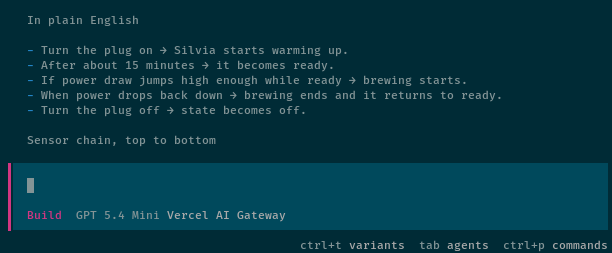
I have a pretty simple test that I have been running by local LLMs. Overly REAPed or quantized local LLMs, and even the dopier cloud models fail this test. I ask my Home Assistant agent to analyze the Rancilio Silvia button on my macropad dashboard and explain how the button works.
It is a fairly complicated button. It shows four different states, and those states are determined by a handful of timers. This requires a lot of queries over the MCP, which is awesome for me, because the worst models tend to fail a lot of tool calls. It is nice to find those failures early.
This is not an exhaustive test, and it isn’t any sort of real benchmark. This is an easy way for me to verify that lots of tool calls run without a hitch, and to see if the model heads in the right direction. It is also handy that the button and dashboard are always there to be queried!
The previous GPT-Mini model did not fail tool calls, but it really didn’t want to use the MCP. It wanted to check the local filesystem, but there is no useful information there. The AGENTS.md explains this. I repeatedly explained this to the model after it failed. This isn’t the only place where GPT-Mini did a poor job, but this was an easy test for me to replicate.
I couldn’t use GPT-5.4-Mini via my Codex subscription because it wasn’t enabled in the OpenCode plugin. So I burned a few nickels on my Vercel account to try this test with both GPT-5.4-Mini and GPT-5.4-Nano. My understanding is that the Nano model won’t be available in our Codex subscriptions, but by the time you read this there should be an OpenCode release that supports GPT-5.4-Mini via Codex.
Both models did a fantastic job. They started their MCP queries in a logical spot. They followed the tree towards the correct sensors. They explained how things work in English, and their explanations matched reality.
I am not the person who could devise the tests to figure out where this new model sits in relation to the various open-weight models. I think the important thing to note is that the new Mini model is a properly capable coding model, and you could definitely use it to stretch out the duration of your Codex quota.
Let’s talk about speed!
Speed is not worth a premium price for me. I don’t do important work in OpenCode, and I have other things to do while OpenCode is working. Even so, let’s talk about speed!
The smaller players are all oversubscribed to different extents. Z.ai’s coding plan is always slow, but at least mostly steady. Synthetic is usually the fastest of my open-weight subscriptions, but it isn’t $17 faster than Chutes. Chutes is occasionally as fast as Synthetic, but often as slow as Z.ai. There just aren’t enough GPUs for these companies to buy or rent.
All the budget providers have either been raising their prices or tightening their quotas. This has driven some customers away, and it has made others more careful with their prompts. Speeds have been improving.
When Kimi K2.5 on Synthetic or Chutes is running fast it is comparable to the usual speed of Codex-5.3 on OpenAI’s service. When Chutes is slow, Codex is probably five times faster.
Speed may not be important to me, but faster is always nicer. How much is that speed worth? Is it worth paying $1 more than Z.ai or OpenCode Go plan or $17 more than a Chutes subscription for three to five times the speed? Don’t forget that Z.ai and Chutes give you more requests than OpenAI.
OpenAI Codex quotas seem pretty tight!
OpenAI isn’t terribly transparent with their quotas. Codex Plus has a 5-hour quota of between 45 and 225 messages. My understanding is that this would translate to 45 Codex or 225 Mini requests. I am not confident that I have deciphered this correctly.
There is also a weekly quota. They don’t seem to tell you what the weekly quota is, but my weekly quota appears to be roughly double my 5-hour quota, meaning I can use about two full 5-hour windows per week. My weekly quota doesn’t seem to follow a consistent pattern – some days it drains quickly, others more slowly. It might be closer to three times the 5-hour quota.
I keep saying that I rarely hit my daily limits on any of my open-weight model providers, and it is equally true that I won’t be likely to hit the daily limit on Codex Plus. I would most definitely be hitting my weekly Codex Plus limit with regularity if it were my only coding subscription. It is rare that I use 300 requests in a day on Chutes, but it is common for me to use more than 50 requests most days of the week.
Figuring out how loose or tight the quotas are is a challenge for someone with my rather light usage levels. I don’t want to just send OpenCode down useless rabbit holes, and I keep having the urge to swap in Kimi or GLM right after using Codex just to see if they actually feel slower, or if I can really see a difference in quality.
Nothing in this blog post is proper science. I’m just here to tell you how things are working out for me in order to help you make your own decisions.
OpenAI Codex pricing makes way more sense when you are a professional
Paying $200 per month for Codex Pro is peanuts if you’re getting paid to write code. It doesn’t even have to be the job you do five days a week to make that a good deal. There is a good chance you’re billing a large fraction of that $200 for an hour of your time, but what do you do if you’re hitting the limits on OpenAI’s biggest plan?
According to the pricing page, Codex Pro gets you 300 Codex-5.3 requests every 5-hour window. I assume that the weekly limits scale the same way as my Codex Plus plan, so you might be able to average 120 Codex-5.3 requests per business day for $200.
If you keep your Codex Pro subscription ($200) and also sign up for Synthetic’s $30 plan, you could use Codex-5.3 or GPT-5.4 for OpenCode’s planning agent, then use Kimi K2.5 for your build agent.
Every $30 per month that you spend on your Synthetic plan gets you at least 135 Kimi K2.5 requests per 5-hour window plus 500 free tool calls per day. At least 10% of my requests are tool calls, which Synthetic doesn’t count against the request limit, effectively extending my quota. There are other models to choose from, but Kimi K2.5 is a good example because it is comparable enough to GPT-5.4-Mini.
I know that I said $200 is probably peanuts to a professional, so paying for TWO Codex Pro accounts might also be cheap for you. I don’t think Synthetic’s plan is just about saving money here, though. It also gives you access to more models, and sometimes having a different model attack the same problem makes all the difference. Saving $110 to $170 and getting more requests for your money is a happy accident.
Even if you are a professional, I think it is still worth throwing some of your work towards Chutes.ai or OpenCode Go. Both have a $10 per month offering with generous limits on GLM-5, Kimi K2.5, and MiniMax M2.5. They’re not as fast as Synthetic, but I think it is worth spending $10 to see if it would work for you. Especially if you’re only just barely going over your Codex Pro quotas every week.
- OpenCode on a Budget — Synthetic.new, Chutes.ai, and Z.ai
- Squeezing Value from Free and Low-Cost AI Coding Subscriptions
Codex and Synthetic make a lot less sense for amateurs
Codex-5.3 is pretty quick, and it is a premium frontier model. Kimi K2.5 on Synthetic often matches Codex’s speed. Speed and a smart model are absolutely worth paying for when you’re earning money using these tools.
I’m not earning money. I am a shade-tree programmer. I write glue code. I do sysadmin stuff in my homelab. I work on parametric 3D models using OpenSCAD. Can I tell that Codex-5.3 is a more capable model than GLM-5? Sure! Is Codex worth $12 more per month for less quota than my $8 NanoGPT subscription? Not for me.
I haven’t yet hit a single problem that Kimi K2.5 or GLM-5 couldn’t handle. A professional working on larger repos would get a lot of mileage out of Claude Opus, Google Gemini Pro, or GPT Codex. I’m not one of those professionals. If you found this blog post, there is a good chance you are like me.
What if we do run into a problem that Kimi or GLM can’t solve? We don’t have to sign up for a month of Codex Plus just to use Codex-5.3! I keep some cash in my OpenRouter account, and I think you should, too. OpenRouter gives you 1,000 requests per day to any of their free models as long as you have deposited $10 in your account, and I can pay by the token to use Opus, Gemini, or Codex.
These are the priciest models, but I would still be getting a better deal if I only paid for a few million tokens when I actually need them. They cost $5, $2, and $1.75 per million input tokens, respectively. It is quick and easy to blow through $5 in Opus tokens via the API, but I could have paid for quite a few Codex planning sessions over the next 12 months if I put this $20 into my OpenRouter account instead of trying out the Codex Plus subscription. One 5-hour window on Codex gives you something like $4 in paid Codex-5.3 tokens.
Why didn’t I just try Codex 5.3 using the API instead of signing up for a subscription? I wanted to see how well I would fit in OpenAI’s limits, and I wanted to see how the speed was when using the plan. I couldn’t write this blog post if I only paid for a few million tokens. I needed to try the subscription.
Things change so fast!
I am just past the three week mark on my Codex subscription. My opinion on the value I’m getting for my ~$21 monthly cost (with tax) changed A LOT in those weeks.
When I signed up, the only GPT-Mini model that could stretch my quota wasn’t a model I could actually use. At the time, my $3 Chutes subscription had 300 GLM-5, Kimi K2.5, or MiniMax M2.5 requests available every single day with no monthly limits. These models aren’t as good as Codex, but paying seven times more for WAY less available usage didn’t feel great.
This has all shifted in a short amount of time. GPT-5.4-Mini is fantastic, and will definitely make my Codex quotas last a lot longer. The $3 Chutes plan no longer has those three models, and their limits are now based on the cost of the models you use. You do now get GLM-5-Turbo on the $3 plan, but you have to bump up to the $10 Chutes plan to use Kimi K2.5, MiniMax M2.5, or the full GLM-5.
You will still get a lot more usage out of a $10 Chutes plan, a $10 OpenCode Go plan, or an $8 NanoGPT plan. Even so, things have gotten a lot closer now, so it might be worth paying a bit more for Codex to get access to faster and more capable models.
I wonder what things will look like a few months from now?!
Conclusion
OpenAI’s Codex Plus subscription is genuinely excellent. Codex-5.3 is fast and capable, and GPT-5.4-Mini is even faster and finally gives us a smaller model that’s actually useful for stretching your Codex quota. The speed is consistently good, and OpenAI’s infrastructure doesn’t feel oversubscribed like some of the budget providers.
For me, it comes down to value. I don’t hit the limits on my $8 NanoGPT subscription, and even my $3 Chutes plan goes a long way. I rarely encounter problems that GLM-5 or Kimi K2.5 can’t solve. Paying $20 for fewer requests and tighter weekly limits doesn’t make sense for my usage pattern.
That doesn’t mean Codex Plus is a bad deal. If you’re a professional building larger projects, or if you regularly bump into problems that GLM-5 or Kimi K2.5 can’t solve, the premium models and consistent speeds might be worth every penny. Even for someone like me, spending $20 to test a frontier model for a month was educational. I now know what I’m not missing out on.
What has your experience been with Codex and OpenCode? Are you sticking with the budget providers, or did you find that frontier model quality is worth the premium? Come hang out with us in our Discord community and share your thoughts. We’re a friendly bunch of homelabbers, tinkerers, and 3D printing enthusiasts all trying to get the most out of these tools.