I start all of these blog posts about coding plans the same way. You need to understand my perspective. I am a light user. I don’t spend all day writing code. I don’t need bleeding-edge models, and I will never need a $200 Claude Code subscription. Since you found your way here, there is a very good chance that you and I have significant overlap in our needs.
You don’t even have to read this entire post for the summary of my thoughts. The $10 OpenCode Go is very nearly the best deal in coding plans by every objective measure. The subscription has the best open-weight coding models, the limits are as high or higher than other budget plans, the price is low, and the speed has been good.
The $3 plan from Chutes gets you fewer tokens for your money, but it is a tough deal to beat if you are an extremely light user. In fact, I believe I could ALMOST fit my normal usage into a $3 Chutes plan. I would have to downgrade to less capable models to make that work, but those models being cheaper is the reason I might be able to stretch that $3 until the end of the month! NanoGPT’s $8 plan looks like it might get you almost twice as much usage of GLM-5 or Kimi K2.5, but they’ve been less reliable for me, and NanoGPT doesn’t give you a discount on cached tokens like Chutes and OpenCode Go.
It is hard for me to run with just a single coding plan, because I enjoy trying new models and services. If I only had one service, I’d be very pleased if it was OpenCode Go. I would fit within the limits most months, the models work well for me, and the speed is better than reasonable.
- Squeezing More Value From Low-Cost Coding Plans — Models and Context
- OpenAI Codex with OpenCode — My Experience After a Month
I am a light user, but here is what I have found
You get to burn $60 worth of tokens at OpenCode Zen API prices for $10 per month. Like with most coding plans, you can’t use it all at once. There are 5-hour and weekly limits.
I have several coding plans active, but I have been trying to use nothing but OpenCode Go since I signed up just to see how far the plan will take me. I am currently 12 days in, and I have used 22% of my monthly allotment of tokens.
| Provider | Cost | Total | Input | Output | Cache Read |
|---|---|---|---|---|---|
| OpenCode Go | $19.13 | 109M | 5.8M | 0.728M | 103M |
| Z.ai Plan | $7.04 | 21M | 2.6M | 0.239M | 18.5M |
| Codex | $4.98 | 8M | 1.2M | 0.107M | 6.9M |
| Chutes | $0.40 | 3M | 0.8M | 0.022M | 2.2M |
Data in the table spans roughly the first three weeks of my OpenCode Go subscription. Cost is based on pay-per-token API pricing. Go and Chutes deduct usage from your quota based on their pricing.
The plan goes quite far if your OpenCode tasks can be done using MiniMax M2.5 or M2.7. At the time that I generated this table, I had used roughly 28 million GLM-5, 15 million MiniMax M2.5, and 33 million MiniMax M2.7 tokens, which cost me $8.16, $0.81, and $2.83 respectively according to tokscale.
My ratio of cached to uncached tokens when using the OpenCode harness seems to vary between 8:1 and 20:1 or so. I use GLM-5 and GLM-5.1 mostly for planning, so they lean closer to 8:1. I use MiniMax M2.7 for implementing plans and doing grunt work, so those jobs tend to run longer so I am averaging something well over 20:1 there.
$10 of my quota on OpenCode Go is getting me around 35 million total GLM-5 tokens or 115 million total MiniMax M2.7 tokens. The total quota for the month is $60, so you can probably puzzle out around how much usage of the various models I could fit within the limits. Your mileage will be different than mine, but I bet it’ll be in a similar enough ballpark.
I tend to run several small jobs almost every day. Sometimes I ask OpenCode to poke around log files and documentation. Sometimes I ask to have something updated on my Home Assistant server. Other times I ask for scripts to be updated or for files to be organized.
Each individual task tends to cost somewhere between a nickel or a dime worth of MiniMax M2.7 tokens. When a job can’t be handled by MiniMax, I often wind up burning $0.20 to $0.40 in GLM-5.1 tokens. I am in good shape as long as I average less than $2.00 per day in tokens, and I seem to be doing that!
- Squeezing More Value From Low-Cost Coding Plans — Models and Context
- OpenCode on a Budget — Synthetic.new, Chutes.ai, and Z.ai
MiniMax weirds me out, but I really do like using it!
MiniMax is the cheap model on OpenCode Go. A Claude Code subscriber might use Opus for planning and Sonnet for building, while I wind up use GLM-5 for planning and MiniMax M2.7 for building. Let the expensive model do the thinking, then let the cheap model do the grunt work. When things aren’t working out, you can call on the smarter model to find out what is going wrong.
MiniMax M2.7 feels way more capable than GLM-4.7 most of the time, which is impressive because MiniMax is less than half the size. GLM-4.7 is my cheaper, grunt-work model on my Z.ai coding plan. The trouble for me is that MiniMax doesn’t always like to follow directives. GLM-4.7 usually does a better job at that.
My Home Assistant AGENTS.md clearly explains that nothing is available on the local filesystem, and that everything needs to be accessed via the Home Assistant Vibe MCP. MiniMax often starts poking around the local directory looking for dashboards and things. It gets back on track if I stop it and explain again, but I don’t feel like I should have to do that with modern models.
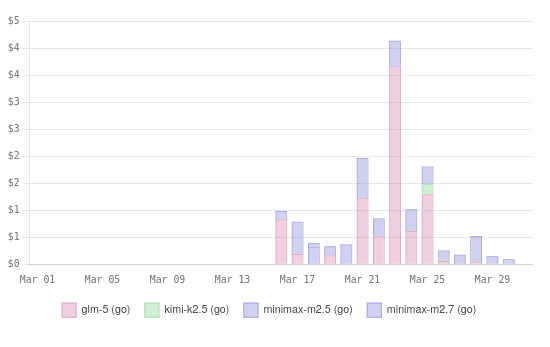
My first two weeks or so of OpenCode Go usage on OpenCode’s dashboard
I have started using Beads. I wound up modifying my AGENTS.MD in all my projects that use Beads to make sure that all queries to Beads happen in a subagent. This does a great job of saving 5 to 10 thousand tokens of context when the agent has to dig deeper to find the correct bead, which saves hundreds of thousands of tokens over the course of a longer session.
GLM and Kimi follow this directive every time. I had to rewrite the directives in the AGENTS.MD three or four times to get MiniMax M2.7 to follow them at all, and MiniMax still ignores it some the time.
Not the end of the world, but I think it illustrates my problems with MiniMax fairly well. MiniMax isn’t perfect, but it is both fast and cheap. You get around three times more MiniMax usage on your OpenCode Go subscription than GLM-5 usage.
- Vibe Coding My Home Assistant Setup — I Can’t Believe How Well This Works!
- Squeezing More Value From Low-Cost Coding Plans — Models and Context
Are the models on OpenCode Go overly quantized? Are they quantized at all?!
I’ve said the same thing in more than one previous blog post. OpenCode claim they aren’t doing any quantization shenanigans, but how your provider is running their models is irrelevant. What matters is that you are getting results you are pleased with at a price you can afford while getting your responses back at a reasonable speed.
I feel like I am getting good results with OpenCode Go. You probably remember that I spent an entire section complaining about MiniMax M2.7. I verified that my complaints are not OpenCode Go’s fault. I ran pay-per-token sessions against MiniMax M2.7 through Vercel and OpenRouter. Both aggregators claim that I was getting my inference direction from MiniMax’s servers, and MiniMax felt the same there.
OpenCode Zen, the pay-per-token service, calls out that they offer models that are known to work well with OpenCode. They don’t call this out as specifically anywhere in the OpenCode Go description or FAQ, but they are selling you a service that is meant to work with their software. It is in their best interest to make sure the service works well with OpenCode.
OpenCode Go has only been available for a few months. I do hope they are experimenting with quants to find the sweet spot between cost and performance.
Here is what I have seen with my own eyes:
- GLM-5.1 is usually faster on OpenCode Go than on my Z.ai Coding Plan
- GLM-5.1 doesn’t have problems over 120k context on OpenCode Go
- GLM-5.1 often royally goofs up over 120k context on my Z.ai Coding Plan
- This problem MIGHT be fixed on the Z.ai Coding Plan!
- MiniMax M2.7 feels the same to me at every provider I have tried
I can’t tell you how OpenCode Go is running their models. They haven’t told us if they are running at 16-bit, 8-bit, or even less accurate weights. I do know that I am happy with how the models are performing.
What if you outgrow the $10 OpenCode Go subscription?
This bums me out. There is only one tier of subscription available. If the $10 OpenCode Go plan isn’t enough for you, then you’re stuck. Maybe you can create a second account, but that feels weird. I’d rather connect another subscription or two to my OpenCode client.
Chutes is a good option. While OpenCode Go gives you six times the cost of your subscription in tokens, Chutes gives you five. Not quite as good of a deal, but not far behind. The $10 plan from Chutes gives you most of the same models as OpenCode Go, plus a whole lot more.
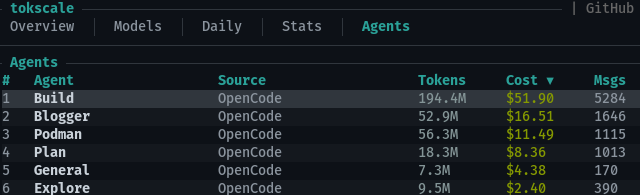
*Tokscale’s breakdown of my long-term OpenCode usage by agent**
I am supplementing my OpenCode Go subscription with a $3 Chutes plan. The $3 plan doesn’t give you access to GLM-5, Kimi K2.5, or Minimax models, but it does have GLM-5-Turbo. Turbo isn’t quite in the same tier as full GLM-5, but it isn’t bad. If you’re running out of OpenCode Go usage around three weeks into the month, this might be a good way to fill out the last week.
NOTE: My understanding is that Chutes said that the $3 plan wouldn’t have access to MiniMax M2.5, and I believe was true when those changes to the quotas were implemented. I have used MiniMax M2.5 on my $3 Chutes plan a few times this week, and it worked just fine. I don’t know for certain whether this is intentional or a mistake!
It would be best to sprinkle Chutes usage in every day instead of being stuck with it for your entire last week. I learned from my `tokscale** report that my simple explore agent accounts for around 5% of my token usage. Just assigning that to an inexpensive model on my $3 Chutes account would instantly free up 5% of my OpenCode Go usage.
Some sensible coding-plan combos!
| Planning | Grunt Work | Cost |
|---|---|---|
| Chutes + GLM 5 Turbo | Chutes + MiniMax M2.5 | $3 |
| OpenCode Go + GLM 5.1 | OpenCode Go + MiniMax M2.7 | $10 |
| Codex Go + GPT-5.4 | OpenCode Go + GLM-5.1 | $18 |
| Codex Go + GPT-5.4 | OpenCode Go + MiniMax M2.7 | $18 |
| Codex Go + GPT-5.4 | MiniMax + MiniMax M2.7 | $18 |
| OpenCode Go + GLM 5.1 | MiniMax + MiniMax M2.7 | $20 |
You can mix and match plans whatever way works best for you!
I also have something like two years of my Z.ai Coding Pro plan left. I haven’t been using many of these tokens while testing other services, because I want to be able to tell you how far I can go before exhausting them. That said, there are more tokens available to me here than I could ever use up, so I have a safety net.
NanoGPT is also a reasonable option. Their quotas currently allow you to use nearly four times as many GLM-5 tokens as OpenCode Go. In my experience, NanoGPT isn’t as fast or as reliable as OpenCode Go, but they definitely give you a good amount of tokens on high-end models for your money.
I keep reading that MiniMax’s Token Plan is fast and has extremely high limits. If you’re already enjoying MiniMax M2.7 on your OpenCode Go plan, then this would be a great way to stretch your quota. You could use GLM-5.1 for planning, Kimi K2.5 when you need a visual model, and then shift the bulk of your grunt work to the MiniMax plan.
The bummer about the MiniMax plan is that you have to use MiniMax. That doesn’t work well for me. MiniMax M2.7 is a fantastic model that punches weigh above its weight class, and I have started using it for nearly half of my tokens now. The trouble is that it often can’t easily solve my problems. I would be in trouble if I didn’t have GLM-5.1 in my back pocket.
- Squeezing More Value From Low-Cost Coding Plans — Models and Context
- OpenAI Codex with OpenCode — My Experience After a Month
DeepSeek V4 is making OpenCode Go even better
My OpenCode Go subscription has lapsed. Two DeepSeek V4 models were released last night, and I woke up to news that they are already available on OpenCode Go. The absolutely massive DeepSeek V4 Pro model is priced at around 60% of the price of GLM-5.1, and DeepSeek V4 Flash only costs half as much as MiniMax M2.7!
The people at OpenCode said that they worked quickly to make this happen. They’re not sure if this is where the pricing will stay, so we will have to keep an eye on it. Today, though, it is quite impressive. You can nearly double the amount of work you can get done before your quota runs out if you switch from GLM-5.1 and MiniMax M2.7 to the new DeepSeek models.
I am doing my best to test out these two new models. I am paying for tokens via OpenRouter, but I am getting rate limited.
DeepSeek V4 Flash does seem to be in the same league as MiniMax M2.7. Both models seem to handle straightforward tasks well, and both absolutely refuse to consistently use the MCP to query and make changes to my Home Assistant server’s configuration. This isn’t exactly an exhaustive test, but I think it gave me a good feel for where the limitations are.
I am having DeepSeek V4 Pro attack a slightly more challenging update to my Home Assistant server. Its reasoning seemed to make sense, and we got to a good solution within 37 cents. It took almost an hour. The retries after being rate limited were sometimes taking 15 minutes between turns.
Day one is not the day to be trying new models!
Conclusion
I suspect OpenCode Go is the most appropriate budget coding plan for most people reading this. The pricing is fair, the limits are quite generous, and the models are fast and reliable. I would have no problem recommending this to anyone that is a light or even medium user. The only real problem is that there isn’t a higher tier available if you outgrow the $10 plan, but the OpenCode harness makes it easy to combine several competing coding plans.
I have a few more coding subscriptions that I want to try, so I won’t be renewing my OpenCode Go subscription when it runs out in a few days. When I do finally run out of coding plans to try out, I am expecting to come back to OpenCode Go. The plan is the right size for me, the price is right, and I get to support a company behind an open-source project that I use every day.
Have you tried OpenCode Go? Are you a light user trying to decide between the budget plans? Has your experience with MiniMax M2.7 been comparable to mine? Come hang out with us in our Discord community and let’s compare notes! We’re a friendly bunch of homelabbers, tinkerers, and machine learning enthusiasts.
- Squeezing More Value From Low-Cost Coding Plans — Models and Context
- OpenAI Codex with OpenCode — My Experience After a Month
- Vibe Coding My Home Assistant Setup — I Can’t Believe How Well This Works!
- OpenCode on a Budget — Synthetic.new, Chutes.ai, and Z.ai
- Squeezing Value from Free and Low-Cost AI Coding Subscriptions
- Is The $6 Z.ai Coding Plan a No-Brainer?
- Fast Machine Learning in Your Homelab on a Budget
- OpenCode with Local LLMs — Can a 16 GB GPU Compete With The Cloud?