The folks at Royal Kludge and Redragon sent me three free hall-effect keyboards to review. I’m going to tell you about the two Royal Kludge keyboards in this post. They arrived first, and they’re the two I’ve had a chance to spend time with so far.
You don’t have to read this entire post. I’m going to give you the most important piece of information right here. As far as gaming is concerned, all three of these hall-effect keyboards are almost indistinguishable from my more expensive and premium Keychron K2 HE. Once I got the actuation points dialed in to match what I am used to, and I got my headphones on, I quickly forgot which keyboard I was using.
The Redragon K617 keyboard, which isn’t going to be the focus of this blog post and is the cheapest hall-effect keyboard available, is missing one important feature. Keychron and Wooting call it Last Key Priority (LKP), while Royal Kludge and Redragon call it Simultaneous Opposite Cardinal Directions (SOCD). This feature isn’t terribly useful for me, but it might be a deal-breaker for you! Using this feature can get you banned from some multiplayer games.
The little Redragon keyboard is different enough from the rest that I feel it deserves its own post.
- Keychron K2 HE Hall Effect Gaming Keyboard at patshead.com
- Royal Kludge C84 HE Keyboard at rkgamingstore.com
- Royal Kludge C84 HE Keyboard at Amazon
- Royal Kludge C98 HE Keyboard at rkgamingstore.com
- Royal Kludge C98 HE Keyboard at Amazon
- Redragon K617 FIZZ HE Keyboard at Amazon
I feel that I need to explain my desk setup!
You can feel free to skip this section if you only care about the keyboards!
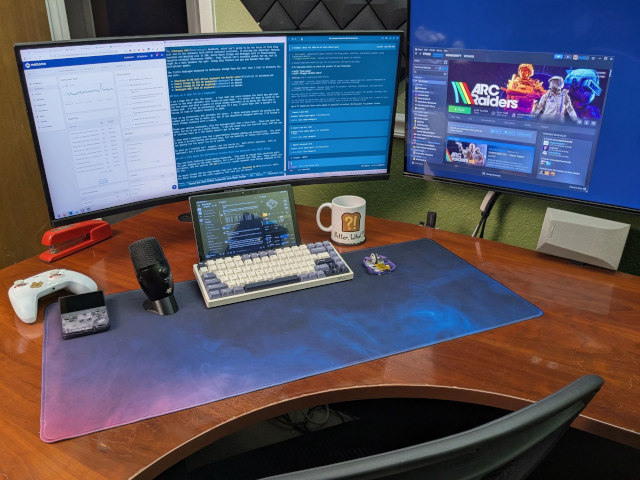
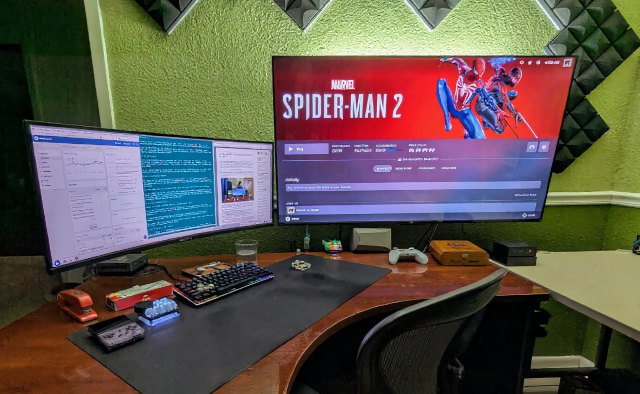
Unique elements of my desk setup are visible in and around the edges of the photos I took for this blog post. I have written about some of them, while others are still rough around the edges and haven’t gotten their own dedicated post yet. Let’s talk a little about some of those things.
I am sitting in a used Herman Miller Aeron chair at a rather large 60” by 48” corner desk. I am staring at a 34” ultrawide gaming monitor, and there is a 55” 120-Hz TV on the wall above my desk. That TV is sitting across the room from a comfy chair. When I’m not sitting in that chair playing Marvel’s Spider-Man 2 with my GameSir Cyclone 2 controller, I can use the bottom corner of that massive TV to watch YouTube videos or to keep an eye on a build or server.
I have an inexpensive 10” Android tablet on my desk running Discord and Home Assistant in split screen. This lets me poke around the Butter, What?! Discord server without interrupting my Arc Raiders gameplay, and it lets me tap things on my Home Assistant macropad dashboard even when my PC is locked. This has been awesome, and is finally fleshed out enough that a blog post will be coming soon.
I have my 15-gram Li’l Magnum! gaming mouse on my desk. It has been a fun project to work on, and it has definitely improved my FPS gaming experience.
There is also a Neat Bumblebee II microphone on my desk with a 3D-printed low-profile stand. I use my Anker Q20i Bluetooth headset for game audio, but I can’t use its mic to chat in game while also using the high-quality Bluetooth audio. I designed that stand to keep the Bumblebee mic out of my line of sight, and it does a great job of letting me chat with my friends while gaming.
You will also see a pair of old and loud Onkyo surround-sound speakers. They’re mounted in a way that they sit slightly above and half behind the desk with custom 3D-printed brackets, and they are plugged into an inexpensive amplifier from Aliexpress. They are fairly small, sound nice, and can get really loud. I am only supplying them with around half their rated power limit, and they want to blast my eardrums out at around 60% volume.
- One Month With My Gigabyte G34WQC A Ultrawide Monitor
- Invest in a Quality Office Chair
- The Ultimate Li’l Magnum! Fingertip Mouse Using The Corsair Sabre Pro V2 or Dareu A950 Hardware
What do I look for in a keyboard?
I am a huge fan of the 75% layout. I feel that the space between the enter key and your mouse is the most valuable real estate on your desk. I’d rather not have to reach as far for the mouse and have a couple of extra inches available on my mouse mat rather than have a number pad. I’m not an accountant, and even if I was, I would hope that I wouldn’t be keying in rows of numbers manually in 2026.
That is my preference, but possibly not yours. I think everyone should try giving up the number pad to see how it works out, but if you absolutely disagree with me, I’ve tested a Royal Kludge keyboard with a numpad.
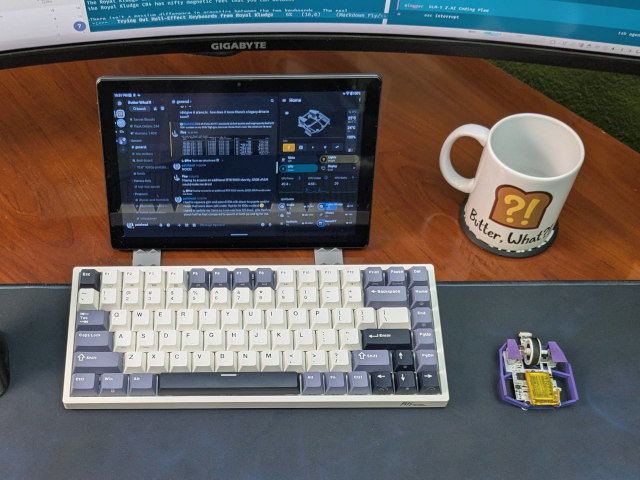
There are smaller keyboards, like the Redragon K617 that I have here. These are just too small for me to use as a daily driver. I use the arrow keys and function keys, and the row of function keys on a 75% layout doesn’t get in my way.
I also need a keyboard that has a good balance between gaming and productivity. The truth is that I do miss having non-linear keys, but the benefits of linear hall-effect switches for gaming are too great for me to ignore.
So what am I looking for? Compact, but not overly so. Hall-effect switches. Feel is important, but a pleasant sounding keyboard would be nice!
Let’s talk about the differences between these two keyboards from Royal Kludge
They are both fantastic wired gaming keyboards. They seem as though they should be built the same judging by the model numbers, but I don’t believe that they are. Their styles are different, and the smaller RK C84 sounds somewhat more hollow compared to the RK C98.
The Royal Kludge C98 has dual-height legs just like my Keychron K2 HE, while the Royal Kludge C84 has nifty magnetic feet that you can detach.
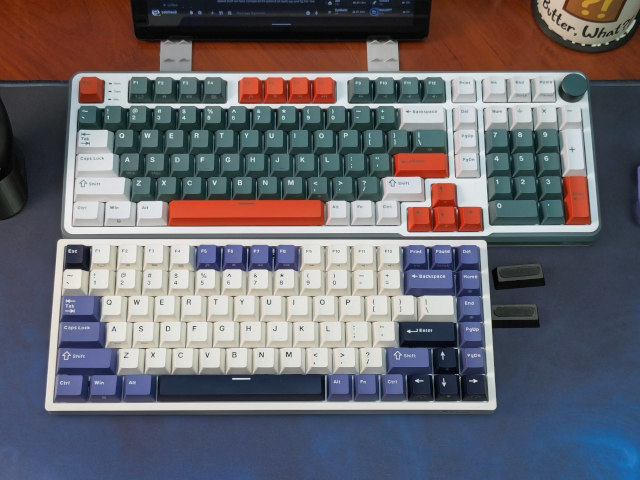
There isn’t a massive difference in acoustics between the two keyboards. The real differences are in the layouts.
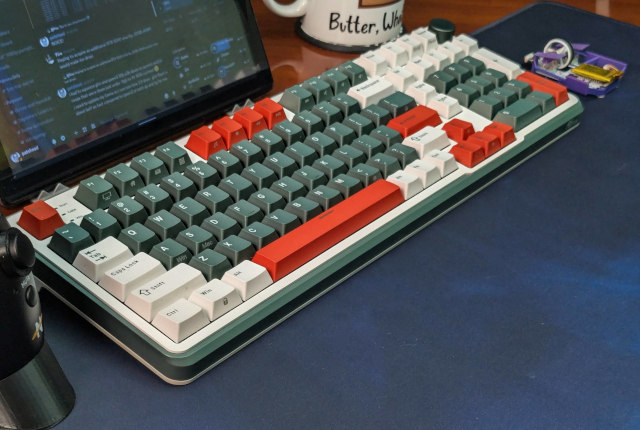
The RK C98 is nearly a full-size keyboard. They’ve tucked the arrow keys in closer to the spacebar and condensed the navigation cluster. This allowed them to make the keyboard narrower by roughly two keys without sacrificing the number pad. There is also a handy volume knob in the corner.
The RK C84 is a space-saver. The arrow keys are tucked in even closer, and the number pad and volume knob are completely absent. There is just a single column of keys between the enter key and your mouse.
- Keychron K2 HE Hall Effect Gaming Keyboard at patshead.com
- Royal Kludge RK C84 HE Keyboard at Amazon
- Royal Kludge RK C98 HE Keyboard at Amazon
Why buy a hall-effect keyboard?
I am nearly convinced that all keyboards should be hall-effect keyboards. The only bummer is that hall-effect switches don’t make a lot of sense unless they are linear, and I have always been a fan of keys like the IBM buckling spring. That said, I’ve never found a modern keyswitch that feels like an IBM Model M keyboard, so I am starting to feel that the pros of the hall-effect switches are more important than having tactile switches.
The majority of the benefits of hall-effect keyboards, which use magnetic sensors instead of switches with physical contacts, come into play when gaming.
You can set the actuation height of one or all the keys on the keyboard. You can put your WASD-cluster on a hair trigger. That means you will start strafing left as soon as the A key begins to descend instead of when the key is nearing the bottom. I don’t have a way to measure this, but the Internet suggests that your keys can register 5 to 10 milliseconds sooner with a hall-effect keyboard.
Not only do you start strafing more quickly, but you also stop strafing as soon as the key lifts a few tenths of a millimeter. You can also activate the key again before it reaches the top. It is pretty neat!
There is also a feature that Royal Kludge refers to as Dynamic Keys (DKS). You can bind an action to a partial keypress, to a full keypress, and even bind a different action on release from either of those states.
DKS seems neat on paper. I tried to set up my 1, 2, and 3 keys to send 4, 5, and 6 when fully depressed so as not to have to reach so far for the less-used weapons in FPS games. I didn’t manage to make it work as I wanted, and I realized that I would have been forced to use different profiles for gaming and productivity if I wanted to use this feature. That’s too much effort for too little gain.
The really neat feature is one that Royal Kludge refers to as SOCD. This feature lets you rapidly change strafe direction so well that it can get you banned in some competitive multiplayer games. It allows you to hold one of your direction keys while tapping the opposite direction, and your character will instantly swap directions every time you press or release the second key.
We’ve been doing the equivalent of SOCD Cleaning in our Team Fortress 2 configuration for years. This allows you to do it in games that don’t support it.
Should you use a hall-effect keyboard for productivity?
Yes. You absolutely should. Especially now that the prices are getting so low.
I have a minor complaint about the layout of both my Keychron K2 HE and the Royal Kludge C84. Neither keyboard has a gap between the number row and the function-key row. This had me accidentally bump my screenshot key when I meant to hit backspace.
I wouldn’t be able to do anything about this on a normal keyboard, but I could adjust the sensitivity of that entire top row with my hall-effect keyboards. I can just set the actuation point of the print-screen key to 3 millimeters.
I’ve worn out a handful of Cherry MX Blue keyswitches. I supposedly won’t be able to do that with hall-effect keys. There are no contacts to wear down, corrode, or get dirty. There is a sensor under each key that detects the force of a magnet. They should just work forever. We won’t know how this works out in practice for quite a few more years still.
You can set up the keys to be as light or as heavy as you like. You can’t adjust the force of the springs, but you can adjust when they engage.
I prefer not to use different modes or profiles for gaming and productivity
The default setup on the Keychron keyboard wanted me to use one profile for gaming and one for productivity. I could have set up the Royal Kludge keyboards to do the same. I didn’t like the idea of having to remember to change modes, so I found a compromise.
I started by setting all the keys on the keyboard to have the default 2-mm activation depth. Then I tweaked the keys around the WASD-cluster to activate at 0.6 mm. I tried 0.4 mm at first, but my character would sometimes run diagonally just from the weight of my finger. I thought it was a bug in the game at first!
Initially having the 0.4-mm activation height set on all the keys taught me about some of my typing idiosyncrasies. Sometimes I would see the letter t repeat over and over again when I stopped in the middle of a sentence to think. It turned out that I sometimes pause with my fingers outside the home row, and I was putting just enough weight on that key to activate it. Isn’t that weird?!
I got this all dialed in a few months ago on my Keychron keyboard, and I used those settings as a base when I tested the Royal Kludge keyboards. I immediately felt right at home.
Royal Kludge’s web configurator works perfectly on Linux
There’s not too much to say here. Both of these Royal Kludge keyboards use a web-based tool for configuration. This is where you configure things like engagement heights, macros, and dynamic keystrokes.
The Royal Kludge configurator works just as well on Linux as the Keychron configurator. An advantage of the Keychron K2 HE is that it can be flashed with the open-source QMK or VIA firmware. I haven’t had a good reason to try this, and I probably never will. It isn’t a massive selling point, but it is nice to know that I can upgrade the Keychron even if the company abandons the hardware.
This seems like a good place to note that the inexpensive [Redragon K617][k617] that I keep recommending has a configuration tool that only runs on Windows. I had to borrow my wife’s laptop to configure it to my liking.
Are the keys creamy or thocky?!
The kids these days have all sorts of vocabulary revolving around the sound of mechanical keyboards. I’m not entirely certain that I am applying the terminology correctly, but I am going to do my best to explain.
Typing on so many keyboards in a short span of time has me believing that creamy and thocky exist on a spectrum. I imagine that the klackier sound of an IBM Model M fits somewhere on this same spectrum.
The Keychron K2 HE is much more creamy with a hint of thock, while both Royal Kludge keyboards are thocky and seem significantly louder. None are as loud as an IBM Model M, but the RK keyboards sound louder and a bit more hollow compared to the Keychron.
| Keyboard | Weight | Keys | Polling |
|---|---|---|---|
| Redragon K617 FIZZ | 530 grams | 61 | 8 KHz |
| Royal Kludge RK C84 | 729 grams | 84 | 8 KHz |
| Keychron K2 HE | 942 grams | 84 | 1 KHz |
| Royal Kludge RK C98 | 977 grams | 98 | 8 KHz |
I imagine the weight has something to do with it. The Keychron is 30% heavier than the same-size Royal Kludge keyboards. Some of that weight is the battery. Some might be differences in sound dampening.
I clicked through a handful of videos on YouTube, and Royal Kludge almost definitely has creamier keyboards in their lineup. They just aren’t hall-effect keyboards.
I am back to using my Keychron K2 HE
The Royal Kludge RK C84 is a fine keyboard. In fact, it has all the features that I truly need, and the color scheme reminds me of the Solarized terminal theme that I use everywhere. Had I bought the RK C84 keyboard back in August, I would never have bought the Keychron, and I wouldn’t miss the creamy sound. If I somehow lost my Keychron, I would put the RK C84 on my desk and not look back. But I do have the Keychron, so I am going to use it.
I have a slight preference for the OSA keycaps on the Keychron. They’re slightly more rounded and one or two millimeters wider at the top than the standard keycaps used on the Royal Kludge keyboards. This is one of those things that is more noticeable when switching away from the OSA caps than when switching to the OSA caps. I barely noticed the difference when I first got the Keychron, but I immediately knew the edges of the keys felt different when I started typing on the RK C84.
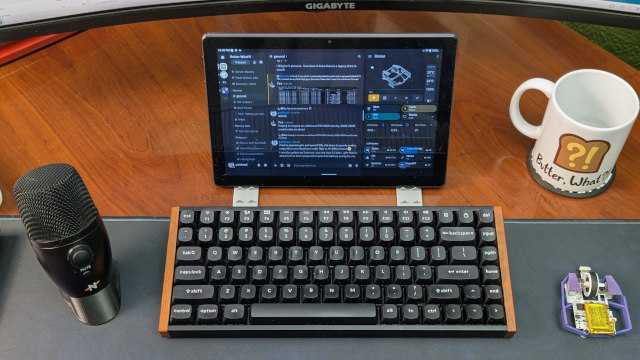
I am giving up the 8-KHz polling rate, which is a bummer, but I am excited to be able to once again eliminate the wire. I only have to charge the Keychron every 10 days, and it is nice to have a bit less clutter.
Royal Kludge most definitely has wireless gaming keyboards that sound and feel just as good as my Keychron K2 in their lineup. The trouble for me is that those models aren’t using hall-effect switches. I am confident that Royal Kludge will have a more direct competitor for my Keychron K2 HE in the future, and the things that I like about my Keychron may not matter to you at all. Especially when the Keychron costs twice as much!
However, I’m less excited about going wireless than I was when I bought the keyboard. I added a 10” Android tablet to my desk to use as a Discord and Home Assistant dashboard. That can’t run for long without being plugged in, and if I have to carefully route one USB-C cable for the tablet, routing a second one won’t be a problem. This is something for future Pat to ponder.
- Keychron K2 HE Hall Effect Gaming Keyboard
- The Ultimate Li’l Magnum! Fingertip Mouse Using The Corsair Sabre Pro V2 or Dareu A950 Hardware
Final Thoughts
I started this post by saying that once I got the actuation points dialed in, I quickly forgot which keyboard I was using. That is absolutely the truth. The Royal Kludge keyboards do everything I actually need a keyboard to do.
I prefer the Keychron K2 HE, but I definitely won’t say that it is worth twice the price of the Royal Kludge C84. The RK C84 and C98 are 90% of the experience at 60% of the price. All the important features are there. If you don’t need a wireless keyboard, then the difference is mostly down to sound.
If all of these keyboards are out of your price range, you should most definitely check out the [Redragon K617 hall-effect keyboard][k617]. It is only missing one hall-effect feature, and I’ve seen it go on sale as low as $25 on Amazon. It is an absolute steal at that price.
You will receive 5% off your order when you use coupon code patshead at rkgamingstore.com, and I will also receive 5%, so we both get a deal there. That said, buy your keyboards wherever you get the best deal. Sales happen all over the place all the time. Don’t pay full price!
Have you tried a hall-effect keyboard yet? Do you think the premium options are worth the extra money? Come hang out in our Discord community and tell me why I am wrong about keycaps. We talk about keyboards, games, homelab servers, 3D printing, and whatever else comes up!
- Royal Kludge C84 HE Keyboard at rkgamingstore.com
- Royal Kludge C84 HE Keyboard at Amazon
- Royal Kludge C98 HE Keyboard at rkgamingstore.com
- Royal Kludge C98 HE Keyboard at Amazon