It has been five weeks since I wiped my NVMe drive and installed Bazzite on my desktop workstation. Why five weeks? I figured a blog post about this would be a good way to wrap up 2025! When I wrote about my initial experience with Bazzite, I was only a few days into the migration. I’ve been using the machine daily since then, and I’m far enough in to provide a meaningful retrospective.
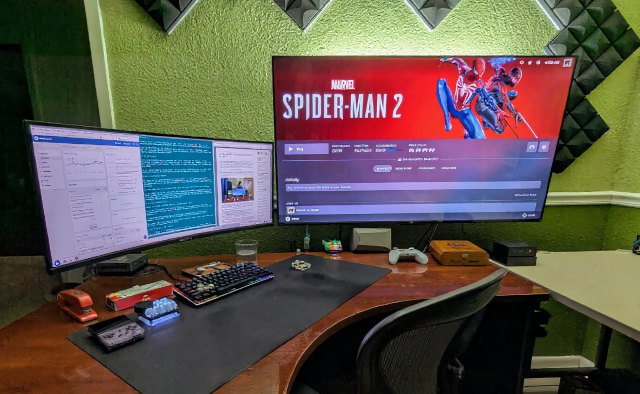
If you’ve been following along, you know that I spent months thinking about this switch. I first considered running Bazzite back in July, tested it on my laptop, ran it on a mini PC in the living room, and finally made the leap to replace my long-running Ubuntu installation. I’m not going to retell the entire story here, but I want to acknowledge that this wasn’t a spur-of-the-moment decision.
I’ll revisit some of the positives I mentioned earlier, but I also want to highlight a couple of unexpected challenges I had to work around!
- Should I Run Bazzite Linux On My Workstation?
- I Am Running Bazzite Linux On My Workstation
- Using A Ryzen 6800H Mini PC As A Game Console With Bazzite
The short answer: I’m happy
If you want the TL;DR version: I don’t regret switching to Bazzite, and I have no plans to go back to Ubuntu. The switch has been mostly positive, with a few annoyances that I’ve either worked around or learned to live with.
The biggest win has been having current Mesa libraries and AMDGPU drivers available without any effort on my part, and knowing that I will be brought to the cutting edge of Mesa’s ray-tracing performance every six months or so. My Radeon 9070 XT works flawlessly, and I know I’ll be ready for whatever AMD releases next. The gaming experience has been smooth, and I’ve been able to focus on playing games rather than tinkering with drivers.
The immutable nature of Bazzite has only gotten in the way twice, but I have been able to work around it. Almost everything I need is either installed via Flatpak or running inside one of my Distrobox containers.
Gaming performance with the 9070 XT
Gaming has been fantastic under Bazzite, but that was to be expected. One thing I didn’t realize about Bazzite is that it lets you run the command ujust install _mesa-git. This installs a nightly build of Mesa in your home directory and sets up a mesa-git wrapper script for you.
Why is this exciting? Mesa has some fantastic ray-tracing performance improvements that haven’t made it into a release yet. Using mesa-git gave me a bump from 65 to 70 FPS in Control when ray tracing is set to high, and it gave me a massive boost from 35 to 70 FPS when using ray tracing in Spider-Man 2!
Most of my last couple of weeks have been spent playing Arc Raiders. I can enable FSR4 in Arc Raiders with PROTON_FSR4_UPGRADE=1, which improves visuals over FSR3.
I have not managed to puzzle out a correct incantation to use Proton-GE’s easy FSR4 upgrade alongside mesa-git. I was able to mod FSR4 into Control using OptiScaler, but I can’t do that with a multiplayer game with anticheat like Arc Raiders.
Switching to Podman was more effort than I expected!
I was all set to fire up my two or three docker-compose.yaml containers using Podman, but Bazzite doesn’t ship with podman-compose. I believe podman-compose is the only thing I have installed manually using rpm-ostree.
This worked great for my first container, but my most important container runs OpenVPN, so it needed privileges that I just couldn’t assign using podman-compose, so I wound up being lazy. I had OpenCode (my AI coding assistant) convert my docker-compose.yaml to a Podman command line for me, and I am running that using sudo.
The containers I run on my workstation should be running in my homelab. I should just make the slightest effort to move them, and I’ll probably do that early next year. I would have skipped installing podman-compose if I had known that 50% of my containers wouldn’t easily work using podman-compose. I could have just converted the other one to a command line as well!
I didn’t even consider my thermal label printer!
Bazzite ships with CUPS. My cheap thermal printer works with CUPS. It should have been easy to get it working, but it was anything but!
I can install the PPD file, but my thermal printer needs a filter binary, and the CUPS filter directory is read-only. There is no easy and clean way to make this work.
I hemmed and hawed for a day, then I decided the easiest solution was disabling CUPS on the host and setting up a Podman container specifically for the thermal printer. I would document exactly how I did that, but I’m not sure I did it in a way anyone should replicate.
Why did I opt to use a container? I figured this container could easily follow my thermal printer through Bazzite upgrades. I could also move the printer and container to one of the mini PCs in my homelab in the future.
Setting up lvmcache went smoothly!
Mostly. I set up my pair of bulk-storage volumes in stages, starting with the basic, uncached volumes and moving data into place. I added them to fstab with noauto set so they wouldn’t mount automatically. I didn’t want to troubleshoot during a reboot if I made a mistake, which turned out to be a good decision. I had accidentally put a twelve-crypt instead of a crypt-twelve in either the fstab or crypttab at one point. That definitely wouldn’t have booted!
LUKS encryption was happy. The lvmcache on both my NVMe and SATA SSD were both happy. My data was happy. It was easy to flip the noauto to auto in my fstab, and everything has been chugging along ever since.
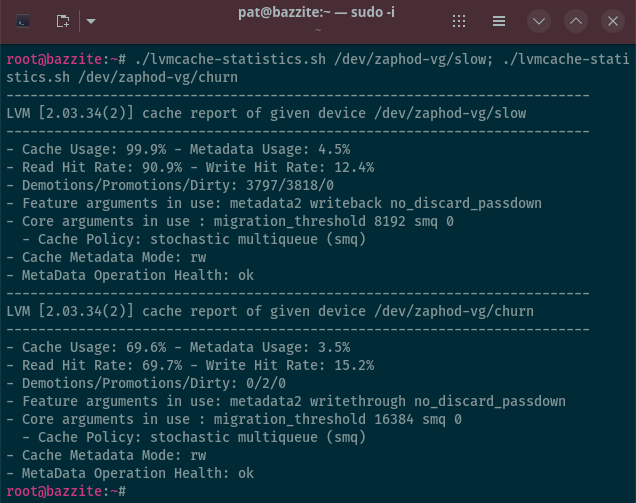
I was running with a 600 gigabyte root filesystem and a 300 gigabyte lvmcache on my previous install, but I flipped that around this time. I did this because it should be easy to move some of my ever-growing and poorly maintained directories, like ~/Downloads, to one of the big cached volumes.
Bazzite is fairly locked down. Flatpak programs get grumpy if I move something out of my home directory and connect it back up with a symlink. I assume that I will have to attack this problem with bind mounts, but I haven’t gotten to the point where I need to do that yet!
My Home Assistant shenanigans easier than I expected!
I thought it was going to be a pain to install hass-cli. It wouldn’t be a big deal if I had to run it in Distrobox, but I wanted to get and set Home Assistant variables from scripts that run directly on Bazzite. I was excited to see that homeassistant-cli was available in the Brew package manager’s preconfigured repositories!
I am having no trouble using hass-cli to fetch the state of my espresso machine and office lighting to put the correct color indications on the appropriate macropad buttons on my little Mission Control macro pad at my desk. I have been using JC Pro Macro 2 mechanical keypads for years to control various aspects of my workflow, including integrating with Home Assistant to control studio lighting.
I am not certain how I installed hacompanion! I didn’t write it down!
There is a static hacompanion binary in my ~/.local/bin/ directory, and there is a static binary in their GitHub releases. I bet I downloaded that and dropped it in place!
Home Assistant knows when I am done using my computer, so the lights turn off automatically. I have keys configured on my macro pad to switch between just my monitor, just the TV as the display, or both at the same time. My scripts are able to reach out to Home Assistant to turn on the TV and select the correct HDMI input, and it is able to use kscreen-doctor to configure the appropriate outputs on the GPU.
- JC Pro Macro 2 Mechanical Keypad
- Replacing my IFTTT Applets with Node-RED and Home Assistant
- My New Budget Gaming TV — The TCL Q6/Q651F
Cheater automatic Bluetooth headphone switching with some vibe coding?!
I’ve been using the gaming version of the Bose QC30 headphones for the last five years. I use them wired, because there is less latency and I don’t have to remember to charge them. I had no way for the computer to detect whether or not I had the headphones on, so I had to switch audio outputs with a key bind.
My Bose headphones went on a plane trip with my wife, because that’s where the noise canceling shines, so I’ve been limping along using an older set of AKG NC70 headphones. My limping made me impulse by a set of Anker Q20i wireless headphones that were on sale for $35.
I have nothing but nice things to say about the Anker headphones. I haven’t been able to compare them to the older Bose headphones back-to-back, but Anker is obviously trying to imitate Bose here. They look similar. They have the same soft pleather earcups. They have similar features.
The budget noise canceling definitely gives older Bose headphones a run for their money. The Anker headphones are only 10% of the price of the current iteration of my Bose headphones, and they punch way above their price point. I’d buy these Anker headphones again in a heartbeat.
1 2 3 4 5 6 7 8 9 10 11 12 13 14 15 16 17 18 19 20 21 22 23 24 25 26 27 28 29 30 31 32 33 34 35 36 37 38 39 40 41 42 43 44 45 46 47 48 49 50 51 52 53 54 55 56 57 | |
What’s the trouble? Bazzite doesn’t automatically switch to the wireless headphones when they connect, and it doesn’t switch back to the speakers when they disconnect. I found two suggestions on the Internet, and I didn’t manage to get either to work correctly, so I asked [OpenCode and Z.ai][zai] to write me a little daemon script to automatically swap inputs when the headphones are connected.
The ROCm Distrobox experiment
I mentioned in my first post that I had set up a ROCm-enabled Distrobox container and run some benchmarks with llama.cpp. I haven’t done a lot with it since then, but the container is there and it works.
I have played around with a few different models in llama.cpp, and the performance has been right where I expected. My 9070 XT with 16 GB of VRAM is plenty for the smaller models I’ve been testing, and the prompt processing and token generation speeds are snappy. I haven’t found a practical use for local LLMs in my day-to-day workflow yet, but it’s nice to know the capability is there when I need it. I did write about whether local LLMs make sense versus using cloud services and my experience deciding not to buy a Radeon Instinct Mi50 before I upgraded to my 9070 XT.
Setting up the ROCm container was straightforward thanks to the guides I found, and I haven’t had to touch it since. It’s one of those things that just works in the background until I need it. I have been able to grab new models as they are released to give them a try.
Gemma 3 4B with its vision model and a ton of context fits well and runs great in 8 gigabytes of VRAM. In fact, I am wondering if I could squeeze that model, a speech-to-text model, and a text-to-speech model into 8 gigabytes. There are a few older 8 gigabyte gaming GPUs available on eBay for under $100. That would be a neat way to run a voice assistant for the house, wouldn’t it?!
- Contemplating Local LLMs vs. OpenRouter and Trying Out Z.ai With GLM-4.6 and OpenCode
- Deciding Not To Buy A Radeon Instinct Mi50 With The Help Of Vast.ai!
Daily workflow and productivity
My daily workflow is largely unchanged from what it was on Ubuntu, but it’s happening in different places.
The browser is a Flatpak, Steam is native on the host, and Resolve is in its own Distrobox container.
My actual work of writing, coding, and general productivity all happens in a single Debian Distrobox container. Emacs is there, my zsh configuration is there, my dotfiles are there, and OpenCode runs in there. It feels like home.
The split between host and container has been cleaner than I expected. I worried that I would constantly be context-switching and thinking about whether I should be installing something in the container or on the host.
I’ve been getting real work done this whole time. My blog is getting written, code is being written, and I haven’t felt like the migration has slowed me down. That’s the real test – can I still get stuff done? The answer is yes. I wrote earlier about how Bazzite uses Distrobox to containerize things like DaVinci Resolve, and that approach is working well for me.
I have gotten into some trouble when asking OpenCode to write a helper script that is meant to run on Bazzite, because OpenCode is running in a Distrobox container. I have learned that I can explain to the LLM that it needs to run commands with distrobox-host-exec when they are not found, and it usually manages to work things out.
What I’ve learned
Five weeks isn’t enough time to declare victory or declare defeat, but it’s enough time to learn some things.
Immutable Linux isn’t as scary. The idea of not being able to install packages freely on the host system felt restrictive, but I’ve adapted. The Distrobox integration is good enough that I don’t feel limited.
The containerization has benefits beyond what I expected. I can update my Debian container without worrying about breaking Resolve or my ROCM container. I can blow away a container and recreate it in minutes if I need to. I can also duplicate Distrobox containers locally, or I can export them to use on my laptop.
I haven’t used Bazzite long enough for its strengths to really shine. I have gotten myself accidentally stuck on an aging Ubuntu release in the past. Sometimes the timing of a major upgrade is bad, so I hold off, but then don’t manage to get around to it. Sometimes a major Ubuntu upgrade will cause headaches, so I put it off.
Almost every single thing that I have customized won’t be touched by a Bazzite system upgrade. My Distrobox environments are independent. My Flatpak apps don’t care what operating system is running on the host. Upgrading to major Bazzite releases should feel quite seamless, and I am excited about that.
Conclusion
Five weeks isn’t forever, but it’s enough time to know whether a migration was a mistake. Switching to Bazzite wasn’t a mistake.
There have been annoyances, and there are still rough edges (like figuring out how to make my thermal printer work). My setup isn’t perfect. But overall, I’m happier than I was on Ubuntu. The computer works, the games play, the videos edit, and I’m getting my work done.
I still have things to configure. I need to move my workstation containers to the homelab, and I haven’t set up all my cron jobs and automation yet. I’ll probably discover missing software for months. That’s normal – every new OS install has a period of discovery.
But the foundation is solid. Bazzite + Distrobox + Flatpak is working for me, and I’m looking forward to years of stability with minimal maintenance.
If you’re on the fence about trying an immutable distro, I’d say give it a shot. Maybe start with a laptop or a secondary machine like I did. Set up a Distrobox container with your comfort distro and use it for a while. You might find that you don’t miss the old way of doing things as much as you thought you would.
Are you using an immutable Linux distribution like Bazzite? How has your experience been? Or are you on the fence about making the switch yourself? I’d love to hear about your setup, the challenges you’ve faced, and what you’ve discovered along the way. If you’re interested in chatting about immutable Linux, gaming on Linux, homelab setups, or machine learning with AMD GPUs, come join our Discord community! We’d love to hear your stories and help you on your own Linux journey.